1. مقدمه
This manual provides essential information for the proper installation, operation, and maintenance of your FLYCOLOR 30A ESC (Electric Speed Controller). This ESC is designed for use with brushless motors in RC drones and airplanes, supporting 2-4S LiPo batteries and featuring a 5V/2A BEC. Please read this manual thoroughly before use to ensure safe and efficient operation.
2. اطلاعات ایمنی
- Always disconnect the battery from the ESC when not in use to prevent accidental motor startup.
- مطمئن شوید که تمام اتصالات محکم و عایقبندی مناسبی دارند تا از اتصال کوتاه جلوگیری شود.
- Operate in a well-ventilated area. ESCs can generate heat during operation.
- Keep hands and loose clothing away from rotating propellers and motors.
- Verify correct motor rotation direction before flight.
- از حجم مشخص شده تجاوز نکنیدtage and current ratings of the ESC.
- این محصول برای کاربران ۱۶ سال به بالا توصیه میشود.
3. محصول تمام شدview
The FLYCOLOR 30A ESC is a compact and efficient speed controller featuring a C8051F850 MCU for reliable performance. It comes pre-soldered with an XT60 plug for battery connection and 3.5mm bullet plugs for motor connection, simplifying installation.
ویژگی های کلیدی:
- C8051F850 MCU: Utilizes a pipelined 8-bit C8051 core for efficient processing.
- Built-in BEC: Integrated 5V/2A Battery Eliminator Circuit provides power to your receiver and servos.
- Pre-soldered Connectors: Equipped with XT60 for battery and 3.5mm bullet plugs for motor.
- ویژگیهای حفاظتی چندگانه: Includes abnormal startup protection, over-heat protection, throttle signal loss protection, and low-voltagحفاظت از قطع.
- تنظیمات قابل تنظیم: Users can set various functions and low-voltage protection thresholds.
- Linear Throttle Response: Provides smooth and precise speed control.
اجزاء:

شکل 3.1: به طور کلی view of the FLYCOLOR 30A ESC, showing the main unit, XT60 battery connector, 3.5mm bullet motor connectors, and the servo signal cable.
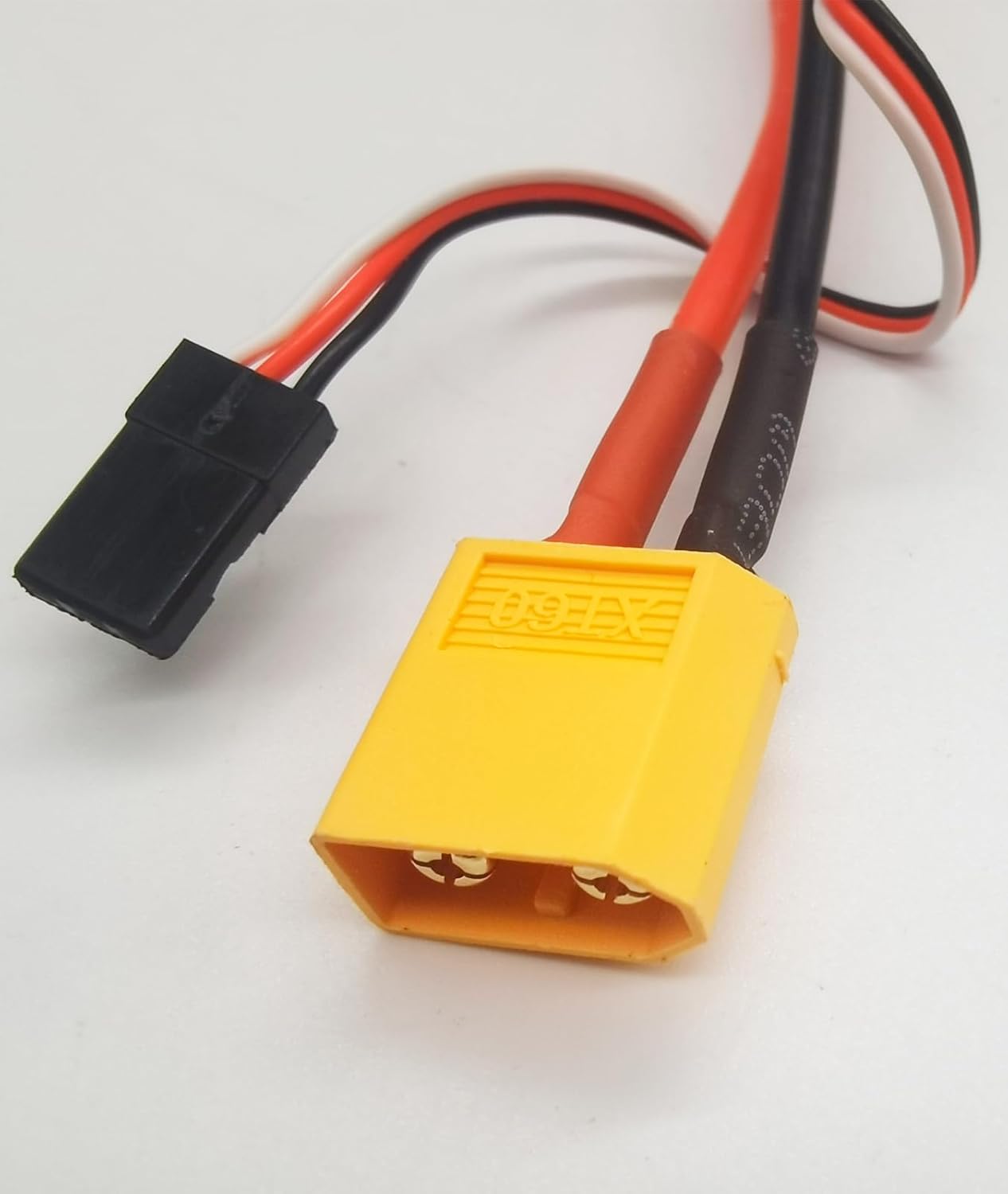
شکل 3.2: Detail of the yellow XT60 battery input connector and the black servo signal connector (JR style) for receiver connection.

شکل 3.3: نمای نزدیک view of the three 3.5mm bullet connectors, which are used to connect to the brushless motor phases.
4. مشخصات
| مشخصات | ارزش |
|---|---|
| جریان خروجی پیوسته | 30A |
| Burst Output Current | ۳۸۰ آمپر (به مدت ۱۰ ثانیه) |
| UBEC Output | 5 ولت / 2 آمپر |
| LiPo Battery Cells | 2 - 4S |
| NiCd/NiMH Cells | 5 - 12 cells |
| جلدtage محدوده ورودی | ۹ ولت - ۱۶ ولت |
| ابعاد (L x W x H) | ۲۲ میلیمتر × ۲۲ میلیمتر × ۱۴ میلیمتر (تقریباً ۰.۸۶۶ × ۰.۸۶۶ × ۰.۵۵۱ اینچ) |
| وزن | ۵۴ گرم (تقریباً ۱.۹ اونس) |
| نوع موتور | موتور براشلس |
| مواد | پلاستیک |
5. راه اندازی و اتصال
Proper connection of the ESC to your battery, receiver, and motor is crucial for safe and correct operation. Ensure all solder joints are insulated with heat shrink where necessary.

شکل 5.1: Connection diagram for the ESC. Connect the battery to the ESC, the ESC to the receiver, and the ESC to the motor.
- Connect to Motor: Connect the three 3.5mm bullet connectors from the ESC to the three phase wires of your brushless motor. The order of connection may affect motor rotation direction; if the motor spins in the wrong direction, swap any two of the three wires.
- اتصال به گیرنده: Plug the servo signal cable (black, red, white wires) from the ESC into the throttle channel of your RC receiver. The white wire is typically the signal, red is positive (5V from BEC), and black is negative/ground.
- اتصال به باتری: Connect the XT60 plug from the ESC to your LiPo battery (2-4S). Ensure correct polarity: red to positive, black to negative. Do not connect the battery until all other connections are made and you are ready to power on.
6. دستورالعمل های عملیاتی
6.1 Normal Start-up Procedure

شکل 6.1: Visual guide for the normal start-up and throttle range calibration processes.
- Turn on your transmitter and ensure the throttle stick is at the bottom (lowest) position.
- Connect the ESC to the battery.
- Wait for approximately 2 seconds. The motor will emit a short "BEEP" sound a few times, indicating the detected LiPo battery cell count.
- After another 1 second, the motor will emit one long and one short tone, signifying "No Brake" mode.
- The ESC is now ready for operation.
توجه: The motor will not start immediately, regardless of the throttle lever position, ensuring safety during power-up.
۶.۱ کالیبراسیون محدوده دریچه گاز
Calibrating the throttle range ensures that your ESC accurately interprets the full range of throttle input from your transmitter.
- Turn on your transmitter and move the throttle stick to the top (highest) position.
- Connect the ESC to the battery.
- Wait for approximately 2 seconds. The motor will emit two short "BEEP" sounds, indicating that the full throttle position has been memorized.
- Within 3 seconds, move the throttle stick to the bottom (lowest) position.
- Wait for 1 second. The "zero throttle" position is now memorized. The motor will emit a short "BEEP" sound a few times, indicating the detected LiPo battery cell count.
- After another 1 second, the motor will emit one long and one short tone, signifying "No Brake" mode.
- The ESC is now calibrated and ready for use.
6.3 توابع قابل برنامه ریزی
The ESC features a cycle programming menu allowing users to customize settings such as low-voltage protection threshold. Refer to the specific programming card or transmitter stick programming sequence (if available) for detailed instructions on adjusting these parameters. The ESC will emit alarm sounds to indicate working conditions and programming steps.
7. تعمیر و نگهداری
- ESC را تمیز و عاری از گرد و غبار، آلودگی و رطوبت نگه دارید.
- Regularly inspect all wires and connectors for signs of wear, damage, or corrosion. Replace damaged components immediately.
- Ensure adequate airflow around the ESC during operation to prevent overheating.
- Store the ESC in a cool, dry place when not in use.
8 عیب یابی
| مشکل | علت احتمالی | راه حل |
|---|---|---|
| Motor does not start or stutters | Incorrect motor/ESC connection, throttle not calibrated, signal loss, low battery voltage. | Check motor phase wire connections. Perform throttle calibration. Ensure receiver is powered and signal is strong. Check battery voltage. |
| موتور در جهت اشتباه میچرخد | Incorrect motor phase wire connection. | Swap any two of the three motor phase wires connected to the ESC. |
| ESC بیش از حد گرم می شود | Excessive current draw, insufficient airflow, incorrect propeller size. | Reduce load (smaller propeller), ensure proper ventilation, check for short circuits. |
| No response from ESC | No power, damaged ESC, incorrect receiver connection. | Check battery connection and charge. Verify receiver connection and power. If still unresponsive, ESC may be damaged. |
9. گارانتی و پشتیبانی
FLYCOLOR products are manufactured to high-quality standards. For warranty information and technical support, please refer to the official FLYCOLOR webبه سایت مراجعه کنید یا با نمایندگی مجاز خود تماس بگیرید. رسید خرید خود را به عنوان مدرک خرید نگه دارید.


