مقدمه
This manual provides essential information for the safe and efficient operation of your VEVOR SGM-1500W Modified Sine Wave Power Inverter. Please read these instructions carefully before use and retain for future reference.

Figure 1: VEVOR SGM-1500W Modified Sine Wave Power Inverter.
راه اندازی
Proper installation is crucial for the safe and optimal performance of your inverter. Ensure the inverter is placed in a well-ventilated area, away from direct sunlight, heat sources, and flammable materials.
1. Connecting to a DC Power Source
The VEVOR SGM-1500W inverter is designed to operate with a 12V DC power source, such as a car battery or a solar battery bank. Use the provided 100% pure copper cables for connection to minimize power conversion loss.
- Connect the red cable to the positive (+) terminal of the inverter and the positive (+) terminal of your 12V DC battery.
- Connect the black cable to the negative (-) terminal of the inverter and the negative (-) terminal of your 12V DC battery.
- Ensure all connections are tight and secure to prevent arcing and ensure efficient power transfer.

Figure 2: Inverter connected to a DC power source.
توجه: برای وات بالاترtage models (e.g., 5000W), the inverter may feature multiple positive and negative terminals to accommodate connections to multiple batteries or thicker gauge cables for increased current. The SGM-1500W model typically uses a single set of terminals for standard 12V battery connection.
۳.۲ روشن کردن اولیه
After securing the battery connections, switch the inverter's power button to the "ON" position. The indicator light should illuminate, indicating the inverter is operational.
3. Video: Connecting the Inverter to a Battery System
Video 1: This video demonstrates the connection of a VEVOR power inverter (5000W model shown for illustration) to a battery system, including its use in an alternative energy setup. It highlights the multiple AC outlets and USB ports.
دستورالعمل های عملیاتی
The VEVOR SGM-1500W inverter converts 12V DC power to 120V AC power, suitable for various small home devices.
1. اتصال دستگاه ها
The inverter features 2 AC outlets, 2 USB charging ports (combined max 18W), and 1 Type-C port (max 30W). Ensure the total power consumption of connected devices does not exceed the inverter's rated continuous power of 1500W.
- Plug AC devices into the 120V AC outlets.
- Connect USB-powered devices to the USB-A or Type-C ports.

Figure 3: Front panel of the inverter with multiple outlets and ports.
2. Intelligent Temperature-Controlled Fan
The inverter is equipped with an intelligent temperature-controlled fan for efficient heat dissipation. The fan automatically activates when the internal temperature exceeds 40°C (104°F) and stops when the temperature falls below this threshold, ensuring optimal performance and quiet operation.
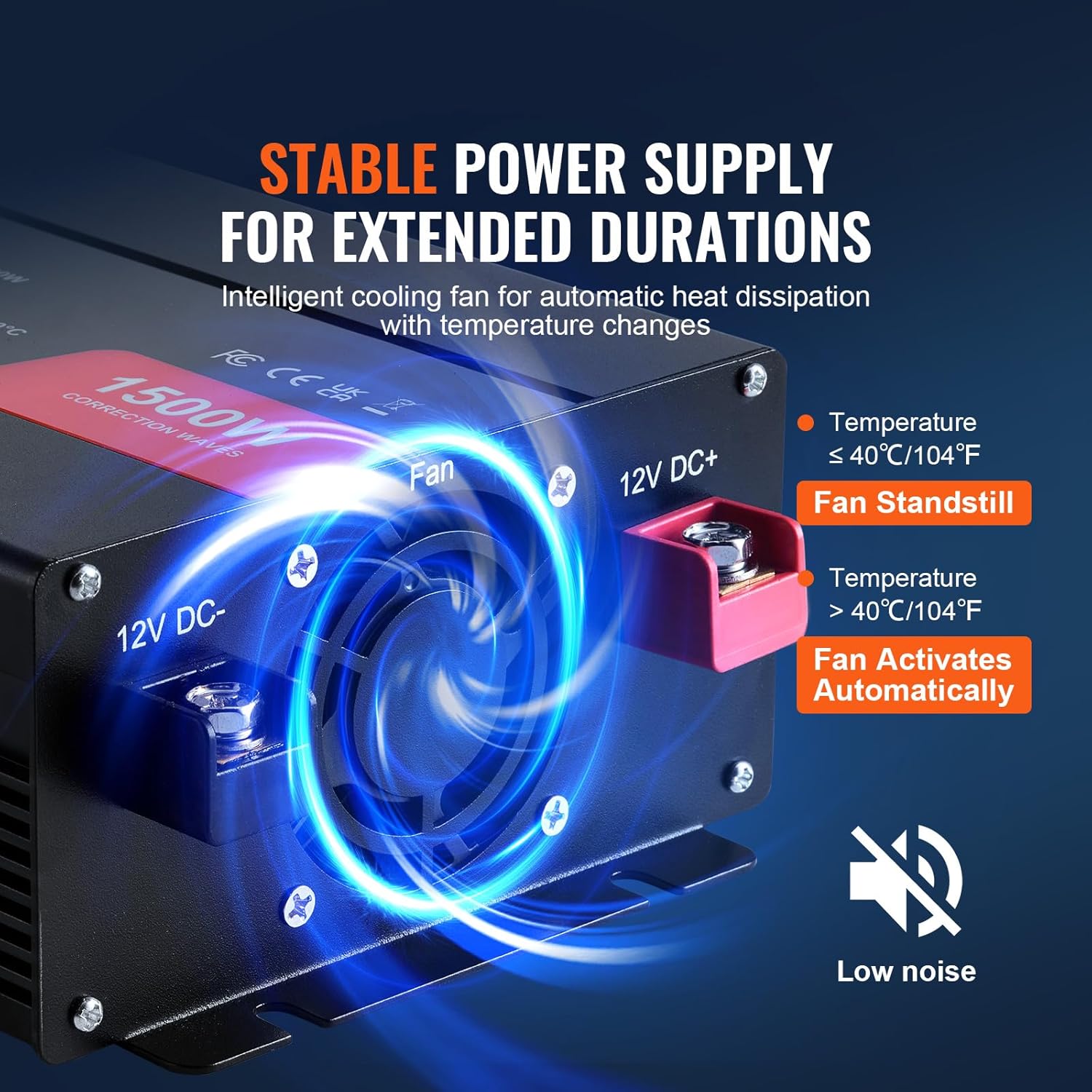
Figure 4: Intelligent cooling fan for heat management.
3. Video: VEVOR 1500W Power Inverter in Use
Video 2: This video demonstrates the VEVOR 1500W power inverter's features, including its multiple outlets and USB ports, and shows it powering various devices.
4. Video: General Overview of VEVOR Power Inverter Features
ویدیوی ۵.۴.۲: یک ژنرال بالای سرview of VEVOR Modified/Pure Sine Wave Power Inverters, showcasing their design, features, and applications.
ایمنی و حفاظت
The VEVOR SGM-1500W inverter is CE/FCC certified and incorporates multiple safety features to protect the inverter and your connected devices:
- بیش از جلدtagحفاظت e: Shuts down if input voltage از حدود ایمن فراتر میرود.
- زیر جلدtagحفاظت e: Automatically turns off if battery voltage drops too low, preventing deep discharge.
- محافظت در برابر بار بیش از حد: Protects against damage from excessive power draw.
- حفاظت بیش از حد دما: Activates the fan or shuts down if the inverter overheats.
- حفاظت از اتصال کوتاه: Prevents damage from short circuits in the output.
- محافظت از قطبیت معکوس: Guards against incorrect battery connections.

Figure 5: Visual representation of the inverter's 6 security protections.
Video: Low Voltage Battery Protection Feature
Video 4: This video explains the inverter's low voltage battery protection, demonstrating its auto-off and auto-on functionality to prevent battery damage.
تعمیر و نگهداری
نگهداری منظم، طول عمر و عملکرد قابل اعتماد اینورتر شما را تضمین میکند.
- تمیز نگه دارید: Periodically clean the exterior of the inverter, especially the fan and ventilation openings, to ensure proper airflow and prevent overheating.
- بررسی اتصالات: Regularly inspect battery and output connections for tightness and corrosion.
- تعویض فیوز: The inverter comes with 6 spare fuses. If a fuse blows, replace it with a fuse of the same rating. Refer to the product specifications for fuse type and rating.

Figure 6: Spare fuses for convenient replacement.
مشخصات
Key technical specifications for the VEVOR SGM-1500W Modified Sine Wave Power Inverter:
| ویژگی | مشخصات |
|---|---|
| شماره مدل مورد | SGM-1500W |
| دارای توان خروجی | 1500 وات |
| توان خروجی سرج | 3000 وات |
| DC ورودی جلدtage | 12 ولت DC |
| خروجی AC جلدtage | 120V AC (US Standard) |
| شکل موج خروجی | موج سینوسی اصلاح شده |
| وزن خالص | 4.41 پوند (2.2 کیلوگرم) |
| ابعاد محصول | 11 x 5.7 x 2.8 اینچ (280 x 144 x 72 میلیمتر) |
| کارایی | Up to 88% (full load) |
| پورت ها | 2 AC Outlets, 2 USB-A (18W total), 1 Type-C (30W max) |
| گواهینامه ها | CE، FCC |

شکل ۷.۱: ابعاد و مشخصات دقیق.
عیب یابی
If you encounter issues with your VEVOR SGM-1500W inverter, consider the following common solutions:
- بدون خروجی برق:
- اتصالات باتری را از نظر سفتی و قطب صحیح بررسی کنید.
- Ensure the battery is sufficiently charged (above 10V DC).
- Verify the inverter's power switch is in the "ON" position.
- Check if any fuses are blown and replace if necessary.
- Inverter Shuts Down:
- اضافه بار: کل وات را کاهش دهیدtage of connected devices. The inverter's continuous power is 1500W.
- حجم باتری کمtage: Recharge or replace the 12V DC battery. The inverter will automatically shut off to protect the battery.
- گرمای بیش از حد: Ensure the inverter is in a well-ventilated area and the cooling fan is not obstructed. Allow it to cool down.
- مدار کوتاه: Disconnect all devices and check for any short circuits in the wiring or devices.
- Device Not Charging/Working:
- Confirm the device's power requirements are within the inverter's capabilities.
- Ensure the device is properly plugged into the correct port (AC, USB-A, or Type-C).
For persistent issues, refer to the warranty and support section for further assistance.
گارانتی و پشتیبانی
VEVOR products are designed for durability and performance. For technical support or to inquire about your e-warranty, please visit the official VEVOR support webسایت:
Please have your model number (SGM-1500W) and purchase information ready when contacting support.


