مقدمه
This manual provides essential instructions for the safe and effective use of your Sony FX30 Digital Cinema Camera. The Sony FX30 is designed for content creators and filmmakers, featuring an APS-C sensor for cinematic capture. Please read this manual thoroughly before operating the camera and retain it for future reference.
محتویات بسته
مطمئن شوید که تمام اقلام ذکر شده در زیر در بسته شما موجود است. در صورت مفقود شدن یا آسیب دیدن هر یک از اقلام، لطفاً با فروشنده خود تماس بگیرید.

Image: The Sony FX30 Digital Cinema Camera body with various accessories including a memory card, LED light, microphone, and stabilization grip.
Sony Manufacturer Items:
- بدنه دوربین سینمایی دیجیتال سونی FX30
- باتری لیتیوم-یونی قابل شارژ سونی NP-FZ100
- آداپتور برق متناوب سونی
- درپوش بدنه سونی ALC-B1EM برای دوربینهای E-Mount
- درپوش کفشک چندکاره سونی
- کابل USB-A به USB-C (USB 3.2)
Bundled Items:
- SanDisk 128GB High Speed Extreme Pro SD Memory Card
- High Power LED Light with Diffusers
- میکروفون شاتگان
- Padded Deluxe Camera Bag
- U-Stabilization Grip
- Extra Replacement Battery (Compatible with NP-FZ100)
- Pistol Hand Grip
- Photo & Video Editing Software (1 Year Digital Download)
- کارت خوان حافظه USB
- Camera Hand Grip Strap
- قلم لنز
- دمنده لنز
- Camera Starter Kit (Microfiber Cloth, Memory Card Case, Buds)
راه اندازی
1. نصب باتری
Insert the provided Sony NP-FZ100 battery into the battery compartment located at the bottom of the camera. Ensure it clicks into place securely. Charge the battery fully before first use using the supplied AC adapter and USB-A to USB-C cable.
۳.۲ نصب کارت حافظه
The FX30 supports SD memory cards. Open the memory card slot cover, typically located on the side of the camera. Insert the SanDisk 128GB Extreme Pro SD card with the label facing the correct direction until it clicks into place. The camera features dual card slots for extended recording or backup.

تصویر: عقب view of the Sony FX30 showing the open memory card slots with two SD cards partially inserted.
3. Attaching the Body Cap
When no lens is attached, always keep the Sony ALC-B1EM Body Cap on the camera's E-mount to protect the sensor from dust and damage.
۳.۲ روشن کردن اولیه
Press the power button to turn on the camera. Follow any on-screen prompts for initial setup, such as language selection and date/time settings.
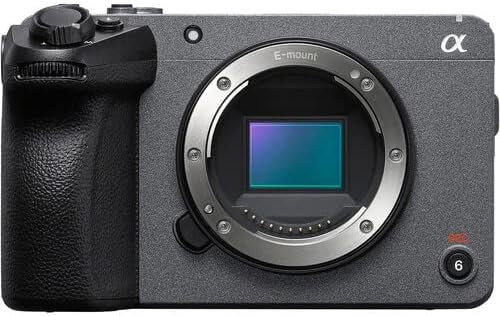
تصویر: جلو view of the Sony FX30 camera body, showcasing the E-mount lens interface and grip.
۳. اتصال لوازم جانبی
Attach the U-Stabilization Grip, Shotgun Microphone, and LED Light as needed for your shooting requirements. The camera features a Multi Interface Shoe for compatible accessories.
کار با دوربین
کنترلهای اساسیview
Familiarize yourself with the camera's main controls for efficient operation.

تصویر: عقب view of the Sony FX30, highlighting the LCD screen, MODE dial, MENU button, and various control buttons and dials.
- MODE Dial: حالتهای تصویربرداری را انتخاب میکند.
- دکمه MENU: Accesses camera settings and functions.
- FOCUS MAG: Magnifies the display for precise focusing.
- Fn (Function) Button: دسترسی سریع به تنظیمات پرکاربرد را فراهم میکند.
- DISP (Display) Button: Changes the information displayed on the screen.
- چرخ کنترل: در منوها حرکت میکند و تنظیمات را انجام میدهد.
- Zebra/Peaking: Assists with exposure and focus.

تصویر: بالا view of the Sony FX30, showing the Multi Interface Shoe, IRIS, WB, ISO buttons, and the REC button.
- IRIS Button: Adjusts aperture.
- WB (White Balance) Button: Sets white balance.
- دکمه ایزو: حساسیت ISO را تنظیم میکند.
- دکمه REC: ضبط ویدیو را شروع و متوقف می کند.
عملکرد صفحه لمسی
The FX30 features a touch-sensitive LCD screen for intuitive control. You can tap to select menu items, adjust focus, and navigate settings directly on the display.

Image: A hand interacting with the touch-sensitive LCD screen on the back of the Sony FX30 camera.
ضبط ویدیو
To begin recording, ensure a memory card is inserted and the battery is charged. Press the REC button to start recording. Press it again to stop. The camera supports video capture resolutions up to 4K and 1080p in MP4 format.
قابلیت اتصال
The Sony FX30 supports Wi-Fi connectivity for remote control, file transfer, and other smart functions. Refer to the camera's on-screen menu for Wi-Fi setup instructions.
تعمیر و نگهداری
- تمیز کردن بدنه دوربین: برای پاک کردن بدنه دوربین از یک پارچه نرم و خشک استفاده کنید. برای آلودگیهای سرسخت، کمی ...ampپارچه را با آب بشویید. از استفاده از مواد شوینده قوی خودداری کنید.
- Cleaning the Lens and Sensor: Use a lens blower to remove dust from the lens and sensor. For smudges on the lens, use a lens pen or a specialized lens cleaning solution with a microfiber cloth. Sensor cleaning should be performed with extreme care or by a professional.
- مراقبت از باتری: باتریها را در جای خشک و خنک نگهداری کنید. برای افزایش طول عمر باتریها، از تخلیه کامل آنها به طور مکرر خودداری کنید.
- ذخیره سازی: When not in use, store the camera in a dry, dust-free environment, preferably in the padded deluxe camera bag provided.
عیب یابی
این بخش به مشکلات رایجی که ممکن است با آنها مواجه شوید میپردازد. برای عیبیابی دقیقتر، به پشتیبانی رسمی سونی مراجعه کنید. webسایت
- دوربین روشن نمیشود: Ensure the battery is fully charged and correctly inserted. Try using the extra replacement battery.
- خطای کارت حافظه: Reinsert the memory card. Ensure it is formatted correctly by the camera. Try a different memory card if the issue persists.
- عدم ضبط ویدئو: Check if the memory card has sufficient free space. Verify that the camera is in a video recording mode.
- مشکلات کیفیت تصویر: Check lens cleanliness. Ensure appropriate ISO, aperture, and shutter speed settings for your lighting conditions.
مشخصات
| ویژگی | جزئیات |
|---|---|
| ابعاد محصول | 3.3 x 3.1 x 3.3 اینچ |
| وزن مورد | 8 پوند |
| ASIN | B0D1RWMS36 |
| شماره مدل مورد | CC-FX30BODY-41524 |
| سازنده | سونی |
| نام تجاری | سونی |
| فناوری حسگر عکس | APS-C |
| وضوح تصویربرداری | 1080p، 4K |
| نوع حافظه فلش | SD |
| فرمت فیلمبرداری | MP4 |
| فرمت صوتی پشتیبانی شده | AAC، MP3 |
| اندازه صفحه نمایش | 3 اینچ |
| فناوری اتصال | وای فای |
| رنگ | مشکی |
| ویژگی خاص | بی سیم |
گارانتی و پشتیبانی
The Sony FX30 Digital Cinema Camera comes with a Limited 1-Year Manufacturer Warranty. Please retain your proof of purchase for warranty claims.
For technical support, service, or further information, please visit the official Sony support webسایت یا با خدمات مشتریان آنها تماس بگیرید. میتوانید اطلاعات بیشتر را در پشتیبانی سونی Webسایت.


