1. مقدمه
This manual provides comprehensive instructions for the installation, operation, and maintenance of your Shelly BLU Button Tough 1. Please read this manual carefully before using the device to ensure proper functionality and safety. Keep this manual for future reference.
The Shelly BLU Button Tough 1 is a durable, battery-powered Bluetooth button designed for activating actions and scenes within your smart home ecosystem. It offers versatile control without constant reliance on a mobile phone, allowing for up to four pre-set actions or scenes through intuitive click combinations.
2. محصول تمام شدview
The Shelly BLU Button Tough 1 is engineered for resilience and ease of use. Its robust design and Bluetooth Low Energy (BLE) technology ensure reliable performance and extended battery life.
ویژگی های کلیدی:
- بلوتوثی: از فناوری BLE برای پاسخ سریع و عمر باتری طولانیتر استفاده میکند.
- قابلیت چند کلیکی: Execute up to four pre-set actions or scenes with different click combinations (single, double, triple, long press).
- دوام استثنایی: IP54 rated, making it resistant to shocks, splashes, and dust. Suitable for various environments.
- طیف وسیع: Offers a significant operating range, connecting seamlessly with compatible Shelly gateways.
- فعالسازی صحنه: Directly trigger complex smart home scenes or control individual devices.

Figure 2.1: Shelly BLU Button Tough 1 and its packaging.

Figure 2.2: Dimensions of the Shelly BLU Button Tough 1, showing a thickness of 13mm and a width of 42mm.

Figure 2.3: The Shelly BLU Button Tough 1 operates via Bluetooth Low Energy (BLE), providing quick response times, extended battery life, and simplified device inclusion.

Figure 2.4: The Shelly BLU Button Tough 1 features IP54 durability, making it resistant to shock, splashes, and dust, suitable for outdoor applications.

Figure 2.5: Key features include an indoor range of 10m/33ft, outdoor range of 30m/100ft, strong encryption, beacon mode, and sound alerts.

Figure 2.6: The multi-click trigger allows execution of up to 4 pre-set actions or scenes, providing simple control over smart devices.

Figure 2.7: The button enables comprehensive control over smart lights, blinds, garage doors, and location-based automations.
3. راه اندازی
3.1. نصب باتری
The Shelly BLU Button Tough 1 requires one CR2032 battery, which is included with the device. To install or replace the battery:
- محفظه باتری دستگاه را پیدا کنید.
- پوشش محفظه را با دقت باز کنید.
- باتری CR2032 را طوری قرار دهید که قطب مثبت (+) آن رو به بالا باشد.
- درپوش محفظه باتری را محکم ببندید.
۵.۲. جفت شدن با یک دروازه
The Shelly BLU Button Tough 1 requires a compatible Shelly gateway for integration with the Shelly Smart Control app and your smart home system. Compatible gateways include the Shelly BLU Gateway, or any Shelly Plus, Pro, or Gen3 device.
- Ensure your Shelly gateway device is powered on and connected to your network.
- دانلود کنید و باز کنید Shelly Smart Control app در دستگاه تلفن همراه شما
- Follow the in-app instructions to add a new device. The app will guide you through the discovery and pairing process for the Shelly BLU Button Tough 1.
- Once paired, you can configure the button's actions and scenes within the Shelly Smart Control app.
توجه: For detailed instructions on setting up your specific Shelly gateway, please refer to its respective user manual.
4. دستورالعمل های عملیاتی
The Shelly BLU Button Tough 1 allows you to trigger various actions and scenes with different click combinations. These combinations are configured within the Shelly Smart Control app.
4.1. Configuring Actions
- را باز کنید Shelly Smart Control app.
- Navigate to the settings for your paired Shelly BLU Button Tough 1.
- You will find options to assign actions to different click types:
- تک کلیک: یک فشار و رها کردن سریع.
- دابل کلیک کنید: دو فشار سریع پشت سر هم.
- سه کلیک: Three quick presses in succession.
- فشار طولانی: Press and hold the button for a specified duration (e.g., 2 seconds).
- Select the desired action or scene for each click combination. Exampموارد شامل:
- Turning lights on/off.
- Adjusting smart blinds.
- Opening/closing a garage door.
- Activating a "Good Morning" or "Good Night" scene.
- تنظیمات خود را ذخیره کنید
4.2. Using the Button
Once configured, simply press the button according to your defined click combinations to trigger the associated actions or scenes. The button provides tactile feedback upon press.
5. تعمیر و نگهداری
5.1. تعویض باتری
The Shelly BLU Button Tough 1 is powered by a CR2032 battery. When the battery level is low, the device may indicate this through the Shelly Smart Control app or reduced responsiveness. Replace the battery as described in Section 3.1.
احتیاط: باتری های مستعمل را طبق مقررات محلی مسئولانه دور بیندازید.
5.2. تمیز کردن
The device is IP54 rated, offering protection against dust and splashing water. To clean the device:
- از d نرم، خشک یا کمی استفاده کنیدamp پارچه
- Avoid using harsh chemicals, abrasive cleaners, or solvents, as these can damage the device's surface or internal components.
- Ensure the device is completely dry before re-use, especially if it has been exposed to moisture.
5.3. ذخیره سازی
Store the Shelly BLU Button Tough 1 in a cool, dry place away from direct sunlight and extreme temperatures when not in use for extended periods. If storing for a long time, consider removing the battery to prevent leakage.
6 عیب یابی
اگر با Shelly BLU Button Tough 1 خود با مشکل مواجه شدید، به مشکلات و راهحلهای رایج زیر مراجعه کنید:
۱. دستگاه پاسخ نمیدهد
- بررسی باتری: مطمئن شوید که باتری CR2032 به درستی نصب شده و شارژ کافی دارد. در صورت لزوم آن را تعویض کنید.
- اتصال دروازه: Verify that your Shelly gateway (e.g., Shelly BLU Gateway, Shelly Plus/Pro/Gen3 device) is powered on, connected to your network, and within range of the button.
- پیکربندی برنامه: Confirm that the desired actions are correctly configured for the button in the Shelly Smart Control app.
- محدوده: Ensure the button is within the operational range of its paired gateway (up to 10m/33ft indoors, 30m/100ft outdoors). Obstacles can reduce range.
۶.۱ مشکلات جفت شدن
- سازگاری دروازه: Ensure you are using a compatible Shelly gateway.
- دکمه تنظیم مجدد: If the button was previously paired or is not discoverable, perform a factory reset (refer to the Shelly Smart Control app or Shelly support for specific reset procedures).
- نسخه برنامه: Ensure your Shelly Smart Control app is updated to the latest version.
6.3. Inconsistent Action Triggering
- Click Timing: For multi-click actions (double, triple), ensure your presses are distinct and within the expected timing window. Practice the click patterns.
- Gateway Load: If your gateway is managing many devices or complex automations, there might be slight delays.
6.4. کمک بیشتر
If you cannot resolve the issue using the above steps, please refer to the "7. Warranty and Support" section for contact information and additional resources.
7. مشخصات
| صفت | ارزش |
|---|---|
| سازنده | شلی اروپا |
| شماره قطعه | 685 |
| وزن مورد | 0.529 اونس (15 گرم) |
| ابعاد محصول | 0.51 x 1.65 x 1.65 اینچ (13 x 42 x 42 میلیمتر) |
| شماره مدل مورد | 3800235266854 |
| باتری ها | 1 باتری CR2032 مورد نیاز (شامل) |
| نوع سلول باتری | دی اکسید منگنز لیتیوم |
| رنگ | موکا |
| مواد | پلاستیک |
| نوع سوئیچ | 1 طرفه |
| نوع نصب | نصب سطحی |
| تغییر سبک | دکمه فشاری |
| گواهینامه | CE، RoHS |
| قابلیت اتصال | بلوتوث کم انرژی (BLE) |
| رتبه بندی حفاظت از ورود (IP). | IP54 |
8. گارانتی و پشتیبانی
8.1. گارانتی محصول
شلی فراهم میکند ۳ سال گارانتی دستگاه for the Shelly BLU Button Tough 1, covering manufacturing defects and malfunctions under normal use conditions. Please retain your proof of purchase for warranty claims.
8.2. پشتیبانی مشتری
For any questions, technical assistance, or further support, Shelly offers multiple resources:
- برنامه کنترل هوشمند Shelly: Provides remote control, device configuration, and notifications.
- دانش محور: به مشخصات محصول، دستورالعملها و سوالات متداول دسترسی پیدا کنید. از پشتیبانی شلی دیدن کنید
- پشتیبانی فنی: Contact Shelly's professional support team.
- انجمن های انجمن: Engage with other users and experts in Facebook Support Groups and Reddit communities.
- آکادمی شلی: آموزشهای ویدیویی را بررسی کنید و webاینارها برای یادگیری عمیق.
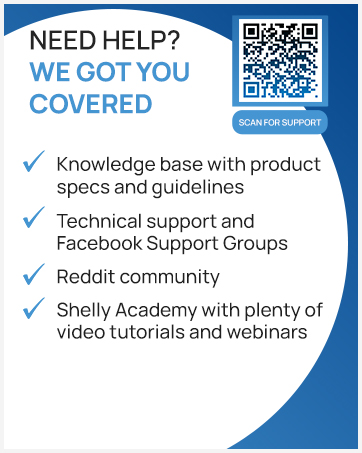
Figure 8.1: Scan this QR code for direct access to Shelly's support resources.


