مقدمه
Welcome to the GOBOULT UFO True Wireless Earbuds user manual. These earbuds are designed to provide a superior audio experience with features like extended playtime, low latency gaming, advanced noise cancellation, and robust bass drivers. Please read this manual carefully to ensure proper use and optimal performance of your device.
آنچه در جعبه است
- GOBOULT UFO True Wireless Earbuds
- کیس شارژ بی سیم
- کابل شارژ سریع Type-C
- جفت گوش اضافی
- راهنمای کاربر
- کارت گارانتی
محصول تمام شده استview
The GOBOULT UFO earbuds feature a distinctive design with integrated breathing LEDs on both the earbuds and the charging case. They are equipped with 13mm drivers for rich bass and Quad Mic ENC for clear calls.

Image: GOBOULT UFO Earbuds and Charging Case. This image highlights key features such as Bluetooth 5.3 connectivity, 48 hours of playtime, Quad Mic ENC, 13mm drivers, 45ms low latency, and Type-C fast charging.
ال ای دی های تنفسی
The breathing LEDs on the case and earbuds provide visual feedback for various actions, including opening/closing the case, charging, and when buds are connected.

Image: The GOBOULT UFO charging case and earbuds displaying their distinctive breathing LED lights, which indicate various operational states.
کیفیت صدا
Experience high-fidelity sound with precision-tuned 13mm drivers, ensuring clear audio across all frequencies and rich bass. The Quad Mic ENC (Environmental Noise Cancellation) system ensures crystal-clear, interference-free calls.
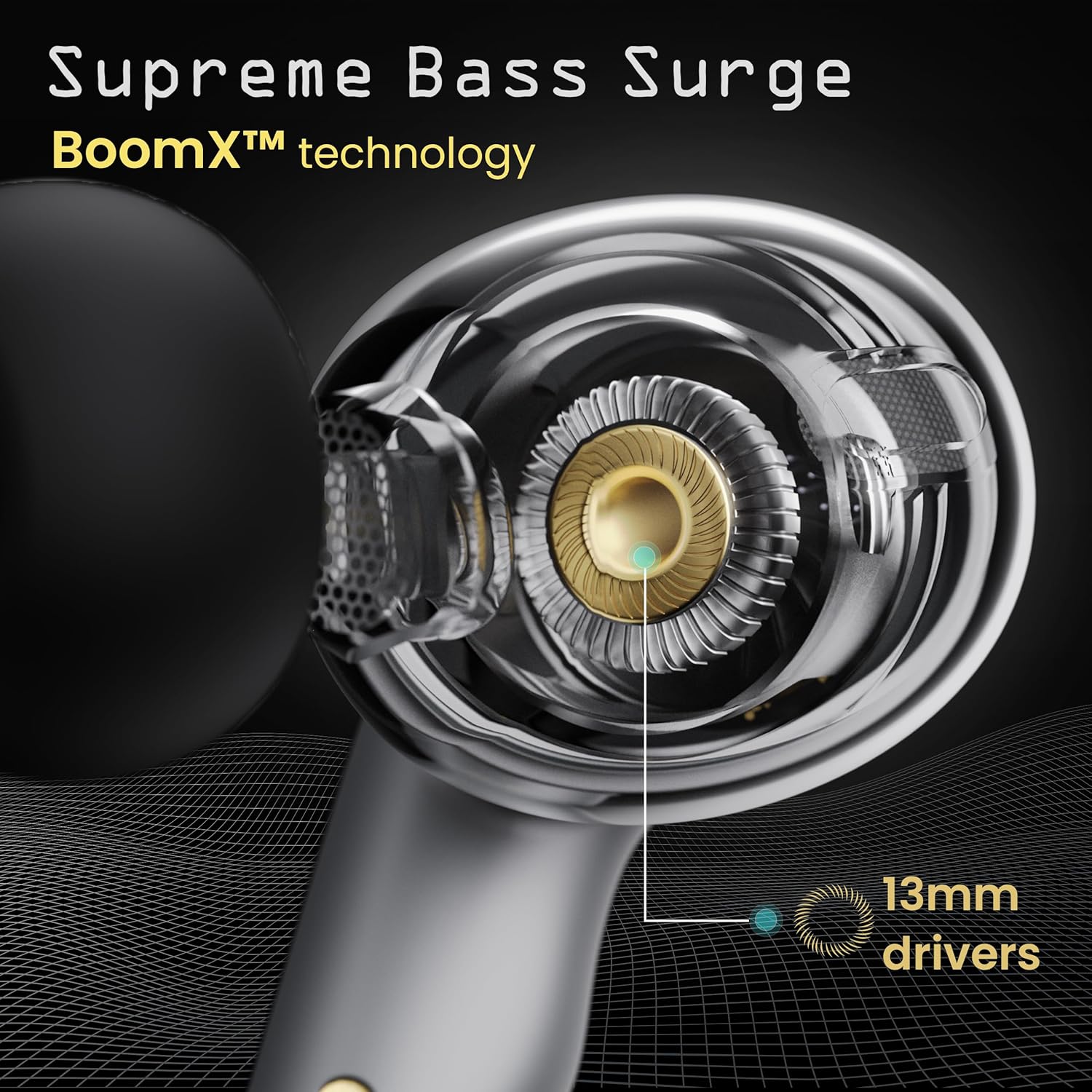
Image: A close-up of a GOBOULT UFO earbud, highlighting the 13mm drivers responsible for supreme bass surge.

تصویر: جزئیات view of a GOBOULT UFO earbud, showcasing the AI-powered Quad Mic AI-ENC technology for high-definition call clarity and Zen™ mode for silence.
راه اندازی
جفت شدن اولیه
- محفظه شارژ را باز کنید. ایربادها به طور خودکار وارد حالت جفت شدن میشوند.
- در دستگاه خود (گوشی هوشمند، تبلت و غیره)، بلوتوث را فعال کنید.
- جستجو برای "GOBOULT UFO" in the list of available Bluetooth devices and select it to connect.
- پس از اتصال، یک پیام صوتی خواهید شنید و نشانگرهای LED روی ایربادها تغییر میکنند.
The earbuds utilize Bluetooth 5.3 for stable and efficient connection, featuring Blink & Pair™ technology for fast pairing.

Image: GOBOULT UFO Earbuds illustrating stable connectivity with Bluetooth 5.3 and fast pairing technology.
پشتیبانی برنامه
Enhance your experience by downloading the dedicated GOBOULT app. The app allows you to:
- Switch between 6 Equalizer Modes.
- کنترلهای لمسی را سفارشی کنید.
- اسم ایربادهاتون رو عوض کنید.
- به تنظیمات و ویژگیهای اضافی دسترسی پیدا کنید.
دستورالعمل های عملیاتی
کنترل ها را لمس کنید
The GOBOULT UFO earbuds feature intuitive touch controls on each earbud.
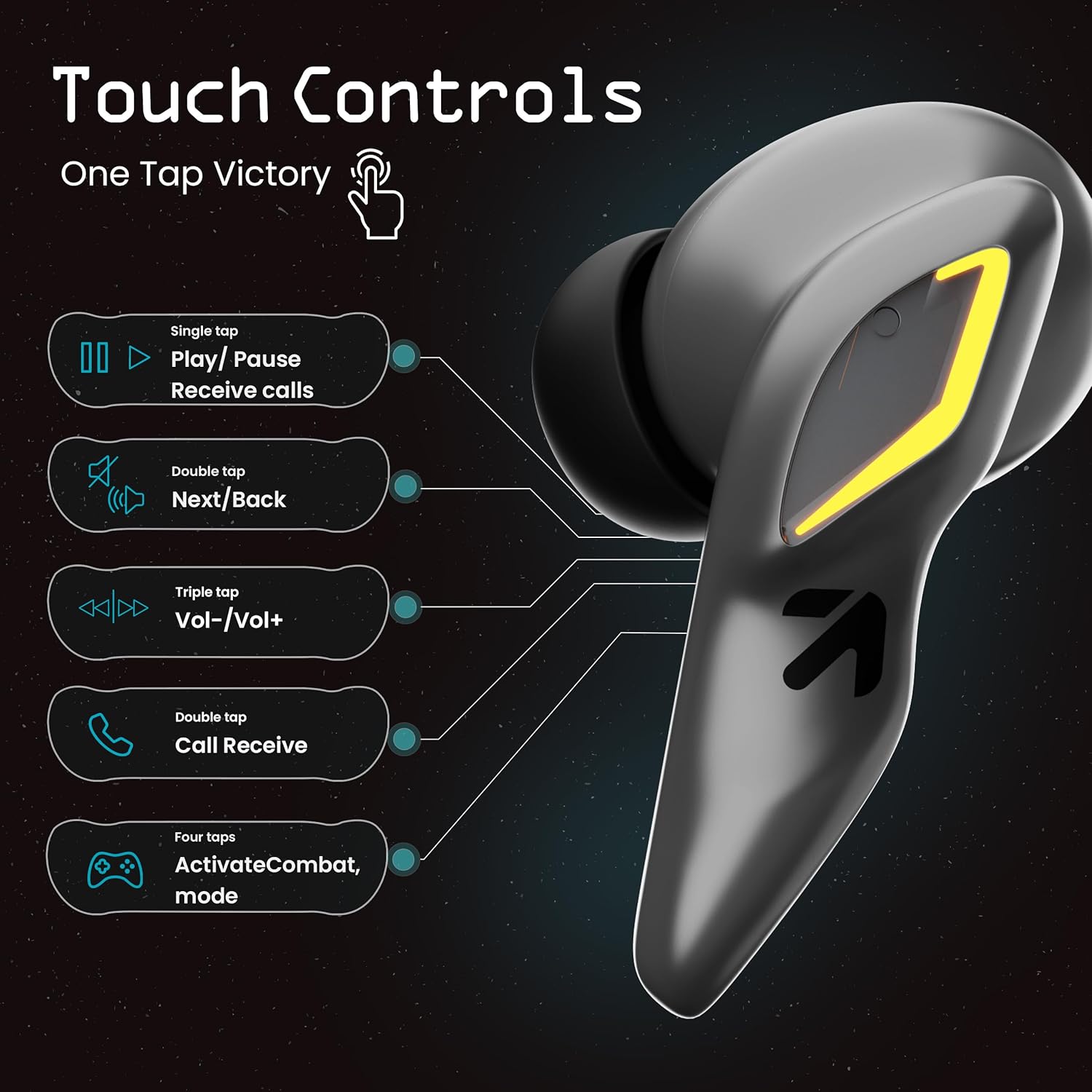
Image: A visual guide to the touch controls on the GOBOULT UFO Earbuds, detailing single, double, triple, and four-tap functions.
- یک ضربه: Play/Pause music, Receive calls.
- دو تا ضربه ی آهسته بزن: Next/Back track.
- شیر سه گانه: ولوم بالا/پایین.
- چهار ضربه: Activate Combat Mode (Gaming Mode).
- فشار طولانی: Activate Voice Assistant (Google Assistant, Siri).
Gaming Mode (Combat Mode)
Activate Combat Mode for an ultra-low latency experience of 45ms, ideal for gaming. Tap the earbud four times to toggle this mode.

Image: The GOBOULT UFO Earbuds case open, highlighting the Combat Gaming Mode with 45ms ultra-low latency, activated by four taps.
دستیار صوتی
Long press the touch control area on either earbud to activate your device's voice assistant (e.g., Google Assistant, Siri).

Image: GOBOULT UFO Earbuds demonstrating the long-press gesture to activate the voice assistant feature.
شارژ کردن
The GOBOULT UFO earbuds offer up to 48 hours of total playtime with the charging case.
شارژ کیس و هدفون
- ایربادها را داخل محفظه شارژ قرار دهید. مطمئن شوید که به درستی در جای خود قرار گرفتهاند.
- Connect the Type-C fast charging cable to the charging port on the case and to a power source.
- نشانگرهای LED روی کیس وضعیت شارژ را نشان می دهند.
- A full charge for the earbuds and case takes approximately 100 minutes.
- With Type-C fast charging, a 10-minute charge can provide up to 1.5 hours of playtime.
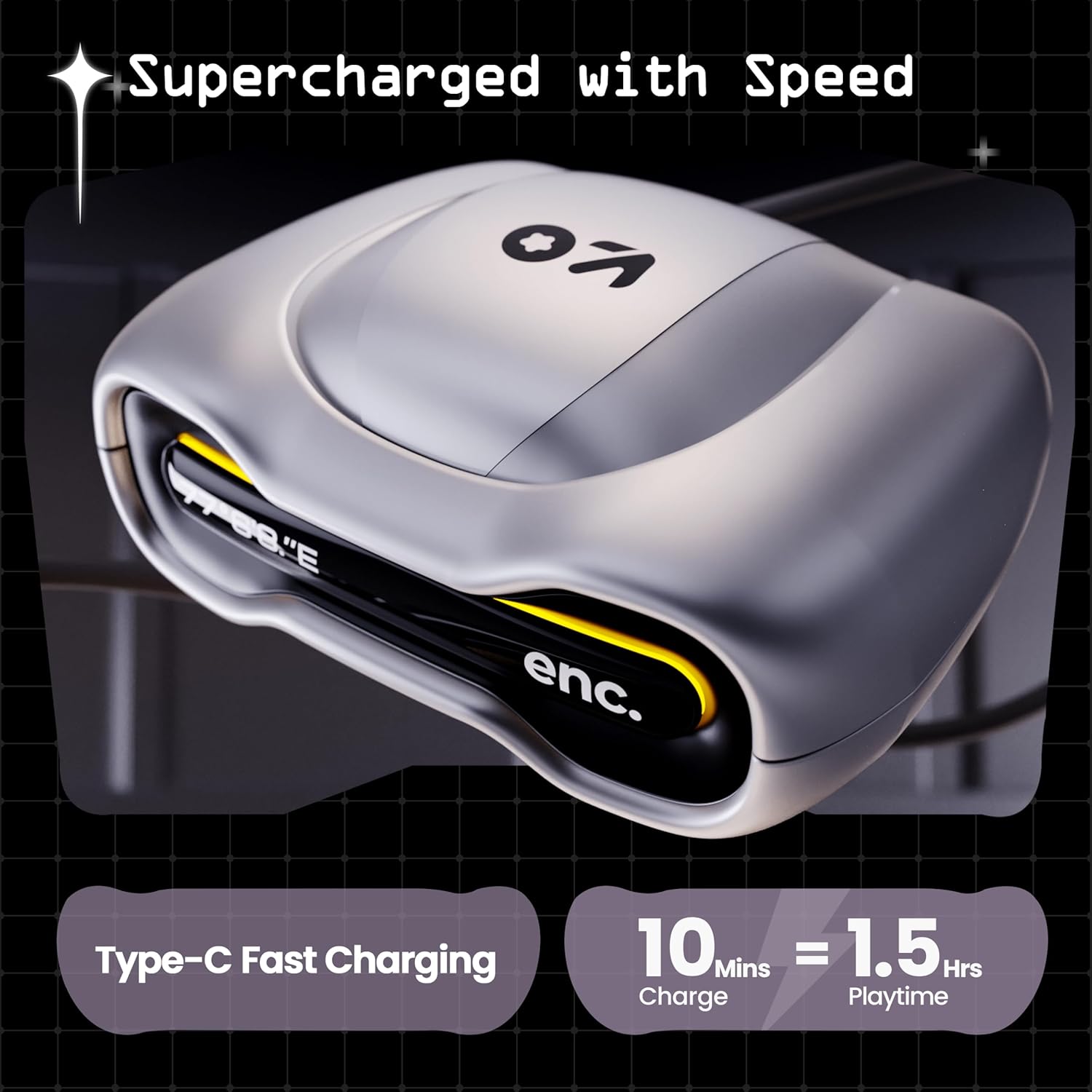
Image: The GOBOULT UFO charging case, illustrating its Type-C fast charging capability, providing 1.5 hours of playtime from a 10-minute charge.
تعمیر و نگهداری
مقاومت در برابر آب
The GOBOULT UFO earbuds are IPX5 water-resistant, making them sweatproof, rainproof, and splashproof. This protection allows for use during workouts or in light rain.

Image: GOBOULT UFO Earbuds on a metallic surface, indicating their IPX5 water resistance, making them suitable for sweat, rain, and splashes.
تمیز کردن
برای حفظ عملکرد بهینه و بهداشت، مرتباً ایربادها و محفظه شارژ خود را تمیز کنید.
- برای پاک کردن ایربادها و قاب آنها از یک پارچه نرم، خشک و بدون پرز استفاده کنید.
- برای کثیفیهای سرسخت، کمی dampپارچه را با آب بشویید. از استفاده از مواد شیمیایی قوی یا مواد ساینده خودداری کنید.
- مطمئن شوید که اتصالات شارژ هم در ایربادها و هم در قاب، تمیز و عاری از هرگونه آلودگی هستند.
- Allow all components to dry completely before placing earbuds back in the case or charging.
عیب یابی
If you encounter any issues with your GOBOULT UFO earbuds, please refer to the following common solutions:
- بدون صدا: Ensure earbuds are charged and properly connected to your device. Check device volume.
- مشکلات جفت شدن: مطمئن شوید که بلوتوث روی دستگاه شما فعال است. سعی کنید دستگاه را در تنظیمات بلوتوث خود فراموش کنید و دوباره جفتسازی کنید. مطمئن شوید که هدفونها کاملاً شارژ شدهاند.
- یک هدفون کار نمی کند: Place both earbuds back in the case, close it, and then open it again. This often resets the connection.
- کیفیت تماس ضعیف: Ensure microphones are clean. Check for strong Bluetooth connection.
- کنترل های لمسی بدون پاسخ: مطمئن شوید که انگشتانتان تمیز و خشک هستند. با قرار دادن ایربادها در جعبه و بیرون آوردن آنها، دوباره آنها را روشن کنید.
For further assistance, please contact GOBOULT customer support.
مشخصات
| ویژگی | جزئیات |
|---|---|
| نام مدل | UFO (Airbass Earbuds) |
| نسخه بلوتوث | 5.3 |
| زمان پخش | تا ۴۲ ساعت (با جعبه شارژ) |
| تأخیر صوتی | ۶۰ میلیثانیه (حالت بازی) |
| رانندگان | درایورهای دینامیک 13 میلی متری |
| میکروفون ها | Quad Mic ENC (Environmental Noise Cancellation) |
| مقاومت در برابر آب | IPX5 (ضد عرق، ضد باران، ضد پاشش آب) |
| پورت شارژ | شارژ سریع Type-C |
| زمان شارژ | تقریباً 100 دقیقه |
| محدوده بلوتوث | 10 متر |
| پاسخ فرکانس | 20 هرتز |
| حساسیت | 115 دسی بل |
| امپدانس | 32 اهم |
| وزن مورد | 60 گرم |
| ابعاد محصول | 4.7 × 9 × 10 سانتی متر |
| مواد | فلز |
گارانتی و پشتیبانی
اطلاعات گارانتی
The GOBOULT UFO True Wireless Earbuds come with a ۱ سال گارانتی سازنده from the date of purchase. Please retain your proof of purchase for warranty claims. The warranty covers manufacturing defects. It does not cover damage caused by misuse, accidents, or unauthorized modifications.
پشتیبانی مشتری
For any questions, technical support, or warranty claims, please contact GOBOULT customer service.
سازنده: Exotic Mile Pvt. Ltd.
آدرس: B67 Wazirpur Industrial Area, New Delhi 110052, India.
Please refer to the warranty card included in your product packaging for specific contact details and procedures.


