1. راه اندازی
1.1 محتویات بسته
قبل از شروع نصب، بررسی کنید که همه اجزا وجود دارند:
- Schlage BE489WBCCEN625 Century Encode Smart WiFi Deadbolt (Exterior and Interior Assemblies)
- 12351 لچ
- 10116 بشقاب ضربه ای
- سخت افزار نصب
- Installation Instructions (refer to included printed guide for detailed steps)
- راهنمای کاربر (این سند)
1.2 نصب
The Schlage BE489WBCCEN625 deadbolt is designed to fit standard pre-drilled doors. Ensure your door meets the following specifications:
- Door thickness: 1-3/8" to 1-3/4" (35mm-44mm)
- Backset: Adjustable 2-3/8" or 2-3/4" (60mm or 70mm)
- Cross bore: 2-1/8" (54mm)
- Edge bore: 1" (25mm)
For detailed, step-by-step installation instructions, please refer to the separate printed installation guide included with your product. Proper installation is crucial for optimal performance and security.
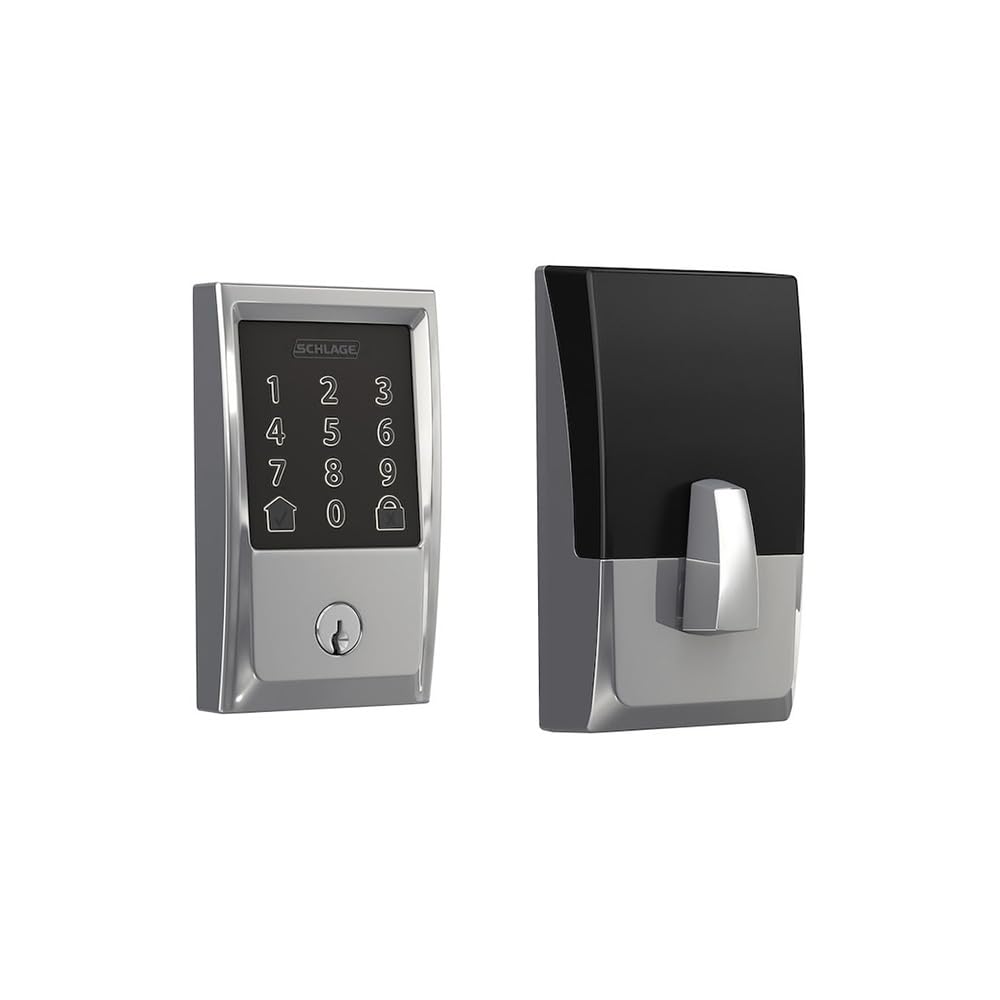
Image showing the exterior component of the Schlage Century Encode Smart WiFi Deadbolt, featuring the touchscreen keypad.
1.3 Initial Configuration and Pairing
After physical installation, the deadbolt requires initial configuration and pairing with your home's Wi-Fi network and the Schlage Home app (or compatible smart home platform). This process typically involves:
- Downloading the Schlage Home app.
- ایجاد حساب کاربری یا ورود به سیستم.
- Following the in-app instructions to add your new deadbolt. This usually involves scanning a QR code or entering a pairing code found on the deadbolt or in the packaging.
- Connecting the deadbolt to your 2.4 GHz Wi-Fi network.
Once paired, you can manage settings, create access codes, and monitor lock activity remotely.
2. Operating the Deadbolt
2.1 قفل کردن و باز کردن قفل
از نمای بیرونی:
- برای قفل کردن: Press the Schlage button (top button on the touchscreen) or enter a valid access code and then press the Schlage button.
- برای باز کردن قفل: Enter a valid 4-8 digit access code on the fingerprint-resistant, capacitive touchscreen. The deadbolt will retract.
از داخل کشور:
- برای قفل کردن/باز کردن قفل: Rotate the thumbturn.
2.2 Access Code Management
You can create and manage up to 100 unique access codes for family, friends, or service providers. This is done through the Schlage Home app. Refer to the app's help section for detailed instructions on adding, deleting, or modifying access codes.
۶.۳ یکپارچهسازی کنترل صوتی
The Schlage Century Encode Smart WiFi Deadbolt supports voice commands via Amazon Alexa or Google Assistant. Ensure your deadbolt is linked to your Alexa or Google Home account through the respective apps. Once linked, you can use commands such as:
- "Alexa, lock the front door."
- "Hey Google, is the back door locked?"
Voice unlocking may require a spoken PIN for security purposes, which can be set up in the Alexa or Google Home app.
۵.۲ فناوری دزدگیر داخلی
The deadbolt features built-in alarm technology that senses potential security breaches. This includes detecting forced entry attempts or tampering. Alarm sensitivity and notification settings can typically be adjusted within the Schlage Home app.
3. تعمیر و نگهداری
3.1 تمیز کردن
To maintain the appearance and functionality of your deadbolt's touchscreen, clean it regularly with a soft, damp پارچه. از پاککنندههای ساینده، حلالها یا مواد شیمیایی قوی خودداری کنید، زیرا این مواد میتوانند به روکش و قطعات الکترونیکی آسیب برسانند.
3.2 تعویض باتری
The deadbolt requires batteries for operation. When the batteries are low, the lock will typically provide an audible and/or visual alert, and you will receive a notification via the Schlage Home app. To replace the batteries:
- پوشش داخلی قفل مرکزی را بردارید.
- بسته باتری را پیدا کنید.
- باتری های قدیمی را خارج کرده و به درستی دور بیندازید.
- Insert new, high-quality alkaline batteries (typically 4 AA batteries, though specific type should be confirmed in the printed guide).
- Replace the battery pack and interior cover.
It is recommended to replace all batteries at the same time to ensure consistent performance.
4 عیب یابی
If you encounter issues with your Schlage BE489WBCCEN625 deadbolt, try the following troubleshooting steps:
- قفل جواب نمیدهد: باتریها را بررسی کنید. اگر کم یا خالی شدهاند، آنها را تعویض کنید.
- کد دسترسی کار نمیکند: Ensure you are entering the correct code. Verify the code's status in the Schlage Home app. The code might be expired or temporarily disabled.
- Deadbolt not connecting to Wi-Fi: Ensure your Wi-Fi router is on and within range. Check your network settings in the Schlage Home app. You may need to restart your router or the deadbolt.
- زنگ خطر به طور غیرمنتظره به صدا درآمد: Check the alarm sensitivity settings in the Schlage Home app. Ensure the door is fully closed and secured.
- Mechanical issues: Ensure the deadbolt is properly aligned with the strike plate. Lubricate the latch and bolt with a silicone-based lubricant if movement is stiff.
For more complex issues, consult the comprehensive troubleshooting section in the Schlage Home app or on the official Schlage support webسایت
5. مشخصات
| ویژگی | مشخصات |
|---|---|
| نام تجاری | برنامه |
| شماره مدل | BE489WBCCEN625 |
| ویژگی خاص | Touchscreen, Smart WiFi |
| نوع قفل | قفل کلیدی، صفحه کلید |
| ابعاد (L x W x H) | 9.4 x 5.5 x 4.5 اینچ |
| مواد | روی |
| سبک | قرن |
| رنگ | کروم روشن |
| وزن مورد | 3.3 پوند |
| اجزای شامل | سخت افزار نصب، دستورالعمل نصب |
| UPC | 043156969647 |
| باتری های مورد نیاز | بله |
| باتری های گنجانده شده است | خیر |
6. اطلاعات گارانتی
Your Schlage BE489WBCCEN625 Century Encode Smart WiFi Deadbolt is covered by a manufacturer's warranty. Specific warranty terms and conditions, including duration and coverage details, are provided with your product documentation or can be found on the official Schlage webلطفاً رسید خرید خود را برای استفاده در گارانتی نگه دارید.
7. پشتیبانی
For further assistance, technical support, or to access additional resources, please visit the official Schlage support website or contact Schlage customer service. Contact information and online resources are typically available on the manufacturer's webسایت
منابع آنلاین: www.schlage.com


