1. مقدمه
Thank you for choosing the Philips PPM5521 Knee Massager. This device is designed to provide targeted relief and relaxation to your knees through a combination of heat therapy, air compression, and massage. Featuring a cordless design and a convenient handheld controller, it offers a personalized and comfortable experience. Please read this manual thoroughly before use to ensure safe and optimal operation.
2. اطلاعات ایمنی
برای جلوگیری از آسیب یا جراحت به دستگاه، لطفاً نکات ایمنی زیر را رعایت کنید:
- اگر سابقه بیماری خاصی دارید، باردار هستید، ضربانساز قلب دارید یا تحت درمان پزشکی هستید، قبل از استفاده با پزشک مشورت کنید.
- از ماساژور روی نواحی متورم، ملتهب یا آسیب دیده پوست استفاده نکنید.
- Avoid using the device while sleeping or in situations where you might fall asleep.
- Keep the device away from water and high humidity. Do not immerse in liquids.
- Do not disassemble, repair, or modify the device yourself. Contact authorized service personnel for any repairs.
- دور از دسترس کودکان نگهداری شود.
- فقط از کابل شارژ و آداپتور ارائه شده استفاده کنید.
- If you experience any discomfort or pain during use, discontinue immediately.
- The heat function should be used with caution by individuals sensitive to heat or with poor circulation.
3. محتویات بسته
The Philips PPM5521 Knee Massager package includes:
- 2 x Philips Knee Massager Units
- 1 عدد کنترلر دستی
- 1 عدد کابل شارژ Type-C
- 1 x دفترچه راهنمای کاربر
4. محصول تمام شدview
The Philips PPM5521 Knee Massager combines advanced features for comprehensive knee care.

This image shows a user wearing both Philips knee massagers, connected to a handheld controller. The image highlights 'Airwave Technology' for 10-area air bag massage and 'Large-area Warm Compress on Knees'.
ویژگی های کلیدی:
- Airwave Technology: 10-area air bags provide a wraparound compression massage.
- Warm Compress: Large-area heat therapy with 3 adjustable levels, reaching approximately 42°C (± 3°C).
- FloatFit Knee Protection Technology: Floated three-dimensional brace for knee joint protection.
- 3D Micro Curved Surface: Ergonomic design to closely fit the curvature of knee joints.
- Hollowed-out Design: Allows for free bending of knees without hindrance during use.
- کنترل دستی: Easy control of modes, intensity, and heat settings.
- Smart Voice Prompts: Provides audio feedback for operations and battery status.
- باتری داخلی: 4000mAh capacity for cordless operation, up to 90 minutes of use.
- شارژ نوع C: شارژ راحت و سریع.
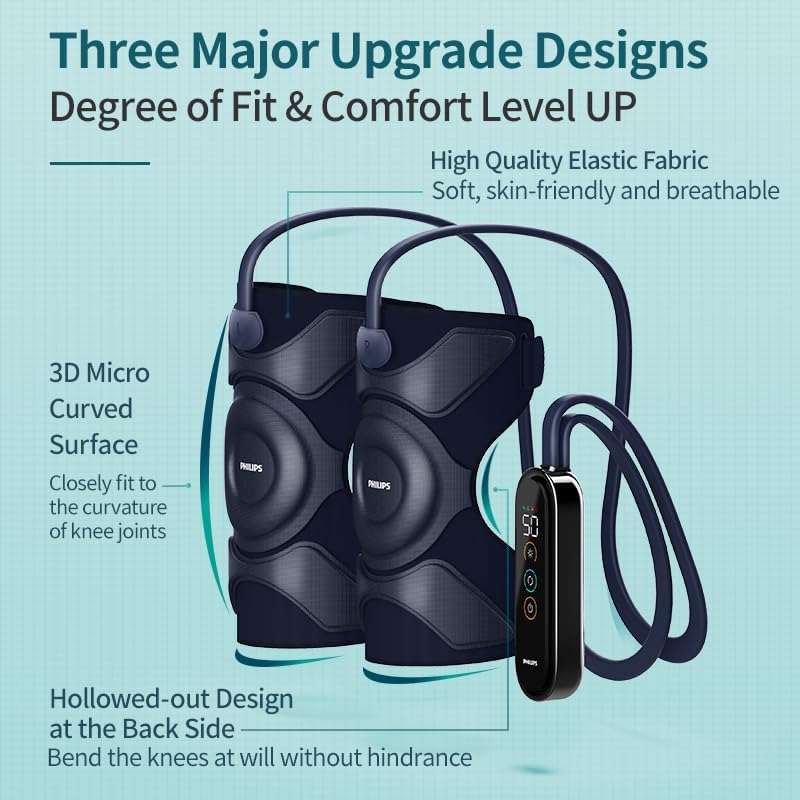
An illustration detailing the design upgrades: a 3D Micro Curved Surface for a close fit to knee joints and a Hollowed-out Design at the back for unrestricted knee bending. It also mentions high-quality elastic fabric.
کنترل دستی:
The controller features a display and control buttons for easy operation. Specific button functions are detailed in the Operating Instructions section.
5. راه اندازی
5.1 شارژ کردن دستگاه
- Connect the Type-C charging cable to the charging port on the handheld controller.
- سر دیگر کابل را به یک آداپتور برق USB مناسب (که همراه دستگاه نیست) یا یک پورت USB وصل کنید.
- The battery indicator on the controller display will show the charging status. A full charge provides up to 90 minutes of operation.
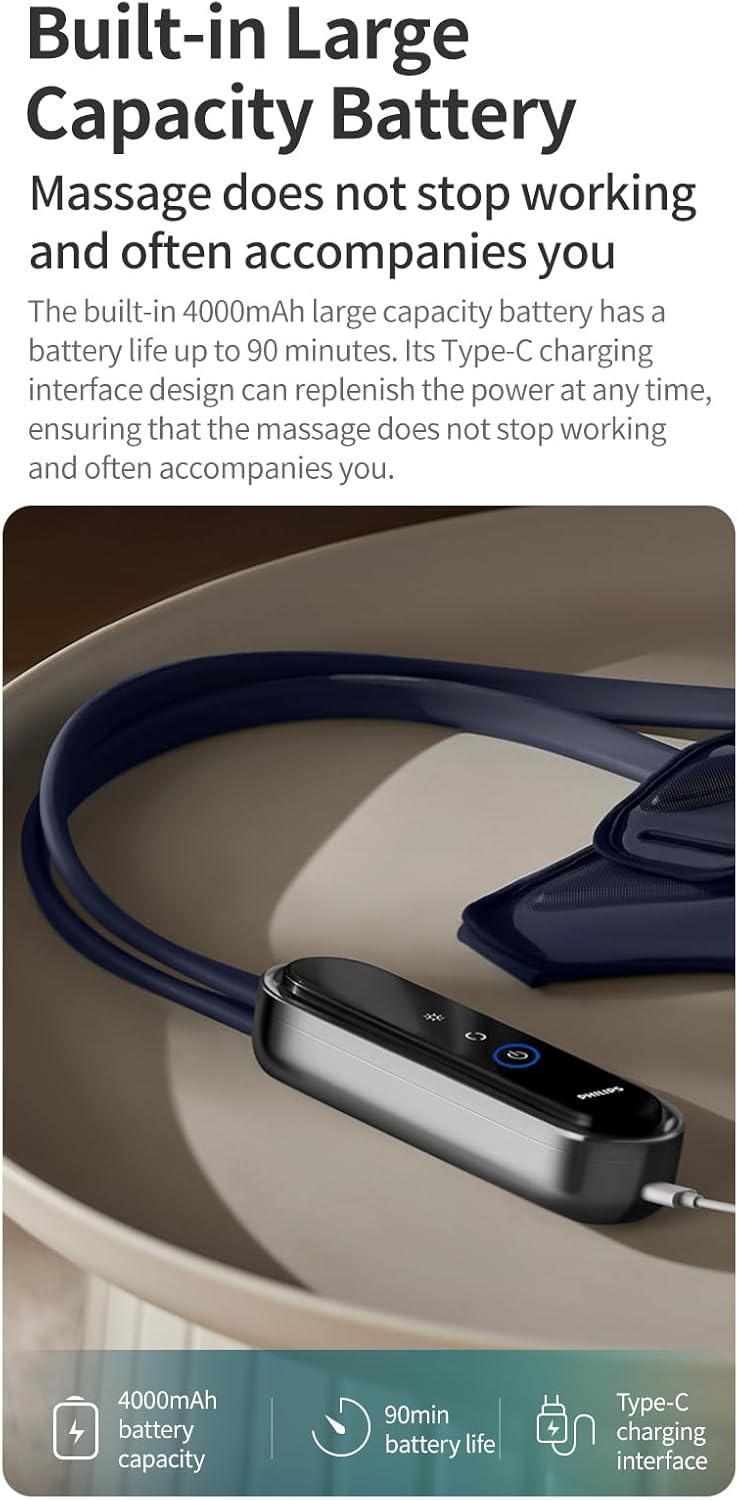
An image highlighting the handheld controller and its built-in 4000mAh large capacity battery, offering up to 90 minutes of use and featuring a Type-C charging interface.
5.2 Wearing the Knee Massagers
- Ensure the massager units are correctly oriented for each knee (left and right).
- Wrap the massager around your knee, ensuring the main massage area is centered over your kneecap.
- Secure the massager using the Velcro straps. Adjust the tightness for a comfortable yet snug fit. The ergonomic design allows for a 3D wraparound fit.
- The applicable range for the upper leg circumference is 34-48cm, and for the lower leg circumference is 30-40cm.
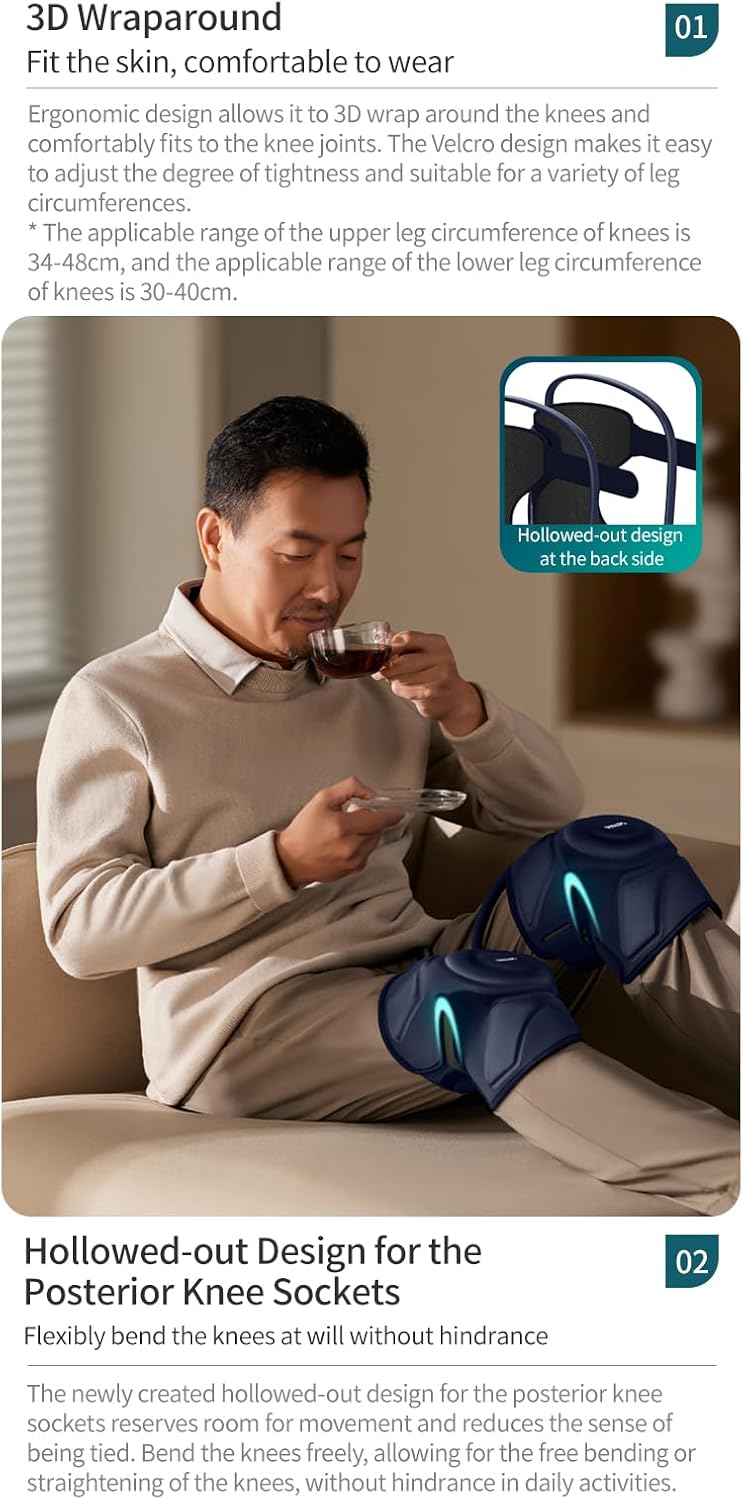
This image shows a person relaxing with the knee massagers, detailing the ergonomic 3D wraparound design for various leg circumferences (34-48cm upper, 30-40cm lower) and the hollowed-out design at the back for free movement.
6. دستورالعمل های عملیاتی
The handheld controller allows you to manage all functions of the knee massager.
6.1 روشن/خاموش
- Press and hold the Power button on the handheld controller to turn the device on. A voice prompt will confirm "Massage On".
- Press and hold the Power button again to turn the device off. A voice prompt will confirm "Massage Off".
۶.۲ انتخاب حالتهای ماساژ
The device offers four customizable massage modes. Press the Mode button (usually indicated by 'M' or a wave icon) to cycle through the available modes. The current mode will be displayed on the controller screen.
6.3 Adjusting Heat Level
The warm compress function has 3 adjustable levels. Press the Heat button (usually indicated by a flame icon) to increase or decrease the heat intensity. The selected heat level will be shown on the display.
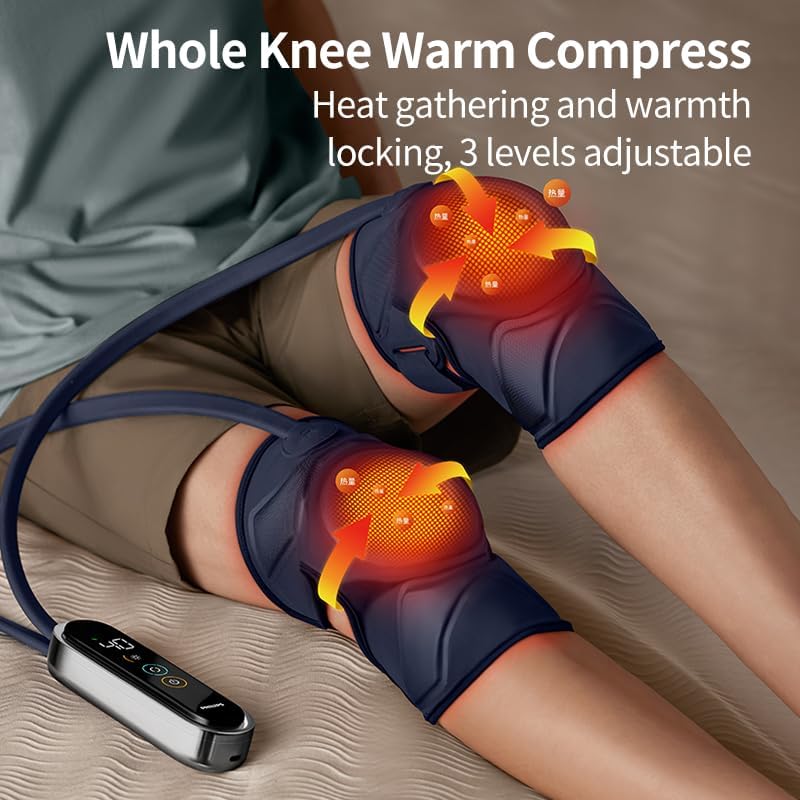
A user wearing the Philips knee massagers, illustrating the whole knee warm compress feature with heat arrows indicating warmth distribution and 3 adjustable levels.
6.4 Air Compression Intensity
The air compression intensity can be adjusted to your preference. Use the Intensity button (often indicated by '+' and '-' symbols or an air icon) to select the desired compression strength.
6.5 Smart Voice Prompts
The device features built-in voice prompts for ease of use. These prompts provide feedback on actions such as powering on/off, unlocking the screen, and low battery status. For example, if the battery is low, you will hear "Low battery, please charge it in time".

A user interacting with the Philips knee massager, illustrating the smart voice prompt function for easy operation, including prompts like 'Massage On', 'Unlock the Screen', 'Massage Off', and 'Low battery, please charge it in time'.
7. تعمیر و نگهداری
7.1 تمیز کردن
- قبل از تمیز کردن، مطمئن شوید که دستگاه خاموش و از برق جدا شده است.
- Wipe the surface of the massager units and controller with a soft, damp پارچه
- از پاککنندههای ساینده، حلالها یا مواد شیمیایی قوی استفاده نکنید.
- دستگاه را در آب غوطه ور نکنید.
7.2 ذخیره سازی
- دستگاه را در جای خشک و خنک، دور از نور مستقیم خورشید و دمای شدید نگهداری کنید.
- Keep the device in its original packaging or a protective case to prevent damage.
8 عیب یابی
If you encounter any issues with your Philips PPM5521 Knee Massager, please refer to the following common solutions:
| مشکل | علت احتمالی | راه حل |
|---|---|---|
| دستگاه روشن نمی شود | Low battery. Device not charged. | دستگاه را با استفاده از کابل Type-C به طور کامل شارژ کنید. |
| بدون گرما یا گرمای ضعیف. | عملکرد گرما فعال نیست یا روی سطح پایین تنظیم شده است. | Ensure the heat function is turned on and set to a higher level using the Heat button. |
| No air compression. | Compression function not activated or set to low intensity. | Ensure the compression function is active and adjust intensity using the Intensity button. |
| Voice prompts are too loud/quiet or off. | Voice prompt settings need adjustment. | Refer to the controller instructions for adjusting voice prompt volume or turning them on/off. |
| Device feels uncomfortable. | Massager not positioned correctly or straps too tight/loose. | Adjust the position of the massager and the tightness of the Velcro straps for a comfortable fit. |
اگر مشکل همچنان ادامه داشت، لطفاً با پشتیبانی مشتری تماس بگیرید.
9. مشخصات
| ویژگی | جزئیات |
|---|---|
| شماره مدل | PPM5521 |
| نام تجاری | فیلیپس |
| منبع تغذیه | شارژ باتری |
| ظرفیت باتری | 4000 میلی آمپر ساعت |
| عمر باتری | تا 90 دقیقه |
| رابط شارژ | نوع C |
| سطوح گرما | 3 levels (approx. 42°C ± 3°C) |
| حالت های ماساژ | 4 حالت قابل تنظیم |
| مواد | پنبه |
| ابعاد محصول | 102L x 54.3W x 4H سانتی متر |
| وزن مورد | 780 گرم |
| Applicable Leg Circumference | Upper: 34-48cm, Lower: 30-40cm |
10. اطلاعات گارانتی
For detailed warranty information, please refer to the warranty card included in your product packaging or visit the official Philips webرسید خرید خود را به عنوان مدرک خرید برای درخواستهای گارانتی نگه دارید.
11. پشتیبانی مشتری
If you have any questions, concerns, or require assistance with your Philips PPM5521 Knee Massager, please contact Philips customer service through their official webسایت یا اطلاعات تماس ارائه شده در مستندات محصول شما.


