1. مقدمه
This manual provides essential information for setting up, operating, and maintaining your Samsung Galaxy S22 SM-S901 5G smartphone. The Galaxy S22 features a vibrant 120Hz Dynamic AMOLED display, advanced camera capabilities, and a powerful 4nm processor for a smooth user experience. This device is a renewed product, ensuring full functionality with generic or original accessories.
۲. چه چیزهایی در جعبه است؟
بررسی کنید که بسته شما حاوی موارد زیر باشد:
- Samsung Galaxy S22 SM-S901 5G Device
- Standard Battery (STD Battery)
- کابل داده
- Cling (Protective film)
Note: Specific accessories may vary based on the renewed product supplier.
3. راه اندازی
3.1 دستگاه تمام شدview

شکل 3.1: جلو view of the Samsung Galaxy S22 SM-S901 5G.
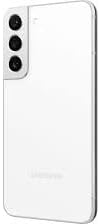
شکل 3.2: پشت view of the Samsung Galaxy S22 SM-S901 5G, highlighting the camera system.
3.2 روشن شدن اولیه
- کلید پاور/ساید که در سمت راست دستگاه قرار دارد را فشار داده و نگه دارید تا لوگوی سامسونگ ظاهر شود.
- برای انتخاب زبان، اتصال به شبکه Wi-Fi و تنظیم حساب Google خود، دستورالعملهای روی صفحه را دنبال کنید.
3.3 نصب سیم کارت
- سینی سیم کارت را در لبه پایینی دستگاه پیدا کنید.
- Insert the SIM ejection tool (not included with renewed products, use a paperclip) into the small hole next to the tray to eject it.
- نانو سیم کارت خود را طوری داخل سینی قرار دهید که قسمتهای طلایی آن رو به پایین باشد.
- سینی را به آرامی به داخل شیار فشار دهید تا در جای خود قرار گیرد.
4. راه اندازی دستگاه شما
4.1 ناوبری اولیه
- لمس کنید و نگه دارید: برای جابجایی یک مورد یا دسترسی به گزینههای بیشتر، آن را فشار داده و نگه دارید.
- کش رفتن: برای پیمایش بین صفحات یا مرور محتوا، انگشت خود را روی صفحه حرکت دهید.
- خرج کردن: برای بزرگنمایی یا کوچکنمایی عکسها از دو انگشت استفاده کنید و web صفحات
۲.۲ برقراری تماس و ارسال پیام
- To make a call, tap the تلفن icon, enter the number, and tap the call button.
- To send a message, tap the پیام ها icon, tap the new message icon, enter the recipient and your message.
4.3 ویژگی های دوربین
The Galaxy S22 features advanced camera technology designed for various lighting conditions.
- شبنگاری: This feature enhances low-light photography by pulling in more light and reducing lens flare through the Super Clear Glass, supported by fast-acting AI processing.
- Linear Camera System: The rear camera housing integrates a linear camera system for a sleek design and optimized performance.
4.4 ویژگی های نمایش
Experience clear and vibrant visuals with the Galaxy S22's display.
- 120Hz Dynamic AMOLED Display: Provides smooth scrolling and responsive touch interactions.
- Vision Booster Technology: Enhances outdoor visibility by optimizing brightness and color contrast, making the screen clear even in bright sunlight.
4.5 باتری و شارژ
The device is equipped with a battery that intelligently adapts to your usage patterns to optimize battery life, often lasting more than 24 hours under normal use. Use the provided data cable and a compatible charging adapter (sold separately or included with renewed product) for optimal charging.
4.6 قابلیت اتصال
- وای فای: برای دسترسی به اینترنت به شبکههای بیسیم متصل شوید.
- بلوتوث: با هدفونهای بیسیم، بلندگوها و سایر دستگاههای دارای بلوتوث جفت شوید.
- هوشمند View: Stream your phone's screen to a compatible TV. Access this feature from the Quick Panel by swiping down from the top of the screen.
5. تعمیر و نگهداری
5.1 تمیز کردن دستگاه
To clean your device, gently wipe it with a soft, lint-free cloth. Avoid using harsh chemicals or abrasive materials.
5.2 به روز رسانی نرم افزار
برای اطمینان از عملکرد بهینه، امنیت و دسترسی به ویژگیهای جدید، مرتباً بهروزرسانیهای نرمافزار را بررسی و نصب کنید. به تنظیمات > بهروزرسانی نرمافزار > دانلود و نصب.
6 عیب یابی
اگر با دستگاه خود با مشکل مواجه شدید، مراحل عیبیابی رایج زیر را امتحان کنید:
- دستگاه پاسخ نمی دهد: برای راهاندازی مجدد دستگاه، کلید پاور/کناری و کلید کاهش صدا را به طور همزمان بیش از 7 ثانیه فشار داده و نگه دارید.
- تخلیه سریع باتری: بررسی میزان استفاده از برنامههای پسزمینه در تنظیمات > باتری و مراقبت از دستگاه > باتری. Reduce screen brightness or disable unnecessary features like GPS or Wi-Fi when not in use.
- مشکلات اتصال: Restart your device. For Wi-Fi, try forgetting the network and reconnecting. For cellular data, ensure your SIM card is properly inserted and your mobile data is enabled.
- از کار افتادن برنامه: حافظه پنهان (cache) و دادههای برنامه را در ... پاک کنید. تنظیمات > برنامهها > [نام برنامه] > فضای ذخیرهسازیاگر مشکل همچنان ادامه داشت، برنامه را حذف و دوباره نصب کنید.
For more complex issues, refer to Samsung's official support resources or contact your renewed product seller.
7. مشخصات
| ویژگی | مشخصات |
|---|---|
| نام مدل | گلکسی اس 22 |
| شماره مدل مورد | SM-S901 |
| نام تجاری | سامسونگ |
| سیستم عامل | اندروید 12.0 |
| اندازه صفحه نمایش | 6.1 اینچ |
| قطعنامه | 1080×2340 |
| نرخ تازه سازی | 120 هرتز |
| سرعت CPU | 2.3 گیگاهرتز |
| اندازه حافظه رم نصب شده | 8 گیگابایت |
| ظرفیت ذخیره سازی حافظه | 128 GB (Internal, specific to this renewed model) |
| وزن مورد | 5.9 اونس (167 گرم) |
| فناوریهای ارتباطات بیسیم | بلوتوث، تلفن همراه، وایفای |
| حامل بی سیم | قفل برای همه شرکت های مخابراتی |
| زمان مکالمه تلفنی | 24 Hours (approximate) |
| رنگ | Phantom White (specific to this renewed model) |
8. Renewed Product Condition Guidelines
As a renewed product, your Samsung Galaxy S22 SM-S901 5G is fully functional and comes with generic or original accessories and packaging. The condition of renewed products is categorized to provide transparency:

Figure 8.1: Amazon Renewed product condition guidelines.
Please refer to the specific condition description provided at the time of purchase for details regarding your device.
9. گارانتی و پشتیبانی
9.1 سیاست بازگشت
This renewed product typically includes a 90-day return policy for refund or replacement. Please consult your seller's specific return policy for detailed terms and conditions.
9.2 پشتیبانی فنی
For technical assistance, software issues, or hardware malfunctions, please contact the seller from whom you purchased this renewed device. You may also find general support resources on the official Samsung webسایت


