مقدمه
ممنون از خریدتونasing the Legami Teddy Bear Wireless Speaker with Phone Stand. This manual provides detailed instructions for the setup, operation, maintenance, and troubleshooting of your device. Please read this manual carefully before use and retain it for future reference.
1. راه اندازی
۱.۱ جعبهگشایی و محتویات بسته
Carefully remove all items from the packaging. Ensure all components are present.
- Legami Teddy Bear Wireless Speaker
- کابل شارژ USB

۴.۱ شارژ کردن بلندگو
قبل از اولین استفاده، بلندگو را به طور کامل شارژ کنید.
- Locate the Micro-USB charging port on the back of the speaker.
- Connect the small end of the included USB charging cable to the speaker's Micro-USB port.
- سر USB استاندارد کابل را به آداپتور برق USB (که همراه دستگاه نیست) یا پورت USB کامپیوتر وصل کنید.
- The charging indicator light (if present, typically red) will illuminate during charging and turn off or change color when fully charged.
- A full charge provides up to 3 hours of playing time.

2. عملیات
2.1 روشن/خاموش کردن
To power the speaker on or off:
- Locate the ON/OFF switch on the back of the speaker.
- Slide the switch to the "ON" position to power on the speaker. A sound or indicator light may confirm it is on.
- Slide the switch to the "OFF" position to power off the speaker.
2.2 جفت شدن بلوتوث
Connect your smartphone or other Bluetooth-enabled device to the speaker wirelessly.
- Ensure the speaker is powered on. It will automatically enter pairing mode.
- در دستگاه خود (گوشی هوشمند، تبلت، لپتاپ)، بلوتوث را فعال کنید.
- جستجو برای available Bluetooth devices. The speaker will appear as "Legami Speaker" or similar.
- Select the speaker from the list to pair. A confirmation sound may play upon successful connection.
- پس از جفت شدن، میتوانید صدای دستگاه خود را از طریق بلندگو پخش کنید.
سازگاری: This speaker is compatible with all devices featuring wireless technology, including iOS and Android smartphones and tablets.
2.3 Wired Connection (Aux Port)
For devices without Bluetooth or for a wired connection, use the Aux port.
- مطمئن شوید که اسپیکر روشن است.
- Connect a 3.5mm audio cable (not included) from your device's headphone jack to the Aux port on the back of the speaker.
- Play audio from your device. The speaker will automatically switch to Aux input.
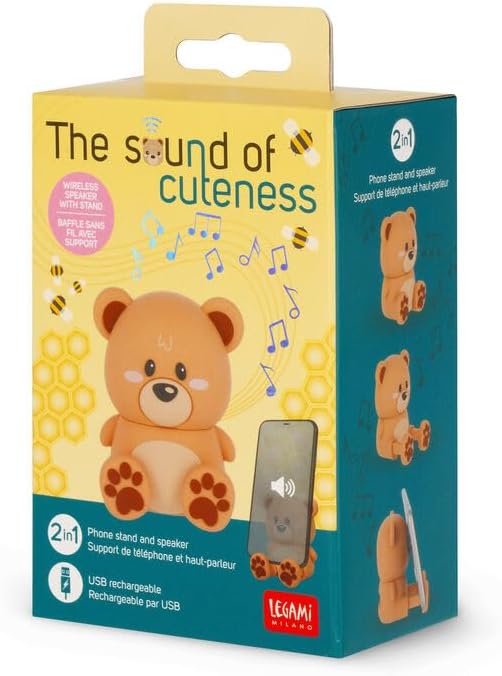
۶.۲ استفاده به عنوان پایه تلفن
The speaker is designed to function as a convenient phone stand.
- Position your smartphone or tablet between the speaker's paws.
- The speaker's design provides a stable base for viewمحتوای

3. تعمیر و نگهداری
3.1 تمیز کردن
برای حفظ ظاهر و عملکرد بلندگوی خود:
- قبل از تمیز کردن، مطمئن شوید که بلندگو خاموش است و از هرگونه منبع تغذیه جدا شده است.
- سطح را با یک پارچه نرم، خشک یا کمی زبر پاک کنید.amp پارچه
- از پاککنندههای ساینده، حلالها یا مواد شیمیایی قوی استفاده نکنید، زیرا ممکن است به روکش آسیب برسانند.
- Avoid getting moisture into any ports or openings.
3.2 ذخیره سازی
در صورت عدم استفاده برای مدت طولانی:
- بلندگو را در جای خشک و خنک، دور از نور مستقیم خورشید و دمای بسیار بالا نگهداری کنید.
- آن را از گرد و غبار و رطوبت دور نگه دارید.
4 عیب یابی
اگر با بلندگوی خود با مشکل مواجه شدید، به مشکلات و راهحلهای رایج زیر مراجعه کنید:
| مشکل | راه حل ممکن |
|---|---|
| بلندگو روشن نمی شود |
|
| جفتسازی از طریق بلوتوث امکانپذیر نیست. |
|
| هیچ صدایی از بلندگو وجود ندارد. |
|
| کیفیت صدای ضعیف. |
|
5. مشخصات
| ویژگی | جزئیات |
|---|---|
| شماره مدل | SPS0002 |
| نام تجاری | LEGAMI |
| ابعاد (L x W x H) | 6 × 5 × 8 سانتی متر |
| مواد | پلاستیک |
| فناوری اتصال | بلوتوث، USB (برای شارژ) |
| فناوری ارتباطات بی سیم | بلوتوث |
| منبع تغذیه | Cable Electric (Rechargeable via USB) |
| اندازه بلندگو | 6 سانتی متر |
| حالت خروجی صدا | استریو |
| ویژگی های خاص | Wireless, Phone Stand Function |
| موارد استفاده توصیه شده | برای گوشی هوشمند یا تبلت |
| دستگاه های سازگار | کامپیوتر رومیزی، لپتاپ، گوشی هوشمند، تبلت |
| زمان پخش | تا 3 ساعت |
6. گارانتی و پشتیبانی
This product comes with a manufacturer's warranty.
- گارانتی سازنده: 2 سال گارانتی سازنده.
- For further support, product information, or warranty claims, please visit the official Legami store or contact their customer service.
- Visit the Legami Brand Store


