1. مقدمه
This manual provides essential information for the proper setup, operation, and maintenance of your Tele System SMART24 LS2 A11 24-inch Android Smart TV. Please read it thoroughly before using the product to ensure safe and efficient operation.
۲. چه چیزهایی در جعبه است؟
بررسی کنید که آیا همه اجزا وجود دارند یا خیر:
- Tele System SMART24 LS2 A11 Smart TV
- کنترل از راه دور
- کابل برق
- راهنمای شروع سریع
- Warranty Paper
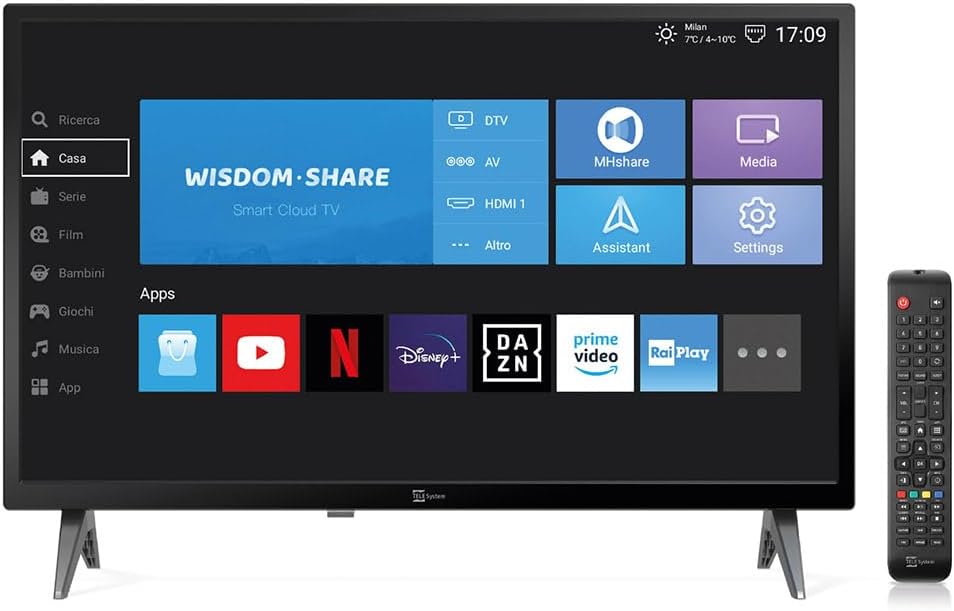
Image: The Tele System SMART24 LS2 A11 Smart TV displaying its home screen, with the included remote control positioned to the right. This illustrates the main components and initial user interface.
3. راه اندازی
3.1. باز کردن بسته بندی و قرار دادن
- تلویزیون را با دقت از بستهبندی آن خارج کنید.
- Place the TV on a stable, flat surface or mount it on a wall using a compatible VESA 100x100 wall mount (sold separately).
- از تهویه مناسب در اطراف تلویزیون اطمینان حاصل کنید.
3.2. اتصال برق
Connect the power cable to the TV's power input and then to a suitable electrical outlet (100-240V AC). While the product description mentions 12/220V, the specifications indicate 100-240V AC. Ensure the power source matches the TV's requirements.
3.3. Initial Setup Wizard
پس از اولین روشن شدن، تلویزیون شما را در یک راهنمای اولیه راهاندازی راهنمایی میکند. این شامل موارد زیر است:
- انتخاب زبان.
- اتصال به شبکه (وایفای یا اترنت).
- Channel scanning for DVB-T2 (Digital Terrestrial) and Satellite channels.
- Tivùsat LCN channel numbering setup (if applicable).
4. دستورالعمل های عملیاتی
4.1. کنترل از راه دورview

Image: The standard remote control for the Tele System Smart TV, showing various buttons for power, numbers, volume, channel, navigation, and smart TV functions.
با دکمههای کنترل از راه دور برای روشن/خاموش کردن، تنظیم صدا، انتخاب کانال، ناوبری و عملکردهای تلویزیون هوشمند آشنا شوید.
4.2. Android Smart TV Features
Your TV runs on Android AOSP, providing access to a wide range of applications.
- دسترسی به برنامه: Navigate to the "Apps" section on the home screen to download and use applications like Prime Video, YouTube, Disney Plus, and DAZN.
- معکوس روی صفحه نمایش: Use the mirroring function to share content from your mobile devices (smartphone, tablet) to the TV screen. This includes photos, videos, and music.
- MHshare App: Download the free MHshare app on your smartphone to use it as an additional remote control for your TV.

Image: The Smart TV displaying a streaming service interface with various movie and series titles, demonstrating the Android app capabilities.

Image: The Smart TV screen displaying "Mirroring" with an arrow pointing from a smartphone icon to the TV, illustrating the screen mirroring function.
4.3. TV Pause (USB)
The TV Pause function allows you to temporarily pause live TV broadcasts. To use this feature:
- Connect an external USB memory stick (not included) to the TV's USB port.
- While watching live TV, press the 'Play/Pause' button on your remote control to pause the program.
- Press 'Play' again to resume.

Image: A TV screen displaying a "TV Pause" overlay with playback controls, indicating the functionality to pause live television.
4.4. Digital Terrestrial (DVB-T2) and Satellite (Tivùsat LCN)
The TV supports DVB-T2 for digital terrestrial broadcasts and satellite reception. It features a CI+ slot for maximum compatibility with TELE System certified Tivùsat CAMs, enhancing viewing quality and experience.
- جستجوی کانال: The TV allows for satellite channel search with Tivùsat HD classification.
- اسلات CI+: Insert a compatible CI+ module (e.g., Tivùsat CAM) into the CI+ slot for access to encrypted channels.
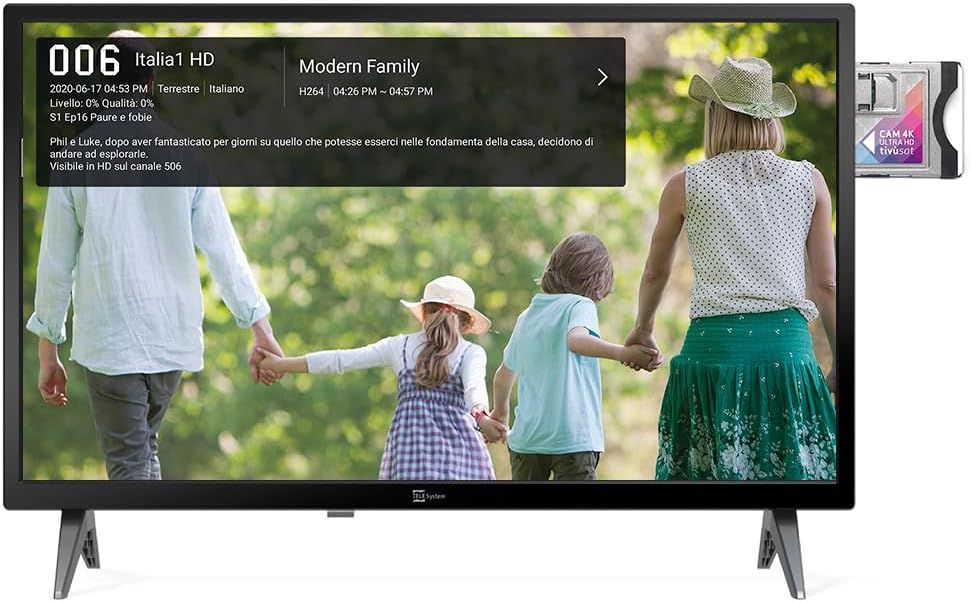
Image: The Smart TV displaying channel information for "Italia 1 HD" and a CI+ module inserted into the side, indicating support for encrypted satellite channels.
4.5. Hotel Mode
The Hotel Mode function is designed for use in hospitality environments. It allows for specific settings to be pre-defined:
- Set maximum audio levels.
- Determine the default channel upon power-on.
- Adjust the initial volume when the unit is turned on.
- Select the default source signal.
5. تعمیر و نگهداری
5.1. تمیز کردن
- همیشه قبل از تمیز کردن، تلویزیون را از برق بکشید.
- برای پاک کردن صفحه نمایش و کابینت از یک پارچه نرم و خشک استفاده کنید.
- برای لکههای سرسخت، به آرامی dampپارچه را با آب یا یک پاککننده ملایم و غیرساینده صفحه نمایش، تمیز کنید.
- از استفاده از مواد شیمیایی خشن یا مواد ساینده خودداری کنید.
5.2. ذخیره سازی
If storing the TV for an extended period, ensure it is kept in a cool, dry place, protected from dust and extreme temperatures.
6 عیب یابی
اگر با مشکلی مواجه شدید، به راهحلهای رایج زیر مراجعه کنید:
- بدون برق: بررسی کنید که آیا کابل برق به طور محکم به تلویزیون و پریز برق وصل شده است یا خیر. مطمئن شوید که پریز برق کار میکند.
- تصویر/صدا ندارد: Verify the correct input source is selected. Check cable connections for external devices. For broadcast channels, perform a channel scan.
- کنترل از راه دور کار نمی کند: باتریها را تعویض کنید. مطمئن شوید که هیچ مانعی بین کنترل از راه دور و حسگر IR تلویزیون وجود ندارد.
- مشکلات اتصال شبکه: Check your Wi-Fi router or Ethernet cable. Try restarting the TV and your router.
- اشکالات نرم افزار: Perform a factory reset (refer to the TV's settings menu for this option). Note that a factory reset will erase all personal settings and installed apps.
7. مشخصات
Below are the technical specifications for the Tele System SMART24 LS2 A11 Smart TV:
| ویژگی | جزئیات |
|---|---|
| شماره مدل | TELE System SMART24 LS2 A11 2022 |
| اندازه صفحه نمایش | 23.6 اینچ (60 سانتی متر) |
| فناوری نمایش | LED |
| قطعنامه | 720p (1366 x 768) |
| نرخ تازه سازی | 60 هرتز |
| سیستم عامل | اندروید AOSP |
| قابلیت اتصال | اترنت، وای فای |
| نسبت تصویر | 16:9 |
| ابعاد (با پایه) | 60.4 × 37.5 × 10.5 سانتی متر |
| وزن | 3 کیلوگرم |
| رتبه بندی بهره وری انرژی | E |
| ورودی برق | 100-240V, 50/60Hz (AC) |
| ویژگی های خاص | TV Pause (USB), Digital Terrestrial DVB-T2, Satellite, Tivùsat LCN, Hotel Mode, Screen Mirroring |

Image: A detailed table listing the technical specifications of the SMART24 LS2 A11 TV, including display size, resolution, operating system, and connectivity options.

Image: The EU Energy Label for the Tele System SMART24 LS2 A11, showing an energy efficiency rating of 'E' and power consumption details. For more information, visit eprel.ec.europa.eu/qr/1183185.
8. گارانتی و پشتیبانی
Your Tele System SMART24 LS2 A11 TV comes with a standard manufacturer's warranty. Please refer to the included Warranty Paper for specific terms and conditions.
For technical support, service, or further inquiries, please visit the official Tele System website or contact their customer service department. Contact information can typically be found in the Quick Start Guide or on the manufacturer's webسایت
Official Tele System Webسایت: www.telesystem-world.com


