مقدمه
ممنون از خریدتونasing the Camiysn Retro Punk Mechanical Keyboard. This full-size, 104-key keyboard features a unique retro design with round keycaps, gold LED backlighting, and durable blue mechanical switches for a tactile and audible typing experience. This manual provides detailed instructions on setting up, operating, maintaining, and troubleshooting your new keyboard to ensure optimal performance and longevity.
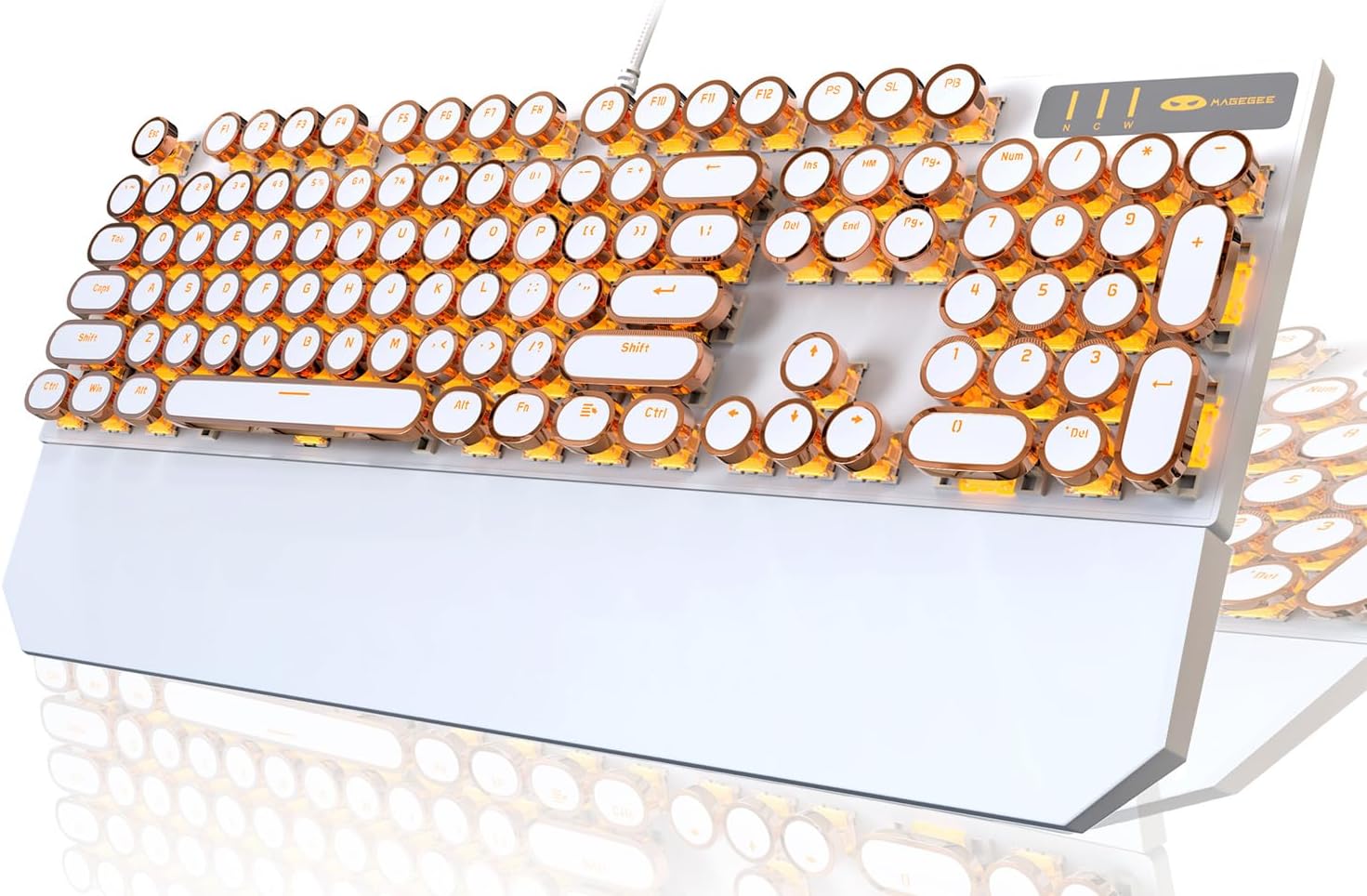
Image: The Camiysn Retro Punk Mechanical Keyboard, showcasing its full layout, white body, and gold-accented round keycaps with bright gold LED backlighting.
محتویات بسته
- Camiysn Retro Punk Mechanical Keyboard (Model: MK-STORM)
- راهنمای کاربر (این سند)
راه اندازی
- باز کردن بسته بندی: کیبورد را با دقت از بستهبندی آن خارج کنید.
- قرار دادن: Place the keyboard on a stable, flat surface. Ensure adequate space for comfortable use. The keyboard features adjustable rear feet for ergonomic positioning.
- اتصال: The keyboard connects via a USB cable. Locate an available USB port on your computer (PC, Laptop, Mac) or compatible device.
- Plug and Play: Insert the USB connector into the USB port. The keyboard is designed for plug-and-play functionality and should be automatically recognized by your operating system (Windows 2000/7/8/10/XP, Vista, Linux, Mac). No additional drivers are typically required.
- آزمایش اولیه: Once connected, test the keyboard by typing in a text editor or browser to ensure all keys are functioning correctly.

Image: A user's hands positioned over the Camiysn Retro Punk Mechanical Keyboard, demonstrating typical usage during typing.
دستورالعمل های عملیاتی
ویژگی های کلیدی:
- کلیدهای مکانیکی آبی: Provides a distinct tactile bump and an audible click sound for clear feedback with each keystroke.
- آنتی گوستینگ (تغییر کلید N-key): All 104 keys feature anti-ghosting, ensuring that every key press is registered accurately, even during rapid or simultaneous key inputs, which is beneficial for both typing and gaming.
- Durable Round Keycaps: The unique round keycaps are manufactured using a two-color injection molding process, enhancing their durability and preventing legends from fading.
- تکیهگاه مچ مغناطیسی: The keyboard includes a magnetic wrist rest for added comfort during extended use.

تصویر: نمای نزدیک view of the Camiysn keyboard, showing the blue mechanical switches beneath the removable round keycaps, highlighting the clicky switch mechanism.

Image: The Camiysn keyboard demonstrating its N-Key Rollover capability and the included magnetic wrist rest, which attaches to the front of the keyboard.
کنترل نور پس زمینه:
The keyboard features multiple white LED backlight modes. Use the following key combinations to control the lighting:
- تغییر حالت نور: را فشار دهید Fn + Ins برای تغییر حالتهای مختلف نور پسزمینه.
- تنظیم روشنایی: را فشار دهید Fn + ↑ to increase brightness, and Fn + ↓ برای کاهش روشنایی
- تنظیم سرعت: را فشار دهید Fn + ← to decrease animation speed, and Fn + → برای افزایش سرعت انیمیشن

Image: The Camiysn keyboard illuminated by its gold LED backlight in a dark setting, showcasing the glow from under and around the keycaps.

Image: A close-up of the Camiysn keyboard's backlit keys, demonstrating the intensity and distribution of the gold LED lighting.
کلیدهای چند رسانه ای:
The keyboard includes dedicated multimedia function keys accessible by pressing the Fn این کلید را در ترکیب با کلیدهای F مربوطه (F1-F12) فشار دهید.
| ترکیب کلید | تابع |
|---|---|
| Fn + F1 | مدیا پلیر |
| Fn + F2 | کاهش حجم |
| Fn + F3 | افزایش حجم |
| Fn + F4 | بی صدا |
| Fn + F5 | توقف |
| Fn + F6 | آخرین آهنگ |
| Fn + F7 | Play/Suspend |
| Fn + F8 | آهنگ بعدی |
| Fn + F9 | ایمیل |
| Fn + F10 | صفحه اصلی |
| Fn + F11 | کامپیوتر من |
| Fn + F12 | ماشین حساب |

Image: A visual guide to the multimedia functions available on the Camiysn keyboard, showing the Fn key combinations for various controls like media playback, volume, and quick access to applications.
تعمیر و نگهداری
- تمیز کردن:
- قبل از تمیز کردن، کیبورد را از کامپیوتر جدا کنید.
- کمی d از یک پارچه نرم و بدون پرز استفاده کنیدampبا آب یا یک محلول تمیزکننده ملایم، سطح صفحه کلید و کلیدهای آن را پاک کنید.
- برای گرد و غبار و خرده ریزهای بین کلیدها، از هوای فشرده استفاده کنید.
- از استفاده از مواد شیمیایی قوی، پاککنندههای ساینده یا رطوبت بیش از حد خودداری کنید، زیرا این موارد میتوانند به صفحه کلید آسیب برسانند.
- برداشتن کلاهک کلید: The round keycaps can be carefully removed for deeper cleaning or switch maintenance. Use a keycap puller (not included) if available, or gently pry them off from the edges. Reattach by aligning and pressing firmly until they click into place.
- ذخیره سازی: وقتی برای مدت طولانی از صفحه کلید استفاده نمیکنید، آن را در محیطی تمیز و خشک و دور از نور مستقیم خورشید و دمای شدید نگهداری کنید.
عیب یابی
- صفحه کلید پاسخ نمیدهد:
- مطمئن شوید که کابل USB به طور ایمن به صفحه کلید و پورت USB کامپیوتر وصل شده است.
- سعی کنید صفحه کلید را به پورت USB دیگری در رایانه خود وصل کنید.
- کامپیوتر خود را مجددا راه اندازی کنید.
- کیبورد را روی یک کامپیوتر دیگر امتحان کنید تا مشخص شود مشکل از کیبورد است یا کامپیوتر اصلی.
- نور پس زمینه کار نمیکند یا سوسو میزند:
- مطمئن شوید که کیبورد به درستی وصل شده است.
- استفاده کنید Fn + Ins combination to cycle through backlight modes.
- استفاده کنید Fn + ↑ برای افزایش روشنایی
- If the issue persists, try reconnecting the keyboard or restarting your computer.
- کلیدها ثبت نمیشوند یا دوبار تایپ میشوند:
- مطمئن شوید که صفحه کلید تمیز و عاری از هرگونه آلودگی زیر کلیدها است.
- If a specific key is problematic, gently remove the keycap and inspect the switch for any obstructions.
- If the issue is widespread, try reconnecting the keyboard or restarting your computer.
- کاراکترهای تایپ شده اشتباه است:
- Check your operating system's keyboard language settings to ensure they match your physical keyboard layout.
مشخصات
| ویژگی | جزئیات |
|---|---|
| نام تجاری | Camiysn |
| شماره مدل | MK-STORM |
| قابلیت اتصال | USB سیمی |
| نوع کلید | مکانیکی (سوئیچهای آبی) |
| تعداد کلید | ۱۰۴ کلید (اندازه کامل) |
| نوع کلید | Round, Two-color Injection Molding |
| نور پس زمینه | Gold LED Backlit (Multiple White Light Modes) |
| ضد شبح | N-Key Rollover |
| سازگاری | Windows 2000/7/8/10/XP, Vista, Linux, Mac, PC, Laptop |
| ابعاد (L x W x H) | 45.21 x 16.79 x 6.2 cm (approx. 17.0 x 5.1 x 1.45 inches from image) |
| وزن | 1.28 کیلوگرم |
| ویژگی های خاص | Ergonomic design, Adjustable rear feet, Magnetic wrist rest |
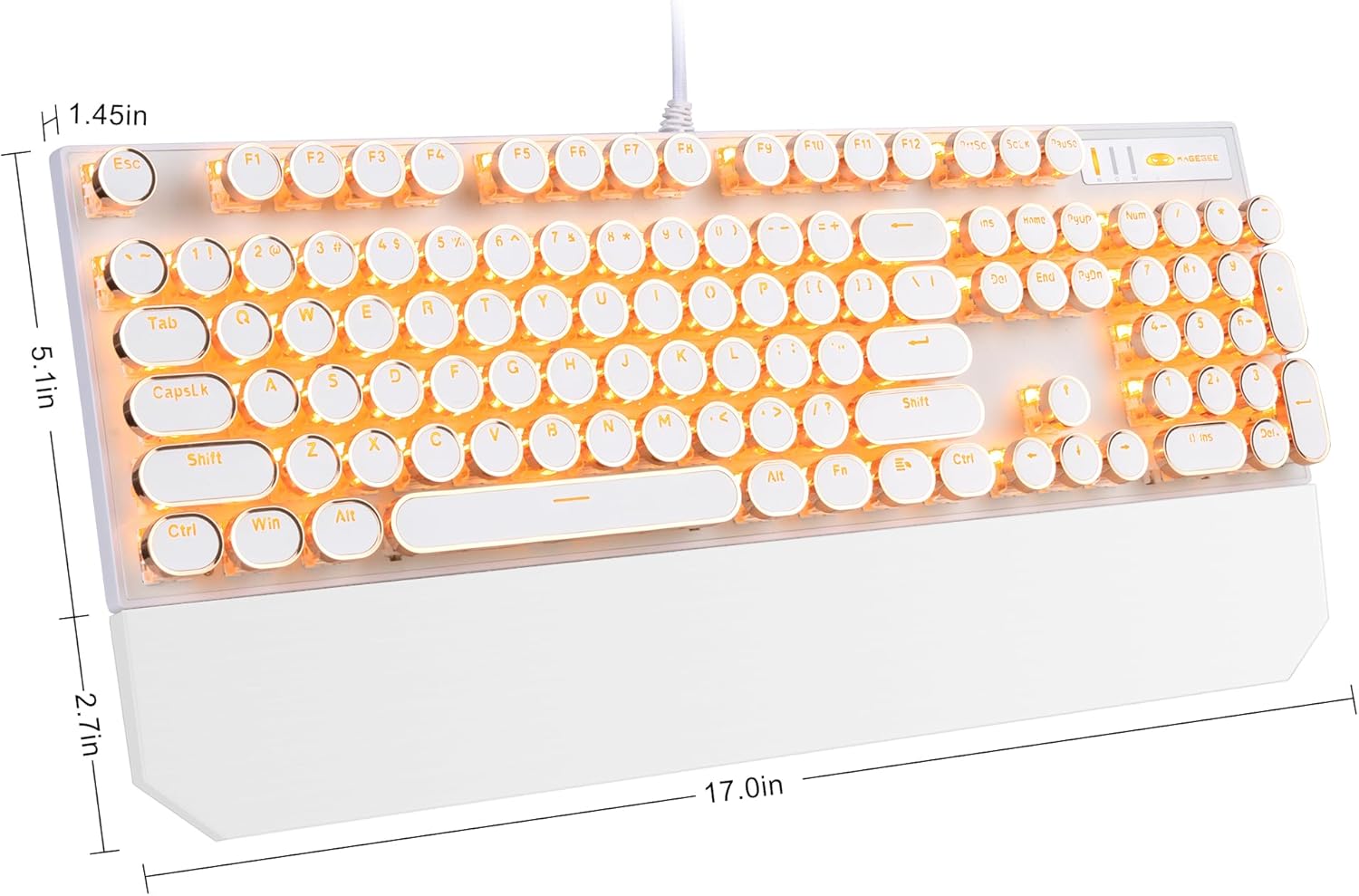
Image: A diagram illustrating the dimensions of the Camiysn Retro Punk Mechanical Keyboard, showing approximate measurements of 17.0 inches in length, 5.1 inches in width, and 1.45 inches in height.
گارانتی و پشتیبانی
For warranty information and technical support, please refer to the warranty card included with your product or contact Camiysn customer service directly. Details for contacting support are typically available on the manufacturer's official webسایت یا از طریق محل خرید شما.
لطفاً مدرک خرید خود را برای ادعاهای گارانتی نگه دارید.


