مقدمه
This manual provides essential instructions for the safe and efficient operation of your JVC 40W Portable Party Speaker, Model XS-N5223PB. Please read this manual thoroughly before using the device and retain it for future reference.
The JVC 40W Portable Party Speaker features integrated Bluetooth technology for wireless audio streaming, a built-in USB port for multimedia file playback (MP3, picture, video), TF card support, Karaoke function, and an LED light show. It delivers 40W output through two 8-inch speakers and is powered by a 4000mAh battery.
اطلاعات مهم ایمنی
- بلندگو را در معرض آب یا رطوبت بیش از حد قرار ندهید.
- از قرار دادن بلندگو در نزدیکی منابع گرما یا در معرض نور مستقیم خورشید خودداری کنید.
- سعی نکنید بلندگو را جدا یا تغییر دهید. تمام مراحل سرویس را به پرسنل واجد شرایط ارجاع دهید.
- فقط از آداپتور شارژ مشخص شده استفاده کنید.
- دور از دسترس کودکان نگهداری شود.
- در حین کار از تهویه مناسب اطراف بلندگو اطمینان حاصل کنید.
محتویات بسته
لطفا بررسی کنید که همه اقلام در بسته موجود باشند:
- 1 x JVC 40W Portable Party Speaker (Model XS-N5223PB)
- 1 عدد کابل شارژ
- ۱ عدد دفترچه راهنمای کاربر (این سند)
محصول تمام شده استview
Familiarize yourself with the main components and controls of your JVC Portable Party Speaker.
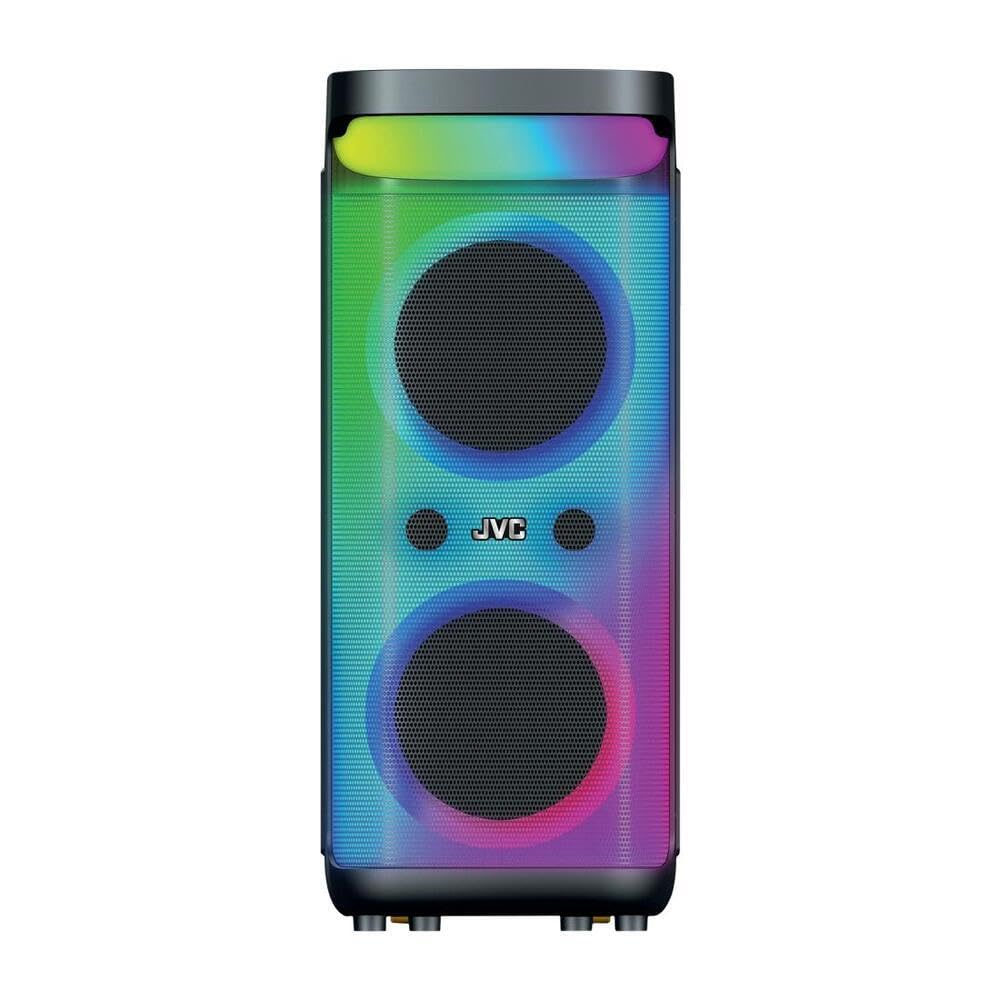
تصویر 1: جلو و بالا view of the JVC 40W Portable Party Speaker, showing the control panel, LED lights, and speaker grille.

تصویر 2: به تفصیل view of the speaker's top control panel, highlighting buttons for mode selection, volume, playback, and input ports.
توابع کنترل پنل:
- دکمه پاور: بلندگو را روشن/خاموش میکند.
- دکمه حالت: Switches between Bluetooth, USB, TF Card, and AUX input modes.
- دکمههای تنظیم صدا: Adjusts master volume and microphone volume (if applicable).
- دکمه پخش/مکث: پخش رسانه را کنترل می کند.
- دکمه های آهنگ قبلی/بعدی: در میان مسیرها حرکت میکند.
- دکمه نور LED: Toggles or changes LED light show patterns.
- پورت USB: For USB drive playback of MP3, picture, and video files.
- اسلات کارت TF: For TF (MicroSD) card playback of MP3, picture, and video files.
- ورودی AUX: برای اتصال دستگاههای صوتی خارجی از طریق کابل 3.5 میلیمتری.
- ورودی میکروفون: For karaoke function.
راه اندازی
شارژ بلندگو
- کابل شارژ را به پورت شارژ اسپیکر وصل کنید.
- Plug the other end of the charging cable into a suitable power adapter (9 Volts input) and then into a wall outlet.
- The charging indicator light will illuminate, typically red, during charging. It will change color or turn off when fully charged.
- برای اولین استفاده، بلندگو را تقریباً ۳-۴ ساعت به طور کامل شارژ کنید.
قرار دادن اولیه
Place the speaker on a stable, flat surface. Ensure there is adequate space around the speaker for optimal sound dispersion and ventilation. The speaker is designed for floorstanding placement.
دستورالعمل های عملیاتی
روشن/خاموش برق
- To turn on: Press and hold the Power button until the display illuminates.
- To turn off: Press and hold the Power button again until the display turns off.
اتصال بلوتوث
- Turn on the speaker. It will automatically enter Bluetooth pairing mode, indicated by a flashing "BLUE" on the display or an audible prompt.
- در دستگاه همراه خود (گوشی هوشمند، تبلت و غیره)، بلوتوث را فعال کنید و دستگاههای موجود را جستجو کنید.
- Select "JVC XS-N5223PB" (or similar name) from the list of devices.
- Once paired, the speaker will confirm the connection with an audible sound, and "BLUE" on the display will stop flashing.
- اکنون میتوانید صدا را به صورت بیسیم از دستگاه خود به بلندگو منتقل کنید.
پخش کارت USB/TF
- Insert a USB flash drive or TF (MicroSD) card into the respective port/slot on the speaker.
- The speaker will automatically switch to USB or TF card mode and begin playing supported audio, picture, or video files. If it does not switch automatically, press the Mode button to select the correct input.
- برای کنترل پخش، از دکمههای پخش/مکث و آهنگ قبلی/بعدی استفاده کنید.
ورودی AUX
- یک سر کابل صوتی 3.5 میلیمتری (که همراه دستگاه نیست) را به پورت ورودی AUX روی بلندگو وصل کنید.
- سر دیگر کابل را به جک خروجی صدای دستگاه خارجی خود (مثلاً پخشکننده MP3، لپتاپ) وصل کنید.
- Press the Mode button on the speaker until "AUX" mode is selected.
- پخش و میزان صدا را از دستگاه خارجی خود کنترل کنید.
عملکرد کارائوکه
- Connect a microphone (not included) to the Microphone Input port.
- با استفاده از دکمهی مخصوص روی پنل کنترل، میزان صدای میکروفون را تنظیم کنید.
- Play music via Bluetooth, USB, TF card, or AUX, and sing along.
نمایش نور LED
Press the LED Light button to cycle through different light patterns or to turn the LED lights on/off.
عملکرد استریو بی سیم واقعی (TWS)
The TWS function allows you to pair two JVC XS-N5223PB speakers together for a stereo sound experience.
- مطمئن شوید که هر دو بلندگو روشن و در حالت بلوتوث هستند، اما به هیچ دستگاهی متصل نیستند.
- On one speaker (this will be the primary speaker), press and hold the TWS button (refer to your speaker's specific button layout if not explicitly labeled).
- بلندگوی اصلی به دنبال بلندگوی ثانویه میگردد. پس از اتصال، هر دو بلندگو صدای تأیید را پخش میکنند.
- Now, connect your mobile device to the primary speaker via Bluetooth as described above. Audio will play through both speakers in stereo.
تعمیر و نگهداری
- تمیز کردن: برای تمیز کردن قسمت بیرونی بلندگو از یک پارچه نرم و خشک استفاده کنید. از پاک کننده های مایع یا مواد ساینده استفاده نکنید.
- ذخیره سازی: در صورت عدم استفاده برای مدت طولانی، بلندگو را در جای خشک و خنک نگهداری کنید. توصیه میشود برای حفظ طول عمر باتری، آن را هر ۳ تا ۶ ماه شارژ کنید.
- مراقبت از باتری: Avoid fully discharging the battery frequently. Charge the speaker when the low battery indicator appears.
عیب یابی
| مشکل | علت احتمالی | راه حل |
|---|---|---|
| بلندگو روشن نمیشود. | باتری خالی شده است. | بلندگو را به منبع تغذیه وصل کنید و آن را شارژ کنید. |
| صدا نداره | صدا خیلی کم است؛ حالت ورودی نادرست است؛ دستگاه متصل نیست. | Increase volume on speaker and connected device. Ensure correct input mode is selected. Reconnect Bluetooth or check cable connections. |
| جفت شدن بلوتوث ناموفق است. | بلندگو در حالت جفت شدن نیست؛ دستگاه خیلی دور است؛ تداخل فرکانسی وجود دارد. | Ensure speaker is in Bluetooth pairing mode. Move device closer to speaker. Avoid strong electromagnetic interference. Try restarting both devices. |
| کارت USB/TF پخش نمیشود. | پشتیبانی نمی شود file فرمت؛ کارت/درایو به درستی وارد نشده است؛ خراب شده است files. | اطمینان حاصل کنید files are in supported formats (e.g., MP3). Reinsert the USB drive/TF card. Try with a different USB drive/TF card or different files. |
| چراغهای LED کار نمیکنند. | LED lights are turned off. | Press the LED Light button to turn them on or change patterns. |
مشخصات
| شماره مدل | XS-N5223PB |
| توان خروجی | 40 وات |
| اندازه بلندگو | 8 اینچ x 2 |
| قابلیت اتصال | بلوتوث، USB، کارت حافظه TF، AUX |
| ظرفیت باتری | 4000 میلی آمپر ساعت |
| حجم ورودیtage | 9 ولت |
| ابعاد (D x W x H) | 33 × 28.5 × 66 سانتی متر |
| مواد | پلاستیک |
| نوع نصب | کفپوش |
| ویژگی های اضافی | TWS Function, Karaoke, LED Light Show |
اطلاعات گارانتی
This JVC Portable Party Speaker (Model XS-N5223PB) comes with a ۱ سال گارانتی سازنده از تاریخ خرید. این ضمانتنامه شامل نقصهای تولیدی در مواد و نحوهی ساخت در شرایط استفادهی عادی میشود.
گارانتی شامل موارد زیر نمی شود:
- خسارات ناشی از تصادف، سوء استفاده، سوء استفاده، سیل، آتش سوزی، زلزله یا سایر علل خارجی.
- Damage caused by operating the product outside the permitted or intended uses described by JVC.
- خسارات ناشی از خدمات انجام شده توسط هر کسی که ارائه دهنده خدمات مجاز JVC نیست.
- محصولات یا قطعاتی که بدون اجازه کتبی JVC برای تغییر عملکرد یا قابلیت اصلاح شدهاند.
لطفاً مدرک خرید خود را برای ادعاهای گارانتی نگه دارید.
اطلاعات پشتیبانی و تماس
For technical support, warranty claims, or further assistance, please contact JVC customer service.
- Webسایت: www.jvc.com (Please check your regional JVC website for local support details)
- ایمیل: Refer to the JVC webسایتی برای آدرسهای ایمیل تماس خاص.
- تلفن: Refer to the JVC website for specific contact phone numbers.
When contacting support, please have your product model number (XS-N5223PB) and proof of purchase readily available.