مقدمه
The Aiwa Smart Band ASB-40 is a versatile fitness tracker designed to help you monitor your health and fitness activities. It features a comfortable silicone strap and a 1.1-inch color AMOLED display for clear visibility. This smart band tracks various health metrics including heart rate, blood pressure, and SpO2 levels, alongside fitness activities such as steps taken, calories burned, and distance traveled. It also offers sleep quality tracking and smart features like notification alerts, music and camera remote control, 'find my phone' function, alarm clock, timer, and stopwatch.
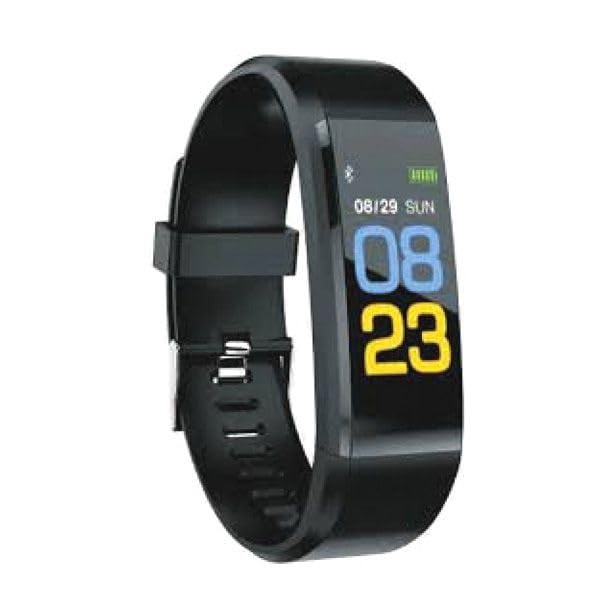
Image: Aiwa Smart Band ASB-40, a sleek black fitness tracker with a clear display.
راه اندازی
1. جعبه گشایی
Carefully remove the Aiwa Smart Band ASB-40 and its accessories from the packaging. The box should contain the smart band and a charging cable.
2. شارژ کردن دستگاه
- Connect the charging cable to the charging port on the back of your smart band.
- سر دیگر کابل شارژ را به آداپتور برق USB (که همراه دستگاه نیست) یا پورت USB کامپیوتر وصل کنید.
- The band's display will show a charging indicator. Allow approximately 2 hours for a full charge before first use.
۳.۲. جفت شدن با تلفن هوشمند شما
- Download the official Aiwa Smart Band application from your smartphone's app store (iOS or Android).
- اطمینان حاصل کنید که بلوتوث در گوشی هوشمند شما فعال است.
- Open the Aiwa Smart Band application and follow the on-screen instructions to create an account or log in.
- در برنامه، به بخش جفتسازی دستگاه بروید و «افزودن دستگاه» را انتخاب کنید.
- The app will search for available devices. Select 'ASB-40' from the list to initiate pairing.
- در صورت درخواست، درخواست جفتسازی را هم در تلفن هوشمند و هم در دستبند هوشمند خود تأیید کنید.
4. Wearing the Smart Band
Wear the smart band snugly on your wrist, about one finger's width above your wrist bone. Ensure the sensor on the back of the band is in contact with your skin for accurate heart rate and other health measurements.
دستورالعمل های عملیاتی
ناوبری اولیه
The Aiwa Smart Band ASB-40 features a touch-sensitive 1.1-inch color AMOLED display. Swipe left/right or up/down to navigate through different menus and functions. Tap the screen to select an option or confirm an action.
ویژگی ها و توابع کلیدی
- پیگیری فعالیت: تعداد قدمهای برداشته شده، مسافت طی شده و کالری سوزانده شده در طول روز را نشان میدهد. View your daily progress directly on the band or in the companion app.
- مانیتور ضربان قلب: Continuously tracks your heart rate. Access real-time readings on the band and historical data in the app.
- Blood Pressure & SpO2 Monitoring: Provides estimates of your blood pressure and blood oxygen saturation (SpO2) levels. These measurements are for reference only and should not be used for medical diagnosis.
- ردیابی خواب: Automatically monitors your sleep patterns, including deep sleep, light sleep, and awake times. Review تجزیه و تحلیل کیفیت خواب شما در برنامه.
- اعلام های هوشمند: Receive alerts for incoming calls, messages, and app notifications directly on your wrist when connected to your smartphone.
- یادآوری کم تحرک: The band can remind you to move if you have been inactive for an extended period.
- کنترل از راه دور: Control music playback and trigger your smartphone camera remotely from the smart band.
- تلفن من را پیدا کن: Use this function on the band to make your paired smartphone ring, helping you locate it.
- ساعت زنگ دار، تایمر، کرنومتر: Access these utility functions directly from the band's menu.
مقاومت در برابر آب (IP67)
The Aiwa Smart Band ASB-40 is IP67 rated, meaning it is protected against dust ingress and can withstand immersion in water up to 1 meter for up to 30 minutes. It is suitable for daily use, such as washing hands or light rain. However, it is not recommended for swimming, showering with hot water, or diving, as steam and prolonged water exposure can damage the device.
نگهداری و مراقبت
- تمیز کردن: Regularly clean the smart band, especially the sensor area and the strap, with a soft, damp پارچه از استفاده از مواد شیمیایی خشن یا مواد ساینده خودداری کنید.
- شارژ کردن: Use only the provided charging cable. Avoid overcharging the device. Disconnect the charger once the battery is full.
- ذخیره سازی: Store the smart band in a cool, dry place when not in use. Avoid extreme temperatures.
- جلوگیری از تاثیر: Protect the device from strong impacts or drops, which can damage the screen or internal components.
عیب یابی
روشن نشدن دستگاه
- مطمئن شوید که دستگاه کاملاً شارژ شده است. آن را حداقل به مدت 30 دقیقه به شارژر وصل کنید.
- If the issue persists, try performing a soft reset (refer to the app for specific instructions, or hold the touch button/area for 10-15 seconds if available).
جفت شدن با گوشی هوشمند امکانپذیر نیست
- Make sure Bluetooth is enabled on your smartphone and the smart band is within range.
- Ensure the Aiwa Smart Band app is installed and updated to the latest version.
- هم گوشی هوشمند و هم دستبند هوشمند خود را مجدداً راهاندازی کنید.
- اگر قبلاً جفتسازی انجام شده است، سعی کنید دستگاه را از تنظیمات بلوتوث تلفن خود جدا کنید و سپس از طریق برنامه دوباره جفتسازی کنید.
Inaccurate Readings (Heart Rate, Steps)
- Ensure the band is worn snugly on your wrist, with the sensor in full contact with your skin.
- Clean the sensor on the back of the band to remove any dirt or sweat.
- مطمئن شوید که اطلاعات شخصی شما (قد، وزن، سن) به طور دقیق در برنامه همراه وارد شده است.
عمر باتری کوتاه
- Reduce screen brightness or screen-on time settings in the app.
- Disable continuous heart rate monitoring if not needed constantly.
- Limit the number of notifications received on the band.
مشخصات
| شماره مدل | ASB-40 |
| نام تجاری | آویوا |
| نمایش | 1.1-inch Color AMOLED |
| قابلیت اتصال | بلوتوث نسخه 4.0 |
| مواد بند | TPU |
| رتبه بندی ضد آب | IP67 |
| پایش سلامت | Heart Rate, Blood Pressure, SpO2 |
| ردیابی فعالیت | Steps, Calories, Distance, Sleep |
| ویژگی های هوشمند | Notifications, Sedentary Reminder, Music/Camera Control, Find Phone, Alarm, Timer, Stopwatch |
| ابعاد بسته بندی | 15 × 8.2 × 3.2 سانتی متر |
| وزن مورد | 60 گرم |
| کشور مبدا | چین |
| اولین تاریخ در دسترس | 19 اکتبر 2023 |
گارانتی و پشتیبانی
For detailed warranty information, please refer to the warranty card included with your purchase or visit the official Aiwa website. If you encounter any issues not covered in this manual or require further assistance, please contact Aiwa customer support through their official channels.


