مقدمه
This manual provides detailed instructions for the operation and maintenance of your Sharp Alarm Clock. Please read this manual thoroughly before using the product to ensure proper function and longevity. This alarm clock is designed for ease of use and features convenient charging options for your devices.
ویژگی های کلیدی
- Super Fast USB-C Charging: Equipped with a USB Type-C port for rapid charging of compatible smartphones, including the latest models.
- سریع 2 Amp شارژ از طریق USB-A: Includes a standard USB Type-A port delivering 2 Amps for efficient charging of various devices.
- هشدار دوگانه: دو زنگ هشدار مستقل برای زمانهای مختلف بیدار شدن تنظیم کنید.
- تعویق 9 دقیقه ای: Provides a convenient snooze function for extra rest.
- 3-Step Dimmer: Adjustable display brightness with three levels to suit your preference.
- Easy-to-Read Green LED Display: Clear 0.7-inch green LED numbers for visibility day or night.
- بک آپ اختیاری باتری: Retains time and alarm settings during power outages (requires 2 x AAA batteries, not included).
محصول تمام شده استview
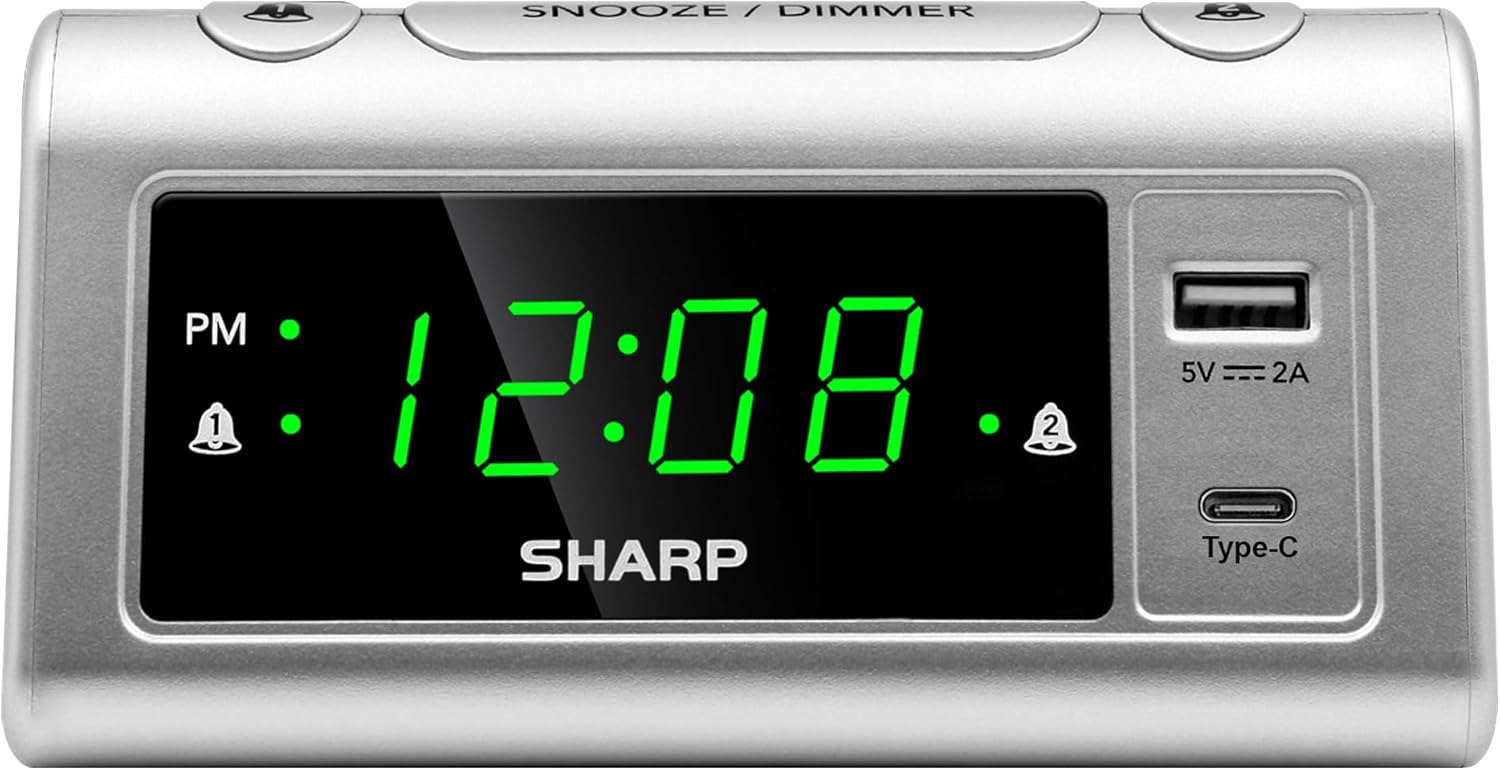
جلو view of the Sharp Alarm Clock, showcasing the large green LED time display, PM indicator, alarm indicators, and the integrated USB-A and USB-C charging ports on the right side.

بالا پایین view of the alarm clock with labels indicating the 'Time Set', 'Time Advancing', 'Time Receding', 'Alarm 1 Set ON/OFF', 'Alarm 2 Set ON/OFF', 'Snooze/Dimmer Control (3-Levels of Brightness)', 'Super Fast Charging USB-C', and 'Fast Charging 2 Amp USB'. Dimensions are also shown as 5.65 inches wide and 2.95 inches high.
راه اندازی
1. اتصال برق
Plug the AC power cord into a standard 120V AC wall outlet. The clock display will illuminate, and the time will default to 12:00 AM.
2. نصب پشتیبان باتری
For optional battery backup, insert 2 x AAA batteries (not included) into the battery compartment located on the bottom of the unit. This feature ensures that time and alarm settings are retained during a power interruption. The display will not be lit during battery backup, but the alarm will still sound.

The bottom of the alarm clock, revealing the battery compartment for 2 AAA batteries (not included) to provide backup power for settings.
دستورالعمل های عملیاتی
1. تنظیم زمان
- را فشار داده و نگه دارید تنظیم زمان دکمه. ارقام ساعت شروع به چشمک زدن میکنند.
- در حین برگزاری تنظیم زمانرا فشار دهید ساعت برای تنظیم ساعت، دکمه را مکرراً فشار دهید. برای تنظیم صحیح AM/PM، به نشانگر PM توجه کنید.
- در حین برگزاری تنظیم زمانرا فشار دهید دقیقه برای تنظیم دقیقه، دکمه را مکرراً فشار دهید.
- را آزاد کنید تنظیم زمان دکمه برای تایید زمان
۲. تنظیم هشدارها (هشدارهای دوگانه)
این ساعت دارای دو زنگ هشدار مستقل (زنگ هشدار ۱ و زنگ هشدار ۲) است.
- را فشار داده و نگه دارید آلارم 1 مجموعه دکمه. ارقام ساعت برای زنگ هشدار ۱ چشمک خواهند زد.
- در حین برگزاری آلارم 1 مجموعهرا فشار دهید ساعت دکمه برای تنظیم ساعت زنگ دار مورد نظر.
- در حین برگزاری آلارم 1 مجموعهرا فشار دهید دقیقه دکمه را برای تنظیم دقیقه دلخواه برای زنگ هشدار فشار دهید.
- را آزاد کنید آلارم 1 مجموعه دکمه تایید
- برای فعال کردن زنگ هشدار ۱، دکمه را فشار دهید ALARM 1 ON/OFF button until the alarm indicator (bell icon) appears next to 'AL1' on the display.
- Repeat steps 1-5 for آلارم 2 مجموعه و ALARM 2 ON/OFF to set and activate the second alarm.
۴. عملکرد چرت زدن
وقتی زنگ هشدار به صدا در میآید، دکمه بزرگ را فشار دهید تعویق / DIMMER button on top of the clock. The alarm will pause for 9 minutes and then sound again.
۸. دیمر نمایشگر
To adjust the brightness of the LED display, repeatedly press the تعویق / DIMMER button when the alarm is not sounding. Cycle through the three brightness levels (High, Medium, Low) and an Off setting.

The Sharp Alarm Clock displaying the time, with a hand adjusting the dimmer function on the top of the unit. This allows for comfortable viewدر شرایط نوری مختلف
۶. پورتهای شارژ USB
The alarm clock features both a USB Type-C port and a standard USB Type-A port for charging your electronic devices. Simply connect your device's charging cable to the appropriate port on the right side of the clock.
- USB Type-C: Provides super-fast charging for compatible devices like the iPhone 15 or Galaxy smartphones.
- USB نوع A: ۲.۴ را ارائه میدهد Amps of fast charging power for other USB-powered devices.

The Sharp Alarm Clock with a smartphone connected to its USB-C port, indicating active charging. The clock also features a USB-A port for additional device charging.
تعمیر و نگهداری
- تمیز کردن: ساعت را با یک پارچه نرم و خشک پاک کنید. از پاک کننده ها یا حلال های ساینده استفاده نکنید.
- سیم برق: سیم برق را مرتباً از نظر هرگونه آسیب بررسی کنید. در صورت آسیب، استفاده را متوقف کرده و با پشتیبانی مشتری تماس بگیرید.
- تعویض باتری: Replace AAA backup batteries annually or when the clock's settings are no longer retained during power outages
عیب یابی
| مشکل | راه حل |
|---|---|
| صفحه نمایش ساعت خالی است. | Ensure the AC power cord is securely plugged into a working outlet. Check if the dimmer is set to 'Off'. |
| صدای آژیر نمیآید. | Verify that the alarm is set and activated (bell icon visible). Check the alarm time is correct (AM/PM). |
| USB ports are not charging. | Ensure the clock is powered via AC. Check the charging cable and device compatibility. |
| زمان/تنظیمات پس از قطع برق از بین میروندtage. | Install fresh AAA batteries for the backup function. |
مشخصات
- برند: شارپ
- مدل: B0CHXR25FJ
- رنگ: نقره ای
- نوع نمایشگر: LED (سبز)
- ابعاد محصول: ۶.۳ اینچ عرض × ۲.۷۲ اینچ ارتفاع
- منبع تغذیه: سیم برقی
- پشتیبان گیری باتری: 2 عدد باتری AAA (شامل نمی شود)
- خروجی USB-C: شارژ فوق سریع
- خروجی USB-A: 2 Amps Fast Charging
- ویژگی های خاص: Charging Port, Corded, Dual Alarms, 3-Step Dimmer, Snooze
ویدیوی رسمی محصول
An official video from Sharp, titled 'Sharp Clocks - Keeps the Rhythm of Your Day', showcasing the features and design of Sharp alarm clocks, including this model.
گارانتی و پشتیبانی
For warranty information or technical support, please refer to the documentation included with your product or visit the official Sharp webرسید خرید خود را به عنوان مدرک خرید برای هرگونه ادعای گارانتی نگه دارید.


