1. مقدمه
Welcome to the user manual for your new SOYES XS16 Mini Smartphone. This compact and powerful device runs on Android 10.0, offering a full smartphone experience in a handheld size. Designed for portability and convenience, it features 4G network support, a 3.0-inch HD display, and essential functionalities for daily communication and entertainment. This manual will guide you through the setup, operation, maintenance, and troubleshooting of your device.
۲. چه چیزهایی در جعبه است؟
- SOYES XS16 Mini Smartphone
- کابل USB Type-C
- اجکتور سینی سیم کارت
- قاب گوشی
- محافظ صفحه نمایش
3. محصول تمام شدview
The SOYES XS16 is engineered for portability without compromising on features. Its small form factor makes it ideal for easy carrying, fitting comfortably in your hand or pocket.

Figure 3.1: The SOYES XS16 Mini Smartphone, showcasing its compact size when held in hand.
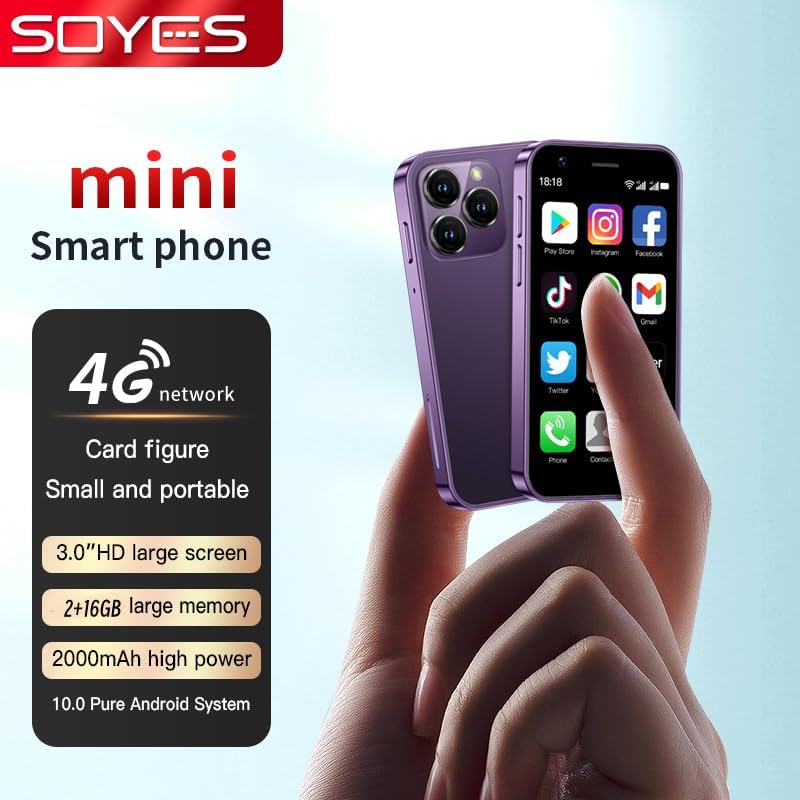
شکل 3.2: تمام شده استview of the SOYES XS16, highlighting its 4G network capability, 3.0-inch HD screen, memory options, 2000mAh battery, and Android 10.0 system.

Figure 3.3: The SOYES XS16 is available in various colors, offering a sleek and modern design.

Figure 3.4: An illustration of the phone's advanced features, including its compact body, large HD screen, high-definition camera, flagship multi-core processor, and 2000mAh battery.

Figure 3.5: The phone offers ample storage space and features a convenient Type-C charging port for efficient power delivery.

Figure 3.6: Demonstrating the phone's small and portable design, comparable to the size of a credit card.

Figure 3.7: The SOYES XS16 runs on a pure Android Native System, ensuring compatibility with mainstream applications and smooth multitasking.

Figure 3.8: The phone's thin and light profile allows it to be easily carried in small bags or pockets.

Figure 3.9: A summary of the phone's flagship configuration and basic parameters.
فیلم محصول
ویدیوی ۴.۱: نمایش ویدیویی رسمی محصولasing the SOYES XS16 Mini Smartphone's design, features, and compact size.
4. راه اندازی
4.1. نصب سیم کارت
- سینی سیم کارت را در کنار گوشی پیدا کنید.
- ابزار خارج کردن سینی سیمکارت را در سوراخ کوچک کنار سینی قرار دهید و به آرامی فشار دهید تا سینی بیرون بیاید.
- Place your Nano-SIM card(s) into the designated slots on the tray. Ensure the gold contacts face downwards. The SOYES XS16 supports dual SIM cards.
- سینی را با دقت به داخل گوشی فشار دهید تا در جای خود قرار گیرد.
4.2. Initial Power On & Language Selection
- دکمه پاور (که در کنار دستگاه قرار دارد) را فشار داده و نگه دارید تا صفحه نمایش روشن شود.
- Follow the on-screen prompts to select your preferred language. The phone supports English, French, Spanish, Portuguese (Brazil), Italian, German, Dutch, Hungarian, Russian, Arabic, Greek, Romanian, Bulgarian, Vietnamese, Czech, Persian, Indonesian, Malay, Thai, Portuguese, Philippine, Hebrew, Korean, and Japanese.
- Complete the initial setup steps, including connecting to Wi-Fi and setting up your Google account.
4.3. اتصال به شبکه
The SOYES XS16 supports 4G, 3G, and 2G networks. Ensure your SIM card supports the following frequencies for optimal performance:
- 4G FDD: B1/B3/B5/B7/B8/B20 (2100/1800/850/2600/900/800MHz)
- 4G TDD: B39/B40 (2600/1900/2300MHz)
- 3G WCDMA: B1/B5/B8 (2100/850/900MHz)
- 2G GSM: B3/B5/B8 (1800/850/900MHz)
If you do not intend to use a SIM card, you can still use the phone by connecting to Wi-Fi.
5. راه اندازی دستگاه شما
5.1. ناوبری اولیه
The SOYES XS16 features a 3.0-inch IPS touchscreen. Navigate by tapping, swiping, and pinching. The Android 10.0 OS provides an intuitive user interface.
۵.۲. تماسها و پیامها
Use the Phone app to make calls and the Messaging app to send and receive SMS/MMS messages. The dual SIM support allows you to manage two numbers simultaneously.
5.3. استفاده از دوربین
The phone is equipped with a 5MP rear camera and a 2MP front camera. Open the Camera app to capture photos and videos. Tap the screen to focus and press the shutter button to take a picture.
5.4. مدیریت برنامه
Download and install applications from the Google Play Store. You can manage installed apps through the Settings menu, including permissions and storage usage.
5.5. ویژگی های اتصال
- وای فای: برای دسترسی به اینترنت به شبکههای بیسیم متصل شوید.
- بلوتوث: با دستگاههای بلوتوث مانند هدفون یا بلندگو جفت شوید.
- هات اسپات موبایل: Share your phone's cellular data connection with other devices.
6. تعمیر و نگهداری
6.1. شارژ کردن
Charge your SOYES XS16 using the provided USB Type-C cable and a compatible power adapter. The 2000mAh battery provides sufficient power for its compact size. Avoid using damaged cables or chargers.
6.2. به روز رسانی نرم افزار
Periodically check for system updates in the Settings menu to ensure your phone has the latest features and security patches.
6.3. تمیز کردن
برای تمیز کردن صفحه نمایش و بدنه گوشی از یک پارچه نرم و بدون پرز استفاده کنید. از استفاده از مواد شیمیایی قوی یا مواد ساینده خودداری کنید.
6.4. حفاظت
Utilize the included screen protector and phone case to safeguard your device from scratches and minor impacts.
7 عیب یابی
If you encounter issues with your SOYES XS16, refer to the following common problems and solutions:
- روشن نشدن گوشی: مطمئن شوید که باتری شارژ شده است. قبل از تلاش برای روشن کردن مجدد، گوشی را حداقل به مدت ۱۵ دقیقه به شارژر وصل کنید.
- مشکلات اتصال به شبکه:
- مطمئن شوید که سیم کارت شما به درستی وارد شده و فعال است.
- Check if your SIM card supports the phone's frequency bands (refer to Section 4.3).
- گوشی را ریستارت کنید.
- Go to Settings > Network & internet > Mobile network > Advanced > Access Point Names (APN) and ensure the correct APN settings for your carrier are selected or configured.
- If issues persist, contact your mobile carrier for assistance.
- Freezing or Glitching:
- گوشی را ریستارت کنید.
- برنامههای پسزمینه را ببندید.
- Clear cache for problematic apps (Settings > Apps & notifications > [App Name] > Storage & cache > Clear cache).
- اطمینان حاصل کنید که فضای ذخیرهسازی کافی در دسترس است.
- Language Changed Unexpectedly: If the phone's language changes to an unfamiliar one, navigate to Settings (usually represented by a gear icon) > System > Languages & input > Languages, and select your desired language.
- کیفیت صدای ضعیف: Ensure the speaker is not obstructed. Adjust volume settings.
- Difficulty Typing on Small Screen: Utilize predictive text features or consider using a stylus for more precise input if available.
If these steps do not resolve the issue, a factory reset may be necessary (Settings > System > Reset options > Erase all data (factory reset)). هشدار: A factory reset will erase all data on your phone. Back up important information before proceeding.
8. مشخصات
| ابعاد محصول | 3.52 x 1.79 x 0.45 اینچ |
| وزن مورد | 5.6 اونس |
| شماره مدل مورد | XS16 |
| سیستم عامل | اندروید 10.0 |
| پردازنده | MTK6737 |
| RAM | 2 گیگابایت |
| ظرفیت ذخیره سازی حافظه | 16 GB (also available in 3GB+64GB variant) |
| اندازه صفحه نمایش | ۱۴ اینچ اچدی |
| وضوح صفحه نمایش | 480×854 |
| دوربین عقب | 5 مگاپیکسل |
| دوربین جلو | 2 مگاپیکسل |
| ظرفیت باتری | لیتیوم پلیمر 2000 میلی آمپر ساعتی |
| رابط ورودی/خروجی | نوع C |
| فناوریهای ارتباطات بیسیم | تلفن همراه، وای فای |
| فن آوری های اتصال | بلوتوث، وای فای، USB |
| حامل بی سیم | قفل برای همه شرکت های مخابراتی |
| Phone Unlocking Method | Graphics + Password |
9. ضمانت و پشتیبانی
For any questions or support regarding your SOYES XS16 Mini Smartphone, please contact the seller or manufacturer. Please refer to your purchase documentation for specific warranty details and contact information.


