1. مقدمه
This manual provides detailed instructions for the setup, operation, maintenance, and troubleshooting of your Montech MKey Mechanical Gaming Keyboard, model MK105FR. This keyboard features Gateron G Red Pro 2.0 pre-lubed switches, premium MDA profile PBT keycaps, customizable RGB LED lighting, and a hot-swappable design for personalized use.
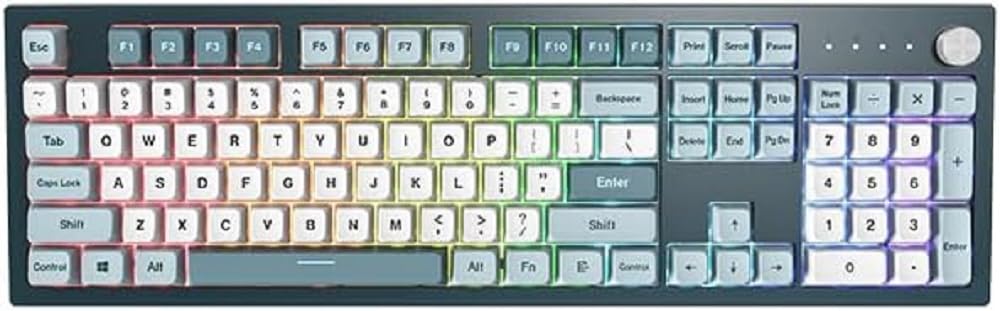
تصویر 1.1: جلو view of the Montech MKey Mechanical Gaming Keyboard.
2. محتویات بسته
بررسی کنید که آیا همه اقلام در بسته موجود است یا خیر:
- Montech MKey Mechanical Gaming Keyboard (MK105FR)
- کابل USB نوع C قابل جدا شدن
- کلاهک کش
- کشنده سوئیچ
- Additional Keycaps (Osaka Castle themed)
3. راه اندازی
۳.۱ اتصال صفحه کلید
- پورت USB Type-C را در پشت صفحه کلید پیدا کنید.
- Connect the provided USB Type-C cable to the keyboard.
- سر دیگر کابل USB را به یک درگاه USB موجود در رایانه خود وصل کنید.
- The keyboard will automatically be detected by your operating system (Windows 10 or later recommended).
۲.۲ نصب نرمافزار (اختیاری)
For advanced customization of RGB lighting effects and key functions, download the official Montech MKey software from the Montech webبرای نصب، دستورالعملهای روی صفحه را دنبال کنید.
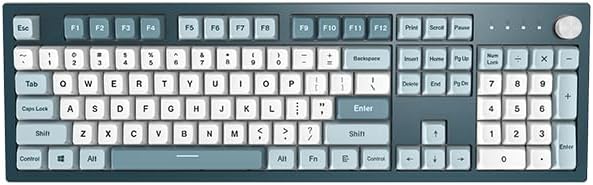
Image 3.1: The Montech MKey keyboard ready for connection.
4. دستورالعمل های عملیاتی
۴.۱ عملکردهای کلیدی پایه
The Montech MKey MK105FR features a full-size layout with standard QWERTY keys, a numeric keypad, and function keys (F1-F12).
4.2 Function Key (Fn) Combinations
استفاده کنید Fn key (located near the right Alt key) in combination with other keys to access various functions:
- Fn+F1-F12: Multimedia controls (e.g., volume, play/pause, stop, next/previous track). Specific functions may vary.
- کلیدهای جهتنما + Fn: تنظیم جلوههای نورپردازی RGB (مثلاً روشنایی، سرعت، جهت).
- Fn + Specific Keys: Cycle through different RGB lighting modes. Refer to the keyboard's quick guide or software for exact combinations.
۴.۲ عملکرد دکمه چرخشی
The rotary knob, located on the top right of the keyboard, offers multi-functional control:
- چرخش: Adjusts volume by default.
- را فشار دهید: Mutes/unmutes audio by default.
- را فشار دهید و نگه دارید: Cycles through different modes (e.g., volume, zoom, RGB lighting brightness/mode).
۴.۴ سوئیچهای قابل تعویض در حین کار
The Montech MKey keyboard features Kailh's Hot-swap sockets, allowing you to change mechanical switches without soldering. This enables customization of typing feel and sound.
- برداشتن کلاهک کلید: Use the provided keycap puller to gently lift the keycap straight up.
- حذف یک سوئیچ: Use the provided switch puller to grasp the top and bottom clips of the switch. Apply gentle pressure and pull the switch straight up.
- نصب سوئیچ جدید: Align the pins of the new switch with the holes on the PCB. Gently press the switch down until it clicks into place. Ensure pins are not bent.
- نصب کلاهک کلید: Place the keycap over the switch stem and press down firmly until it is seated.

Image 4.1: Illustration of hot-swappable switches, keycap puller, and switch puller.

Image 4.2: Detail of a keycap removed, revealing the Gateron G Red Pro 2.0 mechanical switch.
4.5 Keycap Profile: MDA
The keyboard is equipped with premium MDA profile PBT keycaps. The MDA profile is a sculpted keycap profile designed for ergonomic comfort and a unique aesthetic, offering a slightly lower and more uniform height compared to some other profiles, while still providing a comfortable typing angle.
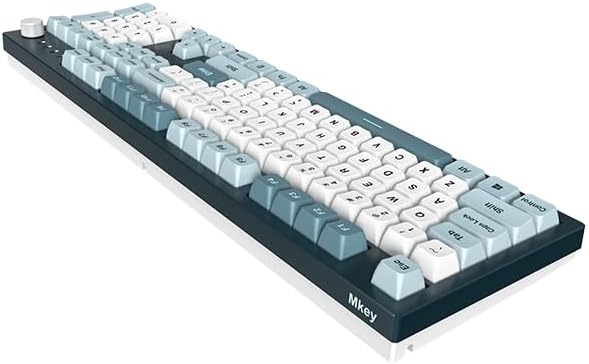
Image 4.3: Comparison diagram illustrating the MDA keycap profile.
5. تعمیر و نگهداری
۷.۱ تمیز کردن صفحه کلید
برای حفظ عملکرد و ظاهر بهینه:
- قبل از تمیز کردن، کیبورد را از کامپیوتر جدا کنید.
- از پارچه نرم و بدون پرز استفاده کنیدampبا مقدار کمی آب یا یک محلول تمیزکننده ملایم، کلاهک کلیدها و شاسی را پاک کنید.
- برای گرد و غبار و آلودگیهای بین کلیدها، از هوای فشرده یا یک برس کوچک استفاده کنید.
- از استفاده از مواد شیمیایی خشن یا مواد ساینده خودداری کنید.
۷.۲ مراقبت از کلیدها و سوئیچها
When removing or installing keycaps and switches, always use the provided tools and apply gentle, even pressure to prevent damage to the components or the keyboard PCB.
6 عیب یابی
If you encounter issues with your Montech MKey keyboard, refer to the following common problems and solutions:
- صفحه کلید پاسخ نمی دهد: Ensure the USB cable is securely connected to both the keyboard and the computer. Try connecting to a different USB port or using a different USB cable. Restart your computer.
- روشنایی RGB کار نمی کند: Check Fn key combinations for lighting control. Ensure the keyboard software is installed and configured correctly if you are using it.
- کلیدهای خاص کار نمیکنند: If a specific key is not registering, try removing and re-seating its switch. If the issue persists, consider replacing the switch (refer to Section 4.4).
- Ghosting or Input Lag: Ensure the keyboard is connected directly to a USB port on your computer, avoiding unpowered USB hubs. Update your computer's USB drivers.
For further assistance, please contact Montech customer support.
7. مشخصات
| ویژگی | جزئیات |
|---|---|
| نام تجاری | مونتک |
| شماره مدل | MK105FR |
| سری | MKey Freedom |
| فناوری اتصال | USB (Detachable Type-C) |
| توضیحات صفحه کلید | مکانیکی |
| نوع سوئیچ | Gateron G Red Pro 2.0 (Pre-lubed) |
| مواد روکش کلید | PBT |
| Keycap Profile | MDA |
| ویژگی خاص | Hot-Swappable, RGB Backlighting |
| سیستم عامل | Windows 10 (and later) |
| ابعاد محصول (LxWxH) | 17.44 x 5.35 x 1.61 اینچ |
| وزن مورد | 4.49 پوند |
8. گارانتی و پشتیبانی
8.1 اطلاعات گارانتی
Montech products are covered by a limited warranty. Please refer to the official Montech webبرای اطلاع از شرایط و ضوابط خاص گارانتی مربوط به منطقه خود، به سایت یا اسناد خرید خود مراجعه کنید.
8.2 پشتیبانی مشتری
For technical support, troubleshooting assistance, or warranty claims, please visit the official Montech website and navigate to the support section. You may find FAQs, driver downloads, and contact information for customer service representatives.
رسمی مونتک Webسایت: www.montechpc.com


