1. مقدمه
The Schlage Encode Plus Smart WiFi Deadbolt provides advanced security and convenient access to your home. Featuring built-in Wi-Fi, this smart lock allows remote control and monitoring via the Schlage Home app, eliminating the need for additional accessories. It supports up to 100 access codes, offers lock history viewing, and sends customizable notifications. Compatibility with Apple HomeKit, Apple home keys, Amazon Alexa, and Google Assistant ensures seamless integration into various smart home ecosystems. The deadbolt is certified for the highest residential security, durability, and finish standards.
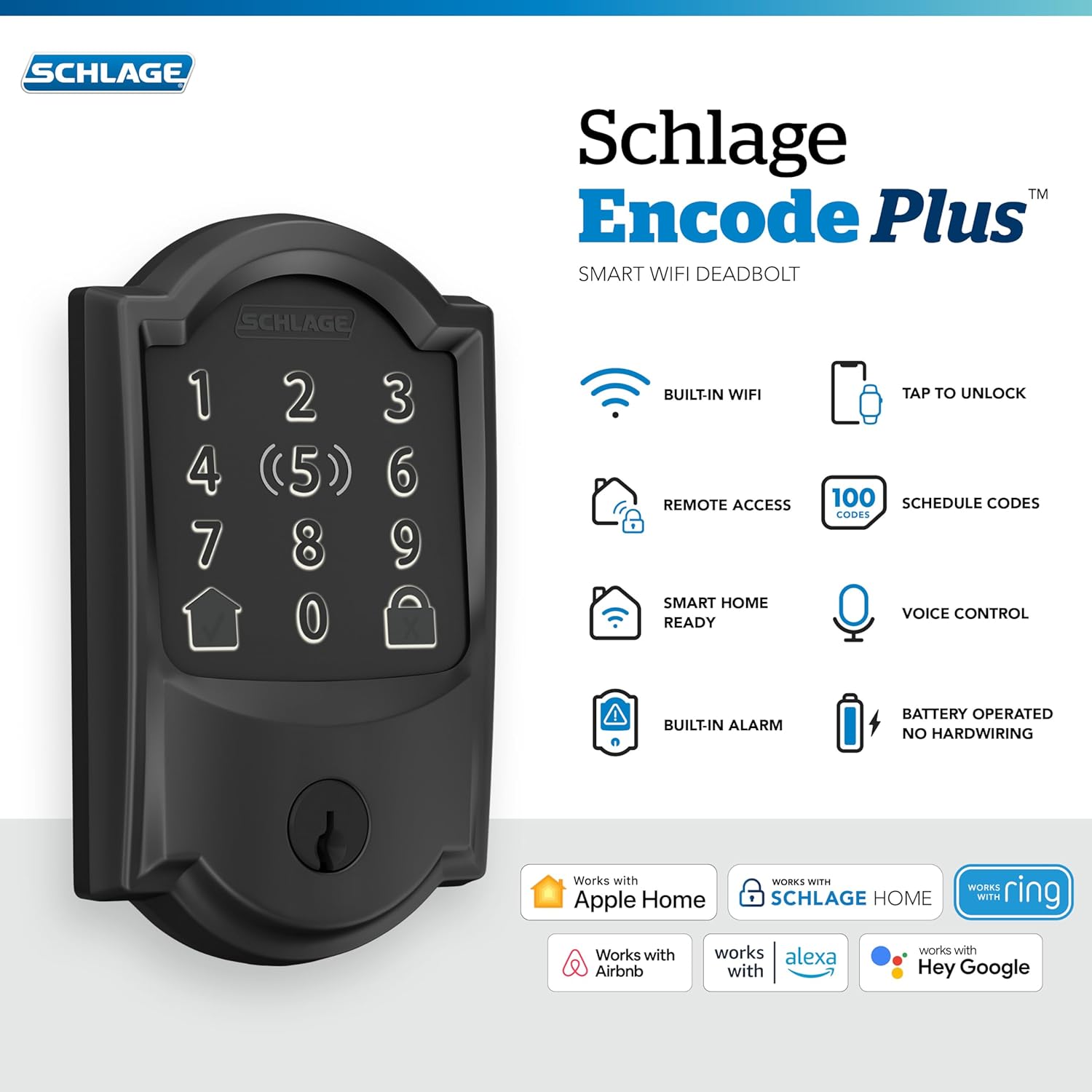
تصویر: تمام شدview of the Schlage Encode Plus Smart WiFi Deadbolt, highlighting features like built-in Wi-Fi, tap to unlock, remote access, 100 schedule codes, smart home readiness, voice control, built-in alarm, and battery operation.
2. اطلاعات ایمنی
لطفاً قبل از نصب و استفاده، تمام دستورالعملها را با دقت مطالعه کنید. این دفترچه راهنما را برای مراجعات بعدی نگه دارید.
- از مواد شیمیایی قوی یا پاککنندههای ساینده روی روکش قفل استفاده نکنید.
- Ensure proper battery installation to prevent damage.
- Regularly check the lock's functionality and battery levels.
- Keep backup codes and physical keys in a secure location outside the home.
3. محتویات بسته
قبل از شروع نصب، از وجود تمام قطعات اطمینان حاصل کنید.
- مونتاژ صفحه لمسی خارجی
- مجمع داخلی
- Deadbolt Latch
- صفحه اعتصاب
- صفحه تقویتی
- پیچ های نصب
- باتری های قلیایی 4 AA
- کلید پشتیبان
- سخت افزار نصب
- دستورالعمل نصب

تصویر: نمای نزدیک view of the Schlage Encode Plus Smart WiFi Deadbolt components, including the exterior keypad, interior assembly, deadbolt mechanism, and various screws and hardware.
4. نصب و راه اندازی
The Schlage Encode Plus is designed for easy installation with minimal tools. A Phillips head screwdriver is typically the only tool required.
- درب را آماده کنید: Ensure your door meets the standard dimensions (1-3/8 in to 1-3/4 in thickness, 2-3/8 in or 2-3/4 in backset).
- لچ را نصب کنید: Insert the deadbolt latch into the door edge. Ensure the 'TOP' indicator is facing up.
- مونتاژ بیرونی را نصب کنید: Place the exterior touchscreen assembly onto the door, feeding the cable through the cross bore hole.
- مونتاژ داخلی را نصب کنید: Connect the cable from the exterior assembly to the interior assembly. Secure the interior assembly to the door using the provided screws. The 'Snap 'n Stay' design helps hold the exterior assembly in place during this step.
- نصب باتری: Insert the 4 AA alkaline batteries into the battery pack within the interior assembly.
- تست قفل: Close the door and test the deadbolt's operation using the interior thumbturn and by entering a default user code on the touchscreen.

Image: A person installing the interior assembly of the Schlage Encode Plus Smart WiFi Deadbolt onto a door, demonstrating the ease of installation with a screwdriver.
۸. راهاندازی اولیه و جفتسازی برنامه
To unlock the full potential of your Schlage Encode Plus, pair it with the Schlage Home app.
- دانلود اپلیکیشن: Download the Schlage Home app from your device's app store.
- ایجاد یک حساب کاربری: Follow the in-app instructions to create a new account or log in.
- Add Your Lock: In the app, select to add a new device. The app will guide you through connecting your lock to your home's Wi-Fi network. No additional hub is required.
- Create Access Codes: Use the app to create and manage up to 100 unique access codes for family, friends, or service providers. You can set permanent, recurring, or temporary codes.
- سفارشی کردن تنظیمات: Configure auto-lock settings, receive customizable notifications, and view lock history directly from the app.

Image: A smartphone displaying the Schlage Home app interface, showing a green unlocked padlock icon and options to view settings, history, and access codes.
6. دستورالعمل های عملیاتی
6.1. قفل و باز کردن
- ورودی بدون کلید: Enter your 4-8 digit access code on the touchscreen keypad, then press the checkmark button.
- قفل کردن با یک لمس: To lock the door from the exterior, simply press the lock icon on the touchscreen.
- قفل خودکار: The lock can be configured to automatically relock after a set period (e.g., 30 seconds, 1 minute, 5 minutes). This feature can be adjusted or disabled in the Schlage Home app.
- Manual Locking/Unlocking: Use the thumbturn on the interior assembly or the physical key for manual operation.
- کنترل از راه دور: Lock and unlock your door from anywhere using the Schlage Home app on your smartphone.
6.2. Access Code Management
- Create, modify, or delete up to 100 unique access codes via the Schlage Home app.
- Assign temporary codes for guests or service personnel with specific validity periods.
- View a detailed activity log in the app to see who entered and when.
7. یکپارچه سازی خانه هوشمند
The Schlage Encode Plus offers versatile integration with popular smart home platforms.
- Apple HomeKit & Apple Home Keys: Tap your iPhone or Apple Watch to lock or unlock the door for easy and secure access. Control with Siri voice commands.
- آمازون الکسا و دستیار گوگل: Pair with a voice-enabled device for hands-free control, allowing you to lock/unlock or check the status of your door using voice commands.
- Schlage Home App: Manage all lock functions, including access codes, history, and notifications, from a single interface.

Image: A person using an iPhone and Apple Watch to tap and unlock the Schlage Encode Plus Smart WiFi Deadbolt, illustrating the Apple Home Keys feature.

Image: A graphic detailing the compatibility of the Schlage Encode Plus with various smart home systems, including Schlage Home, Apple Home, Airbnb, Alexa, and Hey Google, along with features like smart device control, property access management, access codes, voice control, and remote access.
Official Product Video: Schlage Encode Plus Overview
ویدئو: یک مقام رسمی در حال عبورview of the Schlage Encode Plus Smart WiFi Deadbolt, showcasing its features and benefits for modern home security and convenience.
8. تعمیر و نگهداری
8.1. تعویض باتری
The Schlage Encode Plus operates on 4 AA alkaline batteries. With typical use, batteries can last up to 6 months. The lock will provide advanced notice when battery levels are low.
- When the low battery warning appears, replace all four batteries promptly.
- To replace, remove the interior cover, access the battery pack, and swap out the old batteries with new AA alkaline batteries.
8.2. تمیز کردن
Clean the touchscreen and exterior with a soft, damp از استفاده از پاککنندههای ساینده یا حلالهایی که میتوانند به روکش یا قطعات الکترونیکی آسیب بزنند، خودداری کنید.
9 عیب یابی
- قفل پاسخ نمیدهد: Check battery levels and replace if necessary. Ensure the lock is within Wi-Fi range.
- کد دسترسی کار نمیکند: Verify the code is correct and active in the Schlage Home app. Check for temporary code expiration.
- مشکلات اتصال وای فای: Ensure your home Wi-Fi network is active and the lock is within range. Restart your router if other devices are also experiencing connectivity problems.
- Deadbolt Not Extending/Retracting: Check for obstructions in the door frame or strike plate. Ensure the latch is properly installed and aligned.
- تنظیم مجدد کارخانه: If issues persist, a factory reset may be necessary. Refer to the detailed instructions in the Schlage Home app or the full product manual for this procedure.
10. مشخصات
| ویژگی | جزئیات |
|---|---|
| نام تجاری | برنامه |
| نام مدل | Encode Plus Camelot WiFi Deadbolt Smart Lock |
| شماره مدل | BE499WBCAM622 |
| نوع قفل | صفحه کلید، قفل کلیدی |
| ویژگی های خاص | Smart Lock, Touchscreen, Wi-Fi, Built-in Alarm |
| پروتکل اتصال | بلوتوث ، Wi-Fi |
| نوع کنترلر | آمازون الکسا، اپل هوم کیت، گوگل اسیستنت |
| مواد | روی |
| رنگ | مشکی مات |
| ابعاد (L x W x H) | 0.9 x 3 x 5 اینچ |
| وزن مورد | 3.28 پوند |
| منبع تغذیه | 4 باتری قلیایی AA (شامل) |
| سازگاری ضخامت درب | ۱-۳/۸ اینچ تا ۱-۳/۴ اینچ |
| سازگاری با بکست | ۲-۳/۸ اینچ یا ۲-۳/۴ اینچ |
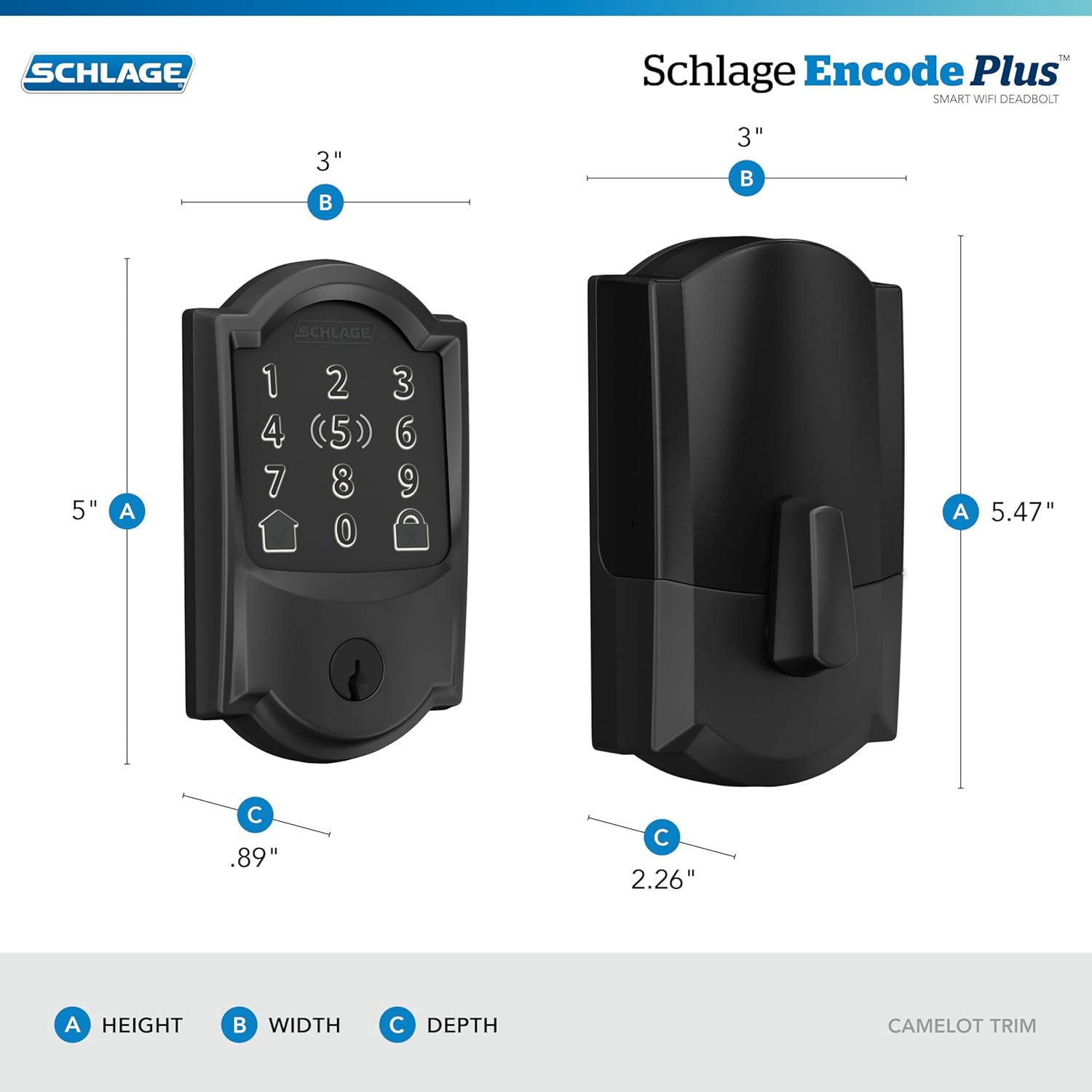
Image: A diagram illustrating the dimensions of the Schlage Encode Plus Smart WiFi Deadbolt, showing height, width, and depth for both the exterior and interior components.
11. گارانتی و پشتیبانی
The Schlage Encode Plus Smart WiFi Deadbolt is backed by a lifetime limited mechanical and finish warranty, and a 3-year limited electronics warranty. For detailed warranty information, please visit schlage.com.
For technical support, troubleshooting assistance, or to register your product, please visit the Schlage support website or contact customer service. Contact information can be found on the manufacturer's webسایت یا در مستندات موجود.


