مقدمه
Thank you for choosing the GOBOULT Z60 Wireless Earbuds. This manual provides detailed instructions to help you set up, operate, and maintain your earbuds for an optimal audio experience. Please read this manual thoroughly before use and retain it for future reference.

Image: GOBOULT Z60 Earbuds, illustrating the brand transition from BOULT to GOBOULT, highlighting the new logo and packaging while assuring consistent product performance.
آنچه در جعبه است
مطمئن شوید که همه اقلام در بسته موجود هستند:
- GOBOULT Z60 Wireless Earbuds (Left and Right)
- کیس شارژ
- کابل شارژ USB نوع C
- سرگوشی (اندازههای مختلف)
- راهنمای کاربر
- کارت گارانتی

Image: The GOBOULT Z60 Wireless Earbuds and their charging case, showcasing the product's design and included accessories.
محصول تمام شده استview
The GOBOULT Z60 earbuds are designed for comfort and high-quality audio. Each earbud features a 13mm bass driver and multiple microphones for clear calls. The charging case provides extended battery life.
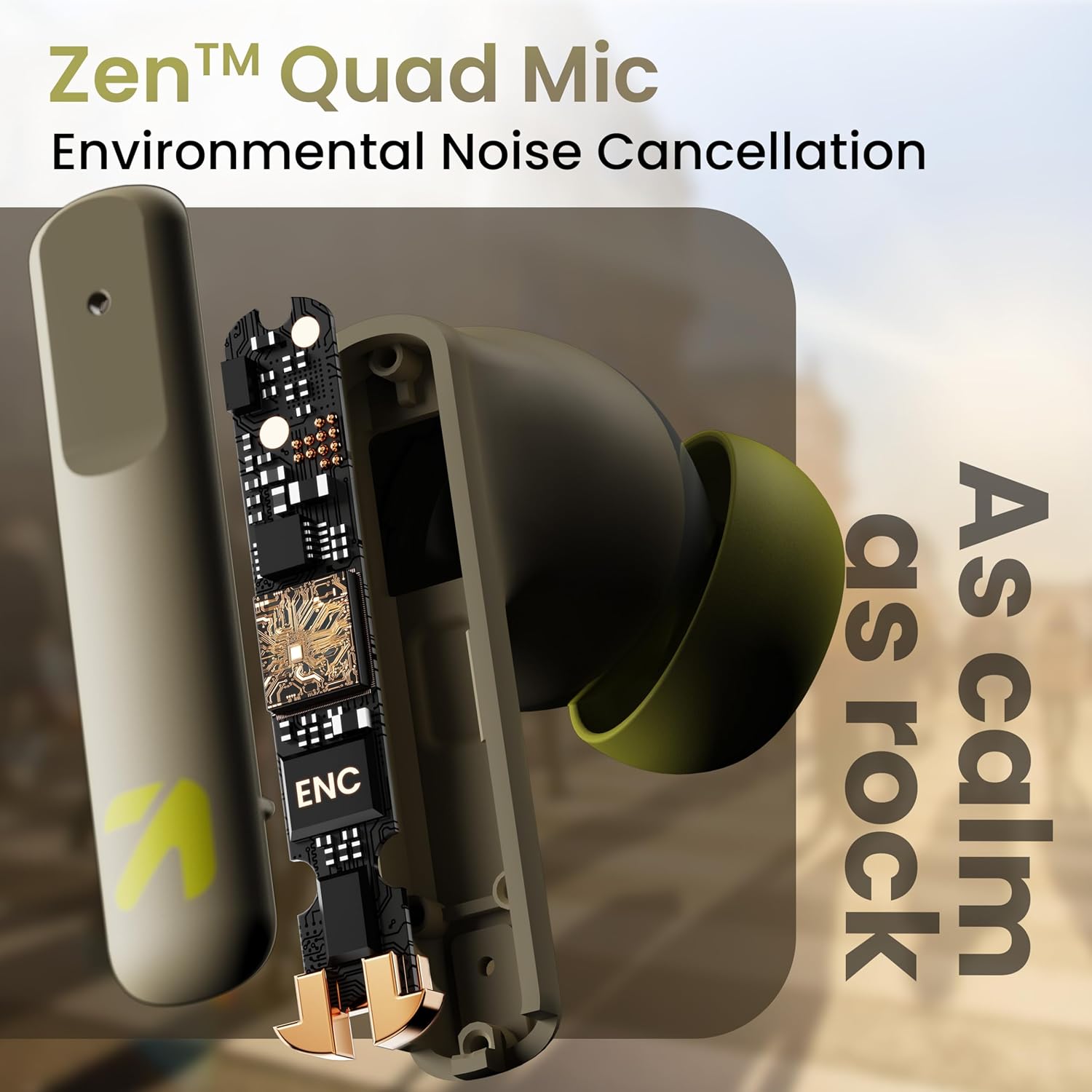
تصویر: یک داخلی view of a GOBOULT Z60 earbud, highlighting the Zen Quad Mic Environmental Noise Cancellation (ENC) technology for clear audio.

Image: A close-up of a GOBOULT Z60 earbud, emphasizing the 13mm BoomX Drivers responsible for rich bass and superior sound quality.
شارژ کردن
To charge your GOBOULT Z60 earbuds and charging case:
- ایربادها را داخل محفظه شارژ قرار دهید. مطمئن شوید که به درستی در جای خود قرار گرفتهاند.
- کابل شارژ USB Type-C را به پورت شارژ روی قاب و به منبع تغذیه وصل کنید.
- نشانگر LED روی کیس، وضعیت شارژ را نشان میدهد.
A full charge provides up to 60 hours of total playtime with the charging case. A quick 10-minute charge can provide up to 150 minutes of playtime.

Image: The GOBOULT Z60 charging case connected via a Type-C cable, illustrating the fast charging capability with indicators for 10 minutes charge yielding 150 minutes playtime.

Image: GOBOULT Z60 earbuds in their charging case, highlighting the impressive 60 hours of total playtime and 8 hours of playtime on a single earbud charge.
Setup: Pairing with Your Device
The GOBOULT Z60 earbuds utilize Bluetooth 5.3 for stable and efficient wireless connectivity.
- جفت شدن اولیه:
- محفظه شارژ را باز کنید. ایربادها به طور خودکار وارد حالت جفت شدن میشوند.
- در دستگاه خود (گوشی هوشمند، تبلت، لپتاپ)، بلوتوث را فعال کنید.
- جستجو برای "GOBOULT Z60" in the list of available Bluetooth devices and select it to connect.
- Once connected, you will hear an audio prompt, and the LED indicator on the case will change.
- جفت شدن مجدد: اگر بلوتوث روی دستگاه فعال باشد، هدفونها هنگام خارج کردن از محفظه، به طور خودکار به آخرین دستگاه جفتشده متصل میشوند.

Image: GOBOULT Z60 earbuds and their open charging case next to a smartphone, illustrating the Bluetooth 5.3 "Blink & Pair" feature for quick and stable connection.
کار کردن با ایربادها
کنترل ها را لمس کنید
The GOBOULT Z60 earbuds feature intuitive touch controls. The specific functions are:
- پخش موسیقی:
- یک ضربه: پخش/مکث
- Double tap (Right earbud): Next track
- Double tap (Left earbud): Previous track
- Triple tap (Right earbud): Volume Up
- Triple tap (Left earbud): Volume Down
- مدیریت تماس:
- یک ضربه: پاسخ دادن/پایان دادن به تماس
- Long press: Reject call
- دستیار صوتی: Long press (either earbud) to activate Google Assistant or Siri.
- حالت بازی: Tap 4 times on either earbud to activate/deactivate Combat Gaming Mode (50ms low latency).

Image: A visual guide to the GOBOULT Z60's touch controls, detailing actions for music playback (play/pause, next/back, volume), call management, activating voice assistance, and toggling game/music mode.
حالت بازی
Activate the 50ms low latency Combat Gaming Mode for a synchronized audio-visual experience during gaming. Tap 4 times on either earbud to switch between gaming and normal modes.

Image: GOBOULT Z60 earbuds in use with a smartphone displaying a racing game, emphasizing the "Combat Gaming Mode" with 50ms ultra-low latency, activated by tapping the earbud 4 times.
دستیار صوتی
Access your device's voice assistant (Google Assistant or Siri) by long-pressing either earbud. This allows for hands-free control of your device.

Image: GOBOULT Z60 earbuds and their charging case, illustrating how to activate voice assistance (Ok Google, Hey Siri) with a long press on an earbud.
تعمیر و نگهداری
To ensure the longevity and optimal performance of your GOBOULT Z60 earbuds:
- تمیز کردن: مرتباً ایربادها و محفظه شارژ را با یک پارچه نرم و خشک تمیز کنید. از استفاده از مواد شیمیایی قوی یا مواد ساینده خودداری کنید.
- گوشواره ها: Remove and clean the eartips periodically. Ensure they are dry before reattaching.
- مقاومت در برابر آب: The earbuds are IPX5 water-resistant, meaning they can withstand sweat and light rain. Do not submerge them in water or expose them to heavy downpours. Ensure the charging port is dry before charging.
- ذخیره سازی: وقتی از ایربادها استفاده نمیکنید، آنها را در جعبه شارژشان قرار دهید تا از آنها محافظت شود و شارژشان حفظ شود.

Image: A GOBOULT Z60 earbud with water droplets on its surface, illustrating its IPX5 water resistance, suitable for protection against sweat, rain, and splashes.
عیب یابی
If you encounter issues with your GOBOULT Z60 earbuds, refer to the following common solutions:
| مشکل | راه حل ممکن |
|---|---|
| هدفونهای هدفون جفت نمیشوند |
|
| صدایی از یک هدفون شنیده نمی شود |
|
| شارژ نشدن هدفون ها |
|
| صدای کم یا کیفیت پایین صدا |
|
مشخصات
| ویژگی | جزئیات |
|---|---|
| نام مدل | AirBass (Z60) |
| فناوری اتصال | بی سیم (بلوتوث) |
| نسخه بلوتوث | 5.3 |
| محدوده بلوتوث | 10 متر |
| اندازه درایور صوتی | 13 میلی متر |
| نوع درایور صوتی | درایور پویا |
| عمر باتری (کل) | تا ۴۲ ساعت (با جعبه شارژ) |
| زمان شارژ | حدودا 90 دقیقه |
| شارژ سریع | ۱۰ دقیقه شارژ = ۱۰۰ دقیقه پخش |
| پورت شارژ | نوع C |
| میکروفون ها | 4 ENC Mics for Clear Calling |
| تأخیر صوتی | ۶۰ میلیثانیه (حالت بازی) |
| مقاومت در برابر آب | IPX5 (ضد عرق، ضد باران، ضد پاشش آب) |
| روش کنترل | لمس، صدا |
| وزن مورد | 41.5 گرم |
| کشور مبدا | هند |
گارانتی و پشتیبانی
Your GOBOULT Z60 Wireless Earbuds come with a ۱ سال گارانتی سازنده از تاریخ خرید
For any support, warranty claims, or technical assistance, please refer to the contact information provided on your warranty card or visit the official GOBOULT support webسایت


