مقدمه
This manual provides detailed instructions for the setup, operation, and maintenance of your Hisense AX5100G 5.1 Channel Soundbar System. This system is designed to enhance your audio experience with 5.1 channel surround sound, Dolby Atmos, and DTS Virtual:X.
آنچه در جعبه است
تمام اجزا را با دقت از بستهبندی خارج کنید و مطمئن شوید که موارد زیر در بستهبندی وجود دارند:
- 5.1 کانال صدا
- ساب ووفر بی سیم
- 2 بلندگوی عقب
- کنترل از راه دور
- Power Cables (for Soundbar, Subwoofer, and Rear Speakers)
- کابل HDMI
- کابل نوری
- Wall Mounting Kit (screws, brackets)
- راهنمای کاربر (این سند)

The Hisense AX5100G 5.1 Channel Soundbar System includes the main soundbar unit, a wireless subwoofer, and two dedicated rear speakers for a complete surround sound experience.
راه اندازی
1. تعیین سطح
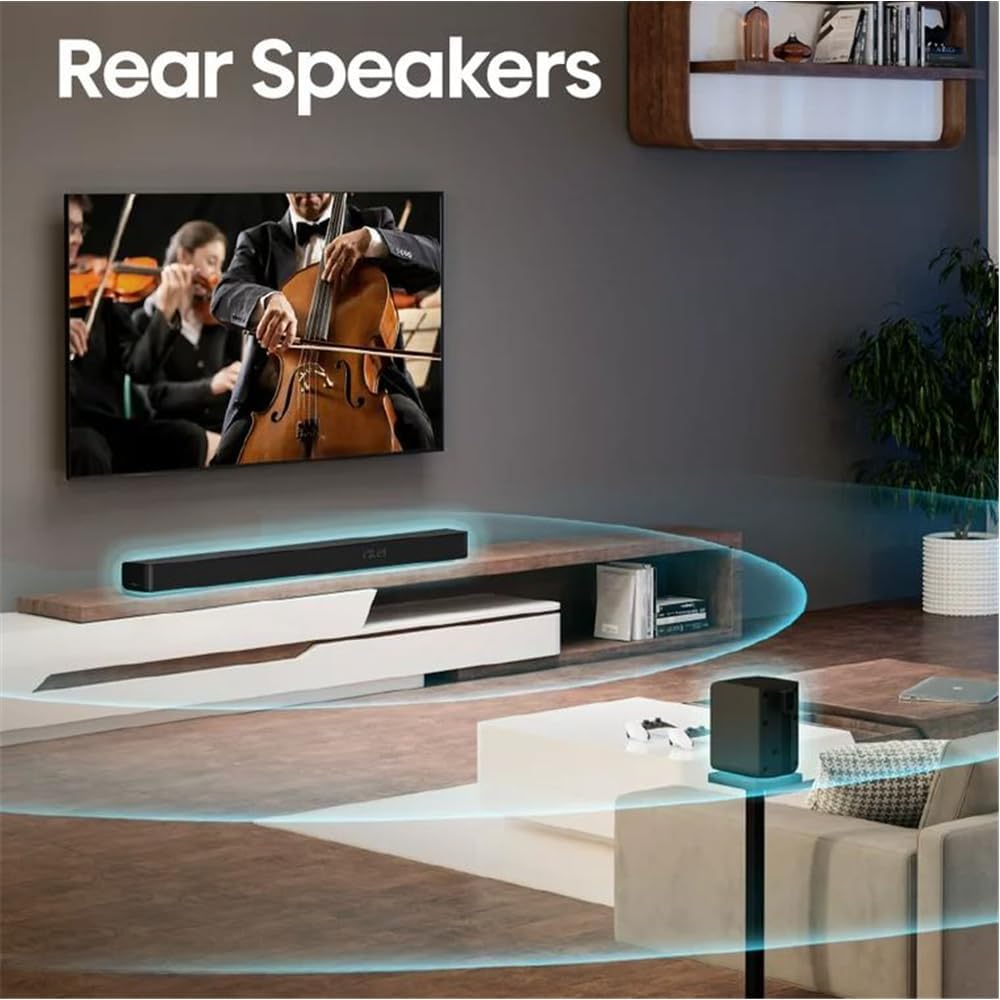
Position the soundbar centrally below your TV. The wireless subwoofer can be placed anywhere in the room, ideally near the soundbar for optimal bass distribution. The rear speakers should be placed behind your listening position, to the left and right, for an immersive surround sound experience.

Optimal placement of the soundbar, wireless subwoofer, and rear speakers in a living room setting to achieve the best 5.1 surround sound.
2. Connecting the Soundbar and Subwoofer
The wireless subwoofer automatically pairs with the soundbar when both are powered on. Ensure both units are plugged into a power outlet.
3. Connecting the Rear Speakers
The rear speakers connect to the wireless subwoofer. Plug the rear speakers into the designated ports on the subwoofer.

Dedicated rear speakers are positioned to provide true surround sound, immersing the listener in audio.
4. اتصال به تلویزیون شما
بر اساس پورتهای موجود تلویزیون خود، یکی از روشهای اتصال زیر را انتخاب کنید:
HDMI eARC (Recommended)
For the best audio quality and control, connect the soundbar to your TV's HDMI eARC port using the provided HDMI cable. This allows for two-way communication, enabling TV remote control of the soundbar.
نوری
If your TV does not have an HDMI eARC port, use the included optical cable to connect the soundbar to your TV's optical audio output.
بلوتوث
For wireless audio streaming from your TV (if supported) or other Bluetooth-enabled devices, pair the soundbar via Bluetooth.
The back panel of the soundbar features multiple connectivity options, including HDMI eARC, Optical, AUX, USB, and Coaxial inputs.
دستورالعمل های عملیاتی
روشن/خاموش برق
برای روشن یا خاموش کردن سیستم، دکمه روشن/خاموش روی ساندبار یا کنترل از راه دور را فشار دهید.
کنترل صدا
با استفاده از دکمههای افزایش صدا (+) و کاهش صدا (-) روی ساندبار یا کنترل از راه دور، صدا را تنظیم کنید.
انتخاب ورودی
Press the Source button on the soundbar or the remote control to cycle through available input sources (HDMI eARC, Optical, Bluetooth, AUX, USB).
حالت های صدا
The soundbar offers various preset sound modes (e.g., Movie, Music, News) to optimize audio for different content types. Select your preferred mode using the remote control.
تنظیم باس و تریبل
Use the remote control to adjust the bass and treble levels to your preference.
مشخصات
| ویژگی | جزئیات |
|---|---|
| نام مدل | AX5100G |
| پیکربندی کانال صدای فراگیر | 5.1 |
| حداکثر توان خروجی بلندگو | 340 وات |
| قابلیت اتصال ساب ووفر | بی سیم |
| قطر ساب ووفر | 5.25 اینچ |
| ویژگی های خاص | Bass Boost, Dolby Enabled (Dolby Atmos, DTS Virtual:X) |
| فناوری اتصال | HDMI (eARC), Optical, AUX, USB, Bluetooth |
| روش کنترل | از راه دور |
| رنگ | مشکی |
| وزن مورد | 43 پوند |
| سازنده | HISENSE |
| Roku TV آماده است | بله |
تعمیر و نگهداری
تمیز کردن
Gently wipe the surfaces of the soundbar, subwoofer, and rear speakers with a soft, dry cloth. Do not use liquid cleaners or abrasive materials, as they may damage the finish.
تهویه
برای جلوگیری از گرمای بیش از حد، از تهویه کافی در اطراف تمام اجزا اطمینان حاصل کنید. هیچ یک از منافذ تهویه را مسدود نکنید.
عیب یابی
بدون صدا
- Ensure all power cables are securely connected and units are powered on.
- مطمئن شوید که منبع ورودی صحیح روی ساندبار انتخاب شده است.
- Check the TV's audio output settings to ensure it's sending audio to the soundbar (e.g., HDMI ARC/eARC, Optical).
- Confirm the volume is not muted or set too low on both the soundbar and the TV.
ساب ووفر کار نمی کند
- Ensure the wireless subwoofer is plugged in and powered on.
- Check if the subwoofer is paired with the soundbar. Refer to the pairing instructions in the full user manual if re-pairing is needed.
کنترل از راه دور کار نمی کند
- باتریهای کنترل از راه دور را بررسی و تعویض کنید.
- مطمئن شوید که هیچ مانعی بین کنترل از راه دور و سنسور ساندبار وجود ندارد.
گارانتی و پشتیبانی
اطلاعات گارانتی
This Hisense soundbar system comes with a limited warranty. Please refer to the warranty card included in the packaging for specific terms and conditions.
پشتیبانی مشتری
For technical assistance or warranty inquiries, please contact Hisense customer support. Contact details can be found in the full user manual or on the official Hisense webسایت


