مقدمه
این دفترچه راهنما دستورالعملهای دقیقی برای راهاندازی، بهرهبرداری و نگهداری از ایستگاه هواشناسی La Crosse Technology WS6824 شما ارائه میدهد. لطفاً قبل از استفاده از دستگاه، این دفترچه راهنما را به طور کامل مطالعه کنید تا از عملکرد صحیح و طول عمر آن اطمینان حاصل شود.
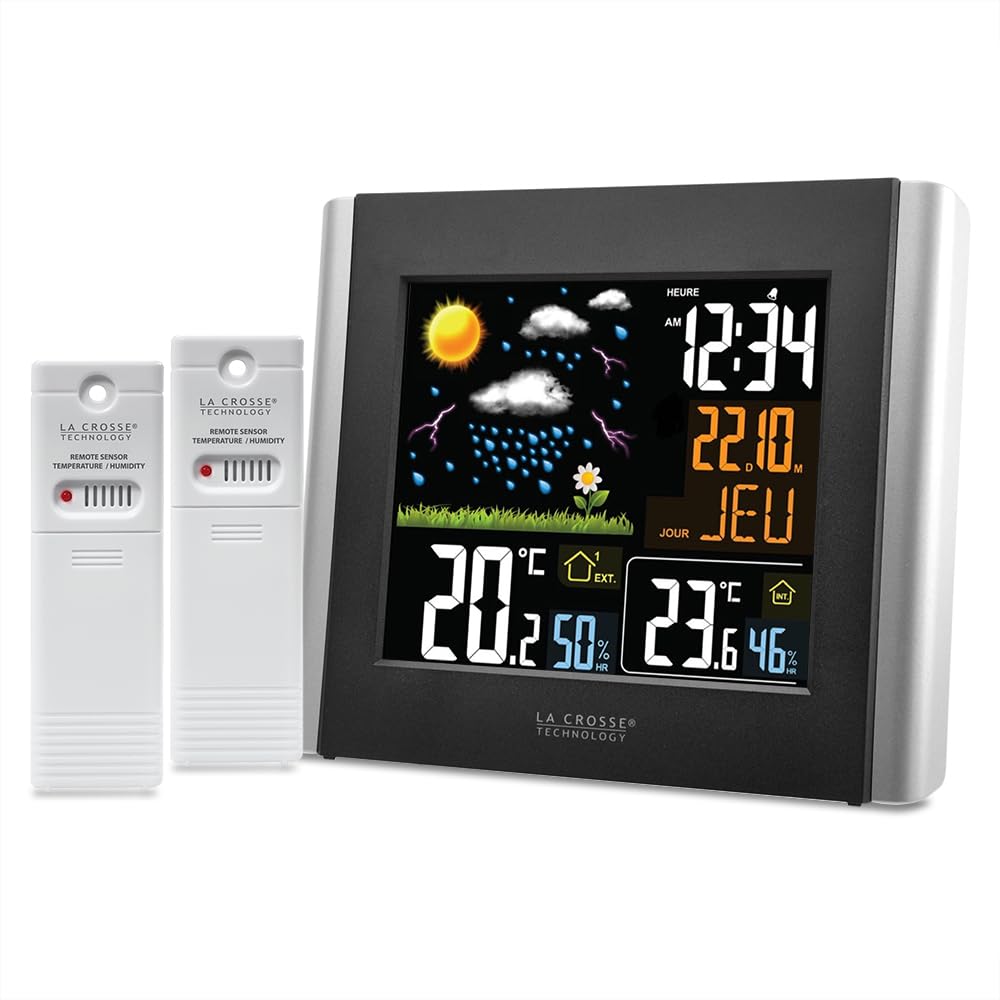
شکل 1: La Crosse Technology WS6824 Weather Station main unit (left) and two remote temperature/humidity sensors (right). The main unit features a color LCD display showing time, date, indoor/outdoor temperature and humidity, and a weather forecast icon.
1. راه اندازی
1.1 باز کردن بسته بندی
Carefully remove all components from the packaging. Ensure you have the main weather station unit, two remote sensors, and this instruction manual.
1.2 نصب باتری
The weather station and sensors require batteries (not included).
- واحد اصلی: Open the battery compartment on the back of the main unit. Insert the required batteries (e.g., 3 x AAA, refer to the compartment label) observing the correct polarity (+/-). Close the compartment.
- سنسورهای از راه دور: Open the battery compartment on each remote sensor. Insert the required batteries (e.g., 2 x AA per sensor, refer to the compartment label) observing the correct polarity (+/-). Close the compartment.
1.3 قرار دادن سنسور
Place the remote sensors in desired outdoor locations. For accurate readings, ensure sensors are:
- Protected from direct sunlight and precipitation.
- Within the effective transmission range (typically up to 100 meters in open air) of the main unit.
- Away from large metal objects or electrical interference.
۵.۳ همگامسازی اولیه
After installing batteries in both the main unit and sensors, the main unit will automatically search for and connect to the sensors. This process may take a few minutes. Ensure sensors are within range during initial setup.
2. عملیات
2.1 نمایش بیش از حدview
The main unit features a color LCD display. Based on the provided image and OCR, the display typically shows:
- زمان و تاریخ: "12:34" (HEURE), "22.10." (Date), "JEU" (Day of week, e.g., Thursday).
- پیش بینی آب و هوا: Icons representing sunny, cloudy, rainy, stormy conditions.
- دما و رطوبت در فضای باز: "20.2°C" and "50%" (EXT.).
- دما و رطوبت داخلی: "23.6°C" and "46%" (INT.).
2.2 تنظیم زمان و تاریخ
Refer to the buttons on the back or side of the main unit. Typically, a "SET" or "MODE" button is used to enter setting mode, and "+"/"-" or "UP"/"DOWN" buttons are used to adjust values. Follow the on-screen prompts to set the time, date, and year.
۴.۲ انتخاب واحد دما (°C/°F)
A dedicated button (often labeled "°C/°F") or a setting within the menu allows you to switch between Celsius and Fahrenheit temperature displays.
2.4 پیش بینی آب و هوا
The weather station predicts weather conditions for the next 12-24 hours based on changes in atmospheric pressure. The forecast icons are an indication and may not always reflect actual weather conditions with 100% accuracy.
3. تعمیر و نگهداری
3.1 تمیز کردن
واحد اصلی و حسگرها را با یک پارچه نرم و لطیف پاک کنید.amp پارچه. از پاککنندههای ساینده یا حلالها استفاده نکنید، زیرا ممکن است به صفحه نمایش یا ... آسیب برسانند.asing.
3.2 تعویض باتری
Replace batteries in both the main unit and sensors when the low battery indicator appears on the display. Always replace all batteries at the same time to ensure optimal performance.
۴.۳ مراقبت از حسگر
Periodically check outdoor sensors for debris or obstructions that might affect readings. Ensure they remain protected from extreme weather conditions.
4 عیب یابی
| مشکل | راه حل |
|---|---|
| صفحه نمایش روی دستگاه اصلی وجود ندارد. | Check battery installation and polarity. Replace with fresh batteries. Ensure power adapter (if applicable) is securely connected. |
| Outdoor temperature/humidity not displayed or incorrect. |
|
| پیشبینی نادرست آب و هوا. | The forecast is based on atmospheric pressure changes and is an estimation for the next 12-24 hours. It may not always match local conditions perfectly. Allow time for the station to calibrate to its environment. |
| زمان/تاریخ نادرست است. | Manually set the time and date as described in Section 2.2. If the unit has an atomic clock feature, ensure it is receiving a signal (check for an antenna icon). |
5. مشخصات
- مدل: WS6824
- نوع نمایشگر: LCD color
- منبع تغذیه: Battery powered (main unit and sensors)
- فناوری اتصال: 433 مگاهرتز، RF
- دقت دما: +/- 1 درجه سانتی گراد
- ویژگی های خاص: 2 thermo/hygro sensors included
- مواد: پلاستیک
- رنگ: خاکستری
- ابعاد (پکیج): 20 × 20 × 7 سانتی متر; 650 گرم
6. ضمانت و پشتیبانی
6.1 اطلاعات گارانتی
La Crosse Technology products are designed for reliability. For specific warranty details, please refer to the warranty card included with your product or visit the official La Crosse Technology webرسید خرید خود را به عنوان مدرک خرید برای درخواستهای گارانتی نگه دارید.
6.2 پشتیبانی مشتری
If you encounter any issues not covered in this manual or require further assistance, please contact La Crosse Technology customer support. Contact information can typically be found on the product packaging or the official brand webسایت


