مقدمه
This manual provides detailed instructions for the TELE System 27-inch Full HD LED TV, model palco hevc s2. Please read this manual carefully before using the product to ensure proper operation, maximize its lifespan, and understand its features. Keep this manual for future reference.
1. راه اندازی
1.1 باز کردن بسته بندی
تلویزیون و تمام لوازم جانبی را با دقت از بستهبندی خارج کنید. مطمئن شوید که تمام قطعات موجود هستند:
- TELE System 27-inch Full HD LED TV
- کنترل از راه دور
- کابل برق
- راهنمای کاربر (این سند)
- اجزای میز تلویزیون (در صورت وجود)
۳.۱ اتصال پایه یا نصب دیواری
برای نصب پایه:
- برای جلوگیری از خش افتادن، صفحه تلویزیون را رو به پایین روی یک سطح نرم و تمیز قرار دهید.
- اجزای پایه را با سوراخهای نصب در پایین تلویزیون تراز کنید.
- پایه را با استفاده از پیچهای ارائه شده محکم کنید. بیش از حد سفت نکنید.
برای نصب دیواری:
This TV supports wall mounting. Refer to the specific instructions provided with your wall mount kit for proper installation. Ensure the wall mount is compatible with the TV's VESA mounting pattern and weight.
1.3 اتصال برق
کابل برق را به ورودی برق تلویزیون وصل کنید، سپس سر دیگر آن را به پریز برق مناسب وصل کنید. تلویزیون وارد حالت آماده به کار میشود.
۳.۲ اتصال دستگاههای خارجی
Use the available ports on the TV to connect your external devices:
- HDMI: برای پخش ویدیو و صدای با کیفیت بالا از دستگاههایی مانند پخشکنندههای بلو-ری، کنسولهای بازی یا گیرندههای دیجیتال.
- USB: برای اتصال دستگاههای ذخیرهسازی USB برای پخش رسانه files.
- آنتن/کابل: Connect your DVB-T2 antenna for digital terrestrial television reception.
۵.۱ راهاندازی اولیه
پس از اولین روشن شدن، تلویزیون شما را در فرآیند راهاندازی اولیه راهنمایی میکند. این فرآیند معمولاً شامل موارد زیر است:
- انتخاب زبان.
- انتخاب کشور/منطقه.
- Automatic channel scanning for DVB-T2 broadcasts.
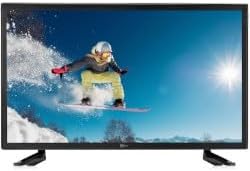
این تصویر نمای جلو را نشان میدهد view of the TELE System 27-inch Full HD LED TV, model palco hevc s2, with its stand attached. The screen displays a vibrant image of a snowboarder in action, highlighting the display quality.
2. دستورالعمل های عملیاتی
2.1 کنترل های اساسی
Use the remote control to operate your TV. Key functions include:
- دکمه پاور: تلویزیون را روشن یا خاموش میکند (حالت آماده به کار).
- افزایش/کاهش صدا: سطح صدا را تنظیم می کند.
- کانال بالا/پایین: کانالهای تلویزیون را عوض میکند.
- دکمه های عددی (0-9): انتخاب مستقیم کانال
- بی صدا: صدای تلویزیون را قطع میکند.
2.2 انتخاب ورودی
را فشار دهید منبع or ورودی button on your remote control to cycle through available input sources (e.g., HDMI1, HDMI2, USB, DVB-T2). Select the desired input for your connected device.
2.3 ناوبری منو
را فشار دهید MENU button to access the TV's main menu. Use the arrow buttons (Up, Down, Left, Right) to navigate through options and the OK or را وارد کنید button to confirm selections. The menu allows you to adjust picture settings, sound settings, channel settings, and more.
2.4 DVB-T2 Tuner Usage
After completing the channel scan during initial setup, you can access digital terrestrial channels. Use the Channel Up/Down buttons or direct number input to switch channels. The TV supports DVB-T2 for high-quality digital broadcast reception.
۶.۳ پخش رسانه از طریق USB
Insert a USB storage device into the TV's USB port. The TV should automatically detect the device and prompt you to open the media browser. You can then navigate and play supported video, audio, and image fileروی دستگاه USB ذخیره می شود.
3. تعمیر و نگهداری
3.1 Cleaning the Screen and Casing
- صفحه نمایش: صفحه نمایش را به آرامی با یک پارچه نرم و بدون پرز پاک کنید. برای لکههای سرسخت، کمی ...ampپارچه را با آب یا یک پاککننده مخصوص صفحه نمایش بپوشانید. هرگز مایع را مستقیماً روی صفحه نمایش اسپری نکنید.
- Casing: برای پاک کردن تلویزیون از یک پارچه نرم و خشک استفاده کنید.asinز. از استفاده از پاککنندههای ساینده، واکسها یا حلالها خودداری کنید زیرا میتوانند به روکش آسیب بزنند.
مهم: همیشه قبل از تمیز کردن، تلویزیون را از پریز برق جدا کنید.
3.2 به روز رسانی نرم افزار
The TV's software may receive updates to improve performance or add new features. Check the TV's menu for a 'Software Update' or 'System Update' option. Follow the on-screen instructions carefully if an update is available. (Note: Software update guarantee information is not available for this model.)
3.3 اقدامات احتیاطی ایمنی
- دهانه های تهویه را مسدود نکنید.
- تلویزیون را در معرض باران یا رطوبت قرار ندهید.
- از قرار دادن تلویزیون در معرض نور مستقیم خورشید یا نزدیک منابع گرما خودداری کنید.
- تلویزیون را باز نکنیدasinز؛ تمام خدمات را به پرسنل واجد شرایط ارجاع دهید.
4 عیب یابی
قبل از تماس با پشتیبانی، راهحلهای زیر را برای مشکلات رایج امتحان کنید:
| مشکل | راه حل ممکن |
|---|---|
| بدون قدرت | Ensure the power cable is securely plugged into both the TV and the wall outlet. Check if the outlet is working by plugging in another device. |
| تصویر ندارد، اما صدا دارد | منبع ورودی را بررسی کنید. منبع button on the remote to ensure the correct input (e.g., HDMI1) is selected. |
| صدا نداره ولی تصویر داره | Check the volume level and ensure the TV is not muted. If using external audio, ensure it is correctly connected and powered on. |
| کنترل از راه دور کار نمی کند | باتریهای کنترل از راه دور را تعویض کنید. مطمئن شوید که هیچ مانعی بین کنترل از راه دور و حسگر مادون قرمز تلویزیون وجود ندارد. |
| Poor DVB-T2 Signal/No Channels | Check your antenna connection. Try repositioning the antenna or performing a new channel scan in the TV's menu. |
| USB Media Not Playing | Ensure the USB device is formatted correctly (e.g., FAT32) and the media files are in a supported format. Try another USB device. |
5. مشخصات
The following are the technical specifications for the TELE System 27-inch Full HD LED TV (Model: palco hevc s2):
- نام مدل: palco hevc s2
- اندازه صفحه نمایش: 27 اینچ
- فناوری نمایش: LED
- رزولوشن: ۱۰۸۰p (فول اچدی)
- نرخ تازه سازی: 120 هرتز
- فناوری تیونر: DVB-T2
- رابط سخت افزاری: HDMI
- مجموع پورت های USB: 1
- نسبت تصویر: 16:9
- حالت خروجی صدا: استریو
- Surround Configuration: 2.0
- نوع نصب: پایه دیواری
- ویژگی خاص: صفحه نمایش تخت
- سال مدل: 2010
Specifications are subject to change without notice. For the most up-to-date information, please refer to the product packaging or manufacturer's webسایت
6. اطلاعات گارانتی
This TELE System TV comes with a manufacturer's warranty. The specific terms and duration of the warranty may vary by region and retailer. Please retain your proof of purchase for warranty claims. For detailed warranty information, refer to the warranty card included with your product or visit the official TELE System webسایت
7. پشتیبانی مشتری
If you encounter issues that cannot be resolved using the troubleshooting guide, or if you require further assistance, please contact TELE System customer support. Contact details can typically be found on the official TELE System webدر محل یا روی بستهبندی محصول.
پشتیبانی آنلاین: Visit the official TELE System webسایتی برای سوالات متداول، مقالات پشتیبانی و فرمهای تماس.
پشتیبانی تلفنی: Check the TELE System webسایت برای شماره تماس منطقه ای


