1. مقدمه
This manual provides essential information for the installation, operation, and maintenance of the Cisco Catalyst 9800-L Copper Uplink Wireless LAN Controller (Model C9800-L-C-K9). Please read this manual thoroughly before using the device to ensure proper functionality and safety.
2. اطلاعات ایمنی مهم
برای جلوگیری از آسیب و جراحت به دستگاه، نکات ایمنی زیر را رعایت کنید:
- Ensure the device is installed in a well-ventilated area to prevent overheating.
- فقط از منبع تغذیه مشخص شده برای این دستگاه استفاده کنید.
- دستگاه را در معرض رطوبت یا دمای شدید قرار ندهید.
- قبل از انجام هرگونه تعمیر و نگهداری یا تمیز کردن، برق را قطع کنید.
- تمام خدمات را به پرسنل خدمات واجد شرایط ارجاع دهید.
3. محتویات بسته
بررسی کنید که آیا همه اقلام در بسته موجود است یا خیر:
- Cisco Catalyst 9800-L Wireless LAN Controller
- سیدی (حاوی مستندات یا نرمافزار)
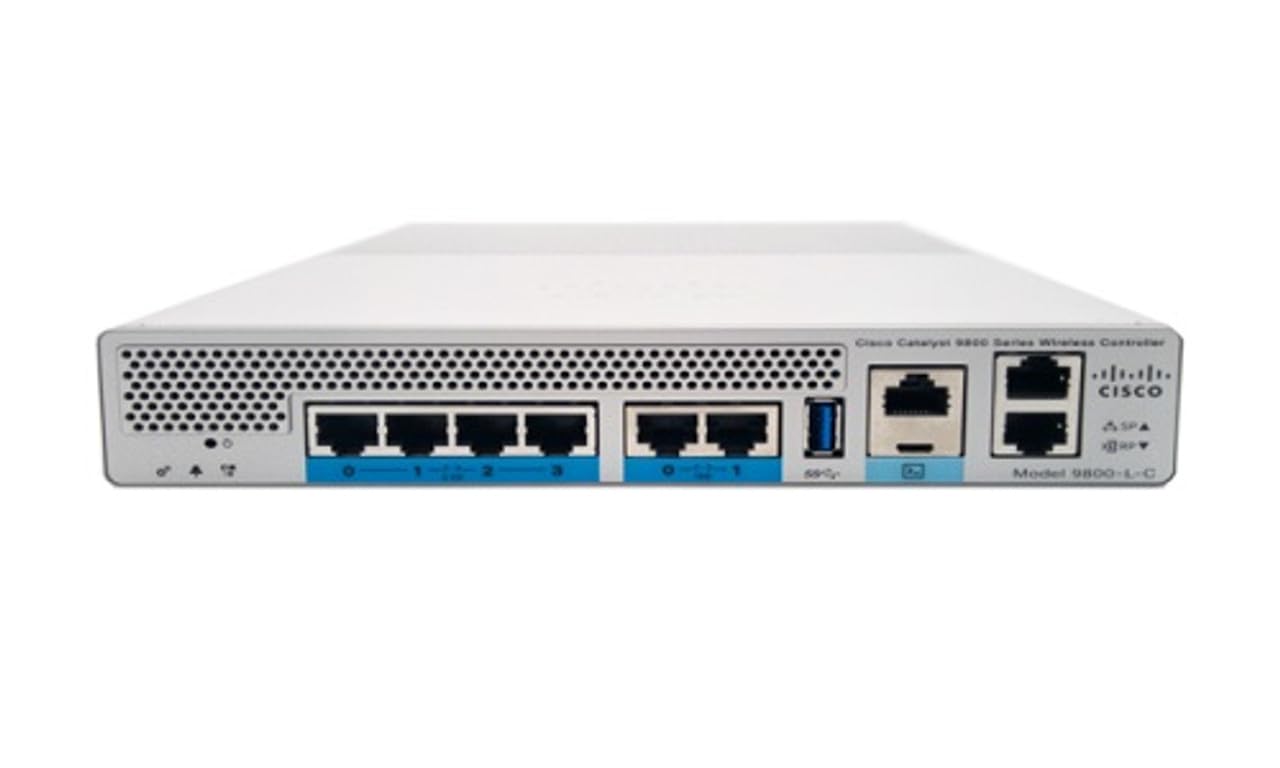
شکل 1: جلو view of the Cisco Catalyst 9800-L Wireless LAN Controller. This image shows the compact design and port layout of the device.
4. محصول تمام شدview
The Cisco Catalyst 9800-L is a compact, fixed-configuration wireless LAN controller designed for small to medium-sized deployments. It provides centralized control for Cisco Aironet access points, offering robust wireless network management capabilities.
ویژگی های کلیدی:
- Managed, Layer 2.5 (Wireless Controller) functionality
- Copper uplink interfaces
- RJ45 interface type
- 11 ports for connectivity
- Designed for desktop environments
5. راه اندازی
5.1 باز کردن و بازرسی
- کنترلر را با دقت از بستهبندی آن خارج کنید.
- Inspect the device for any signs of physical damage. If damage is found, contact your supplier immediately.
5.2 نصب فیزیکی
- Place the controller on a stable, flat surface, such as a desktop.
- Ensure adequate clearance around the device for proper airflow and ventilation.
5.3 اتصال برق
- Connect the power cord to the power input on the rear of the controller.
- Plug the other end of the power cord into a grounded electrical outlet (220 Volts).
5.4 اتصال شبکه
- Connect Ethernet cables from your network infrastructure to the RJ45 uplink ports on the controller.
- Connect access points to the appropriate downlink ports as required by your network design.
۲.۶ دسترسی اولیه به پیکربندی
- Refer to the included CD or Cisco's official documentation for detailed instructions on initial console access and software configuration.
- Typically, this involves connecting a console cable to the device and using a terminal emulator.
۳. کار با کنترلر
6.1 عملیات اساسی
Once powered on and initially configured, the controller will begin managing connected access points. Monitor the status indicators on the device for operational status.
6.2 Access Point Management
The Cisco Catalyst 9800-L automatically discovers and provisions Cisco Aironet access points. Use the controller's management interface (CLI or GUI) to configure wireless networks, security policies, and guest access.
6.3 پیکربندی شبکه
Detailed network configuration, including VLANs, QoS, and routing, is performed through the controller's operating system. Consult Cisco's official documentation for advanced configuration guides.
7. دستورالعمل های نگهداری
- به روز رسانی سیستم عامل: Regularly check for and apply the latest firmware updates from Cisco to ensure optimal performance and security.
- تمیز کردن: Keep the device clean and free of dust. Use a soft, dry cloth for cleaning. Do not use liquid or aerosol cleaners.
- شرایط محیطی: Ensure the operating environment remains within specified temperature and humidity ranges to prevent hardware failure.
- پیکربندی پشتیبان گیری: Periodically back up your controller's configuration to prevent data loss.
8 عیب یابی
این بخش به مشکلات رایجی که ممکن است با آنها مواجه شوید میپردازد:
| مشکل | علت احتمالی | راه حل |
|---|---|---|
| روشن نشدن کنترلر | Power cable disconnected; Power outlet failure | Check power cable connections; Test power outlet with another device. |
| Access points not connecting | Incorrect network configuration; APs not discovered | Verify network settings on the controller; Ensure APs are on the same network segment or reachable via IP. |
| Slow wireless performance | Interference; Overloaded channels; Outdated firmware | Perform a site survey to identify interference; Optimize channel selection; Update controller and AP firmware. |
9. مشخصات فنی
| مشخصات | جزئیات |
|---|---|
| نام تجاری | سیسکو |
| شماره مدل | C9800-L-C-K9 |
| تعداد پورت ها | 11 |
| رابط | RJ45 |
| نوع سوئیچ | Managed, Layer 2.5 (Wireless Controller) |
| پلت فرم | زتا |
| نوع جنس بدنه | مس |
| جلدtage | 220 ولت |
| دستگاه های سازگار | دسکتاپ |
| رنگ | آبی |
| وزن مورد | 3.09 کیلوگرم |
| UPC | 657768416101 |
| ASIN | B0C3FQPCY4 |
10. اطلاعات گارانتی
This Cisco Catalyst 9800-L Wireless LAN Controller (Renewed) comes with a 90 روز گارانتی محدود. For specific terms and conditions, please refer to the warranty documentation provided with your purchase or contact your reseller.
11. پشتیبانی مشتری
For technical assistance, troubleshooting, or further inquiries regarding your Cisco Catalyst 9800-L Wireless LAN Controller, please visit the official Cisco support website or contact your authorized Cisco reseller. Ensure you have your model number (C9800-L-C-K9) and serial number available when seeking support.


