1. مقدمه
This manual provides detailed instructions for the setup, operation, and maintenance of your Adler AD 1196B Digital Alarm Clock. Please read this manual thoroughly before using the device to ensure proper function and longevity.
2. محصول تمام شدview
2.1 ویژگی های کلیدی
- Digital time display with 12/24 hour format.
- صفحه نمایش با نور پس زمینه برای آسانی viewing, automatically turns off after 4 seconds.
- Three independent alarm time settings.
- Three alarm activation settings: 5 days (weekday), 6 days (weekday + Saturday), 7 days (every day).
- Displays current time, date, indoor temperature, and humidity.
- Battery-powered for portability and backup during power outages
2.2 محتویات بسته
- Adler AD 1196B Digital Alarm Clock Unit
- راهنمای کاربر
Note: 2x AA batteries are required and not included in the package.

شکل 1: جلو view of the Adler AD 1196B Digital Alarm Clock, displaying 12:00, 26°C, 56% humidity, and the current date.
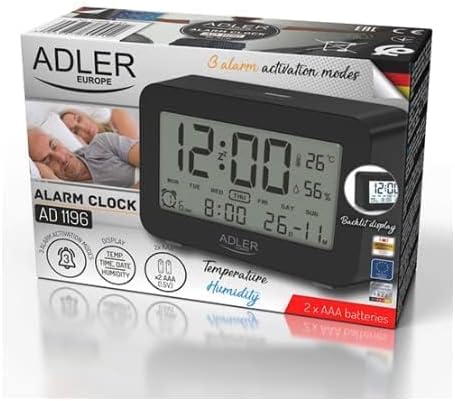
Figure 2: The Adler AD 1196B Digital Alarm Clock shown in its retail packaging, highlighting key features.
3. راه اندازی
3.1 نصب باتری
- پوشش محفظه باتری را در پشت ساعت زنگ دار پیدا کنید.
- برای باز کردن محفظه، درپوش را بلغزانید یا بلند کنید.
- دو (2) باتری قلمی (AA) را وارد کنید و از صحیح بودن قطبهای (+ و -) مطابق آنچه در داخل محفظه نشان داده شده است، اطمینان حاصل کنید.
- درپوش محفظه باتری را به طور ایمن تعویض کنید.
The clock will power on automatically once batteries are inserted. The display will show default settings or begin flashing.
3.2 روشن شدن اولیه
Upon successful battery installation, the display will illuminate. You may need to press a button (e.g., "MODE" or "SET") to activate the display if it remains blank after battery insertion. The backlight will activate briefly and then turn off.
4. دستورالعمل های عملیاتی
Familiarize yourself with the control buttons, typically located on the back or top of the device. Common buttons include: MODE, SET, UP/+, DOWN/-, ALARM.
4.1 تنظیم زمان
- را فشار داده و نگه دارید تنظیم کنید دکمه (یا حالت button, depending on model) until the hour digits begin to flash.
- استفاده کنید UP/+ or پایین/- دکمه های تنظیم ساعت
- را فشار دهید تنظیم کنید (یا حالت) again to move to the minute setting.
- استفاده کنید UP/+ or پایین/- دکمه های تنظیم دقیقه
- به فشار دادن ادامه دهید تنظیم کنید (یا حالت) to cycle through 12/24 hour format, and then to exit time setting mode.
4.2 تنظیم تاریخ
- از نمایش زمان عادی، دکمه را فشار دهید حالت button repeatedly until the date display starts flashing or you enter date setting mode.
- The year digits may flash first. Use UP/+ or پایین/- برای تنظیم سال
- را فشار دهید حالت to move to the month setting, then adjust with UP/+ or پایین/-.
- را فشار دهید حالت to move to the day setting, then adjust with UP/+ or پایین/-.
- را فشار دهید حالت again to confirm and exit date setting.
4.3 Setting Alarms (Alarm 1, Alarm 2, Alarm 3)
The AD 1196B features three independent alarms. The process is similar for each.
- را فشار دهید آلارم دکمه یک بار به view Alarm 1. Press again for Alarm 2, and a third time for Alarm 3.
- در حالی که viewing the desired alarm (e.g., AL1), press and hold the تنظیم کنید را فشار دهید تا ارقام ساعت زنگ دار چشمک بزنند.
- استفاده کنید UP/+ or پایین/- برای تنظیم ساعت زنگ
- را فشار دهید تنظیم کنید برای رفتن به تنظیم دقیقه زنگ هشدار.
- استفاده کنید UP/+ or پایین/- to set the alarm minutes.
- را فشار دهید تنظیم کنید دوباره برای تأیید زمان هشدار.
- برای فعال/غیرفعال کردن زنگ هشدار، دکمه آلارم button repeatedly until the alarm icon (e.g., bell symbol) appears or disappears next to the corresponding alarm number (AL1, AL2, AL3).
4.4 Alarm Activation Modes (5, 6, 7 Days)
After setting an alarm time, you can choose its activation frequency:
- While in alarm setting mode (after setting minutes for an alarm), press تنظیم کنید one more time. The display will show a day indicator (e.g., "5 DAY", "6 DAY", "7 DAY").
- استفاده کنید UP/+ or پایین/- to cycle through the options:
- 5 روز: زنگ خطر از دوشنبه تا جمعه به صدا در میآید.
- 6 روز: Alarm sounds Monday to Saturday.
- 7 روز: Alarm sounds every day of the week.
- را فشار دهید تنظیم کنید to confirm your selection and exit alarm setting for that specific alarm.
۵.۸ عملکرد نور پس زمینه
The display features a backlight for improved visibility in low light conditions. The backlight automatically activates when a button is pressed and turns off after approximately 4 seconds to conserve battery power.
۶.۲ نمایشگر دما و رطوبت
The alarm clock continuously displays the current indoor temperature (in Celsius) and relative humidity percentage. No specific action is required to view these readings; they are shown on the main display.
5. تعمیر و نگهداری
5.1 تمیز کردن
To clean the alarm clock, gently wipe the surface with a soft, dry cloth. Do not use abrasive cleaners, solvents, or chemical sprays, as these may damage the display or casing.
5.2 تعویض باتری
When the display becomes dim or the clock functions erratically, it is time to replace the batteries. Follow the battery installation steps in Section 3.1. Always replace both batteries with new AA batteries of the same type. Dispose of old batteries responsibly according to local regulations.
6 عیب یابی
| مشکل | علت احتمالی | راه حل |
|---|---|---|
| صفحه نمایش خالی یا کم نور است. | باتریها ضعیف هستند یا به درستی نصب نشدهاند. | باتریها را با باتریهای AA جدید تعویض کنید و از قطبیت صحیح آنها اطمینان حاصل کنید. |
| صدای آژیر نمیآید. | زنگ هشدار فعال نشده یا به درستی تنظیم نشده است. | Ensure the alarm icon is visible on the display. Verify the alarm time and activation mode (5, 6, or 7 days) are set correctly. |
| زمان/تاریخ نادرست است. | زمان/تاریخ پس از تعویض باتری تنظیم یا بازنشانی نشده است. | Follow instructions in Section 4.1 and 4.2 to set the correct time and date. |
| به نظر میرسد مقادیر دما/رطوبت دقیق نیستند. | ساعت در نزدیکی منبع گرما، دریچه هوا یا در معرض نور مستقیم خورشید قرار گرفته است. | ساعت را به محیطی پایدار و دور از نوسانات شدید دما یا رطوبت منتقل کنید. به آن زمان بدهید تا اعداد به حالت پایدار برسند. |
7. مشخصات
- مدل: AD 1196B
- منبع تغذیه: 2 عدد باتری AA (شامل نمی شود)
- نوع نمایشگر: ال سی دی دیجیتال با نور پس زمینه
- توابع: Time, Date, Day of Week, Temperature (°C), Humidity (%), 3 Alarms with 3 Activation Modes
- Backlight Duration: تقریبا 4 ثانیه
- مواد: پلاستیک
- ابعاد (W x D x H): 11 × 3.81 × 5 سانتی متر
- وزن: 1.6 کیلوگرم
8. گارانتی و پشتیبانی
For warranty information or technical support, please refer to the warranty card included with your product or contact the manufacturer directly. Keep your purchase receipt as proof of purchase.
Manufacturer: Adler


