مقدمه
This manual provides detailed instructions for the proper use and maintenance of your AIWA HST-250BT Bluetooth Over-Ear Headphones. Please read this manual thoroughly before using the product to ensure optimal performance and longevity.
آنچه در جعبه است
هنگام باز کردن بستهبندی، لطفاً از وجود تمام موارد زیر اطمینان حاصل کنید:
- AIWA HST-250BT Bluetooth Over-Ear Headphones
- Braided nylon micro USB charging cable
- Aux cable 3.5mm stereo to 3.5mm stereo (1 meter length, high quality with metal plugs)
- Deluxe carrying case
- راهنمای کاربر (این سند)
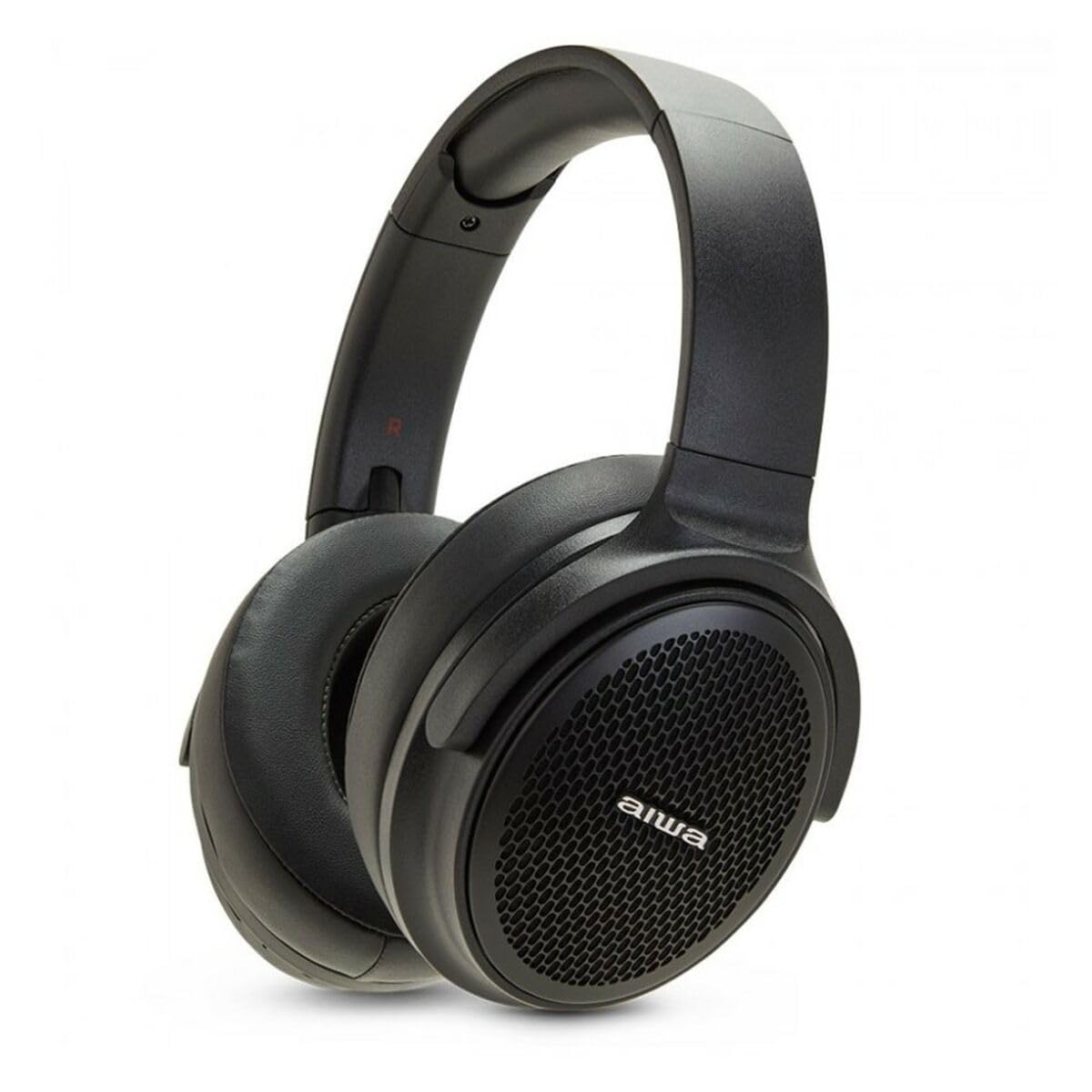
Image: The AIWA HST-250BT headphones shown with the braided micro USB charging cable, 3.5mm aux cable, and deluxe carrying case.
ویژگی های محصول
- اتصال بلوتوث 5.0: برای اتصال بیسیم پایدار و کارآمد.
- HyperBass Technology: Enhanced bass for a rich audio experience.
- Wired and Wireless Operation: Use via Bluetooth or the included 3.5mm audio cable.
- اسلات میکرو SD: Play music directly from a Micro SD card.
- کنترل های یکپارچه: Touch controls for music playback and call management.
- میکروفون داخلی: برای تماس های هندزفری
- باتری قابل شارژ: Long-lasting battery with ultra-low power consumption.
- طراحی ضد آب: محافظت در برابر پاشش و عرق را فراهم میکند.
- طراحی راحت: Over-ear earpiece shape for extended wear.
راه اندازی
1. شارژ کردن هدفون
Before first use, fully charge your AIWA HST-250BT headphones. Use the provided micro USB charging cable.
- Connect the micro USB end of the cable to the charging port on the headphones.
- Connect the USB-A end of the cable to a USB power adapter (not included) or a computer's USB port.
- The LED indicator will illuminate to show charging status. It typically takes approximately 2 hours for a full charge.
- Once fully charged, the LED indicator will change or turn off (refer to the specific LED behavior in your product's quick start guide if available).
2. جفت شدن بلوتوث
Pair your headphones with your smart device for wireless audio.
- از شارژ و خاموش بودن هدفون اطمینان حاصل کنید.
- Press and hold the power button on the headphones until the LED indicator flashes rapidly (usually blue and red), indicating pairing mode.
- On your smart device (smartphone, tablet, computer), go to the Bluetooth settings.
- بلوتوث را روشن کنید و دستگاههای موجود را جستجو کنید.
- Select "AIWA HST-250BT" from the list of found devices.
- Once paired, the LED indicator on the headphones will typically show a slow blue flash or solid blue light.
- اگر از شما رمز عبور خواسته شد، "0000" را وارد کنید.
توجه: هدفونها هنگام روشن شدن، بهطور خودکار سعی میکنند دوباره به آخرین دستگاه جفتشده متصل شوند.
دستورالعمل های عملیاتی
روشن/خاموش برق
- روشن کردن: دکمه پاور را تقریباً 3 ثانیه فشار دهید و نگه دارید.
- خاموش: دکمه پاور را تقریباً 5 ثانیه فشار دهید و نگه دارید.
پخش موسیقی (حالت بلوتوث)
- پخش/مکث: دکمه چند منظوره را یک بار فشار دهید.
- آهنگ بعدی: دکمه افزایش صدا را فشار داده و نگه دارید.
- آهنگ قبلی: دکمه کاهش صدا را فشار داده و نگه دارید.
- افزایش صدا: دکمه افزایش صدا را فشار کوتاه دهید.
- کاهش حجم: دکمه کاهش صدا را فشار کوتاه دهید.
مدیریت تماس
- پاسخ/پایان تماس: دکمه چند منظوره را یک بار فشار دهید.
- رد تماس: دکمه Multi-function را به مدت 2 ثانیه فشار داده و نگه دارید.
- شماره گیری مجدد آخرین شماره: دکمه چند منظوره را دوبار فشار دهید.
با استفاده از کارت حافظه Micro SD
The headphones support direct playback from a Micro SD card.
- یک کارت Micro SD (با پشتیبانی از صدا) وارد کنید files) را در شیار تعیینشده روی هدفون قرار دهید.
- The headphones will automatically switch to Micro SD playback mode or you may need to press a mode button (refer to specific button layout if available).
- Use the music playback controls (Play/Pause, Next/Previous Track, Volume) as described above.
Wired Connection (AUX Mode)
برای اتصال سیمی، از کابل صوتی ۳.۵ میلیمتری موجود در بستهبندی استفاده کنید.
- Connect one end of the 3.5mm audio cable to the AUX input port on the headphones.
- Connect the other end to the 3.5mm audio output jack of your audio source (e.g., smartphone, MP3 player).
- In AUX mode, controls on the headphones (like volume, play/pause) may not function, and you will need to control playback from your audio source.
تعمیر و نگهداری
- تمیز کردن: هدفونها را با یک پارچه نرم و خشک پاک کنید. از پاککنندههای ساینده یا حلالها استفاده نکنید.
- ذخیره سازی: Store the headphones in the provided deluxe carrying case when not in use to protect them from dust and damage.
- مراقبت از باتری: برای افزایش عمر باتری، از خالی شدن کامل شارژ هدفونها به طور مکرر خودداری کنید. آنها را به طور منظم شارژ کنید، حتی اگر برای مدت طولانی استفاده نمیشوند.
- مقاومت در برابر آب: While waterproof, avoid submerging the headphones in water. Dry them thoroughly if they get wet.
عیب یابی
| مشکل | علت احتمالی | راه حل |
|---|---|---|
| هدفونها روشن نمیشوند. | باتری کم. | هدفونها را با استفاده از کابل USB ارائه شده به طور کامل شارژ کنید. |
| نمیتوان با دستگاه جفتسازی کرد. | هدفون در حالت جفتسازی نیست؛ بلوتوث دستگاه خاموش است؛ دستگاه خیلی دور است. | Ensure headphones are in pairing mode (flashing LED). Turn on Bluetooth on your device. Move device closer to headphones (within 10 meters). Forget previous pairings on your device and try again. |
| صدا نداره یا صداش کمه. | صدای هدفون یا دستگاه خیلی کم است؛ منبع صوتی نادرست است؛ هدفونها متصل نیستند. | Increase volume on both headphones and connected device. Ensure headphones are properly paired or the AUX cable is fully inserted. Check if the correct audio output is selected on your device. |
| Micro SD card not playing. | کارت به درستی وارد نشده است؛ پشتیبانی نمیشود file فرمت؛ کارت خراب است. | Reinsert the Micro SD card. Ensure audio files are in a supported format (e.g., MP3). Try a different Micro SD card. |
مشخصات
| ویژگی | جزئیات |
|---|---|
| نام مدل | HST-250BT |
| فناوری اتصال | بیسیم (بلوتوث)، با سیم (جک ۳.۵ میلیمتری صدا) |
| فناوری ارتباطات بی سیم | بلوتوث 5.0 |
| شکل گوشی | بالای گوش |
| نوع درایور صوتی | درایور پویا |
| روش کنترل | لمس کنید |
| ویژگی های خاص | HyperBASS, 10M Range, Call use, Rechargeable, Ultra low power consumption, Micro SD Slot, Waterproof |
| زمان شارژ | تقریبا 2 ساعت |
| دستگاه های سازگار | دستگاه های هوشمند |
| وزن مورد | 100 گرم (3.53 اونس) |
| ابعاد محصول | 19.69 x 19.69 x 11.02 اینچ |
| مواد | نایلون |
| سازنده | AIWA |
اطلاعات ایمنی
Please observe the following safety guidelines for safe operation and to prevent damage to your device:
- هدفون را در معرض دمای شدید، نور مستقیم خورشید یا رطوبت زیاد قرار ندهید.
- برای جلوگیری از آسیب شنوایی از گوش دادن با صدای بلند برای مدت طولانی خودداری کنید.
- سعی نکنید هدفونها را جدا یا تغییر دهید. این کار گارانتی را باطل میکند و ممکن است باعث آسیب شود.
- هدفون را از دسترس کودکان و حیوانات خانگی دور نگه دارید.
- فقط از کابل شارژ ارائه شده یا معادل معتبر آن استفاده کنید.
- محصول را طبق مقررات محلی و به طور مسئولانه دفع کنید. آن را با زبالههای خانگی دور نیندازید.
گارانتی و پشتیبانی
AIWA products are designed and manufactured to the highest quality standards. For warranty information and technical support, please refer to the warranty card included with your purchase or visit the official AIWA webسایت
For further assistance, you may contact AIWA customer support through their official channels.
Note: Specific warranty terms may vary by region. Please retain your proof of purchase for warranty claims.


