1. محصول تمام شدview
The Sharp RP-TT70 is a 12-inch vinyl record player turntable designed to deliver a rich audio experience with modern convenience. It features a classic wooden cabinet and comes with stereo bookshelf speakers. This belt-drive turntable supports multiple playback speeds and offers versatile connectivity options, including dual Bluetooth functionality.

Figure 1.1: Sharp RP-TT70 Turntable and Speakers. The turntable features a stylish wooden finish and a clear dust cover, flanked by two matching stereo bookshelf speakers.
۳. چه چیزهایی شامل میشود
لطفاً محتویات بسته را بررسی کنید تا از وجود همه موارد اطمینان حاصل کنید:
- Sharp RP-TT70 Turntable Unit
- Stereo Bookshelf Speakers (2 units)
- پوشش گرد و غبار
- آداپتور برق
- راهنمای کاربر (این سند)
۱. دستورالعملهای راهاندازی
Follow these steps to set up your Sharp RP-TT70 turntable:
- قرار دادن: صفحه گردان را روی یک سطح صاف و پایدار و دور از نور مستقیم خورشید، منابع گرما و گرد و غبار زیاد قرار دهید. از تهویه مناسب در اطراف دستگاه اطمینان حاصل کنید.
- اتصال بلندگو: Connect the included stereo bookshelf speakers to the "SPEAKER OUT" terminals on the rear of the turntable. Ensure correct polarity (positive to positive, negative to negative).
- اتصال برق: Connect the power adapter to the "POWER IN DC 12V" port on the rear of the turntable, then plug the adapter into a wall outlet.
- پوشش گرد و غبار: Carefully attach the dust cover to the hinges on the back of the turntable.

Figure 3.1: Rear Panel Connections. This image highlights the AUX-IN Jack, RCL (R&L) Speaker Out, Pitch (+)(-) Speed Calibration, and Power In DC 12V ports, crucial for proper setup.
4. دستورالعمل های عملیاتی
۶.۲ پخش صفحه گرامافون
- روشن کردن: برای فعال کردن صفحه گردان، دکمه روشن/خاموش را بچرخانید.
- انتخاب سرعت: Adjust the speed selector to match the record's RPM (33 1/3, 45, or 78 RPM). For 45 RPM records, place the included 45 RPM adapter on the spindle.
- رکورد مکان: صفحه گرامافون خود را با دقت روی صفحه گرامافون قرار دهید.
- بلند کردن تون آرم: با استفاده از اهرم نشانه گیری، به آرامی بازوی تنوره را بلند کنید.
- موقعیت قلم: تون آرم را روی شیار شروع دلخواه صفحه حرکت دهید.
- تون آرم پایینی: با استفاده از اهرم نشانهگیری، به آرامی بازوی تنور را پایین بیاورید. قلم با صفحه تماس پیدا میکند و پخش شروع میشود.
- تنظیم صدا: Adjust the volume using the volume knob on the turntable.
- ویژگی توقف خودکار: The turntable features an auto-stop function that will automatically stop the platter rotation when the record reaches its end.
4.2 قابلیت اتصال بلوتوث
The Sharp RP-TT70 supports dual Bluetooth connectivity, allowing you to stream music in two ways:
- Streaming Vinyl to External Bluetooth Device:
- مطمئن شوید که میز گردان روشن است.
- Activate Bluetooth pairing mode on your external Bluetooth speaker or headphones.
- The turntable will automatically search for and connect to nearby Bluetooth devices. The Bluetooth indicator light will illuminate when connected.
- Once connected, audio from your vinyl record will play through the external Bluetooth device.
- Streaming Music from Your Phone to Turntable Speakers:
- مطمئن شوید که میز گردان روشن است.
- On your smartphone or other Bluetooth-enabled device, search for "Sharp RP-TT70" in the Bluetooth settings.
- Select the turntable to pair. The Bluetooth indicator light will illuminate when connected.
- Once connected, audio from your phone will play through the turntable's included stereo speakers.
4.3 Auxiliary Input (AUX-IN)
Connect external audio devices such as smartphones, tablets, or MP3 players using a 3.5mm audio cable (not included) to the AUX-IN jack on the rear of the turntable. Switch the input mode to AUX to play audio through the turntable's speakers.
4.4 جک هدفون
For private listening, connect headphones to the headphone jack located on the front panel of the turntable.
5. تعمیر و نگهداری
Proper maintenance ensures the longevity and optimal performance of your turntable:
- پوشش گرد و غبار: Always keep the dust cover closed when the turntable is not in use to prevent dust accumulation on the platter and stylus.
- تمیز کردن قلم نوری: Gently clean the stylus regularly using a soft brush designed for turntable styli. Brush from back to front.
- تمیز کردن صفحه گردان: صفحه گرامافون و بلندگوها را با یک پارچه نرم و خشک پاک کنید. از پاککنندهها یا حلالهای ساینده استفاده نکنید.
- Cartridge and Stylus Replacement: The RP-TT70 uses a changeable ceramic cartridge and stylus. If sound quality degrades or the stylus is damaged, replace it with a compatible Sharp replacement part.
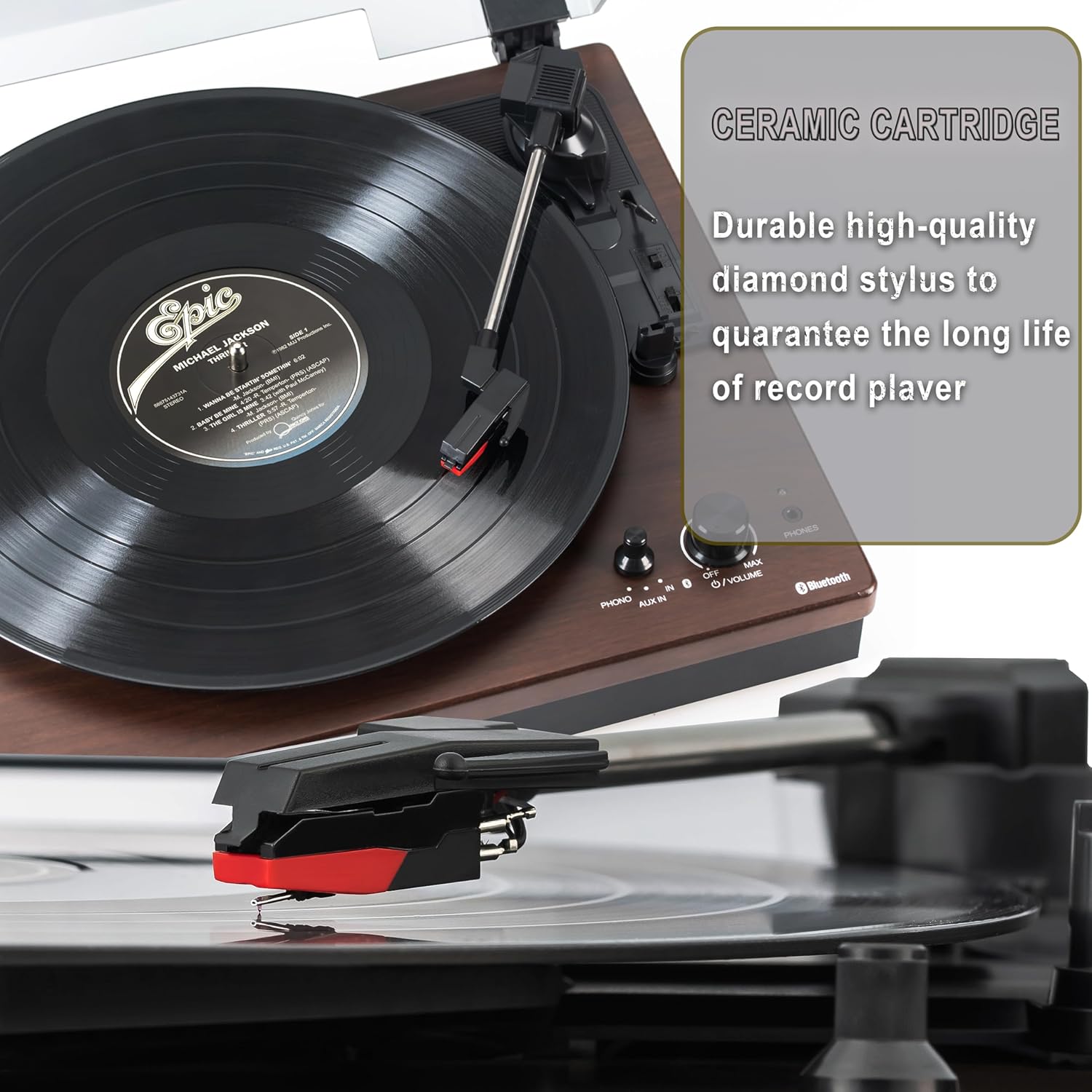
Figure 5.1: Ceramic Cartridge. The turntable is equipped with a durable high-quality diamond stylus designed for extended record playback life.
6 عیب یابی
If you encounter issues with your Sharp RP-TT70, refer to the following common problems and solutions:
| مشکل | علت احتمالی | راه حل |
|---|---|---|
| بدون قدرت | آداپتور برق وصل نیست یا پریز برق فعال نیست. | Ensure power adapter is securely plugged into the turntable and a working wall outlet. |
| صدایی از بلندگوها وجود ندارد | Speakers not connected correctly; Volume too low; Incorrect input mode. | Check speaker cable connections and polarity. Increase volume. Ensure turntable is in PHONO or AUX mode as appropriate. |
| Poor Sound Quality / Skipping | Dirty or worn stylus; Dirty record; Turntable not level. | Clean the stylus and record. Ensure the turntable is on a stable, level surface. Consider replacing the stylus if worn. |
| مشکلات جفت شدن بلوتوث | Device too far; Bluetooth not enabled on external device; Interference. | Ensure devices are within range (approx. 30 ft). Confirm Bluetooth is enabled on the external device. Try restarting both devices. |
| Platter Not Spinning | Belt dislodged; Auto-stop engaged prematurely. | Check if the drive belt is properly seated around the platter and motor pulley. If auto-stop is causing issues, ensure the record is placed correctly. |
7. مشخصات
| ویژگی | جزئیات |
|---|---|
| شماره مدل | RP-TT70 |
| نام تجاری | شارپ |
| ابعاد محصول | 16.8 x 13.5 x 2.8 اینچ |
| وزن مورد | 18.6 پوند |
| فناوری اتصال | Bluetooth (Bi-directional) |
| سرعت های پشتیبانی شده | 33 1/3، 45، 78 دور در دقیقه |
| اجزای شامل | Turntable, Stereo Bookshelf Speakers |
| مواد | پلاستیک ، چوب |
| رنگ | Black (with wooden finish) |
| نوع کارتریج | Changeable Ceramic Cartridge and Stylus |
| ویژگی ها | Belt-drive, Auto-return, Pitch control, Dust cover |
8. گارانتی و پشتیبانی
For warranty information and technical support, please refer to the official Sharp webبه سایت مراجعه کنید یا مستقیماً با خدمات مشتریان آنها تماس بگیرید. رسید خرید خود را به عنوان مدرک خرید برای درخواستهای گارانتی نگه دارید.


