مقدمه
This user manual provides detailed instructions for the Camiysn Typewriter Style Mechanical Gaming Keyboard. Please read this manual thoroughly before using the product to ensure proper operation and to maximize your experience. Keep this manual for future reference.
ویژگی های محصول
- کلیدهای آبی کلیکی: Offers medium resistance, audible click sound, and tactile feedback for a satisfying typing experience.
- Multiple Blue Backlight Modes: Customize your keyboard's lighting with various blue light modes.
- اتصال پلاگین و بازی: Simple USB connection for immediate use with Win 2000/ 7/ 8/ 10/ XP, Vista, Linux, Mac, etc.
- طراحی بادوام: Features two-color injection molded round keycaps for enhanced durability and a unique retro aesthetic.
- استفاده چند منظوره: Equipped with 26 anti-ghosting keys and adjustable rear feet, suitable for both office work and gaming.

Image: The Camiysn Typewriter Style Mechanical Gaming Keyboard in white with blue backlighting, showcasing its full layout and retro round keycaps.
محتویات بسته
لطفا مطمئن شوید که همه اقلام در بسته موجود است:
- Camiysn Typewriter Style Mechanical Gaming Keyboard
- کابل USB

تصویر: یک بیش ازview of the keyboard and its key features, including multiple backlighting options, hot-swappable switches, 26-key punchless design, 12 multimedia buttons, ergonomic design, and wired connection.
راه اندازی
- اتصال کیبورد: Locate an available USB port on your computer (desktop, laptop, or gaming console).
- Plug and Play: Insert the USB cable from the keyboard into the USB port. The keyboard is designed for plug-and-play functionality and should be recognized automatically by your operating system (Windows, Mac, Linux, etc.) without requiring additional drivers.
- Initial Light Check: The keyboard's blue backlighting should illuminate upon successful connection.
دستورالعمل های عملیاتی
کنترل نور پس زمینه
The keyboard features multiple blue backlight modes and adjustable brightness/speed:
- تغییر حالت نور: را فشار دهید Fn + Ins to cycle through different blue light modes.
- تنظیم روشنایی: را فشار دهید Fn + ↑ (فلش بالا) برای افزایش روشنایی. فشار دهید Fn + ↓ (فلش رو به پایین) برای کاهش روشنایی.
- تنظیم سرعت: را فشار دهید Fn + ← (Left Arrow) to slow down the light effect speed. Press Fn + → (Right Arrow) to speed up the light effect.
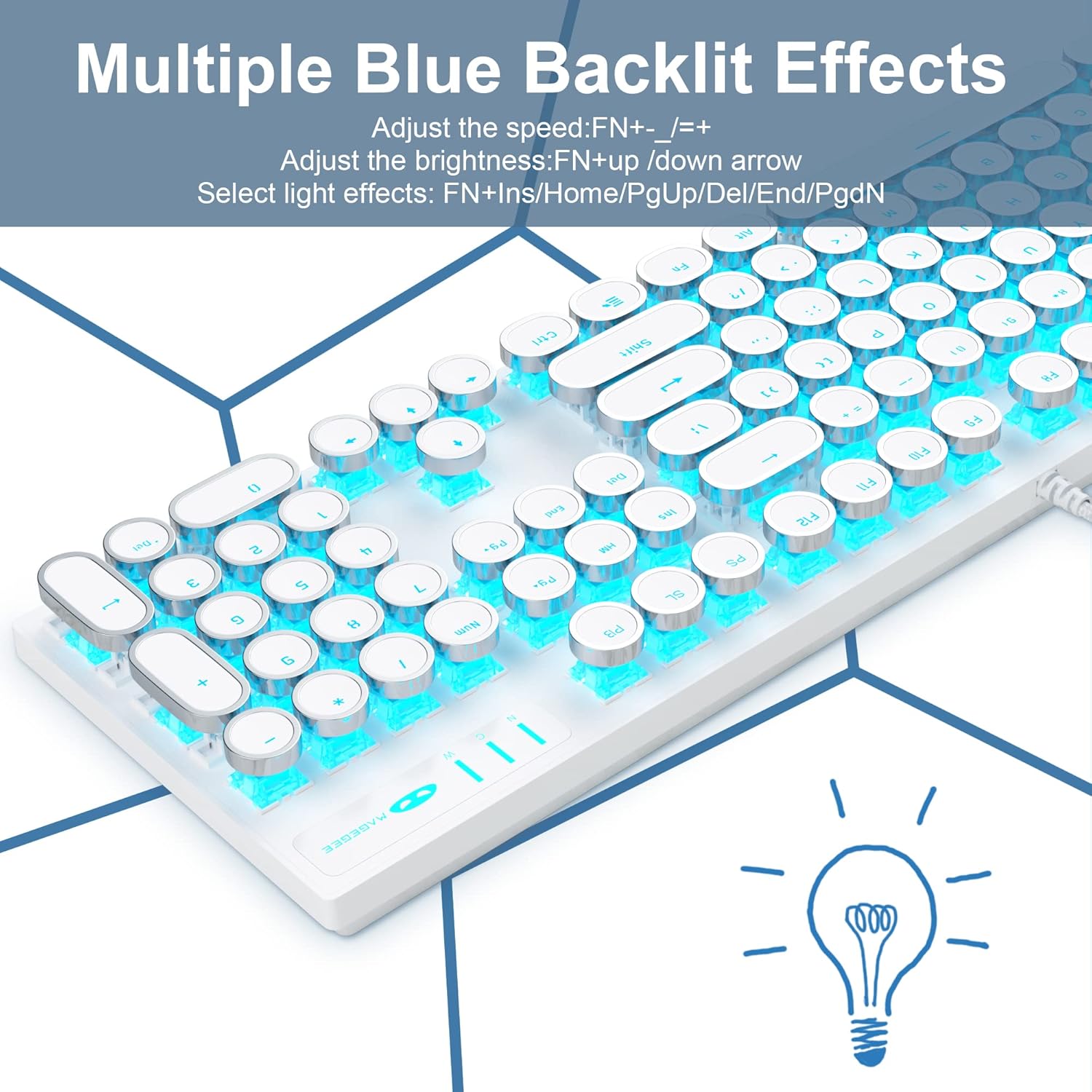
Image: The keyboard displaying various blue backlight effects, illustrating the dynamic lighting capabilities.

Image: A visual guide to combination keys for controlling backlighting, including brightness and speed adjustments.
کلیدهای چندرسانه ای
Access common multimedia functions using the Fn key in combination with the F-keys:
| ترکیب کلید | تابع |
|---|---|
| Fn + F1 | مدیا پلیر |
| Fn + F2 | کاهش حجم |
| Fn + F3 | افزایش حجم |
| Fn + F4 | بی صدا |
| Fn + F5 | توقف |
| Fn + F6 | آخرین آهنگ |
| Fn + F7 | Play/Suspend |
| Fn + F8 | آهنگ بعدی |
| Fn + F9 | ایمیل |
| Fn + F10 | صفحه اصلی |
| Fn + F11 | کامپیوتر من |
| Fn + F12 | ماشین حساب |

Image: The keyboard layout indicating the location and function of multimedia keys when used with the Fn key.
N-Key Rollover (Anti-Ghosting)
The keyboard supports 26-key anti-ghosting, ensuring that multiple simultaneous key presses are registered accurately, which is crucial for fast-paced gaming and efficient typing.

Image: A diagram illustrating the N-Key Rollover feature, highlighting its benefit for gaming and complex key combinations.
تعمیر و نگهداری
To ensure the longevity and optimal performance of your Camiysn keyboard, follow these maintenance guidelines:
- نظافت منظم: از یک پارچه نرم و خشک برای پاک کردن پوشش کلیدها و سطح صفحه کلید استفاده کنید. برای تمیز کردن عمیقتر، از هوای فشرده برای پاک کردن گرد و غبار و آلودگیها از بین کلیدها استفاده کنید.
- اجتناب از مایعات: Do not spill liquids on the keyboard. If accidental spillage occurs, immediately disconnect the keyboard from your computer and allow it to dry completely before reconnecting.
- با احتیاط رفتار کنید: While the two-color injection molded keycaps are durable, avoid excessive force or dropping the keyboard.
- ذخیره سازی: When not in use for extended periods, store the keyboard in a clean, dry environment away from direct sunlight or extreme temperatures.
عیب یابی
اگر با صفحه کلید خود با مشکل مواجه شدید، لطفاً به راهحلهای رایج زیر مراجعه کنید:
| مشکل | علت / راه حل احتمالی |
|---|---|
| Keyboard not responding / Lights not on |
|
| Keys not registering or sticking (e.g., Spacebar, N key) |
|
| نور پس زمینه کار نمیکند یا سوسو میزند |
|
| Incorrect characters typed (e.g., @ instead of 2) |
|
مشخصات
| ویژگی | جزئیات |
|---|---|
| ابعاد محصول | 17.09 x 4.93 x 1.34 اینچ |
| وزن مورد | 2.13 پوند |
| سازنده | Camiysn |
| ASIN | B096DS1R8P |
| شماره مدل مورد | CPKJXFBWHITE602 |
| نام تجاری | Camiysn |
| رنگ | سفید |
| فناوری اتصال | USB سیمی |
| ویژگی خاص | نور پس زمینه |
| دستگاه های سازگار | Gaming Console, PC (Windows/Mac/Linux) |
| نوع سوئیچ کلید | سوئیچ آبی (کلیک) |
| نوع کلید | Round, Two-color Injection Molded |
| ضد شبح | چرخش ۶ کلیده |

Image: Diagram showing the full size of the keyboard with its dimensions (17.1 inches length, 4.95 inches width).

Image: Detailed specifications for the retro punk mechanical keyboard, including key life (50 million times), key force (50 ± 10gf), and conduction stroke (2.2 ± 0.5gf).
گارانتی و پشتیبانی
Camiysn products are designed for reliability and performance. For any product-related inquiries, technical support, or warranty claims, please contact Camiysn customer service directly through the retailer's platform or the official Camiysn webسایت
لطفا رسید خرید خود را برای بررسی گارانتی نگه دارید.


