1. محصول تمام شدview
The THIRDREALITY ZigBee Smart Button is a versatile wireless remote control designed to integrate with your smart home ecosystem. Utilizing the ZigBee 3.0 standard, it offers low power consumption and stable connectivity. This smart button provides three distinct control settings—Pressed, Double Pressed, and Held—allowing you to manage various smart devices or activate predefined scenes with a single action.

تصویر 1.1: جلو view of the THIRDREALITY ZigBee Smart Button.
Its compact and wireless design allows for flexible placement, either by sticking it to a wall with double-sided tape, attaching it to a metallic surface with magnetic strips, or simply placing it on a surface. A Zigbee hub is required for operation and is sold separately.
2. مشخصات
| ویژگی | جزئیات |
|---|---|
| سازنده | Third Reality, Inc |
| شماره مدل | 850001595575 |
| قابلیت اتصال | ZigBee 3.0 Standard |
| منبع تغذیه | 2 AAA Batteries (required, not included) |
| عمر باتری | تا ۲ سال (استفاده عادی) |
| دمای عملیاتی | 0-45 درجه سانتیگراد |
| ابعاد | 1.01 x 0.52 x 3.52 اینچ |
| وزن مورد | 1.44 اونس |
| مواد | پلاستیک |
| رنگ | سفید |

Image 2.1: Key specifications of the Smart Button.
3. راه اندازی
3.1. نصب باتری
The Smart Button requires 2 AAA batteries. To install, open the battery compartment, insert the batteries according to the polarity markings, and close the compartment securely.
3.2. گزینه های نصب
The Smart Button offers flexible mounting:
- نصب چسب: Use the provided double-sided tape to stick the button to a clean, flat surface.
- نصب مغناطیسی: Attach the button to metallic surfaces like a refrigerator using the included magnetic strips.
- قرار دادن: Simply place the button on any convenient surface.

تصویر ۴.۲: مثالample of the Smart Button mounted on a refrigerator.

Image 3.2: Various installation methods for the Smart Button.
۳.۳ جفت شدن با هاب زیگبی
The THIRDREALITY ZigBee Smart Button requires a compatible Zigbee hub (sold separately) to function within your smart home system. Compatible hubs include SmartThings, Aeotec, Hubitat, Home Assistant, and Third Reality Smart Hub. For Apple HomeKit integration, the Smart Bridge MZ1 (sold separately) is required.
Follow the specific pairing instructions provided by your Zigbee hub manufacturer. Generally, this involves putting your hub into pairing mode and then activating the pairing mode on the Smart Button (refer to the button's specific pairing sequence, usually a long press on the button itself).
3.3.1. Connecting to Home Assistant (ZHA)
Video 3.1: Instructions on how to connect the Smart Button to Home Assistant using ZHA.
3.3.2. Connecting to Apple Home (via Matter & Smart Bridge MZ1)
Video 3.2: Guide for connecting the Smart Button to Apple Home using Matter via the Smart Bridge MZ1.
3.3.3. Connecting to Homey
Video 3.3: Instructions for connecting the Smart Button to Homey.
3.3.4. اتصال به الکسا
Video 3.4: Guide for connecting the Smart Button to Alexa.
3.3.5. Connecting to Hubitat
Video 3.5: Instructions for connecting the Smart Button to Hubitat.
4. دستورالعمل های عملیاتی
The Smart Button offers three programmable control settings:
- فشرده شده: A single, quick press of the button.
- Double Pressed: Two quick presses of the button in succession.
- Held: دکمه را برای چند ثانیه فشار داده و نگه دارید.
Each setting can be assigned to control individual smart devices or activate complex smart home scenes through your connected Zigbee hub. For example, a single press could turn on lights, a double press could activate a fan, and a long press could turn off all devices in a room.
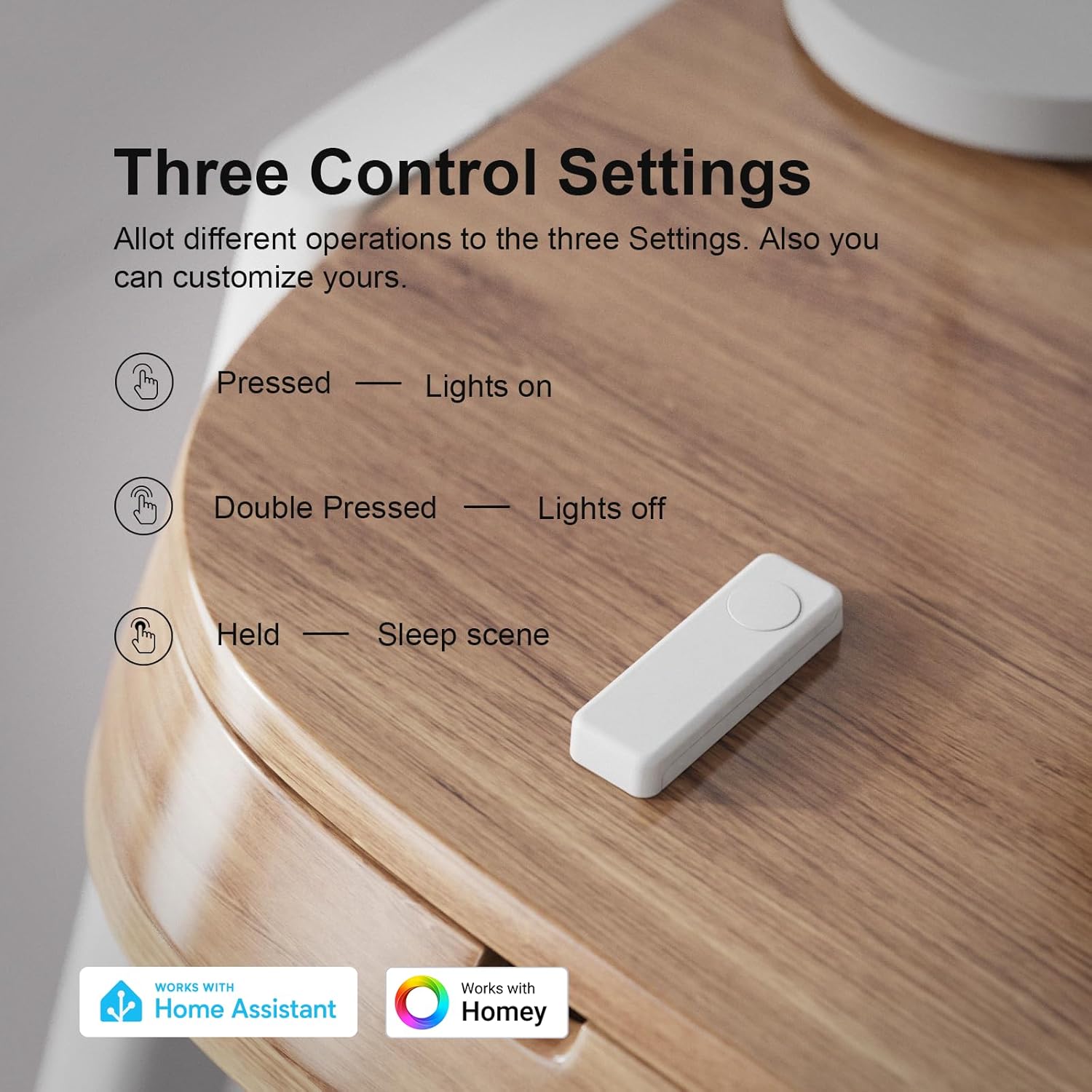
Image 4.1: Illustration of the three programmable control settings.

Image 4.2: The Smart Button can simplify control of a group of connected smart devices.
4.1. کنترل صحنه
You can configure your Smart Button to trigger specific scenes. For instance, a 'movie night' scene could dim lights and close smart blinds with one press, while a 'goodnight' scene could turn off all lights before bed.
4.1.1. Easy to Use Wireless Smart Button
Video 4.3: Demonstration of the THIRDREALITY Wireless Smart Button's ease of use.
4.1.2. Smart Button with THIRDREALITY Smart Bridge MZ1
Video 4.4: Exploring additional functionalities of the Smart Button when paired with the THIRDREALITY Smart Bridge MZ1.
5. تعمیر و نگهداری
5.1. تعویض باتری
The Smart Button is powered by 2 AAA batteries, offering a battery life of up to 3 years under normal usage. When the battery level is low, your connected Zigbee hub or smart home app may provide a notification. Replace the batteries promptly to ensure continuous operation.
- Open the battery compartment on the side of the device.
- باتریهای قدیمی AAA را بردارید.
- باتریهای AAA جدید را وارد کنید و از قطبیت صحیح آنها اطمینان حاصل کنید.
- محفظه باتری را محکم ببندید.

Image 5.1: The Smart Button uses 2 AAA batteries for up to 3 years of operation.
6 عیب یابی
- دستگاه پاسخ نمی دهد: Check battery level and ensure the device is within range of your Zigbee hub. Verify the hub is online and functioning correctly.
- مشکلات جفت شدن: Ensure your Zigbee hub is in pairing mode. Reset the Smart Button (refer to specific reset instructions, usually a long press) and attempt pairing again. Confirm your phone's Bluetooth is on and connected to a stable 2.4GHz Wi-Fi network if using a bridge for setup.
- پاسخ با تأخیر: This can sometimes occur due to network congestion or distance from the Zigbee hub. Consider adding Zigbee repeaters to strengthen your network.
- به روز رسانی سیستم عامل: Ensure your Smart Button's firmware is up to date through your smart home app or the THIRDREALITY app, especially if experiencing new issues.
7. گارانتی و پشتیبانی
For warranty information and technical support, please refer to the documentation included with your product or visit the official THIRDREALITY website. You can also contact customer service through the Third Reality, Inc. seller page on Amazon.


