1. مقدمه
The Godox SL300III LED Video Light is designed for professional video recording, live streaming, and photography applications. It offers a powerful 330W output with a stable 5600K daylight-balanced color temperature. This light features high color fidelity with CRI/TLCI ratings of 96/97, ensuring accurate color reproduction. The SL300III includes 8 built-in FX effects for creative lighting scenarios and supports versatile control options including on-board operation, an optional RC-A6 remote, and the Godox Light App via Bluetooth. Its Bowens mount ensures wide compatibility with various light modifiers, and the rotatable U-shaped yoke provides flexible positioning. The integrated cooling system is designed for quiet operation, making it suitable for sound-sensitive environments.
۲. چه چیزهایی در جعبه است؟
- Godox SL300III LED Video Light
- بازتابنده استاندارد
- سیم برق
3. راهنمای راه اندازی
- نصب نور: Securely attach the Godox SL300III LED Video Light onto a compatible light stand. Twist the knob on the light stand mount to ensure it is firmly secured.
- برق اتصال: Insert the universal three-pin power cord into the power input port on the back of the light. Ensure the connection is secure.
- روشن کردن: Press the power switch located near the power input to turn on the light.
- نصب رفلکتور: Align the standard reflector with the Bowens mount on the front of the light. Push and twist clockwise until it locks into place.
- تنظیم زاویه: Use the rotatable U-shaped yoke to adjust the light's angle as needed. Loosen the locking knobs on the sides of the yoke, position the light, and then tighten the knobs to secure it.
فیلم 1: Godox SL300III Operation Tutorial. This video demonstrates the basic setup, including mounting, power connection, reflector installation, angle adjustment, and initial operation of the light.
4. دستورالعمل های عملیاتی
4.1 تنظیم روشنایی
The SL300III allows for stepless brightness adjustment from 0% to 100%. Use the DIM control knob on the back panel to precisely set the desired light intensity.
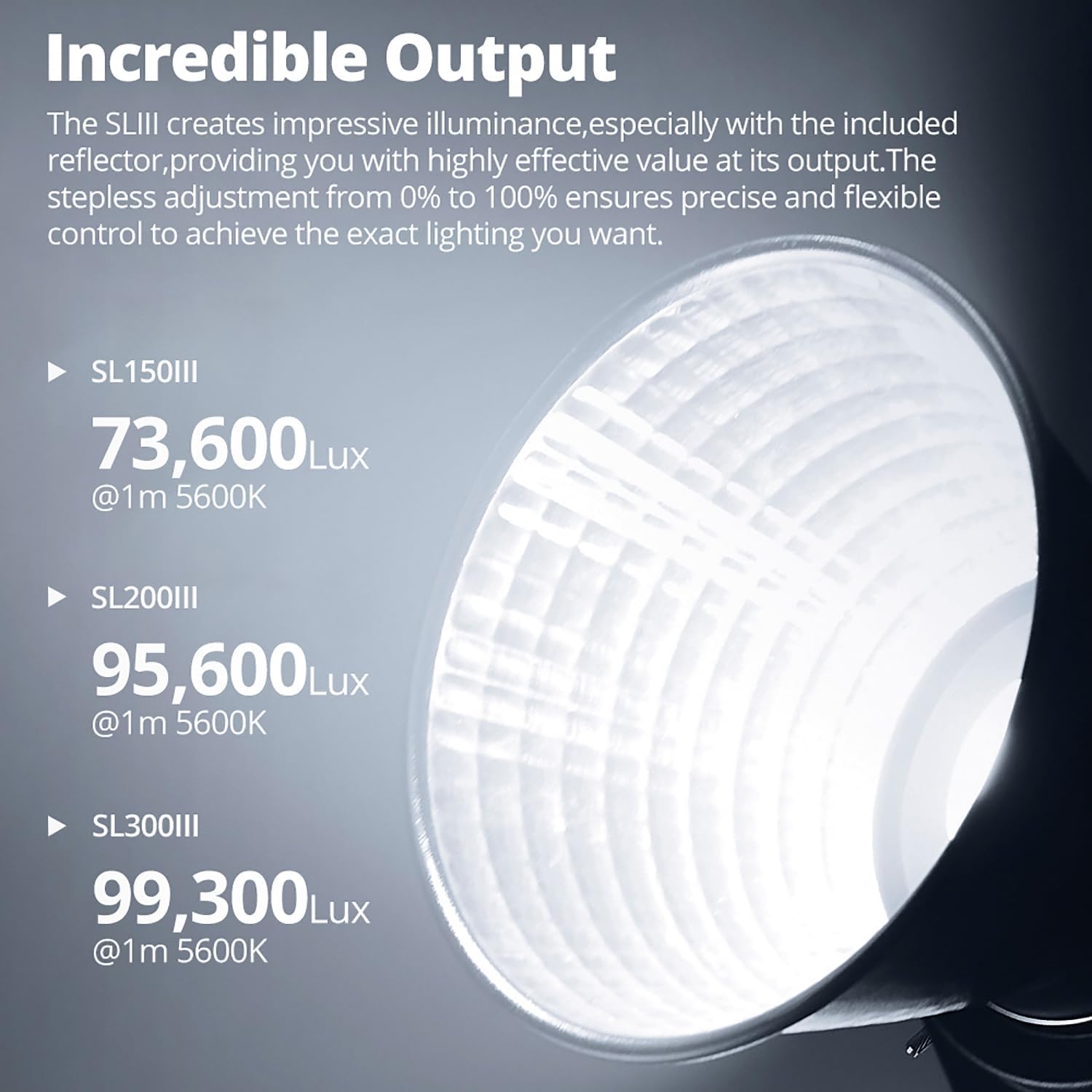
تصویر 1: The Godox SL300III provides impressive illuminance, with stepless adjustment from 0% to 100% for precise control.
4.2 Built-in FX Effects
The light features 8 built-in cinematic FX effects to simulate various lighting scenarios. Press the FX button and rotate the FX control knob to select from effects such as Flash I, Flash II, Flash III, Storm I, Storm II, Storm III, TV, and Bad Bulb.

تصویر 2: Visual representation of the 8 built-in FX effects available on the Godox SL300III.
۵.۲ تنظیمات گروه و کانال
To control multiple lights or avoid interference, you can set the group (A, B, C, D, E, F, 0-9) and channel (1-32) for the light. Use the GR and CH buttons and corresponding control knobs to adjust these settings.
4.4 Remote Control (RC-A6)
The SL300III can be controlled wirelessly using the optional Godox RC-A6 remote control. Ensure the remote and the light are set to the same group and channel for proper communication. The remote allows adjustment of brightness, FX effects, and other settings.
4.5 App Control (Godox Light App)
For enhanced flexibility, the SL300III supports control via the Godox Light App on your smartphone or tablet. To connect, reset the Bluetooth on the light by pressing the Bluetooth button. Then, open the Godox Light App, search for the device, and connect. The app provides comprehensive control over brightness, color temperature, FX effects, and more.
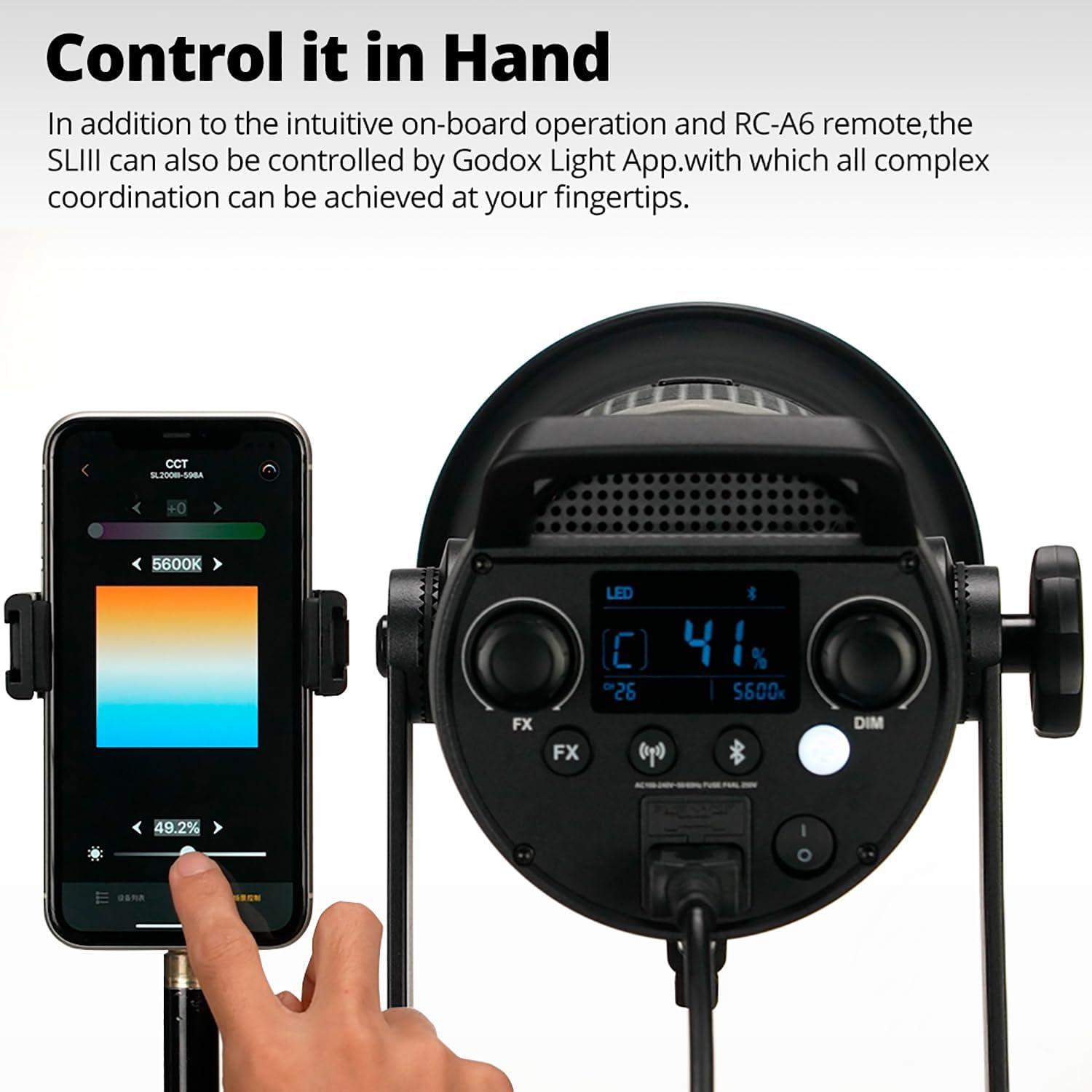
تصویر 3: Controlling the Godox SL300III via the Godox Light App on a smartphone.
4.6 حالت بی صدا
The SL300III features a silent mode, which can be activated by pressing the DIM knob. This reduces fan noise, making the light suitable for sound-sensitive recording environments. Note that activating silent mode may reduce the maximum light output.

تصویر 4: The silent mode feature helps reduce unwanted noise during recording.
فیلم 2: Godox SL300III Product Features. This video highlights key features such as the Bowens mount, brightness adjustment, FX effects, group/channel/ID settings, remote control, and app control.
5. مشخصات
| ویژگی | جزئیات |
|---|---|
| نام تجاری | GODOX |
| شماره مدل | GODOX-SL300II-OP-FBA |
| فناوری اتصال | USB |
| اجزای شامل | SL300III |
| ابعاد بسته بندی | 54.6 × 26.7 × 24.1 سانتی متر |
| وزن بسته بندی | 5.35 کیلوگرم |
| سطح مقاومت در برابر آب | ضد آب نیست |
| گارانتی سازنده | 2 سال |
6. تعمیر و نگهداری
- تمیز کردن: Regularly clean the light's exterior with a soft, dry cloth. Do not use abrasive cleaners or solvents.
- تهویه: Ensure the ventilation openings are clear and unobstructed to prevent overheating.
- ذخیره سازی: Store the light in a dry, dust-free environment when not in use.
- رسیدگی: Handle the light with care to avoid physical damage to the LED chip or housing.
7 عیب یابی
- روشن نشدن چراغ:
- Check if the power cord is securely connected to both the light and the power outlet.
- Ensure the power switch is in the 'ON' position.
- Verify the power outlet is functional. - No Wireless Control (Remote/App):
- Ensure the light and remote/app are set to the same group and channel.
- For app control, reset the Bluetooth on the light and re-pair with the app.
- Check battery levels in the remote control. - گرمای بیش از حد:
- Ensure the ventilation openings are not blocked.
- Operate the light in a well-ventilated area.
- If the light continues to overheat, reduce the brightness or turn it off to cool down. - صدای غیرمعمول:
- If fan noise is disruptive, activate the silent mode (note potential reduction in output).
- If the noise is abnormal or persistent, contact customer support.
8. گارانتی و پشتیبانی
The Godox SL300III LED Video Light comes with a 2-year manufacturer's warranty. For technical support, service, or warranty claims, please contact Godox customer service through their official webلطفاً رسید خرید خود را برای اعتبارسنجی گارانتی نگه دارید.
برای اطلاعات بیشتر به سایت رسمی مراجعه کنید Godox Store.


