1. مقدمه
This manual provides detailed instructions for the safe and efficient operation of your InFocus P120 INL412 Multimedia Projector (Model INL4128). Please read this manual thoroughly before using the projector and keep it for future reference. This projector is designed for high-quality image projection, suitable for various applications including presentations, home entertainment, and gaming.
2. اطلاعات ایمنی
برای جلوگیری از آسیب به پروژکتور و اطمینان از ایمنی کاربر، اقدامات احتیاطی ایمنی زیر را رعایت کنید:
- تهویه: Ensure adequate ventilation around the projector. Do not block ventilation openings. Maintain a minimum distance of 30 cm (12 inches) from walls or other objects.
- منبع تغذیه: فقط از منبع تغذیه و ولتاژ مشخص شده استفاده کنیدtage. Connect the power cord securely.
- گرما: The projector generates heat during operation. Do not touch the projector's vents or exhaust areas directly after use.
- خروجی نور: هنگام روشن بودن پروژکتور، مستقیماً به لنز آن نگاه نکنید.amp روشن است، زیرا نور شدید میتواند به چشم آسیب برساند.
- قرار دادن: Place the projector on a stable, level surface. Avoid placing it in direct sunlight, near heat sources, or in areas with high humidity or dust.
- تمیز کردن: قبل از تمیز کردن، سیم برق را جدا کنید. از یک پارچه نرم و خشک استفاده کنید. از پاک کننده های مایع یا آئروسل استفاده نکنید.
- سرویس دهی: خودتان سعی در سرویس پروژکتور نکنید. تمام مراحل سرویس را به پرسنل خدمات واجد شرایط ارجاع دهید.
3. محصول تمام شدview
3.1 Top Panel and Lens Area
The top panel features the control buttons for basic operation and the lens area with focus and zoom adjustments.

شکل 3.1: بالا view of the InFocus P120 INL412 projector, highlighting the control panel on the right and the lens adjustment area on the left. The InFocus logo is visible on the top surface.
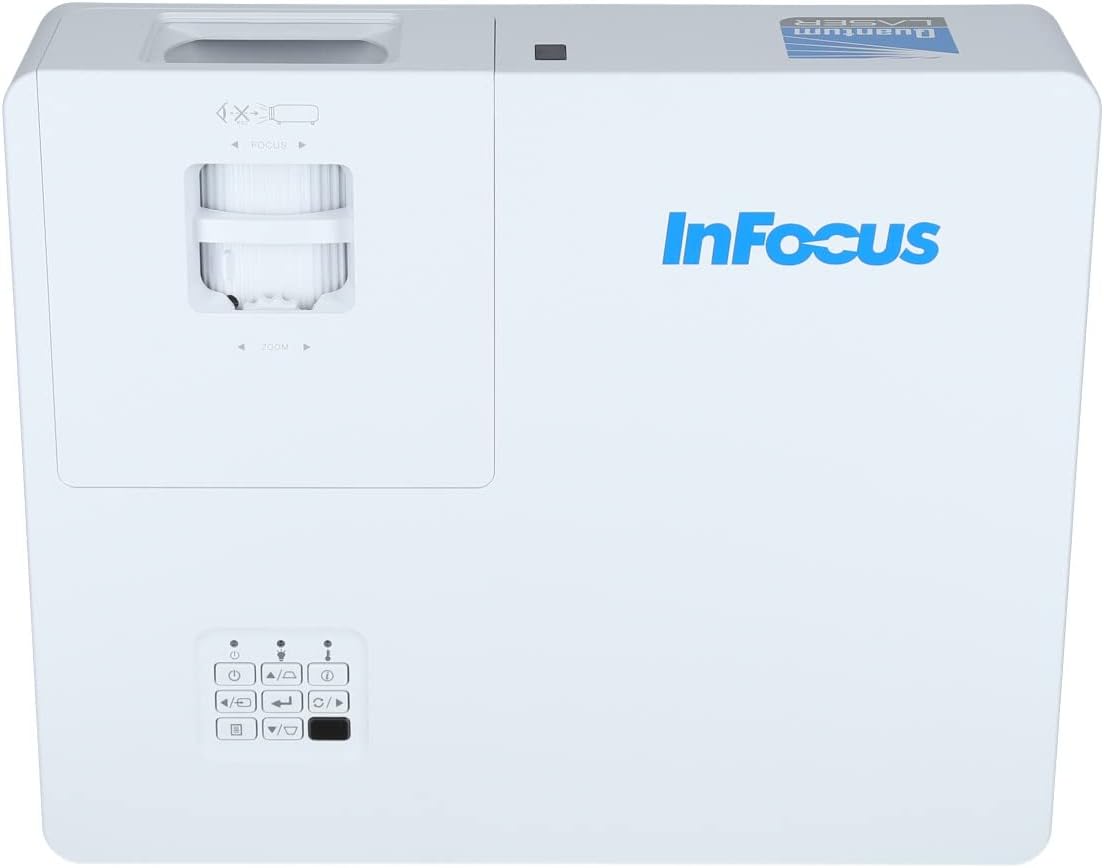
شکل ۳: نمای نزدیکتر view of the projector's top panel, showing the focus and zoom rings near the lens opening and the array of control buttons for power, menu, source selection, and navigation.
3.2 اتصالات پنل عقب
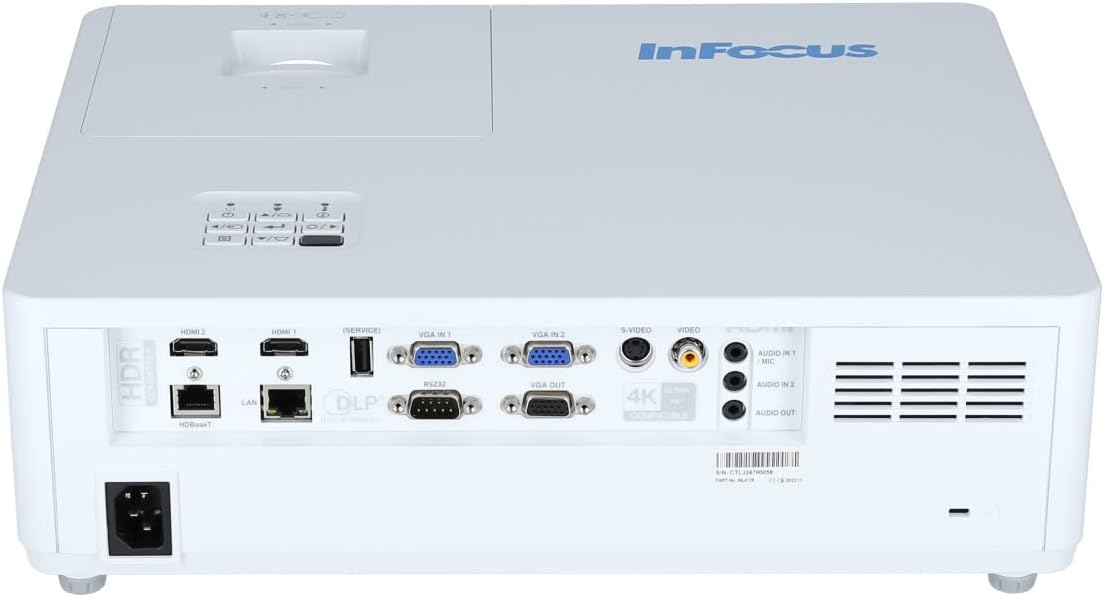
The rear panel provides various input and output ports for connecting external devices.

Figure 3.3: Rear panel of the InFocus P120 INL412 projector, displaying a comprehensive array of connectivity options including HDMI (x2), USB, S-Video, Ethernet (LAN), VGA In (x2), VGA Out, RS232, and Audio In/Out ports. The power input is located on the bottom left.
Key ports include:
- HDMI 1 و 2: For connecting high-definition digital video and audio sources.
- USB: For connecting USB devices, potentially for media playback or firmware updates.
- S-Video: For connecting older video sources.
- VGA IN 1 & 2: For connecting computers or other devices with VGA output.
- خروجی VGA: برای اتصال به مانیتور خارجی.
- اترنت (LAN): برای اتصال به شبکه و کنترل.
- Audio IN 1 & 2 / Audio OUT: برای اتصالات صوتی آنالوگ.
- RS232: برای کنترل سریال.
- ورودی برق: برای اتصال سیم برق متناوب (AC).
3.3 Front and Side Panels
The front panel houses the projection lens and front ventilation, while the side panels feature additional ventilation grilles.

شکل 3.4: جلو view of the InFocus P120 INL412 projector, displaying the main projection lens on the right and the extensive front ventilation grille on the left, crucial for heat dissipation.
شکل 3.5: سمت view of the InFocus P120 INL412 projector, illustrating the side ventilation grilles that contribute to maintaining optimal operating temperature.
4. راه اندازی
۴.۱ محل قرارگیری پروژکتور
Position the projector on a stable, flat surface or mount it securely. Ensure the projector is within the optimal projection distance for your screen size. Maintain clear space around the projector for proper ventilation.
4.2 اتصال دستگاه ها
Before connecting any cables, ensure the projector and all source devices are powered off.
- اتصال HDMI: Connect an HDMI cable from your source device (e.g., laptop, Blu-ray player, gaming console) to either the HDMI 1 or HDMI 2 port on the projector.
- اتصال VGA: Connect a VGA cable from your computer to either VGA IN 1 or VGA IN 2. For audio, connect a separate audio cable from your computer's audio output to the corresponding Audio IN port on the projector.
- اتصال USB: Insert a USB drive into the USB port for media playback (if supported by firmware) or service functions.
- اتصال اترنت (LAN): Connect an Ethernet cable to the LAN port for network control or updates.
- خروجی صدا: If using external speakers, connect an audio cable from the Audio OUT port on the projector to your audio system.
4.3 اتصال برق
Connect the power cord to the projector's power input and then plug the other end into a grounded electrical outlet.
5. دستورالعمل های عملیاتی
5.1 روشن/خاموش کردن
- روشن کردن: را فشار دهید قدرت button on the projector's control panel or the remote control. The power indicator light will change.
- خاموش: را فشار دهید قدرت button again. A confirmation message may appear. Press the button a second time to confirm shutdown. Allow the projector to cool down before unplugging it.
۶.۲ تنظیم فوکوس و زوم
Rotate the focus ring around the lens until the image appears sharp and clear. Use the zoom ring to adjust the image size to fit your screen.
۵.۲ انتخاب منبع ورودی
را فشار دهید منبع button on the control panel or remote control to cycle through available input sources (HDMI 1, HDMI 2, VGA 1, VGA 2, S-Video, USB). Select the input corresponding to your connected device.
5.4 ناوبری منو
استفاده کنید منو button to access the on-screen display (OSD) menu. Use the arrow buttons to navigate through menu options and the وارد کنید برای انتخاب، دکمه را فشار دهید. منو دوباره برای خروج
6. تعمیر و نگهداری
۶.۱ تمیز کردن لنز
Gently wipe the lens with a soft, lint-free cloth specifically designed for optical surfaces. Do not use abrasive cleaners or excessive force, as this can scratch the lens.
6.2 Cleaning the Projector Exterior
Use a soft, dry cloth to clean the projector's casing. For stubborn dirt, dampen the cloth slightly with water, then wipe dry immediately. Avoid getting liquids into the projector's openings.
6.3 Ventilation Care
Regularly check the projector's ventilation grilles for dust accumulation. Use a soft brush or a vacuum cleaner with a brush attachment to gently remove dust from the vents to ensure proper airflow and prevent overheating.
7 عیب یابی
7.1 No Image Displayed
- مطمئن شوید که پروژکتور روشن است و چراغ نشانگر روشن بودن آن ثابت است.
- Verify that the video cable (HDMI, VGA, etc.) is securely connected to both the projector and the source device.
- بررسی کنید که منبع ورودی صحیح روی پروژکتور انتخاب شده باشد.
- Confirm that the source device (laptop, player) is powered on and outputting a signal.
۶.۲ تصویر تار یا خارج از فوکوس است
- حلقه فوکوس روی لنز پروژکتور را تنظیم کنید تا تصویر واضح شود.
- مطمئن شوید که پروژکتور در فاصله صحیح از پرده نمایش قرار دارد.
- اگر لنز پروژکتور کثیف به نظر میرسد، آن را تمیز کنید.
7.3 بدون صدا
- If using HDMI, ensure the source device's audio output is set to HDMI.
- If using VGA, ensure a separate audio cable is connected from the source to the projector's Audio IN port.
- تنظیمات صدا را هم در پروژکتور و هم در دستگاه منبع بررسی کنید.
- If using external speakers, ensure they are properly connected to the Audio OUT port and powered on.
8. مشخصات
| ویژگی | جزئیات |
|---|---|
| نام تجاری | InFocus |
| سازنده | در فوکوس |
| نام مدل | P120 INL412 |
| شماره مدل | INL4128 |
| سال | 2023 |
| رابط سخت افزار | Ethernet, HDMI, S-Video, USB |
| تعداد آیتم ها | 1 |
| نسبت تصویر | 16:9 |
| واتtage | 341 وات |
| باتری های گنجانده شده است | خیر |
| باتری های مورد نیاز | خیر |
| فاکتور فرم | دسکتاپ |
| نوع نصب | پایه میز |
| کنترل از راه دور گنجانده شده است | بله |
| ابعاد محصول | 56.13 × 46.48 × 25.15 سانتی متر |
| وزن مورد | 5.5 کیلوگرم |
| حداکثر اندازه تصویر | 308.28 اینچ |
| حداقل اندازه تصویر | 910.63 میلیمتر |
| اولین تاریخ در دسترس | 5 ژانویه 2022 |
9. گارانتی و پشتیبانی
For warranty information and technical support, please refer to the documentation included with your purchase or visit the official InFocus webسایت. فاکتور خرید خود را برای موارد گارانتی نگه دارید.


