1. مقدمه
Thank you for choosing the InFocus P120 INL412 Multimedia Projector. This manual provides essential information for the safe and efficient operation of your projector. Please read it thoroughly before using the device and retain it for future reference. The InFocus P120 INL412 is designed for versatile multimedia presentations, offering clear and vibrant images for various applications.
2. اطلاعات ایمنی
To ensure safe operation and prevent damage to the projector, please observe the following safety precautions:
- منافذ تهویه را مسدود نکنید. برای جلوگیری از گرم شدن بیش از حد، فضای کافی در اطراف پروژکتور برای جریان هوای مناسب فراهم کنید.
- از نگاه مستقیم به لنز پروژکتور زمانی که lamp روشن است، زیرا نور شدید میتواند به چشم آسیب برساند.
- Do not place the projector on an unstable cart, stand, or table. The projector may fall, causing serious injury to a child or adult, and serious damage to the unit.
- Disconnect the power cord from the wall outlet if the projector will not be used for an extended period.
- تمام مراحل سرویس را به پرسنل خدمات واجد شرایط ارجاع دهید. خودتان سعی نکنید پروژکتور را باز یا تعمیر کنید.
- Keep the projector away from water or moisture. Do not expose it to rain or immerse it in liquid.
- Use only the power cord supplied with the projector or an authorized replacement.
3. محتویات بسته
مطمئن شوید که تمام موارد ذکر شده در زیر در بسته پروژکتور شما موجود است:
- InFocus P120 INL412 Multimedia Projector
- سیم برق
- کنترل از راه دور با باتری
- کابل VGA
- راهنمای کاربر (این سند)
- راهنمای شروع سریع
4. محصول تمام شدview
Familiarize yourself with the main components of your InFocus P120 INL412 projector.
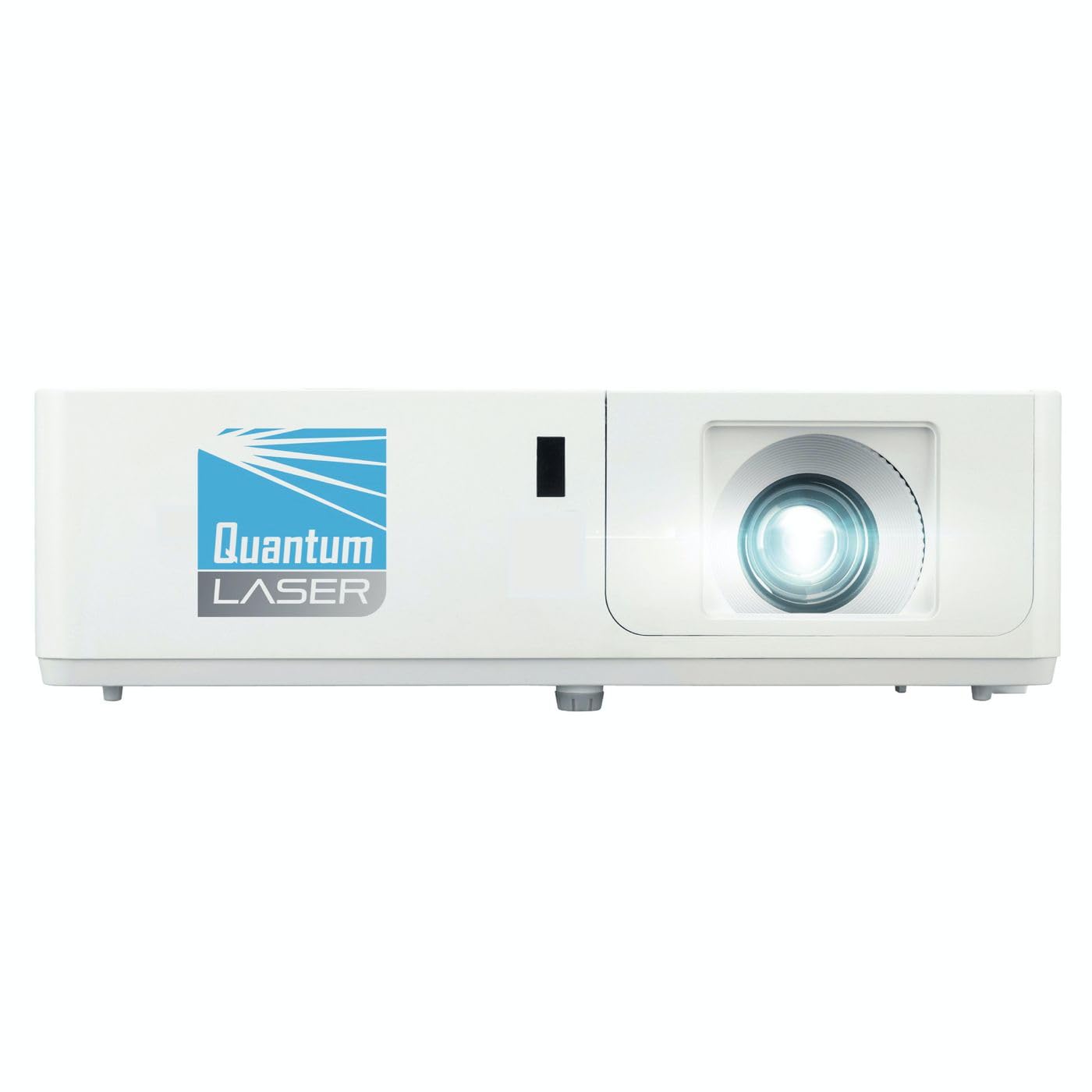
تصویر 1: جلو view of the InFocus P120 INL412 Multimedia Projector, showing the lens and ventilation grilles.
4.1 صفحه جلو
- لنز پروجکشن: تصویر را روی صفحه نمایش منتشر میکند.
- حلقه کانونی: وضوح تصویر پخش شده را تنظیم میکند.
- حلقه زوم: اندازه تصویر پخش شده را تنظیم میکند.
- گیرنده IR: سیگنال هایی را از کنترل از راه دور دریافت می کند.
4.2 صفحه برتر
- کنترل پنل: Buttons for power, menu navigation, source selection, and keystone correction.
- چراغ های نشانگر: Display the projector's status (e.g., power, lamp, temperature).
۴.۲ پنل پشتی (اتصالات)
- ورودی HDMI: Connects to HDMI-enabled devices (laptops, Blu-ray players).
- ورودی VGA: Connects to computers with VGA output.
- پورت USB: For service or connecting USB devices (if supported by model).
- ورودی/خروجی صدا: برای اتصال منابع صوتی خارجی یا بلندگوها.
- ورودی برق: سیم برق را وصل می کند.
5. راه اندازی
این مراحل را برای راه اندازی اولیه پروژکتور خود دنبال کنید:
- قرار دادن: Place the projector on a stable, flat surface or mount it securely. Ensure the projector is positioned at an appropriate distance from the screen to achieve the desired image size.
- اتصال برق: Connect the power cord to the projector's power inlet and then to a grounded electrical outlet.
- اتصال دستگاه منبع: Connect your source device (e.g., laptop, DVD player) to the projector using an appropriate cable (HDMI, VGA, etc.). Ensure the cable is securely connected to both the source and the projector.
- روشن کردن: Press the power button on the projector's control panel or the remote control to turn on the projector. The power indicator light will illuminate.
- Adjust Focus and Zoom: Once an image is projected, rotate the focus ring on the lens until the image is sharp and clear. Use the zoom ring to adjust the image size to fit your screen.
- تصحیح کیستون: If the image appears trapezoidal, use the keystone correction function (either via buttons on the projector/remote or through the on-screen menu) to square the image.
6. دستورالعمل های عملیاتی
6.1 روشن/خاموش
- روشن کردن: Press the power button once. The projector will go through a warm-up sequence.
- برای خاموش کردن: Press the power button twice. The first press will prompt a shutdown confirmation; the second press will initiate shutdown. Allow the projector to cool down completely before unplugging.
6.2 انتخاب منبع
Press the 'Source' button on the projector or remote control to cycle through available input sources (HDMI, VGA, etc.) until your desired source is displayed.
6.3 ناوبری منو
Press the 'Menu' button to access the on-screen display (OSD) menu. Use the arrow buttons to navigate through options and 'Enter' or 'OK' to select. Use the 'Exit' or 'Menu' button to close the OSD.
- تنظیمات تصویر: روشنایی، کنتراست، رنگ، نسبت ابعاد و حالت تصویر را تنظیم کنید.
- تنظیمات نمایشگر: Configure keystone, projection mode (front/rear, desktop/ceiling), and resolution.
- تنظیمات صدا: Control volume and audio output options.
- تنظیمات سیستم: Manage language, timer, power-saving modes, and factory reset.
7. تعمیر و نگهداری
نگهداری منظم، عملکرد بهینه را تضمین میکند و طول عمر پروژکتور شما را افزایش میدهد.
- تمیز کردن لنز: لنز پروژکتور را به آرامی با یک پارچه نرم و بدون پرز که مخصوص سطوح اپتیکی طراحی شده است، پاک کنید. از پاک کنندههای ساینده یا نیروی بیش از حد استفاده نکنید.
- نظافت کابینت: Use a soft, dry cloth to clean the projector's exterior. For stubborn marks, dampen the cloth slightly with water. Avoid using harsh chemicals.
- تمیز کردن/تعویض فیلتر هوا: Check the air filter periodically. If your model has a removable filter, clean it with a soft brush or vacuum cleaner. Replace the filter as recommended in the on-screen menu or when visibly dirty to maintain proper ventilation.
- Lamp جایگزینی: پروژکتور lamp طول عمر محدودی دارد. وقتی lamp life indicator appears, or the image brightness significantly decreases, replace the lamp according to the instructions provided in the full service manual or by a qualified technician. Always allow the projector to cool down completely before attempting lamp جایگزینی
8 عیب یابی
برای مشکلات رایج و راهحلهای آنها به جدول زیر مراجعه کنید:
| مشکل | علت احتمالی | راه حل |
|---|---|---|
| هیچ تصویری نمایش داده نمی شود | Power cord disconnected, incorrect input source, source device off. | Check power connections. Select correct input source. Ensure source device is powered on. |
| تصویر تار است | لنز خارج از فوکوس، فاصلهی نادرست برای نمایش تصویر. | Adjust the focus ring on the lens. Reposition the projector closer or further from the screen. |
| تصویر ذوزنقهای است | پروژکتور عمود بر پرده نمایش نیست. | Use keystone correction (manual or automatic) to square the image. |
| پروژکتور بیش از حد گرم میشود و خاموش میشود | Blocked ventilation, dirty air filter. | از فضای خالی اطراف دریچهها اطمینان حاصل کنید. فیلتر هوا را تمیز یا تعویض کنید. |
| کنترل از راه دور کار نمی کند | Dead batteries, obstruction between remote and projector, incorrect angle. | Replace batteries. Ensure clear line of sight to IR receiver. Point remote directly at the projector. |
9. مشخصات
Key technical specifications for the InFocus P120 INL412 Multimedia Projector:
| ویژگی | مشخصات |
|---|---|
| شماره مدل | P120 INL412 (Item model number: 7296144) |
| نوع نمایشگر | DLP |
| وضوح بومی | 1280×800 |
| حداکثر وضوح صفحه نمایش | 1280×800 |
| فناوری اتصال | USB (and other standard inputs like HDMI, VGA) |
| ابعاد محصول | 5.25 x 0.31 x 1.66 اینچ |
| وزن مورد | 6.6 پوند |
| سازنده | در فوکوس |
10. گارانتی و پشتیبانی
The InFocus P120 INL412 Multimedia Projector comes with a standard manufacturer's warranty. Please refer to the warranty card included in your package for specific terms and conditions, including warranty duration and coverage details. For technical support, service, or further inquiries, please visit the official InFocus support webسایت یا با بخش خدمات مشتریان آنها تماس بگیرید.
برای دریافت جدیدترین اطلاعات پشتیبانی، لطفاً به آدرس زیر مراجعه کنید: www.infocus.com/support


