1. مقدمه
Thank you for choosing the Dalton 10 kVA Uninterruptible Power Supply (UPS) unit. This manual provides essential information for the safe and efficient operation of your UPS. Please read this manual thoroughly before installation and operation, and keep it for future reference.
This UPS is designed to provide reliable power protection for critical equipment, safeguarding against power outages, surges, and fluctuations. Its advanced technology ensures stable and clean power delivery, extending the lifespan of your connected devices.
2. اطلاعات ایمنی
Always observe the following safety precautions to prevent injury or damage to the UPS and connected equipment:
- یو پی اس را باز نکنیدasinز. هیچ قطعهای که توسط کاربر قابل تعمیر باشد در داخل وجود ندارد. تمام مراحل سرویس را به پرسنل خدمات واجد شرایط ارجاع دهید.
- مطمئن شوید که یو پی اس به پریز برق دارای اتصال زمین متصل است.
- Do not block ventilation openings. Adequate airflow is crucial for proper cooling.
- Avoid installing the UPS in areas with excessive dust, humidity, or extreme temperatures.
- Disconnect the UPS from the AC power source before performing any maintenance or moving the unit.
- باتریها میتوانند خطر برقگرفتگی و جریان اتصال کوتاه بالا را ایجاد کنند. هنگام کار با باتریها، اقدامات احتیاطی لازم را رعایت کنید.
3. محتویات بسته
Carefully unpack the UPS and check if all items are present and undamaged. If any items are missing or damaged, contact your dealer immediately.
- Dalton 10 kVA UPS Unit
- راهنمای کاربر (این سند)
- کابل برق ورودی
- Output Power Cables (quantity may vary)
- USB Communication Cable (for monitoring software)
- سیدی نرمافزار (در صورت وجود)
4. محصول تمام شدview
The Dalton 10 kVA UPS is a robust power protection solution. Below is an overview of its typical components and features.
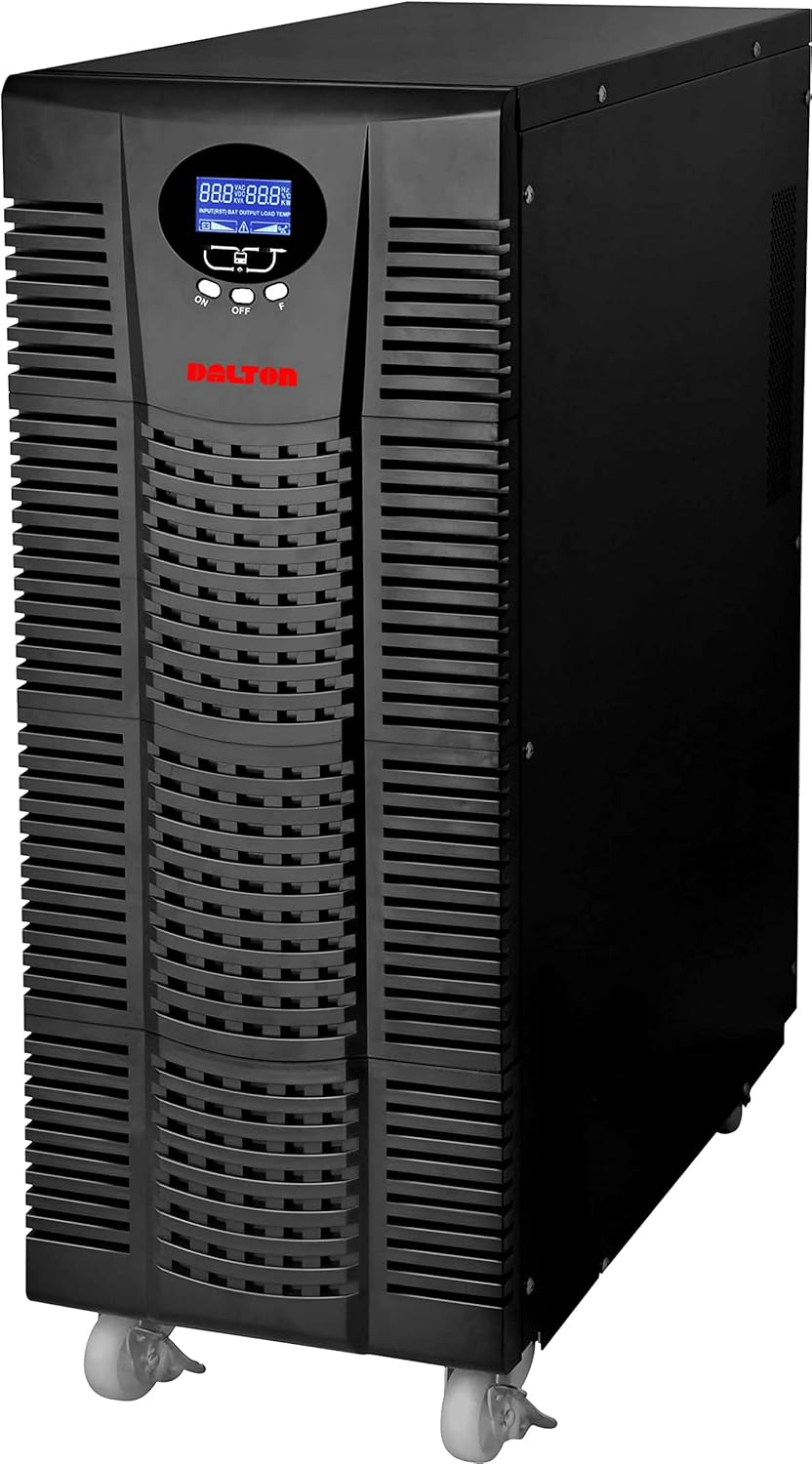
شکل 4.1: جلو view of the Dalton 10 kVA UPS unit. This image displays the tall, black tower design of the UPS, featuring a prominent vented front panel for airflow and integrated wheels at the base for easy mobility. The control panel and display are visible towards the top of the unit.
4.1 صفحه جلو
- نمایشگر LCD: Shows real-time status, input/output voltage, battery level, load percentage، و کدهای خطا.
- دکمه های کنترل: Used to navigate menus, acknowledge alarms, and perform system tests.
- دکمه پاور: یو پی اس را روشن یا خاموش می کند.
4.2 پنل عقب
- اتصال برق ورودی: For connecting the UPS to the main AC power source.
- مخازن خروجی: For connecting protected equipment.
- Communication Ports (USB/RS232): For connecting to a computer for monitoring and management.
- External Battery Connector (if applicable): For connecting optional external battery packs.
- قطع کننده مدار: محافظت در برابر اضافه بار را فراهم میکند.
5. راه اندازی و نصب
Follow these steps for proper installation of your UPS unit:
- قرار دادن:
- Place the UPS in a clean, dry, and well-ventilated area.
- Ensure sufficient clearance around the unit for proper airflow.
- Avoid direct sunlight, heat sources, and excessive moisture.
- شارژ اولیه باتری:
- یو پی اس را به یک پریز برق AC متصل کنید.
- Allow the UPS to charge for at least 8 hours before connecting any equipment to ensure full battery capacity. The display will indicate charging status.
- تجهیزات اتصال:
- With the UPS turned off and fully charged, connect your critical equipment (computers, servers, networking devices) to the UPS output receptacles.
- Do not connect laser printers or other high-surge current devices to the battery-backed outlets, as this may overload the UPS.
- روشن شدن:
- Press and hold the power button on the front panel until you hear a beep and the display illuminates.
- The UPS will perform a self-test and then enter normal operating mode.
6. دستورالعمل های عملیاتی
6.1 عملیات عادی
Once powered on, the UPS continuously monitors the incoming AC power. In normal mode, it provides clean and stable power to connected devices.
6.2 حالت باتری
If the utility power fails or fluctuates outside acceptable limits, the UPS will automatically switch to battery mode, providing power from its internal batteries. An audible alarm will sound, and the LCD display will indicate "Battery Mode".
- During battery mode, save your work and shut down connected equipment gracefully to prevent data loss.
- The duration of battery backup depends on the load connected and the battery charge level.
۲.۳ خاموش کردن یو پی اس
To turn off the UPS and disconnect power to connected devices:
- Shut down all connected equipment.
- Press and hold the power button on the UPS until it powers off.
- Disconnect the UPS from the AC power outlet.
7. تعمیر و نگهداری
7.1 مراقبت از باتری
- Regularly charge the batteries by keeping the UPS connected to AC power.
- Perform a battery self-test periodically (refer to your UPS display menu for this option) to check battery health.
- Batteries have a limited lifespan (typically 3-5 years). Contact service for battery replacement when performance degrades.
7.2 تمیز کردن
- Clean the exterior of the UPS with a soft, dry cloth.
- از پاک کننده های مایع و اسپری استفاده نکنید.
- مطمئن شوید که منافذ تهویه عاری از گرد و غبار و آوار هستند.
8 عیب یابی
این بخش راهحلهایی برای مشکلات رایجی که ممکن است با UPS خود مواجه شوید، ارائه میدهد.
| مشکل | علت احتمالی | راه حل |
|---|---|---|
| یو پی اس روشن نمیشود. | برق ورودی AC وجود ندارد؛ باتری ضعیف است؛ خطای UPS رخ داده است. | Check power cord connection and wall outlet. Allow UPS to charge for several hours. Contact service if problem persists. |
| یو پی اس در حالت عادی بوق ممتد می زند. | Overload; Battery fault. | Reduce connected load. Perform battery self-test. |
| زمان پشتیبان گیری کوتاه. | Overload; Old battery; Insufficient charging. | Reduce load. Replace battery. Ensure UPS is fully charged. |
For issues not listed here, or if solutions do not resolve the problem, please contact Dalton customer support.
9. مشخصات
| ویژگی | جزئیات |
|---|---|
| نام تجاری | دالتون |
| مدل | یو پی اس 10 کیلو ولت آمپر |
| حداکثر توان | 10,000 وات |
| توان خروجی | 10,000 وات |
| محدوده فرکانس | 50/60 هرتز (± 3 هرتز) |
| نوع رابط | IEC 320, Battery |
| رنگ | مشکی |
| مواد | فلز |
| ASIN | B09NC2FXNC |
| اولین تاریخ در دسترس | 9 دسامبر 2021 |
10. گارانتی و پشتیبانی
Dalton provides comprehensive support for its products. As authorized distributors in the Arab Republic of Egypt, we maintain an authorized service center for all Dalton UPS units.
- For technical assistance, troubleshooting, or warranty claims, please contact our authorized service center.
- Ensure you have your product model and ASIN (B09NC2FXNC) ready when contacting support.
- تعمیرات یا تغییرات غیرمجاز، گارانتی محصول را باطل میکند.
For more information, please visit the official Dalton webسایت یا با توزیع کننده محلی خود تماس بگیرید.


