1. مقدمه و بیش ازview
The Garmin Tread SxS Edition is a rugged 8-inch powersport navigator designed for off-road adventures. It features an ultrabright, glove-friendly touchscreen display, providing clear visibility in various conditions. This device offers turn-by-turn trail navigation, Group Ride Radio for communication and tracking, and built-in inReach technology for global satellite communication and interactive SOS capabilities. The Tread SxS is built to withstand challenging environments, ensuring reliable performance during your expeditions.
۲. محتویات جعبه و تنظیمات
2.1 محتویات بسته
- Tread - SxS Edition Navigator
- Group Ride Radio
- Fist Mic
- آنتن VHF
- کیت نصب آنتن
- Locking Magnet-Assisted Mount
- Tube Mount Kit
- High-Current Power Cable
- کابل USB
- مستندات
2.2 راه اندازی اولیه
- نصب دستگاه: Secure the Tread SxS navigator using the provided locking magnet-assisted mount or the tube mount kit, depending on your vehicle's setup. Ensure the mount is firmly attached and the device is positioned for optimal viewو دسترسیپذیری.
- اتصال برق: Connect the high-current power cable to your vehicle's power source and to the navigator. Ensure a stable power supply for continuous operation, especially when using features like Group Ride Radio.
- نصب آنتن: Attach the VHF antenna to the Group Ride Radio and mount it using the antenna mount kit for optimal signal reception.
- روشن شدن اول: Power on the device. Follow the on-screen prompts to complete initial setup, including language selection and basic preferences.
- به روز رسانی نرم افزار: Connect the device to a Wi-Fi network or a computer via the USB cable to check for and install any available software updates. Keeping your device updated ensures access to the latest features and map data.

Image: The rugged back of the Garmin Tread SxS navigator, highlighting its durable construction and mounting interface.
3. ویژگی های کلیدی
- Rugged, Weather-Resistant Design: The Tread SxS features an 8-inch ultrabright, glove-friendly touchscreen. It is IP67 rated, meaning it is dust-tight and can withstand incidental exposure to water up to 1 meter for 30 minutes.
- Group Ride Radio: Stay connected with friends using the Group Ride Radio, which includes a push-to-talk fist mic and allows group tracking for up to 20 riders. (Note: Group tracking requires a Tread navigator for each rider and connection to vehicle power for full functionality.)
- Turn-by-Turn Trail Navigation: Navigate unpaved roads and trails with preloaded adventure roads and trails map content, including OpenStreetMap and USFS Motor Vehicle Use Maps. (Limitations may exist in map data; always defer to posted road signs and conditions.)
- Preloaded Topographic Maps & BirdsEye Satellite Imagery: Access 3D terrain maps of North and Central America, U.S. public and private landowner information, and subscription-free BirdsEye Satellite Imagery via direct-to-device download.
- Tread App Integration: Pair with the Tread app on your compatible smartphone to track friends via Group Ride Mobile, sync trip data, and plan routes with consistent maps and vehicle profiles. (Group Ride Mobile requires the Tread app, Bluetooth, and an active cellular connection.)
- Built-in inReach Technology: Offers global satellite communication, two-way text messaging, location sharing, and interactive SOS capabilities. (Requires an active subscription; some jurisdictions regulate or prohibit satellite communication devices.)
- سنسورهای مجتمع: Features a built-in altimeter, barometer, compass, and pitch and roll gauges to assist with navigating challenging terrain.
- Garmin Ecosystem Compatibility: Works with other Garmin off-road products, such as the Garmin PowerSwitch digital switch box for 12-volt accessory control and select Garmin GPS dog tracking devices.
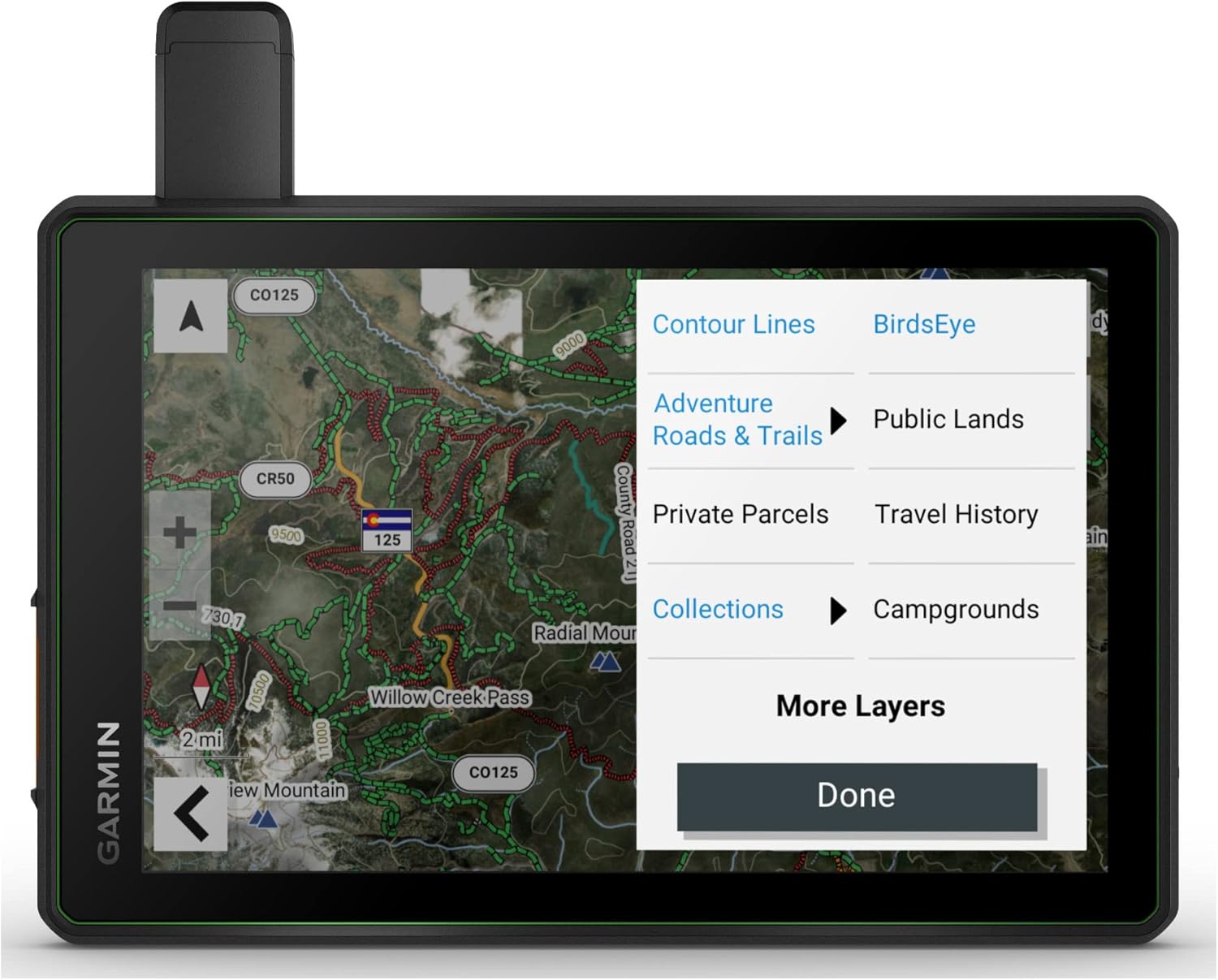
Image: The Garmin Tread SxS display showing various map layers for detailed navigation.
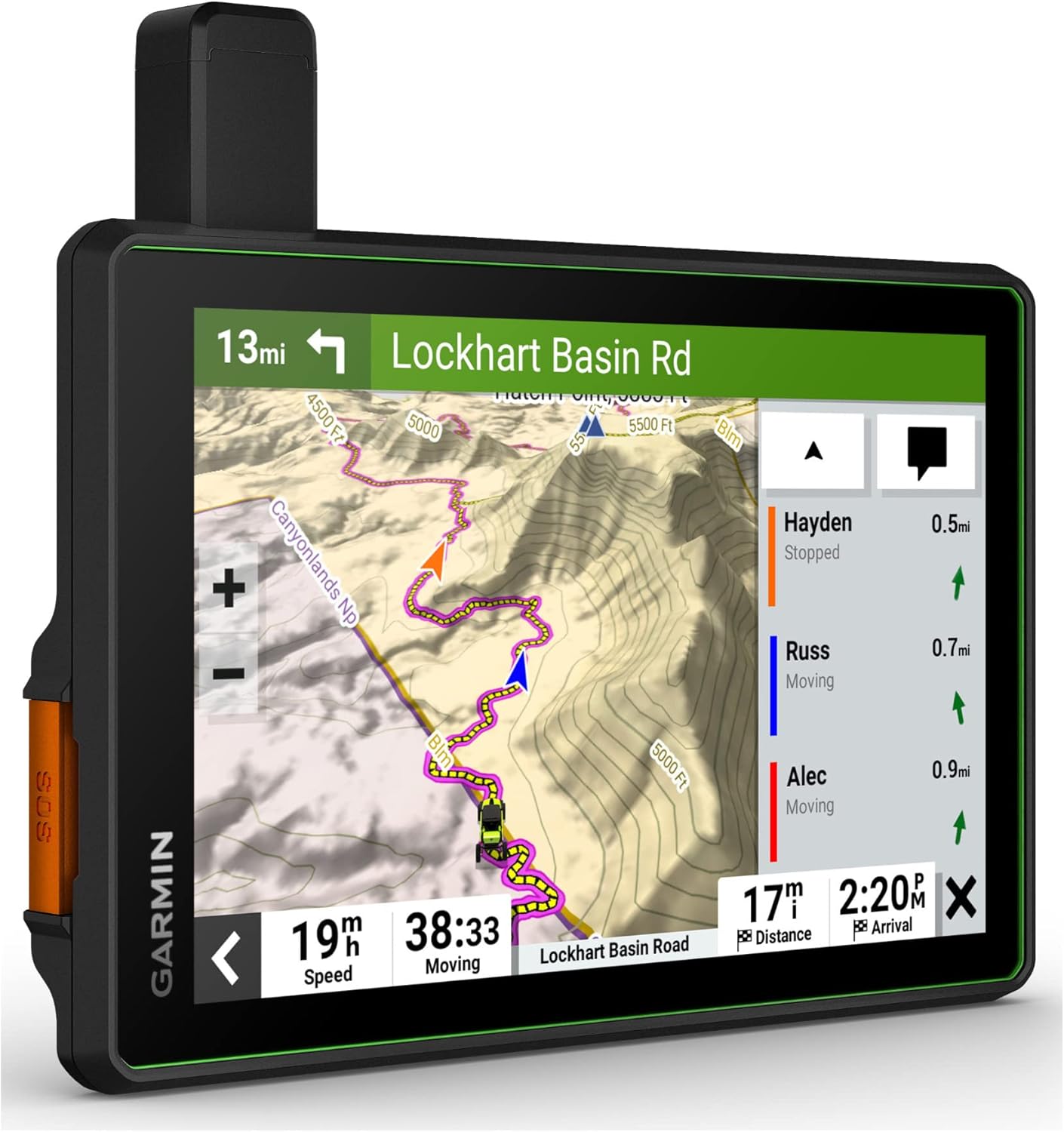
Image: The Garmin Tread SxS displaying real-time group ride tracking on a trail map.

Image: The Garmin Tread SxS inReach messaging screen, demonstrating two-way text communication.
4. دستورالعمل های عملیاتی
4.1 ناوبری اولیه
- Starting a Route: From the main menu, select 'Where To?' and choose your destination (e.g., address, point of interest, saved location). The device will calculate a route based on preloaded maps and your vehicle profile.
- Following a Trail: Utilize the turn-by-turn trail navigation feature. The device will guide you along unpaved roads and trails, displaying your progress and upcoming turns.
- نقشه Views: Switch between different map views, including topographic maps, 3D terrain, and BirdsEye Satellite Imagery, to get the best perspective for your current environment.
4.2 Using Group Ride Radio
- Connecting to a Group: Ensure all riders have a Tread navigator and are within range. Follow the on-screen instructions to create or join a group ride.
- Tracking Riders: پس از اتصال، می توانید view the location of up to 20 riders on your map.
- Push-to-Talk Communication: Use the included fist mic for instant voice communication with your group.
4.3 inReach Satellite Communication
- ارسال پیام: Compose and send two-way text messages to any phone number or email address, even outside cellular coverage.
- اشتراک گذاری موقعیت مکانی: موقعیت مکانی خود را با دوستان و خانواده به اشتراک بگذارید و به آنها اجازه دهید پیشرفت شما را پیگیری کنند.
- کمک اضطراری تعاملی: In case of emergency, activate the interactive SOS feature to send a distress signal to the Garmin International Emergency Response Coordination Center (IERCC).
4.4 Tread App Functionality
- برنامهریزی مسیر: Use the Tread app on your smartphone to plan routes with the same maps and vehicle profiles as your device.
- همگام سازی داده ها: Sync waypoints, tracks, routes, and collections across all your devices.
- Group Ride Mobile: Track friends who are also using the Tread app with Bluetooth technology and an active cellular connection.
Video: Official Garmin video showcasing the features and usage of the Tread SxS navigator in off-road environments.
5. تعمیر و نگهداری
- تمیز کردن دستگاه: Regularly clean the touchscreen and device exterior with a soft, lint-free cloth. For stubborn dirt, use a mild soap solution and wipe gently. Avoid abrasive cleaners or solvents.
- به روز رسانی نرم افزار: Periodically check for and install software updates via Wi-Fi or Garmin Express on your computer. Updates often include performance improvements, bug fixes, and new features.
- مراقبت از باتری: For optimal battery life, avoid exposing the device to extreme temperatures. If storing the device for an extended period, charge it to approximately 50% before storage.
- Mounting System Check: Before each ride, ensure all components of the mounting system are securely fastened and free from damage.
6 عیب یابی
- روشن نشدن دستگاه: Ensure the device is properly connected to a power source and the power cable is not damaged. Check the vehicle's power outlet or fuse.
- بدون سیگنال GPS: مطمئن شوید که دستگاه شفاف است view of the sky. Move to an open area away from tall buildings or dense tree cover. Allow several minutes for the device to acquire satellites.
- صفحه لمسی پاسخگو نیست: Perform a soft reset by holding down the power button until the device restarts. If the issue persists, ensure the screen is clean and dry.
- Group Ride Radio Issues: Verify that all devices in the group are within range and properly configured for group ride. Check antenna connections.
- inReach Messaging Failure: Confirm that your inReach subscription is active and the device has a clear view آسمان برای ارتباطات ماهواره ای
- Map Data Inaccuracies: Ensure your maps are up to date. Remember that map data for some roads and trails may have limitations; always rely on posted signs and conditions.
7. مشخصات
| ویژگی | جزئیات |
|---|---|
| نام تجاری | گارمین |
| نام مدل | Tread SxS |
| اندازه صفحه نمایش | 8 اینچ |
| نوع نمایشگر | صفحه نمایش لمسی خازنی |
| فناوری اتصال | USB |
| نوع نقشه | North America (Preloaded Topographic) |
| پشتیبانی از سیستم ناوبری ماهواره ای | جی پی اس |
| عمر باتری | 3.5 Hours (Average) |
| نوع نصب | Dashboard Mount (Locking Magnet-Assisted, Tube Mount) |
| مقاومت در برابر آب | IP67 (Dust tight, withstands 1m water for 30 min) |
| حسگرها | Altimeter, Barometer, Compass, Pitch and Roll Gauges |
| وزن مورد | 22.8 اونس |
| ابعاد مورد L x W x H | 9 اینچ طول × 7 اینچ عرض × 2 اینچ ارتفاع |
8. گارانتی و پشتیبانی
8.1 اطلاعات گارانتی
The Garmin Tread SxS GPS Navigator comes with a 1 سال گارانتی محدوداین ضمانتنامه شامل نقص در مواد و ساخت در شرایط استفاده عادی میشود. لطفاً فاکتور خرید خود را برای موارد گارانتی نگه دارید.
8.2 پشتیبانی مشتری
For further assistance, technical support, or detailed product information, please visit the official Garmin support website. You can find FAQs, software downloads, and contact information for customer service representatives.
پشتیبانی گارمین Webسایت: www.garmin.com/support


