1. مقدمه
The ION Audio Boombox Deluxe Stereo is a versatile audio system designed to provide a range of listening experiences. It combines classic audio playback options with modern connectivity, featuring an AM/FM radio, a cassette player, Bluetooth streaming, and USB/Micro SD card playback. This manual provides detailed instructions for setting up, operating, and maintaining your device.

شکل 1: جلو view of the ION Audio Boombox Deluxe Stereo, showcasing its dual speakers, cassette deck, and radio tuner display.
۲. چه چیزهایی در جعبه است؟
- Boombox Deluxe Unit
- کابل برق
- راهنمای شروع سریع
3. راه اندازی
۴.۱ تغذیه واحد
The Boombox Deluxe can be powered using the included AC power cable or by batteries for portable use. Insert the AC power cable into the AC IN port on the back of the unit and plug it into a standard wall outlet. For battery operation, open the battery compartment (typically on the bottom or back) and insert the required D-cell batteries (not included), ensuring correct polarity.
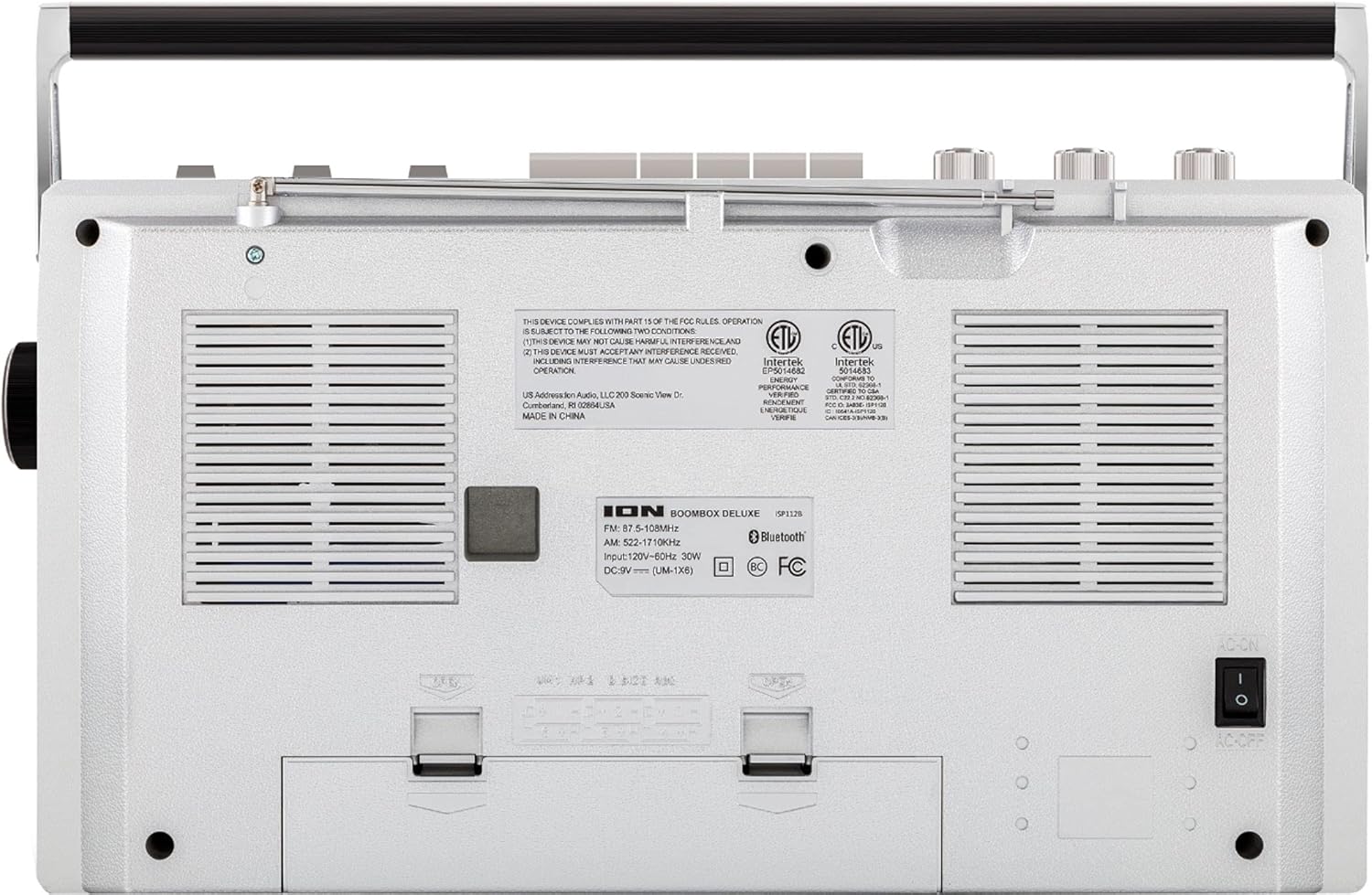
Figure 2: Rear panel of the Boombox Deluxe, highlighting the AC power input and battery compartment location.
۶.۳ تنظیم آنتن
For optimal AM/FM radio reception, extend the telescopic antenna located on the top of the unit. Adjust its position for the clearest signal.
4. دستورالعمل های عملیاتی
۶.۱ کنترلهای عمومی
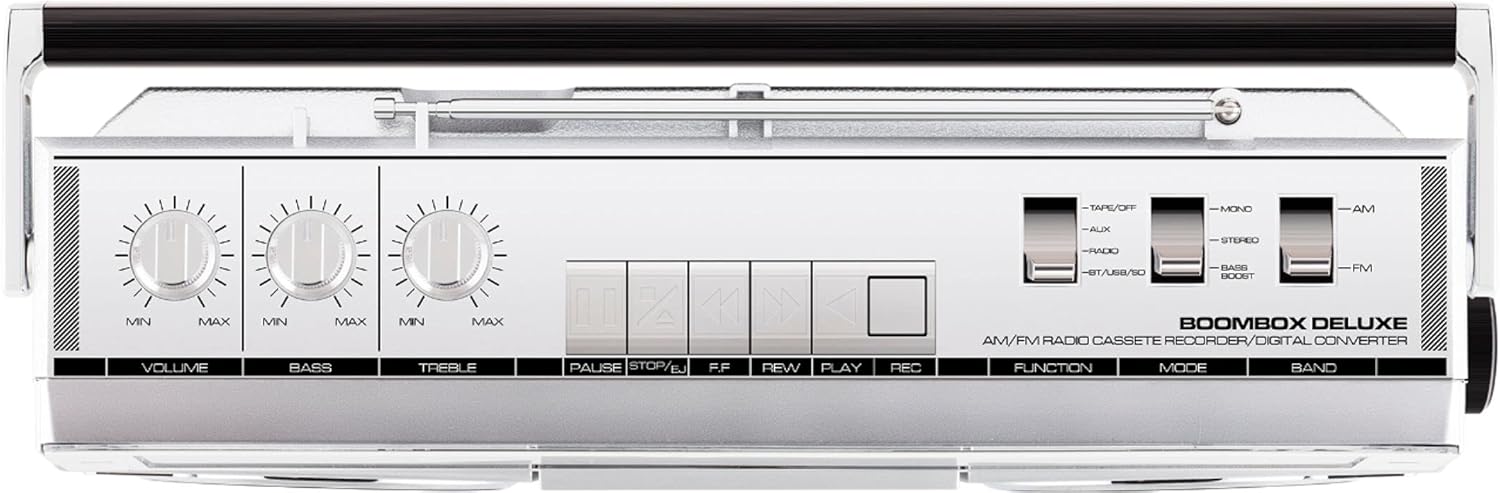
Figure 3: Top panel controls, including Volume, Bass, Treble knobs, and cassette playback buttons.
- کلید تنظیم صدا: سطح کلی صدای خروجی را تنظیم میکند.
- دستگیره باس: خروجی صدای فرکانس پایین را تنظیم میکند.
- دستگیره سه گانه: خروجی صدای فرکانس بالا را تنظیم میکند.
- سوئیچ عملکرد: Selects between Tape/Off, Aux, Radio, and BT/USB/SD modes.
- تغییر حالت: Selects between Mono, Stereo, and Bass Boost audio modes.
- سوئیچ باند: Selects between AM and FM radio bands.
4.2 عملیات رادیویی
- را تنظیم کنید سوئیچ to 'Radio'.
- را تنظیم کنید سوئیچ باند به «AM» یا «FM».
- استفاده کنید دکمه تنظیم to select your desired radio station. The frequency will be displayed on the tuner scale.
۴.۴ عملکرد پخشکننده کاست
- را تنظیم کنید سوئیچ to 'Tape/Off'.
- را فشار دهید توقف/خارج کردن دکمه برای باز کردن محفظه کاست.
- یک نوار کاست را طوری قرار دهید که لبه باز آن رو به بالا باشد. محفظه را ببندید.
- را فشار دهید بازی کنید دکمه برای شروع پخش.
- استفاده کنید Rewind (REW) و سریع به جلو (FF) دکمههایی برای پیمایش نوار.
- را فشار دهید مکث کنید برای توقف موقت پخش. برای ادامه، دوباره فشار دهید.
- را فشار دهید توقف/خارج کردن برای متوقف کردن پخش و خارج کردن نوار.
- To record, ensure the سوئیچ is set to 'Tape/Off' and press the Record (REC) دکمه را همزمان با بازی کنید دکمه
4.4 قابلیت اتصال بلوتوث

Figure 4: Side panel with USB and Micro SD card slots, and playback controls for digital media.
- را تنظیم کنید سوئیچ to 'BT/USB/SD'. The unit will enter Bluetooth pairing mode, indicated by a flashing LED.
- On your Bluetooth-enabled device (e.g., smartphone, tablet), search for 'ION Boombox Deluxe' in the Bluetooth settings.
- Select 'ION Boombox Deluxe' to pair. Once connected, a confirmation tone will sound, and the LED will stop flashing.
- You can now stream audio from your device to the Boombox Deluxe. Use your device's controls or the boombox's playback buttons (Play/Pause, Next/Previous Track) for media control.
پخش از طریق USB/Micro SD با ظرفیت ۶.۴ گیگابایت
- را تنظیم کنید سوئیچ to 'BT/USB/SD'.
- Insert a USB flash drive or Micro SD card (with compatible audio files) into the respective slot on the side of the unit.
- The unit will automatically detect and begin playing audio files.
- Use the playback control buttons (Play/Pause, Next/Previous Track, Delete) on the side panel to manage your music.
4.6 ورودی کمکی

Figure 5: Side panel with headphone output and auxiliary input jacks.
- را تنظیم کنید سوئیچ to 'Aux'.
- Connect an external audio device (e.g., MP3 player, CD player) to the AUX IN جک با استفاده از کابل صوتی 3.5 میلیمتری (شامل نمیشود).
- Audio from the connected device will play through the boombox speakers. Control playback from your external device.
5. ویژگی ها
- Integrated Stereo System with Dual Speakers
- پخش جریانی بی سیم بلوتوث
- تیونر رادیو AM/FM
- پخشکننده/ضبطکننده کاست
- پخش کارت USB و Micro SD
- Auxiliary Input for External Devices
- Adjustable Bass and Treble Controls
- Portable Design with Carry Handle
6. مشخصات
| مشخصات | جزئیات |
|---|---|
| نام تجاری | ION صوتی |
| مدل | Boombox Deluxe |
| فناوری اتصال | بلوتوث، USB |
| نوع بلندگو | استریو |
| منبع تغذیه | Battery Powered (D-cell), AC Power |
| رنگ | مشکی، نقره ای |
| وزن مورد | 8.93 پوند |
| ابعاد بسته بندی | 18.1 x 11.1 x 7.6 اینچ |
7 عیب یابی
- بدون برق:
Ensure the AC power cable is securely connected to both the unit and a working power outlet. If using batteries, check that they are inserted correctly and are not depleted. - دریافت ضعیف رادیو:
Fully extend the telescopic antenna and adjust its position. Try relocating the unit to an area with better signal reception, away from potential interference sources like other electronic devices. - Cassette Tape Not Playing/Recording:
Ensure the tape is inserted correctly and the cassette compartment is fully closed. Check that the tape is not tangled or damaged. For recording, ensure both Play and Record buttons are pressed simultaneously. - بلوتوث وصل نمی شود:
Make sure the Boombox Deluxe is in 'BT/USB/SD' mode and in pairing mode (flashing LED). Ensure Bluetooth is enabled on your external device and it is within range (typically 30 feet). Try unpairing and re-pairing the device. - No Sound from USB/Micro SD:
Verify that the USB drive or Micro SD card is inserted correctly and contains compatible audio files (e.g., MP3). Ensure the volume is turned up on the boombox.
8. تعمیر و نگهداری
- تمیز کردن: برای تمیز کردن قسمت بیرونی دستگاه از یک پارچه نرم و خشک استفاده کنید. از پاک کننده های مایع یا حلال ها استفاده نکنید.
- مراقبت از عرشه کاست: به طور دورهای سر نوارها و غلتکهای فشاری را با یک پنبه به آرامی تمیز کنید.ampened with isopropyl alcohol to ensure optimal playback and recording quality.
- ذخیره سازی باتری: اگر قرار است برای مدت طولانی از دستگاه استفاده نشود، باتریها را خارج کنید تا از نشت و آسیب جلوگیری شود.
9. گارانتی و پشتیبانی
This product is offered as an Amazon Renewed item. Amazon Renewed products are professionally inspected and tested to work and look like new. If you are not satisfied with your purchase, renewed products are eligible for replacement or refund under the Amazon Renewed Guarantee. For specific details regarding the Amazon Renewed Guarantee, please refer to the Amazon Renewed program terms and conditions on the Amazon webسایت
For further assistance or technical support, please contact ION Audio customer service or refer to their official webسایت برای منابع پشتیبانی


