مقدمه
Welcome to the user manual for your Melitta Passione F530-101 Automatic Coffee Machine. This guide provides essential information for the safe and efficient operation, maintenance, and care of your appliance. Please read these instructions thoroughly before first use and keep them for future reference.
۴. راهاندازی و اولین استفاده
1.1 باز کردن بسته بندی و قرار دادن
Carefully remove all packaging materials. Place the coffee machine on a stable, level, and heat-resistant surface. Ensure adequate ventilation around the appliance.
1.2 پر کردن مخزن آب
Remove the water tank from the machine. Fill it with fresh, cold tap water up to the 'max' mark. If desired, install a Melitta PRO AQUA water filter as shown in the image. Reinsert the water tank securely into the machine. The image shows a hand holding the water tank under a faucet, filling it with water, and another hand inserting a water filter into the tank.
۴.۳ پر کردن ظرف دانهها

Open the lid of the bean container located on top of the machine. Pour fresh whole coffee beans into the container. Close the lid firmly to maintain bean freshness. The image displays a hand pouring coffee beans from a bag into the machine's bean container, and a close-up of the beans inside the container.
1.4 شروع اولیه
Connect the power plug to a suitable wall socket. Press the power button to switch on the machine. Follow the on-screen instructions for the initial rinsing process. This prepares the machine for first use.
2. دستورالعمل های عملیاتی
۴.۱ درست کردن قهوه
Place a cup under the coffee spout. Select your desired coffee strength and cup size using the LED symbol screen. Press the coffee button to start the brewing process. The machine will grind the beans and dispense your coffee. The image shows a hand pressing a button on the control panel to adjust settings, and a cup being filled with coffee from the machine's spout.
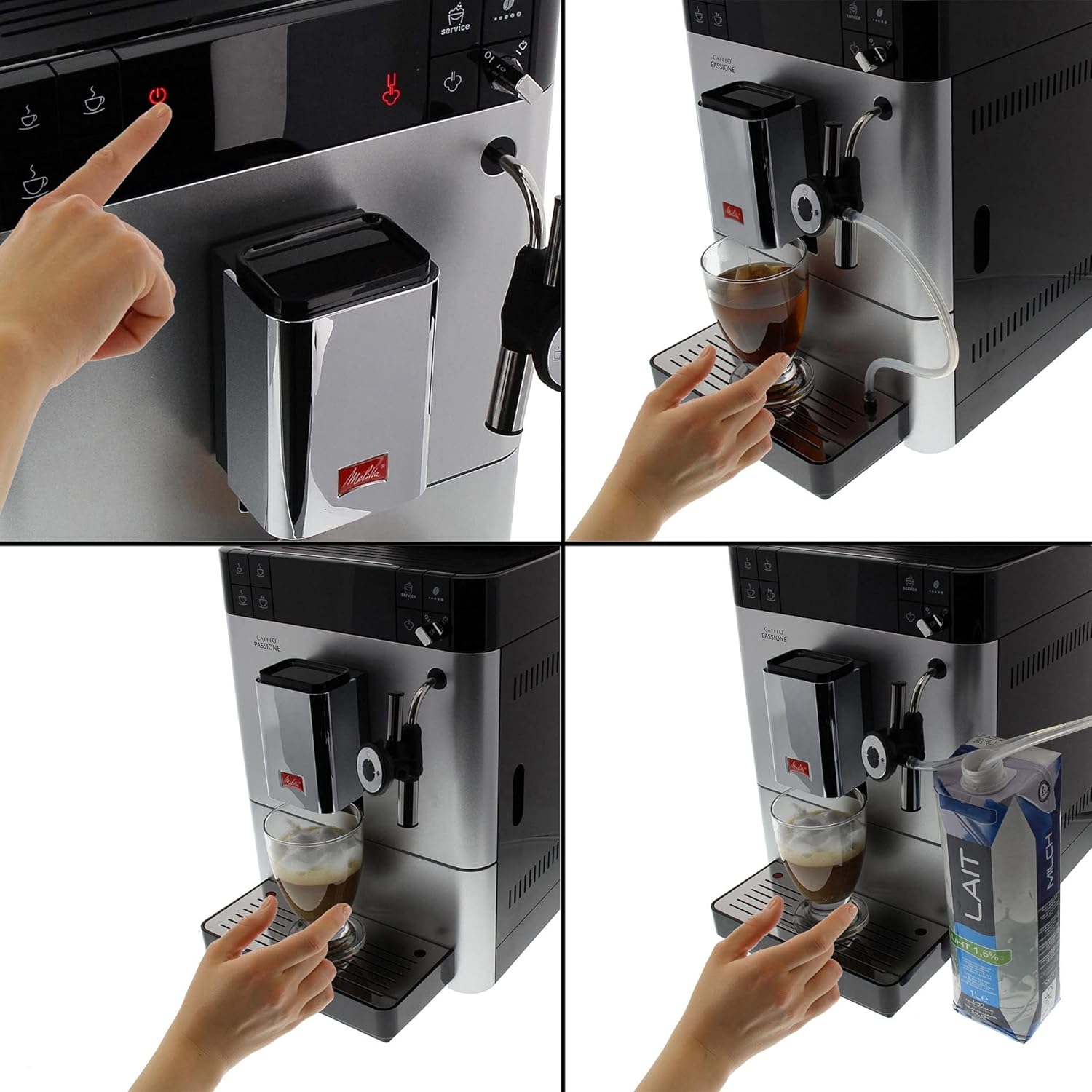
2.2 Using the Auto Cappuccinator (Milk System)

Connect the milk hose to the Auto Cappuccinator and immerse the other end into a container of cold milk. Select your desired milk-based beverage (e.g., cappuccino, latte macchiato) from the menu. The machine will automatically froth and dispense milk, then add coffee. The image shows the machine's milk frother in action, preparing a drink with milk, and a hand holding a carton of milk connected to the frother.
۵.۴ سفارشیسازی نوشیدنی
- درجه سنگ زنی: Adjust the grinder setting to one of 5 degrees for finer or coarser coffee grounds.
- شدت قهوه: Choose from 3 intensity levels to match your preferred coffee strength.
- اندازه فنجان: Program your preferred cup volume for various beverages.
3. تمیز کردن و نگهداری
3.1 Emptying Drip Tray and Coffee Grounds Container

Regularly empty and clean the drip tray and the coffee grounds container. Slide out the drip tray assembly from the front of the machine. Separate the coffee grounds container and dispose of the spent grounds. Rinse both components with warm water. The image shows a hand pulling out the drip tray and coffee grounds container from the front of the machine.
۵.۲ تمیز کردن واحد دم کردن

To ensure optimal coffee quality, the brewing unit should be cleaned regularly. Open the service door on the side of the machine. Press the release button and carefully remove the brewing unit. Rinse it thoroughly under running water. Allow it to air dry before reinserting. The image shows a hand removing the brewing unit from the side of the coffee machine.
3.3 Automatic Cleaning and Descaling Programs
The Melitta Passione F530-101 features automatic cleaning and descaling programs. The machine will prompt you when these cycles are due. Follow the instructions on the LED display to initiate and complete these programs. Use only Melitta-approved cleaning and descaling agents.
4 عیب یابی
If you encounter issues with your coffee machine, please refer to the following common solutions before contacting customer service:
- قهوه توزیع نشده: Check if the water tank is filled and correctly inserted. Ensure the bean container has enough coffee beans.
- Coffee Too Weak/Strong: Adjust the grinding degree and coffee intensity settings.
- شیری که کف نمیکند: Ensure the milk hose is clean and properly connected. Use cold milk. Clean the Auto Cappuccinator.
- پیام خطا روی صفحه نمایش: Consult the specific error code in the full manual (if available) or contact Melitta customer support.
- روشن نشدن ماشین: اتصال برق را بررسی کنید و مطمئن شوید که دکمه پاور فشرده شده است.
5. مشخصات فنی
| نام تجاری | ملیتا |
| شماره مدل | F530-101 (6708771-cr) |
| رنگ | نقره ای |
| ابعاد محصول (L x W x H) | 24.99 × 38 × 38.99 سانتی متر |
| وزن | 11 کیلوگرم |
| ظرفیت | 1.2 لیتر |
| قدرت | 1000 وات |
| مواد | پلاستیک |
| ویژگی خاص | قابل برنامه ریزی |
| نوع قهوه ساز | دستگاه اسپرسوساز |
| حالت عملیاتی | تمام اتوماتیک |
| محصولات سازگار | Melitta PRO AQUA Filter, Claris Water Filter |
6. اطلاعات گارانتی
Specific warranty details for your Melitta Passione F530-101 are typically provided with your purchase documentation. Please refer to the warranty card or contact your retailer for information regarding warranty coverage and terms. Information regarding spare parts availability is currently unavailable.
7. پشتیبانی مشتری
For further assistance, technical support, or to inquire about service, please contact Melitta customer service or visit the official Melitta website. Have your model number (F530-101) and purchase details ready when contacting support.


