1. محصول تمام شدview
The Cisco Catalyst 9300 C9300-24S-E is a 24-port Gigabit Ethernet SFP modular uplink network switch designed for enterprise-level network deployments. It provides high-performance switching capabilities, advanced security features, and network automation for modern business environments. This manual provides essential information for the safe and efficient installation, operation, and maintenance of your switch.
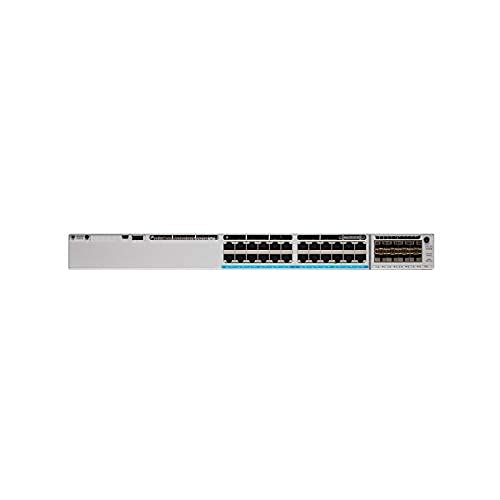
شکل 1: جلو view of the Cisco Catalyst 9300 C9300-24S-E Switch. This image displays the 24 SFP ports and modular uplink slots.
2. اطلاعات ایمنی
Read all safety warnings and instructions before installing, operating, or servicing this equipment. Failure to follow these instructions can result in serious injury or equipment damage.
- ایمنی برق: Ensure the power source matches the switch's voltage requirements. Always connect the power cord to a grounded outlet. Do not operate the switch with damaged power cords or plugs.
- تهویه: برای جلوگیری از گرمای بیش از حد، جریان هوای کافی را در اطراف سوئیچ حفظ کنید. منافذ تهویه را مسدود نکنید.
- رسیدگی: This device is heavy. Use proper lifting techniques or assistance when moving or installing.
- محیط زیست: Operate the switch within the specified temperature and humidity ranges. Avoid exposure to moisture or extreme temperatures.
- سرویس دهی: Refer all servicing to qualified service personnel. Do not attempt to open or repair the switch yourself.
3. محتویات بسته
Verify that your package contains the following items. If any item is missing or damaged, contact your vendor immediately.
- Cisco Catalyst 9300 C9300-24S-E Switch
- سیم برق AC
- Rack-mount Kit (brackets, screws)
- کابل کنسول (RJ-45 تا DB-9)
- مستندات (راهنمای شروع سریع، اطلاعات ایمنی)
۳. توصیف فیزیکی و اجزا
The C9300-24S-E switch features a robust design with various ports and indicators for network connectivity and status monitoring.
4.1 صفحه جلو
شکل 2: با جزئیات view of the switch's front panel, highlighting SFP ports and status LEDs.
- 24 x SFP Ports: For Gigabit Ethernet fiber or copper connectivity using SFP transceivers.
- Modular Uplink Slots: Located on the right side, these slots accommodate optional uplink modules for higher bandwidth connections (e.g., 10G, 25G, 40G, 100G).
- LED های وضعیت: Indicate system status (SYS), redundant power supply (RPS), port status (STAT), and stack status (STACK).
- پورت USB Type-A: For external storage or software upgrades.
- USB Type-C Console Port: برای دسترسی به کنسول و پیکربندی اولیه.
- پورت کنسول RJ-45: For traditional console access.
4.2 پنل عقب
شکل 3: عقب view of the switch, showing power supply bays and fan modules.
- Power Supply Bays: Two bays for redundant power supplies.
- ماژول های فن: Field-replaceable fan modules for cooling.
- StackWise-1T Ports: (If applicable to the specific model variant) For stacking multiple switches.
5. راه اندازی و نصب
Follow these steps to properly install your Cisco Catalyst 9300 switch.
5.1 نصب در قفسه
- براکتهای رکمونت ارائه شده را با استفاده از پیچهای موجود به کنارههای سوئیچ وصل کنید.
- Align the switch with the desired rack unit (RU) space in your equipment rack.
- Secure the switch to the rack using the rack screws.
Figure 4: Illustration of the switch being mounted into a standard equipment rack.
5.2 اتصال برق
- Insert the AC power cord into the power supply module on the rear of the switch.
- Connect the other end of the power cord to a grounded AC power outlet.
- If using redundant power supplies, repeat for the second power supply.
5.3 اتصالات شبکه
- Insert appropriate SFP transceivers into the 24 SFP ports as needed.
- Connect fiber optic or copper cables from your network devices (servers, workstations, other switches) to the SFP transceivers.
- Install any optional uplink modules into the modular uplink slots and connect them to your core network infrastructure.
6. دستورالعمل های عملیاتی
6.1 روشن کردن
Once power is connected, the switch will automatically power on. Observe the system status LEDs on the front panel. The SYS LED should turn green after the boot sequence completes.
6.2 پیکربندی اولیه
For initial configuration, connect a console cable from your computer to the switch's console port (either USB-C or RJ-45). Use a terminal emulation program (e.g., PuTTY, Tera Term) with the following settings:
- نرخ باود: 9600
- بیت های داده: 8
- برابری: هیچ کدام
- توقف بیت ها: 1
- کنترل جریان: هیچ کدام
Follow the on-screen prompts to complete the initial setup wizard. For advanced configurations, refer to the Cisco IOS XE documentation for Catalyst 9300 Series switches.
6.3 نشانگرهای LED
| LED | رنگ/حالت | توضیحات |
|---|---|---|
| SYS (سیستم) | سبز (جامد) | سیستم به طور عادی کار می کند. |
| کهربا (جامد) | System fault or error. | |
| آمار (Port Status) | سبز (جامد) | پیوند برقرار شد. |
| سبز (چشمک زن) | Activity on port. | |
| خاموش | هیچ لینک یا پورتی غیرفعال نیست. |
7. تعمیر و نگهداری
نگهداری منظم، عملکرد بهینه و طول عمر سوئیچ شما را تضمین میکند.
- تمیز کردن: Periodically clean the exterior of the switch with a soft, dry cloth. Ensure ventilation openings are free from dust and debris. Do not use liquid cleaners directly on the switch.
- به روز رسانی سیستم عامل: مرتباً پشتیبانی سیسکو را بررسی کنید website for the latest firmware updates. Applying updates can improve performance, add features, and address security vulnerabilities. Follow Cisco's recommended procedures for firmware upgrades.
- پایش محیط زیست: Ensure the operating environment remains within specified temperature and humidity ranges to prevent hardware stress.
8 عیب یابی
این بخش راهحلهایی برای مشکلات رایجی که ممکن است با آنها مواجه شوید ارائه میدهد.
8.1 بدون برق
- سیم برق را چک کنید: مطمئن شوید که سیم برق به طور محکم به سوئیچ و پریز برق وصل شده است.
- تأیید خروجی: برای اطمینان از سالم بودن پریز برق، آن را با دستگاه دیگری آزمایش کنید.
- وضعیت منبع تغذیه: Check the power supply LEDs on the rear of the switch. If off or amber, the power supply may be faulty or not receiving power.
۵.۲ عدم وجود لینک در پورت
- اتصال کابل: Ensure the network cable is securely connected to both the switch port and the connected device.
- یکپارچگی کابل: Test the cable with another device or replace it to rule out a faulty cable.
- فرستنده فرستنده: If using SFP transceivers, ensure they are properly seated and compatible with both the switch and the connected device.
- پیکربندی پورت: Verify that the switch port is enabled and correctly configured (e.g., speed, duplex settings).
۵.۳ مشکلات اتصال شبکه
- پیکربندی IP: آدرسهای IP، ماسکهای زیرشبکه و تنظیمات دروازه را روی دستگاههای متصل و سوئیچ تأیید کنید.
- VLAN ها: If using VLANs, ensure ports are assigned to the correct VLANs and trunk links are properly configured.
- Firewall/ACLs: Check for any Access Control Lists (ACLs) or firewall rules on the switch that might be blocking traffic.
- مشکلات نرم افزاری: Consider restarting the switch or checking the system logs for error messages.
9. مشخصات
Key technical specifications for the Cisco Catalyst 9300 C9300-24S-E switch:
| ویژگی | جزئیات |
|---|---|
| شماره مدل | C9300-24S-E |
| نام تجاری | سیسکو |
| نوع رابط | SFP |
| تعداد پورت ها | 24 |
| دستگاه های سازگار | دسکتاپ، لپتاپ، چاپگر |
| ابعاد محصول | 21.65 x 22.44 x 9.45 اینچ |
| مواد مورد | پلاستیک |
| درجه حرارت بالا | 40 درجه سانتیگراد |
| سازنده | سیستمهای سیسکو - سازمانی |
| UPC | 656942062790 |
10. گارانتی و پشتیبانی
This Cisco product is typically covered by a limited hardware warranty provided by Cisco Systems. The exact terms and duration of the warranty may vary based on your region and purchase agreement. For detailed warranty information, please refer to the official Cisco warranty statements available on their webبه سایت مراجعه کنید یا با فروشنده مجاز سیسکو تماس بگیرید.
For technical support, documentation, and software downloads, visit the official Cisco Support website. You will need your product serial number to register and access certain support resources.
- پشتیبانی سیسکو Webسایت: www.cisco.com/go/support
- تماس با پشتیبانی: رجوع به سیسکو شود webسایتی برای اطلاعات تماس منطقهای.


