1. مقدمه
This manual provides instructions for the Sharp Digital Alarm Clock, Model SPC547AJAMZ. This device features an easy-to-read LED display, a high-speed USB charging port, and essential alarm functions. Please read this manual thoroughly before use to ensure proper operation and to maximize the product's lifespan.

Figure 1: Sharp Digital Alarm Clock (Model SPC547AJAMZ) front view.
2. ویژگی های محصول
The Sharp Digital Alarm Clock offers the following key features:
- صفحه نمایش آسان خوان: Large, clear green LED digits for visibility from a distance.
- High-Speed USB Charging Port: الف 2 AMP USB port for rapid charging of compatible devices such as smartphones and tablets.
- تنظیم صدای زنگ هشدار: Select between high and low alarm volume settings.
- عملیات ساده: Intuitive button controls for setting time and alarm.
- پشتیبان گیری باتری: تنظیمات زمان و زنگ هشدار را در طول قطع برق حفظ میکندtages (requires 2 AAA batteries, not included). The display will be blank during battery backup mode, but the internal clock will continue to run, and the alarm will sound at the set time.

Figure 2: Alarm clock with a smartphone connected to the USB charging port.
3. محتویات بسته
بررسی کنید که آیا همه اقلام در بسته موجود است یا خیر:
- Sharp Digital Alarm Clock (Model SPC547AJAMZ)
- آداپتور برق
- راهنمای کاربر (این سند)
Note: 2 AAA batteries for backup are not included and must be purchased separately.
4. اطلاعات ایمنی
لطفاً نکات ایمنی زیر را رعایت کنید:
- دستگاه را در معرض آب یا رطوبت بیش از حد قرار ندهید.
- از قرار دادن دستگاه در نزدیکی منابع گرما یا در معرض نور مستقیم خورشید خودداری کنید.
- Use only the provided AC power adapter.
- سعی نکنید دستگاه را جدا کنید یا تغییر دهید.
- دور از دسترس کودکان نگهداری شود.
- از تهویه مناسب اطراف دستگاه اطمینان حاصل کنید.
5. راه اندازی
5.1 اتصال برق
- Plug the AC power adapter into the DC IN jack located on the back of the alarm clock.
- سر دیگر آداپتور برق متناوب (AC) را به یک پریز برق استاندارد (120 ولت متناوب، 60 هرتز) وصل کنید.
- The display will illuminate, and the clock will be ready for time setting.
۵.۲ نصب باتری پشتیبان
برای اطمینان از حفظ تنظیمات زمان و زنگ هشدار در طول قطع برقtage:
- محفظه باتری را در پایین دستگاه پیدا کنید.
- درپوش محفظه باتری را باز کنید.
- Insert two (2) new AAA batteries, observing the correct polarity (+ and -) as indicated inside the compartment.
- درپوش محفظه باتری را محکم ببندید.
Note: Batteries are for backup only. The clock display will not be lit during a power outage when operating on battery backup, but the internal clock will continue to run, and the alarm will sound at the set time.
6. دستورالعمل های عملیاتی
Familiarize yourself with the control buttons located on the top of the unit:
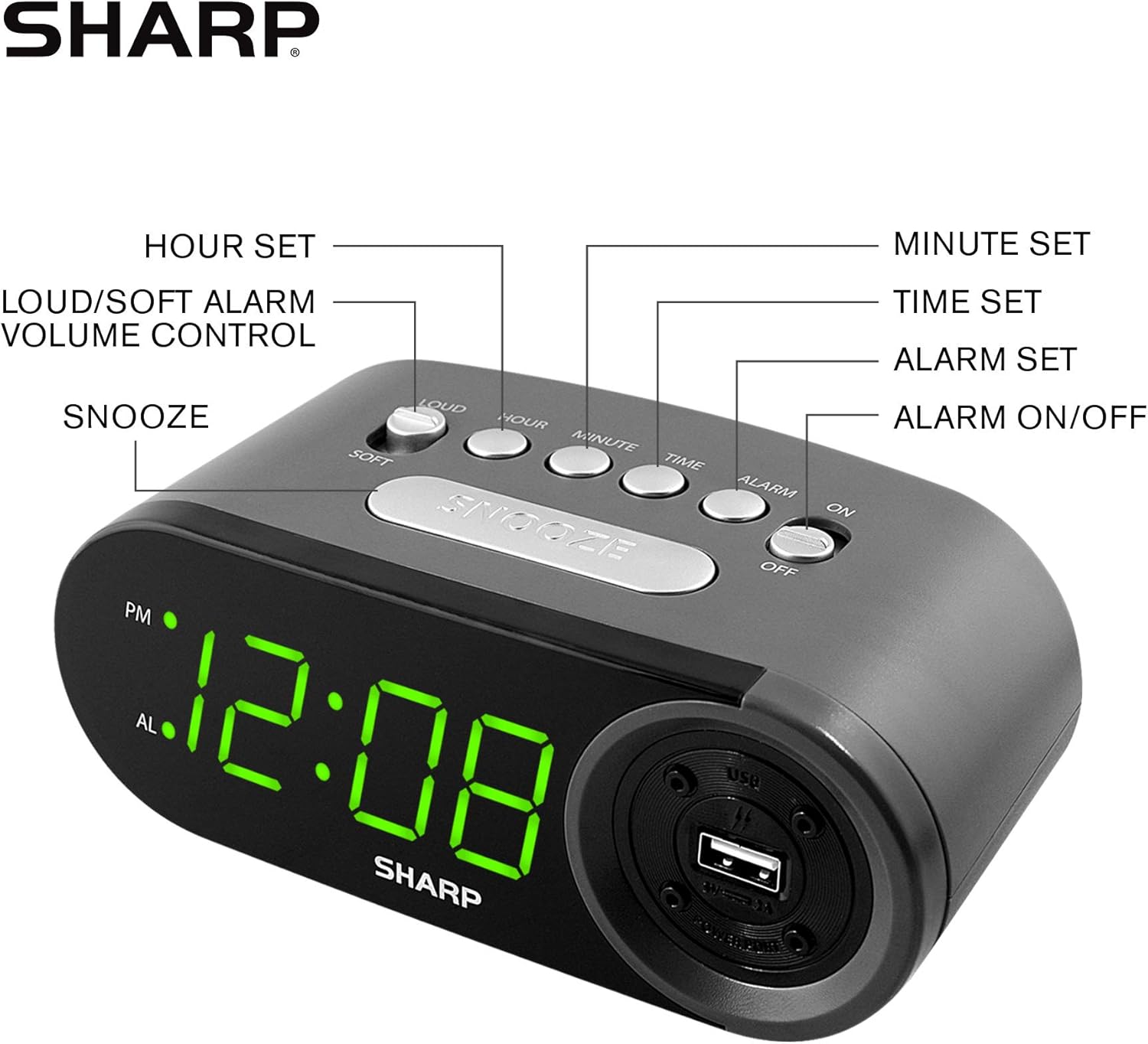
Figure 3: Top panel controls and their functions.
۴.۱ تنظیم زمان فعلی
- را فشار داده و نگه دارید TIME را فشار دهید تا صفحه نمایش شروع به چشمک زدن کند.
- را فشار دهید ساعت button repeatedly to set the hour. Observe the PM indicator for afternoon hours.
- را فشار دهید دقیقه button repeatedly to set the minutes.
- پس از تنظیم زمان مورد نظر، دکمه TIME برای تأیید و خروج از حالت تنظیم زمان، دوباره دکمه را فشار دهید.
۵.۱ تنظیم زمان هشدار
- را فشار داده و نگه دارید آلارم button until the alarm time display begins to flash. The "AL" indicator will also flash.
- را فشار دهید ساعت button repeatedly to set the alarm hour. Observe the PM indicator.
- را فشار دهید دقیقه برای تنظیم دقیقه زنگ هشدار، دکمه را مکرراً فشار دهید.
- پس از تنظیم زمان دلخواه برای زنگ هشدار، دکمه آلارم برای تأیید و خروج از حالت تنظیم زنگ، دوباره دکمه را فشار دهید.
۵.۲ فعال/غیرفعال کردن دزدگیر
- برای روشن کردن زنگ هشدار ON، اسلاید کنید هشدار روشن / خاموش switch to the "ON" position. The "AL" indicator will appear on the display.
- برای روشن کردن زنگ هشدار خاموش، اسلاید کنید هشدار روشن / خاموش switch to the "OFF" position. The "AL" indicator will disappear.
6.4 عملکرد تعویق
وقتی زنگ هشدار به صدا درآمد، دکمه بزرگ را فشار دهید چرت زدن دکمه. زنگ هشدار موقتاً متوقف شده و پس از تقریباً 9 دقیقه دوباره به صدا در میآید.
۶.۴ متوقف کردن زنگ هشدار
To stop the alarm completely after it sounds (without using snooze), slide the هشدار روشن / خاموش switch to the "OFF" position. The alarm will reset for the next day if the switch is moved back to "ON".
۴.۶ تنظیم میزان صدای زنگ هشدار
را فشار دهید بلند/آرام button to toggle between high and low alarm volume settings.
۴.۳ استفاده از پورت شارژ USB
2 AMP USB charging port is located on the right side of the unit.
- Connect your device's USB charging cable (not included) to the USB port on the alarm clock.
- Connect the other end of the cable to your smartphone, tablet, or other compatible USB-powered device.
- Ensure the alarm clock is connected to AC power for the USB port to function.
Note: Charging speed may vary depending on your device and cable.
7. تعمیر و نگهداری
To keep your alarm clock in optimal condition:
- تمیز کردن: دستگاه را با یک پارچه نرم و خشک پاک کنید. از پاک کننده ها یا حلال های ساینده استفاده نکنید.
- تعویض باتری: Replace AAA backup batteries annually or when the battery low indicator (if present) appears, to ensure reliable backup functionality.
- ذخیره سازی: If storing the unit for an extended period, remove the backup batteries to prevent leakage.
8 عیب یابی
| مشکل | علت احتمالی | راه حل |
|---|---|---|
| صفحه نمایش ساعت خالی است. | برق AC وجود ندارد؛ برق OUtage; unit unplugged. | Ensure AC adapter is securely plugged into the unit and a working wall outlet. Check for power outages |
| صدای آژیر نمیآید. | Alarm is not activated; alarm time is incorrect; volume is too low. | Slide ALARM ON/OFF switch to "ON". Verify alarm time is set correctly. Adjust alarm volume using the LOUD/SOFT button. |
| پورت شارژ USB کار نمیکند. | Clock not connected to AC power; device not compatible; faulty cable. | Ensure the clock is plugged into AC power. Try a different USB cable or device to confirm compatibility. |
| تنظیمات زمان/هشدار پس از قطع برق از بین میرودtage. | باتریهای پشتیبان از کار افتادهاند یا نصب نشدهاند. | Install two fresh AAA batteries in the battery compartment, ensuring correct polarity. |
9. مشخصات
- برند: شارپ
- مدل: SPC547AJAMZ
- نوع نمایشگر: چراغ دیجیتال LED (سبز)
- منبع تغذیه: برق سیمی (AC 120V، 60Hz)
- پشتیبان گیری باتری: 2 عدد باتری AAA (شامل نمی شود)
- پورت شارژ USB: 2 AMP (5V)
- ابعاد محصول: تقریباً ۷۴.۹ اینچ عرض x ۴۵.۹ اینچ ارتفاع x ۱۶.۱ اینچ عمق
- وزن مورد: تقریبا 9.6 اونس
- مواد: پلاستیک
- UPC: 049353006000

شکل ۵: ابعاد محصول.
10. ضمانت و پشتیبانی
10.1 اطلاعات گارانتی
This Sharp product is covered by a limited manufacturer's warranty. For specific warranty terms and conditions, please refer to the warranty card included with your purchase or visit the official Sharp webرسید خرید خود را به عنوان مدرک خرید نگه دارید.
10.2 پشتیبانی مشتری
If you have any questions, require assistance, or need to report an issue with your Sharp Digital Alarm Clock, please contact Sharp customer support. Contact details can typically be found on the official Sharp webدر محل یا روی بستهبندی محصول.
برای اطلاعات بیشتر به سایت مراجعه کنید فروشگاه شارپ در آمازون.


