1. بیش ازview
The Logitech C505/C505e HD Wired Business Webcam is designed to enhance your video communication experience. It provides crisp, smooth, and colorful widescreen HD 720p video with a 60° diagonal field of view. را webcam features fixed focus and automatic light correction, adapting to various lighting conditions. Its single, omnidirectional microphone incorporates noise-reduction technology, supporting clear conversations up to 3 meters away, even in noisy environments. The extra-long USB-A cable and universal clip offer flexible placement options on your computer or up to 7 feet away.
۱. دستورالعملهای راهاندازی
Setting up your Logitech C505/C505e webcam is a straightforward plug-and-play process. No additional software installation or charging is required.
- را وصل کنید Webطب مکمل و جایگزین: کابل USB-A را از webcam into an available USB port on your desktop or laptop computer.
- موقعیت Webطب مکمل و جایگزین: Use the universal clip to securely mount the webcam on your monitor, laptop screen, or place it on a flat surface. The extra-long cable allows for flexible positioning.
- را انتخاب کنید Webطب مکمل و جایگزین: کامپیوتر شما باید به طور خودکار تشخیص دهد webcam. If you have multiple cameras or microphones, you may need to select the "Logitech C505/C505e" in your application's settings (e.g., video conferencing software, recording applications) or your operating system's device settings.

Image: The Logitech C505/C505e webcam easily clips onto a monitor for convenient placement.
3. بهره برداری از Webبادامک
Once connected, the Logitech C505/C505e is ready for use with most video conferencing and recording applications.
- کیفیت ویدیو: را webcam delivers HD 720p video at 30 frames per second, providing clear visuals for your calls and recordings.
- زمینه از View: میدان مورب 60 درجه از view ensures you are framed appropriately without capturing excessive background.
- فوکوس ثابت: The fixed focus lens maintains sharpness for subjects within its optimal range, simplifying operation.
- تصحیح نور خودکار: را webcam automatically adjusts to the lighting conditions of your environment, helping to ensure you appear well-lit even in varying light. Optimal lighting conditions will yield the best video quality.
- میکروفون: The integrated omnidirectional microphone with noise-reduction technology is designed to capture your voice clearly from up to 3 meters away, minimizing background distractions.

Image: The Logitech C505/C505e provides HD 720p widescreen video for clear communication.
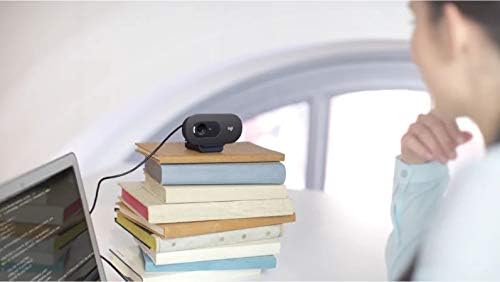
Image: Flexible placement options allow the webcam to be positioned on various surfaces.
4. تعمیر و نگهداری
To ensure optimal performance and longevity of your Logitech C505/C505e webدوربین، این دستورالعملهای سادهی نگهداری را دنبال کنید:
- تمیز کردن لنز: به آرامی پاک کنید webلنز دوربین را با یک پارچه نرم و بدون پرز تمیز کنید. از استفاده از مواد شیمیایی قوی یا مواد ساینده که میتوانند لنز را خراش دهند، خودداری کنید.
- ذخیره سازی: وقتی استفاده نمی شود ، آن را ذخیره کنید webدوربین را در مکانی تمیز و خشک و دور از دمای شدید و نور مستقیم خورشید قرار دهید.
- مراقبت از کابل: Avoid sharply bending or crimping the USB cable to prevent internal damage.
5 عیب یابی
If you encounter issues with your Logitech C505/C505e webcam، مراحل عیبیابی زیر را امتحان کنید:
- بدون صدا/تصویر:
- مطمئن شوید که کابل USB به طور محکم به هر دو دستگاه وصل شده است. webدوربین و کامپیوتر شما.
- سعی کنید وصل کنید webبه پورت USB دیگری متصل شوید
- Check your application's settings (e.g., Zoom, Microsoft Teams) to confirm the Logitech C505/C505e is selected as the active camera and microphone.
- Verify your operating system's privacy settings allow applications to access the camera and microphone.
- کیفیت ضعیف ویدیو:
- از نور کافی در محیط خود اطمینان حاصل کنید. webcam performs best with good illumination.
- را تمیز کنید webلنز دوربین را با یک پارچه نرم تمیز کنید.
- Check for any obstructions in front of the lens.
- کیفیت ضعیف صدا:
- اطمینان حاصل کنید webcam's microphone is selected in your application and system audio settings.
- نویز پسزمینه را در محیط خود کاهش دهید.
- Ensure you are within the 3-meter optimal range of the microphone.
- Webcam Not Recognized:
- کامپیوتر خود را مجددا راه اندازی کنید.
- Check your computer's Device Manager (Windows) or System Information (macOS) to see if the webcam is listed. You may need to update or reinstall drivers, though typically the webcam is plug-and-play.
6. مشخصات
| نام تجاری | لاجیتک |
| شماره مدل | Logitech C505/C505e |
| وضوح تصویربرداری | 720p |
| وضوح تصویر | 720p |
| فناوری اتصال | سیمی (USB-A) |
| نوع فوکوس | فوکوس ثابت |
| Viewing angle | 60 درجه |
| میکروفون | Omnidirectional with Noise-Reduction |
| سیستم عامل | Multiple (Windows 8 or later, macOS 10.10 or later, ChromeOS) |
| رسانه داخلی | USB Cable, Universal Clip |
| ویژگی ها | Automatic Light Correction, Low Light Performance |
7. گارانتی و پشتیبانی
برای اطلاعات دقیق در مورد گارانتی و پشتیبانی فنی، لطفاً به پشتیبانی رسمی Logitech مراجعه کنید. webسایت. میتوانید درایورها، سوالات متداول و اطلاعات تماس خدمات مشتریان را در آنجا پیدا کنید.


