مقدمه
This manual provides detailed instructions for the setup, operation, and maintenance of your Sharp Digital Alarm Clock, Model B08TG1QB2B. Designed for simplicity, this clock features a clear LED display, dual ascending alarms, and a battery backup system to ensure reliability.

شکل 1: جلو view of the Sharp Digital Alarm Clock, displaying the time 12:08 in green LED digits.
ویژگی های محصول
- طراحی آسان برای استفاده: عملیات ساده مناسب برای همه کاربران.
- سیستم هشدار دوگانه: Set two independent alarms for different schedules.
- Ascending Alarm Volume: Alarm starts softly and gradually increases in volume for a gentle wake-up.
- پشتیبان گیری باتری: تنظیمات زمان و زنگ هشدار را در طول قطع برق حفظ میکندtages (requires 2x AA batteries, not included).
- Illuminated Green LED Digits: صفحه نمایش واضح و خوانا
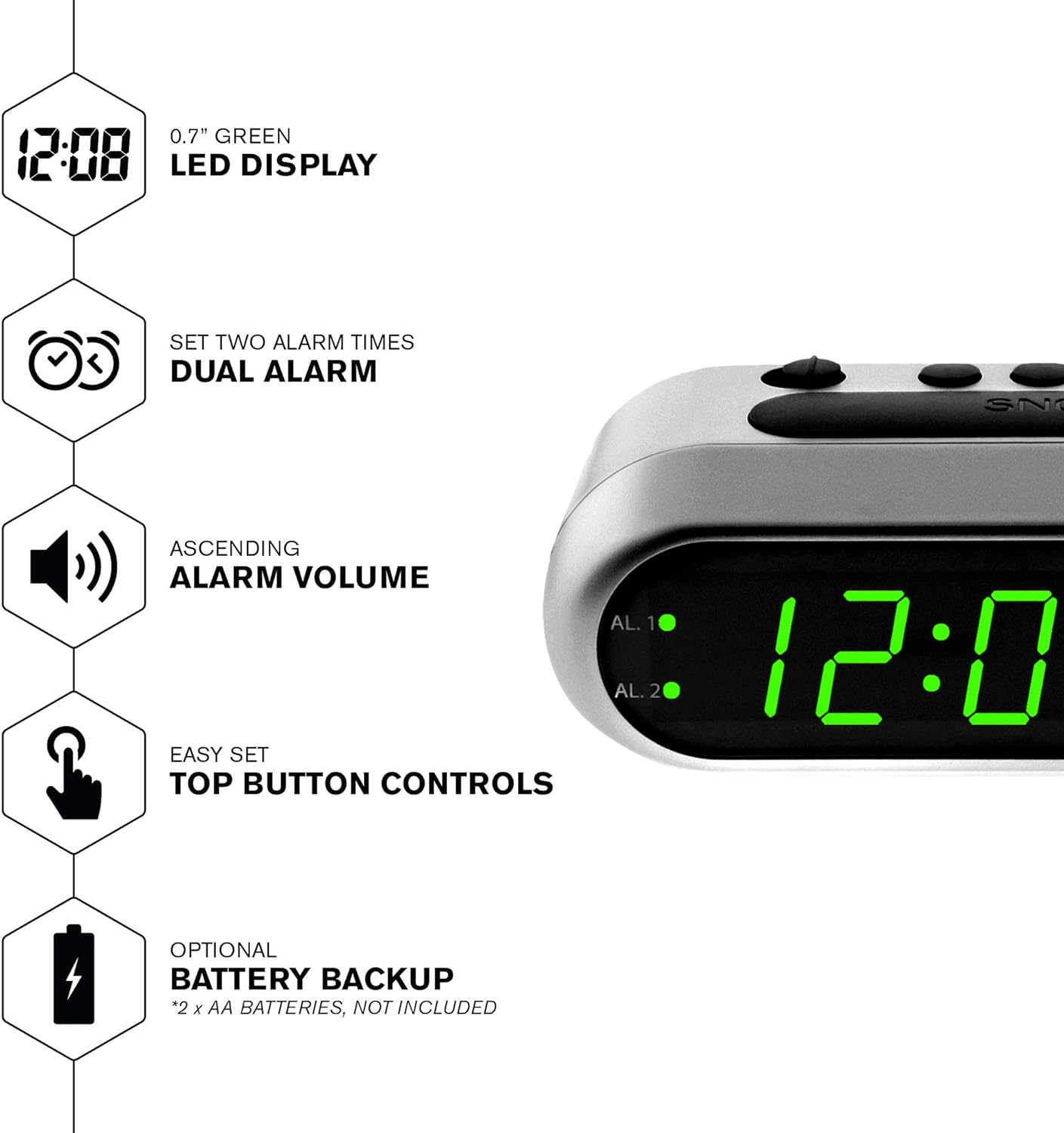
شکل 2: تمام شده استview of the clock's main features, including the LED display, dual alarm, ascending volume, and battery backup.
محتویات بسته
- Sharp Digital Alarm Clock (Model B08TG1QB2B)
- آداپتور برق
- راهنمای دستورالعمل
توجه: 2x AA batteries for battery backup are not included and must be purchased separately.
کنترل ها و نمایش
Familiarize yourself with the buttons and indicators on your alarm clock:
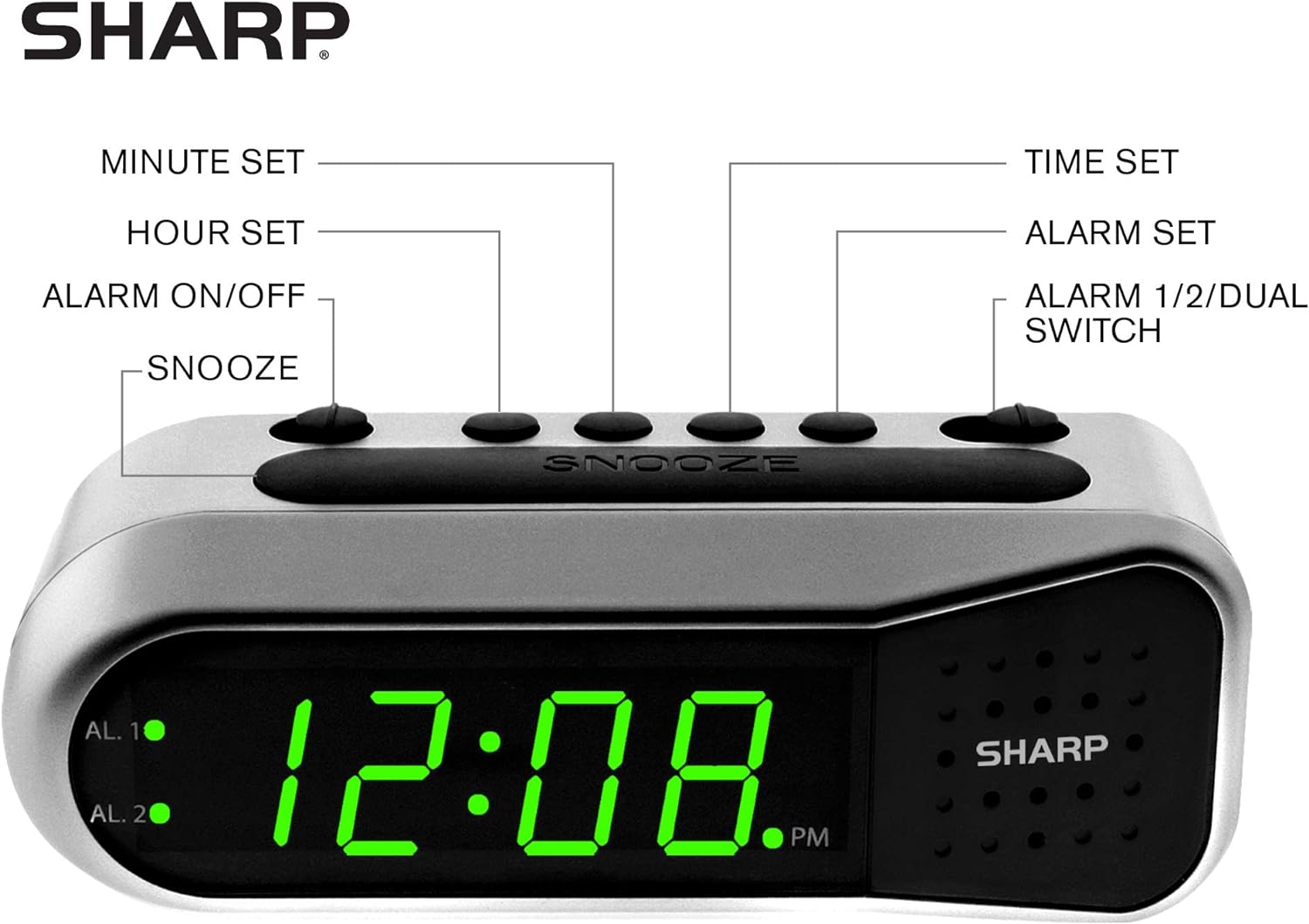
Figure 3: Labeled diagram of the clock's controls and display elements.
- Minute Set Button: Adjusts minutes for time and alarm settings.
- Hour Set Button: Adjusts hours for time and alarm settings.
- کلید روشن/خاموش کردن دزدگیر: Activates or deactivates the selected alarm.
- دکمه تعویق: به طور موقت و برای مدت کوتاهی صدای زنگ را قطع میکند.
- دکمه تنظیم زمان: وارد حالت تنظیم زمان میشود.
- دکمه تنظیم زنگ هشدار: وارد حالت تنظیم زنگ هشدار میشود.
- Alarm 1/2/Dual Switch: Selects which alarm (Alarm 1, Alarm 2, or both) is being set or activated.
- AL. 1 Indicator: Lights up when Alarm 1 is active.
- AL. 2 Indicator: Lights up when Alarm 2 is active.
- شاخص PM: Lights up when the displayed time is PM.
راه اندازی
1. اتصال برق
Connect the AC power adapter to the DC input jack located on the back of the alarm clock. Plug the adapter into a standard electrical outlet. The display will illuminate.
2. نصب پشتیبان باتری
The battery backup feature requires two (2) AA batteries (not included). These batteries maintain time and alarm settings during a power outage but do not power the display.
- پوشش محفظه باتری را که در پایین ساعت قرار دارد، باز کنید.
- Insert two (2) AA batteries, observing the correct polarity (+ and -) as indicated inside the compartment.
- درپوش محفظه باتری را تعویض کنید.
توجه: Replace batteries annually or when the clock experiences frequent power interruptions to ensure reliable backup.
۱. تنظیم اولیه زمان
After connecting power, the display will show a default time (e.g., 12:00 AM). Set the current time:
- را فشار داده و نگه دارید تنظیم زمان دکمه. ارقام ساعت چشمک خواهند زد.
- در حین برگزاری تنظیم زمانرا فشار دهید مجموعه ساعت برای تنظیم ساعت، دکمه را مکرراً فشار دهید. برای تنظیم صحیح AM/PM، به نشانگر PM توجه کنید.
- را آزاد کنید تنظیم زمان دکمه
- را فشار داده و نگه دارید تنظیم زمان دوباره دکمه را فشار دهید. ارقام دقیقه چشمک خواهند زد.
- در حین برگزاری تنظیم زمانرا فشار دهید تنظیم دقیقه برای تنظیم دقیقه، دکمه را مکرراً فشار دهید.
- را آزاد کنید تنظیم زمان دکمه برای صرفه جویی در زمان
دستورالعمل های عملیاتی
تنظیم هشدار 1 یا زنگ هشدار 2
Your clock features two independent alarms. To set an alarm:
- را بلغزانید زنگ هشدار ۱/۲/دوگانه switch to either AL. 1 or AL. 2, depending on which alarm you wish to set.
- را فشار داده و نگه دارید تنظیم هشدار button. The hour digits for the selected alarm will flash.
- در حین برگزاری تنظیم هشداررا فشار دهید مجموعه ساعت button repeatedly to adjust the alarm hour. Ensure the correct AM/PM is selected.
- را آزاد کنید تنظیم هشدار دکمه
- را فشار داده و نگه دارید تنظیم هشدار button again. The minute digits for the selected alarm will flash.
- در حین برگزاری تنظیم هشداررا فشار دهید تنظیم دقیقه برای تنظیم دقیقه زنگ هشدار، دکمه را مکرراً فشار دهید.
- را آزاد کنید تنظیم هشدار دکمه برای ذخیره زمان زنگ هشدار.
Activating/Deactivating Alarms
To turn an alarm ON or OFF:
- را بلغزانید زنگ هشدار ۱/۲/دوگانه تغییر به AL. 1 or AL. 2.
- حرکت دهید هشدار روشن / خاموش سوئیچ به ON position to activate the alarm. The corresponding AL. 1 or AL. 2 indicator light will illuminate.
- حرکت دهید هشدار روشن / خاموش سوئیچ به خاموش position to deactivate the alarm. The indicator light will turn off.
To activate both alarms, set both alarm times and then slide the زنگ هشدار ۱/۲/دوگانه تغییر به دوگانه. Both AL. 1 and AL. 2 indicators will light up.
عملکرد تعویق
وقتی زنگ هشدار به صدا درآمد، دکمه بزرگ را فشار دهید چرت زدن دکمه بالای ساعت. زنگ هشدار موقتاً متوقف میشود و تقریباً پس از ۵ دقیقه دوباره به صدا در میآید.
توقف هشدار
To stop the alarm completely after it sounds, slide the هشدار روشن / خاموش سوئیچ به خاموش position. The alarm will reset for the next day.
تعمیر و نگهداری
تمیز کردن
ساعت را با یک پارچه نرم و خشک پاک کنید. از پاک کننده ها یا حلال های ساینده استفاده نکنید، زیرا ممکن است به روکش آن آسیب برسانند.
تعویض باتری
Replace the AA backup batteries annually or if the clock loses time during power interruptions. Refer to the "Battery Backup Installation" section for instructions.
عیب یابی
| مشکل | علت احتمالی | راه حل |
|---|---|---|
| صفحه نمایش ساعت خالی است. | بدون برق AC | Ensure the AC adapter is securely plugged into the clock and a working electrical outlet. |
| صدای آژیر نمیآید. | زنگ هشدار فعال نشده یا به درستی تنظیم نشده است. | تایید کنید هشدار روشن / خاموش سوئیچ در ON position and the alarm time is correctly set (check AM/PM). |
| بعد از روشن شدن دستگاه، زمان نادرست است.tage. | باتریهای پشتیبان از کار افتادهاند یا نصب نشدهاند. | Install fresh AA batteries or replace existing ones. Reset the time if necessary. |
| صدای آژیر خیلی کم/زیاد است. | Alarm volume is ascending, not fixed. | The alarm features an ascending volume. It starts faintly and gradually increases. This is normal operation. |
مشخصات
- مدل: B08TG1QB2B
- برند: شارپ
- نوع نمایشگر: چراغ دیجیتال LED (سبز)
- منبع تغذیه: AC Power Adapter (included), 2x AA Batteries (for backup, not included)
- ابعاد محصول: 5.5" W x 2.1" H x 2.3" D (approximate)
- وزن: 8.4 اونس
- مواد: پلاستیک
- رنگ: نقره برس خورده
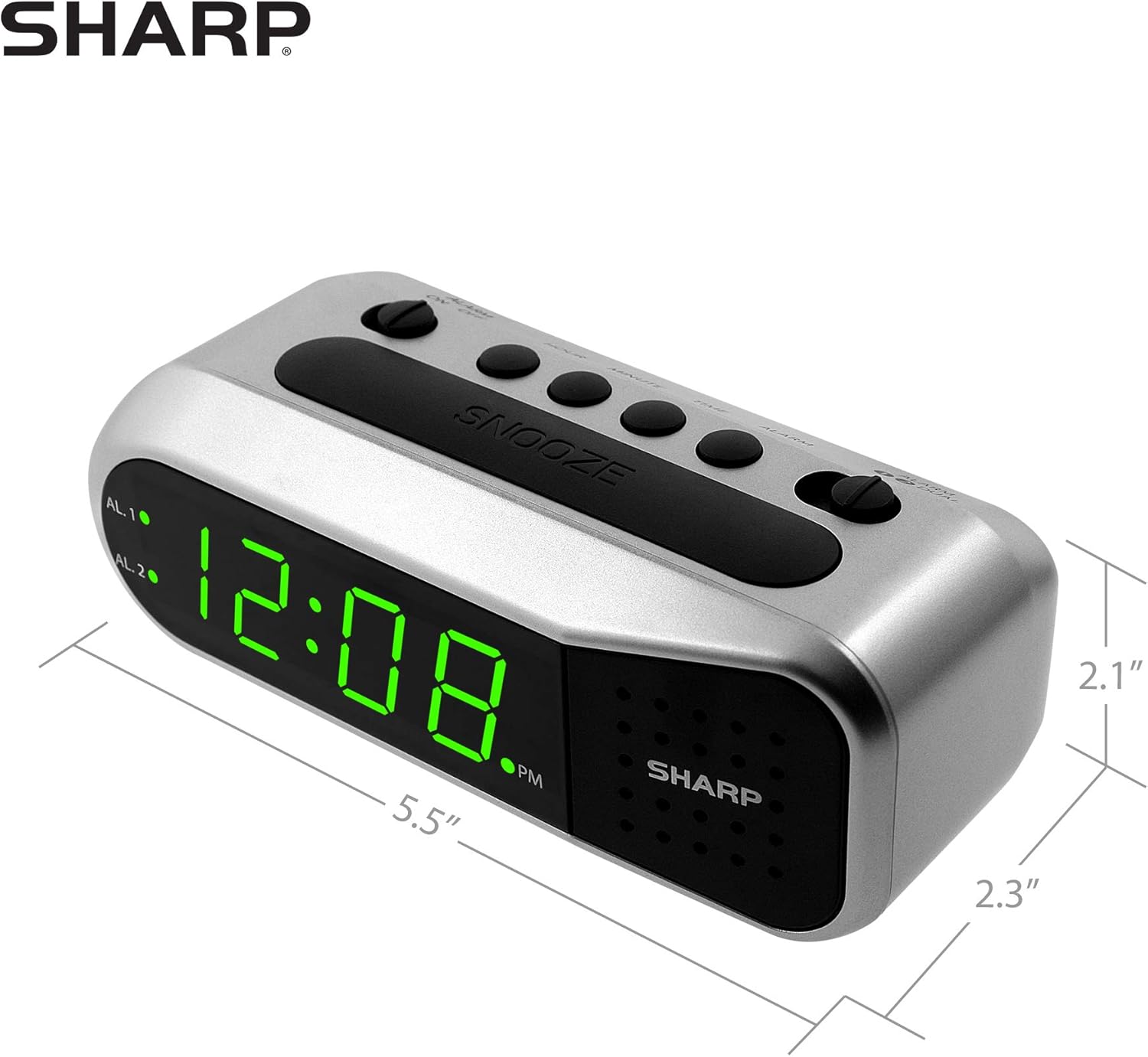
Figure 4: Dimensions of the Sharp Digital Alarm Clock.
گارانتی و پشتیبانی
برای اطلاعات مربوط به گارانتی یا پشتیبانی فنی، لطفاً به کارت گارانتی ارائه شده همراه محصول خود مراجعه کنید یا از نمایندگی رسمی شارپ دیدن کنید. webرسید خرید خود را به عنوان مدرک خرید نگه دارید.
For further assistance, you may contact Sharp customer service through their official channels.


