مقدمه
This manual provides essential information for the proper installation, operation, and maintenance of your Zebronics Zeb-D370S DVD Player. Please read this manual thoroughly before using the device to ensure safe and efficient operation. Keep this manual for future reference.
اطلاعات مهم ایمنی
- برای جلوگیری از آتشسوزی یا برقگرفتگی، دستگاه را در معرض باران یا رطوبت قرار ندهید.
- سی را باز نکنیدasinز. تمام مراحل سرویس را به پرسنل واجد شرایط ارجاع دهید.
- از تهویه مناسب در اطراف دستگاه اطمینان حاصل کنید. منافذ تهویه را مسدود نکنید.
- Use only the power adapter supplied with the unit or specified by the manufacturer.
- از قرار دادن دستگاه روی سطوح ناپایدار خودداری کنید.
- در هنگام رعد و برق یا زمانی که برای مدت طولانی از دستگاه استفاده نمیشود، سیم برق را از آن جدا کنید.
محتویات بسته
بررسی کنید که آیا همه اقلام در بسته موجود است یا خیر:
- Zebronics Zeb-D370S DVD Player Unit
- کنترل از راه دور
- کابل AV
- کابل برق
- راهنمای دستورالعمل
محصول تمام شده استview
The Zebronics Zeb-D370S is a versatile DVD player featuring a built-in stereo speaker and amplifier, HDMI, USB, and SD card support, and dual karaoke microphone inputs. It supports multiple formats and offers 5.1 channel, coaxial, and optical audio outputs.
کنترلها و پورتهای پنل جلویی
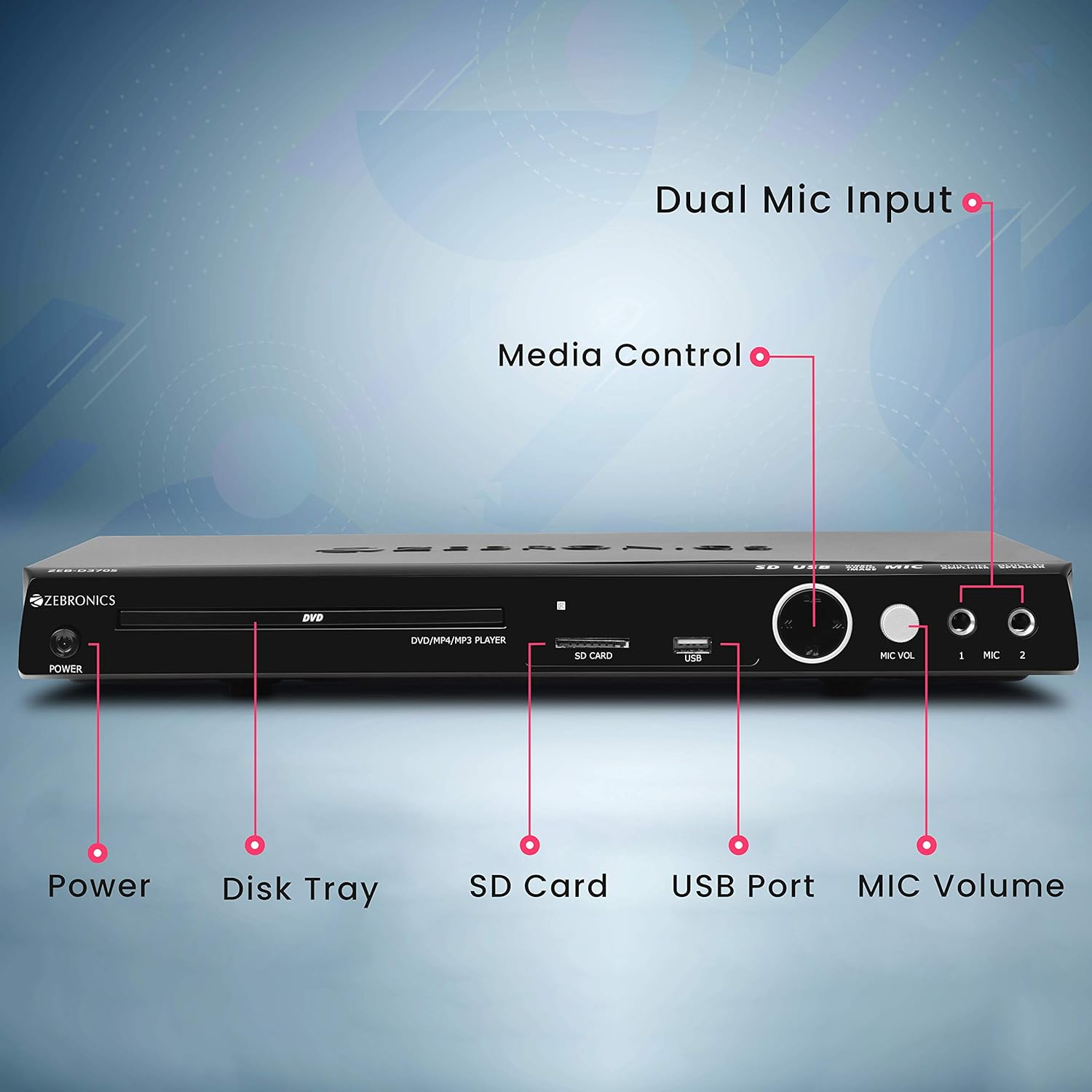
Front panel of the Zebronics Zeb-D370S DVD Player, showing the Power button, Disk Tray, SD Card slot, USB Port, MIC Volume control, and two Microphone inputs (MIC 1, MIC 2).
- دکمه پاور: دستگاه را روشن یا خاموش می کند.
- Disk Tray: For inserting DVDs, CDs, VCDs, and SVCDs.
- اسلات کارت SD: برای پخش رسانه files از یک کارت SD.
- پورت USB: برای پخش رسانه files از درایو USB.
- حجم MIC: Adjusts the volume of the connected microphones.
- MIC 1 & MIC 2: Inputs for connecting microphones for karaoke.
- دکمه های کنترل رسانه: Play/Pause, Stop, Skip, etc.
اتصالات پنل عقب

Rear panel of the Zebronics Zeb-D370S DVD Player, detailing the Coaxial Output, Optical Output, 5.1 Channel Output, HDMI port, Composite video output, Component video output, S-Video output, and Ext-Audio Output.
- خروجی HDMI: For high-definition video and audio connection to a TV or display.
- خروجی ویدیوی ترکیبی: خروجی ویدئو با کیفیت استاندارد
- خروجی ویدیوی کامپوننت: Higher quality analog video output (YPbPr).
- خروجی S-Video: Improved analog video output.
- Digital Audio Output (Optical & Coaxial): For connecting to external audio receivers or sound systems.
- Analog 5.1 Channel Output: For connecting to a 5.1 channel speaker system.
- Ext-Audio Output: Additional audio output connections.
- خروجی بلندگو: Terminals for connecting external speakers, utilizing the built-in ampزنده تر

عقب view of the Zebronics Zeb-D370S DVD Player highlighting the built-in amplifier, built-in speaker, and speaker output terminals.
دستورالعمل های راه اندازی
1. اتصال برق
- Ensure the DVD player is placed on a stable, flat surface with adequate ventilation.
- Connect the power cable to the AC input on the rear of the DVD player.
- Plug the other end of the power cable into a standard electrical outlet (110V - 260V AC).
2. Video Connection to TV/Display
یکی از روش های اتصال زیر را انتخاب کنید:
- HDMI (برای بهترین کیفیت توصیه میشود): Connect an HDMI cable from the HDMI output on the DVD player to an HDMI input on your TV.
- ویدئوی کامپوننت: Connect component video cables (Red, Green, Blue) from the DVD player's component outputs to the corresponding inputs on your TV.
- ویدئوی ترکیبی: Connect a composite video cable (Yellow) from the DVD player's composite output to the yellow video input on your TV.
- S-Video: Connect an S-Video cable from the DVD player's S-Video output to the S-Video input on your TV.
3. اتصال صوتی
یکی از روشهای اتصال صوتی زیر را انتخاب کنید:
- HDMI: اگر از HDMI برای تصویر استفاده شود، صدا نیز از طریق کابل HDMI منتقل میشود.
- 5.1 Channel Analog Output: Connect RCA cables from the 5.1 channel outputs (Front Left, Front Right, Center, Subwoofer, Surround Left, Surround Right) on the DVD player to a compatible 5.1 channel ampسیستم لافایر یا بلندگو
- Digital Audio (Optical/Coaxial): Connect an optical or coaxial cable from the respective output on the DVD player to a digital audio input on your amplifier or home theater system for surround sound.
- Built-in Speaker Output: If using the built-in speakers, ensure no external speakers are connected to the 5.1 channel outputs unless desired.
4. Microphone Connection (Optional)
- Plug your microphones into the MIC 1 and/or MIC 2 inputs on the front panel.
- Adjust the MIC Volume knob to control microphone audio levels.
دستورالعمل های عملیاتی

Zebronics Zeb-D370S DVD Player with a disc inserted, remote control, and a visual representation of content playing on a screen, illustrating its multimedia capabilities.
۱. پخش دیسک
- را فشار دهید قدرت دکمه برای روشن کردن پخش کننده DVD.
- را فشار دهید باز کردن/بستن button (usually on the remote or front panel) to open the disc tray.
- Place a compatible disc (DVD Video, DVD+RW/-RW/+R/-R, Dual Layer Disc, CD Audio, CD-R/-RW, VCD, SVCD) onto the disc tray with the label side facing up.
- را فشار دهید باز کردن/بستن button again to close the tray. The player will automatically begin playback or display a menu.
- Use the remote control for playback functions such as Play, Pause, Stop, Fast Forward, Rewind, and Chapter Skip.
2. USB/SD Media Playback
- Insert a USB drive into the USB port or an SD card into the SD card slot on the front panel.
- The player should automatically detect the media and display a menu to browse files. If not, select the USB or SD source using the remote control's منبع or ورودی دکمه
- از طریق خود حرکت کنید files (VOB, MP4, DIVX, AVI, MPEG-1, MPEG-2, 3GP, MP3, WMA, AAC, JPEG, TXT) using the remote control and press بازی کنید برای شروع پخش
۵. عملکرد کارائوکه
- Connect one or two microphones to the MIC 1 and MIC 2 inputs.
- Play a karaoke disc or a media file with instrumental tracks.
- Adjust the MIC Volume knob on the front panel to control the microphone audio level.
4. توابع پیشرفته
- ریپ کردن سی دی: Convert audio CDs to digital formats (refer to on-screen menu for options).
- Picture Slideshow: View JPEG images from disc, USB, or SD card as a slideshow.
- اسکن پیشرونده: Provides a smoother, flicker-free image on compatible displays.
- Zoom IN/OUT: Magnify or reduce the displayed image during playback.
- High Speed Search: Quickly scan through disc or media content.
- قفل والدین: Restrict playback of certain content based on ratings.
- پخش فوری: در حین پخش، چند ثانیه به عقب برگردید.
- Disc Resume: Resume playback from where it was last stopped on a disc.
تعمیر و نگهداری
- تمیز کردن واحد: Use a soft, dry cloth to clean the exterior of the DVD player. Do not use liquid cleaners or abrasive materials.
- مراقبت از دیسک: دیسکها را از لبههایشان بگیرید. آنها را تمیز و بدون خراش نگه دارید. از یک پارچه نرم و بدون پرز برای پاک کردن دیسکها از مرکز به سمت بیرون استفاده کنید.
- تهویه: برای جلوگیری از گرم شدن بیش از حد، از مسدود نشدن منافذ تهویه اطمینان حاصل کنید.
عیب یابی
If you encounter issues with your DVD player, refer to the table below for common problems and solutions:
| مشکل | علت احتمالی | راه حل |
|---|---|---|
| بدون قدرت | کابل برق وصل نیست؛ پریز برق کار نمیکند | اتصال کابل برق را بررسی کنید؛ یک پریز برق دیگر را امتحان کنید |
| بدون خروجی ویدیو | Incorrect video cable connection; Incorrect input selected on TV | Ensure video cables are securely connected; Select the correct input source on your TV (e.g., HDMI 1, AV) |
| بدون خروجی صدا | Incorrect audio cable connection; TV/amplifier volume too low; Mute activated | Check audio cable connections; Increase volume; Deactivate mute function |
| دیسک پخش نمی شود | Disc is dirty or scratched; Disc format not supported; Disc inserted incorrectly | Clean the disc; Ensure disc is compatible; Insert disc with label side up |
| USB/SD media not detected | USB drive/SD card not inserted correctly; Incompatible file format; Corrupted media | Reinsert USB/SD; Check supported file formats; Try a different USB/SD device |
مشخصات

Dimensions of the Zebronics Zeb-D370S DVD Player: 360mm (width), 220mm (depth), and 50mm (height).
| ویژگی | جزئیات |
|---|---|
| نام مدل | Zeb D370S |
| نام تجاری | زبرونیک |
| ابعاد محصول | 28 x 39 x 82 mm (1.4 kg) |
| قطعنامه | 1920 x 1080 (Supported resolutions: 480i/576i/480p/576p/720p/1080i/1080p) |
| ویژگی های خاص | Surround Sound, Built-in Amplifier, Built-in Stereo Speaker, Karaoke Mic Input |
| حالت خروجی صدا | Stereo, Surround (2CH / 5.1CH / Virtual Surround Sound) |
| پیکربندی کانال صدای فراگیر بلندگو | 5.1 |
| فرمت های صوتی پشتیبانی شده | Dolby Digital, MP3, WMA, AAC |
| Video Playback System | NTSC / PAL / AUTO |
| نوع رابط | HDMI, USB, SD Slot, MIC 1 & MIC 2, Composite, Component, S-Video, Digital Audio Output (Optical & Coaxial), Analog 5.1Ch Output, Ext-Audio Output x 2 |
| Media Type (Playback Disc) | DVD Video, DVD+RW/-RW/+R/-R, Dual Layer Disc, CD Audio, CD-R/-RW, VCD, SVCD |
| رسانه ها Fileپشتیبانی می شود | VOB, MP4, DIVX, AVI, MPEG-1, MPEG-2, 3GP, MP3, WMA, AAC, JPEG, TXT |
| جلد عملیاتیtage | ۱۱۰ ولت - ۱۲۰ ولت متناوب |
| توابع | CD Ripping, Picture SlideShow, Progressive scan, Zoom IN/OUT, High speed search, Parental lock, Instant replay, Disc resume |
گارانتی و پشتیبانی
For warranty information, technical support, or service inquiries, please refer to the warranty card included with your product or visit the official Zebronics webسایت. سعی نکنید خودتان دستگاه را تعمیر کنید.


