1. محصول تمام شدview
The CUBOT Note 7 is a 4G unlocked smartphone running Android 10. It features a 5.5-inch Dewdrop screen, 2GB RAM, 16GB internal storage (expandable up to 128GB via TF card), a 13MP rear camera, and an 8MP front camera. The device supports dual Nano SIM cards and includes a 3100mAh battery.

Figure 1: CUBOT Note 7 Smartphone (Green)
ویژگی های کلیدی:
- 5.5-inch Waterdrop Incell Fullview صفحه نمایش
- Android 10 GO Operating System
- 2GB RAM + 16GB ROM (expandable up to 128GB with TF card)
- 13MP Rear Main Camera + 2 sub cameras with 1A LED flashlight
- دوربین جلو 8 مگاپیکسلی
- باتری 3100 میلی آمپری
- Dual Nano SIM Card Slots
- باز کردن قفل با تشخیص چهره (Face ID)
- 2.4G Wi-Fi Support, Bluetooth 4.2
- Micro USB port, 3.5mm Headphone Jack
2. راهنمای راه اندازی
2.1 Unpacking and Initial Checks
Upon opening the box, ensure all components are present. The package typically includes the CUBOT Note 7 smartphone, a USB cable, and a power adapter. Before first use, verify that the insulating film on the battery has been removed. This film is present for transportation safety and must be removed for the phone to power on.
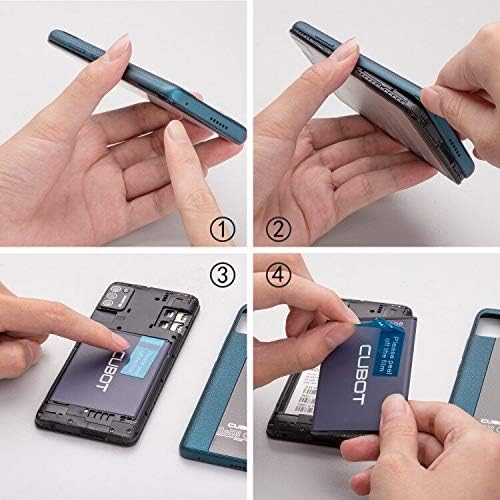
Figure 2: Battery Insulating Film Removal
Detailed description: This image illustrates the process of removing the insulating film from the CUBOT Note 7 battery. Step 1 shows the phone with its back cover. Step 2 shows the back cover being gently pried open. Step 3 reveals the battery compartment. Step 4 shows a hand peeling off a blue insulating film from the battery, which is labeled 'CUBOT'.
۲.۳ نصب سیم کارت و کارت TF
The CUBOT Note 7 supports two Nano SIM cards and one TF (MicroSD) card for expandable storage. To install them:
- قاب پشتی گوشی را به آرامی بردارید.
- Locate the battery compartment and the SIM/TF card slots.
- Insert your Nano SIM cards into the designated SIM slots.
- Insert the TF card (up to 128GB) into its dedicated slot.
- Ensure the battery is correctly seated and replace the back cover.

شکل ۲: اسلاتهای سیمکارت و کارت حافظه
Detailed description: This image displays the rear of the CUBOT Note 7, highlighting the slots for two Nano SIM cards and one Micro-SD (TF) card. The 3100mAh detachable battery is also visible, indicating its position relative to the card slots.
2.3 روشن کردن
Press and hold the Power button located on the side of the device until the CUBOT logo appears on the screen. Follow the on-screen prompts to complete the initial setup, including language selection, Wi-Fi connection, and Google account setup.
3. دستورالعمل های عملیاتی
3.1 Navigating Android 10 GO
The CUBOT Note 7 runs on Android 10 GO, a streamlined version of Android optimized for entry-level devices. The interface is designed for simplicity and efficiency. Swipe up from the bottom of the screen to access the app drawer. Swipe down from the top to access quick settings and notifications.

Figure 4: Android 10 GO Interface
Detailed description: This image shows the CUBOT Note 7 displaying various screens of the Stock Android 10 interface, including the home screen, settings menu, a cleaner app, and battery optimization options. This illustrates the simpler and smarter operation experience provided by the system.
۵.۳ باز کردن قفل با تشخیص چهره
The device supports Face ID for convenient unlocking. To set up Face ID:
- رفتن به تنظیمات > امنیت > باز کردن قفل با چهره.
- دستورالعمل های روی صفحه را برای ثبت چهره خود دنبال کنید.
- Ensure you are in a well-lit environment during registration for optimal performance.
۵.۵ استفاده از دوربین
The CUBOT Note 7 is equipped with a 13MP rear camera and an 8MP front camera. Open the Camera app to capture photos and videos. Tap the screen to focus, and press the shutter button to take a picture. Switch between front and rear cameras using the camera toggle icon.

شکل ۵.۸: دوربینهای جلو و عقب
Detailed description: This image highlights the camera capabilities of the CUBOT Note 7, showing a sample photo taken with the 8MP front camera (a person smiling on a beach) and a sample photo taken with the 13MP AI rear camera (a scenic beach with umbrellas and a distant tower).
4. نگهداری و مراقبت
4.1 مراقبت از باتری
To prolong battery life, avoid exposing the phone to extreme temperatures. Charge the device using the provided charger and cable. If the phone does not turn on, ensure the battery's insulating film has been removed and the battery is properly seated.
4.2 به روز رسانی نرم افزار
برای اطمینان از عملکرد و امنیت بهینه، مرتباً بهروزرسانیهای نرمافزار را بررسی کنید. به تنظیمات > سیستم > به روز رسانی سیستم. If an update fails, try turning off Wi-Fi and mobile data, then attempt the update again. If issues persist, skip the update and proceed with normal phone usage.
4.3 تمیز کردن
برای تمیز کردن صفحه نمایش و بدنه گوشی از یک پارچه نرم و بدون پرز استفاده کنید. از استفاده از مواد شیمیایی قوی یا مواد ساینده که میتوانند به دستگاه آسیب برسانند، خودداری کنید.
5 عیب یابی
۶.۱ تلفن روشن نمیشود
- مطمئن شوید که لایه عایق باتری برداشته شده است.
- بررسی کنید که باتری به درستی نصب و شارژ شده باشد.
- Connect the phone to its charger and wait a few minutes before attempting to power on again.
۵.۳ مشکلات اتصال شبکه
The CUBOT Note 7 is compatible with GSM carriers such as AT&T, T-Mobile, Metro PCS, and Cricket Wireless. It is NOT compatible with CDMA carriers like Verizon, Sprint, Boost Mobile, Straight Talk, or U.S. Cellular. If you experience network issues:
- Check if your carrier is supported.
- مطمئن شوید که سیم کارت شما به درستی وارد شده است.
- گوشی را ریستارت کنید.
- Check network settings under تنظیمات > شبکه و اینترنت.

Figure 6: Supported Network Bands
Detailed description: This image shows the CUBOT Note 7 with an overlay detailing its network compatibility: 4G FDD (B2/4/5/7/12/17/28A+B), 3G (B2/4/5), and 2G (B2/3/5/8). This visual aid helps users understand the specific bands supported by the device.
۶.۳ تأخیر عملکرد
As an entry-level smartphone, performance may vary with demanding applications. To optimize performance:
- برنامههای بلااستفادهای که در پسزمینه اجرا میشوند را ببندید.
- حافظه پنهان (cache) برنامههای پرکاربرد را پاک کنید.
- Avoid running multiple heavy applications simultaneously.
6. مشخصات
| ویژگی | مشخصات |
|---|---|
| شماره مدل | 867 |
| سیستم عامل | اندروید ۱۴ گو |
| نمایش | 5.5-inch Waterdrop Incell Fullview صفحه نمایش |
| قطعنامه | 1280×720 |
| RAM | 2 گیگابایت |
| حافظه داخلی (ROM) | 16 گیگابایت |
| فضای ذخیره سازی قابل ارتقا | Up to 128GB via TF Card |
| دوربین عقب | 13MP Main + 2 Sub Cameras |
| دوربین جلو | 8 مگاپیکسل |
| ظرفیت باتری | لیتیوم یون 3100 میلی آمپر ساعت |
| پشتیبانی از سیم کارت | دو سیم کارت نانو |
| سازگاری شبکه | 4G FDD (B2/4/5/7/12/17/28A+B), 3G (B2/4/5), 2G GSM |
| وای فای | Wi-Fi 2.4G |
| بلوتوث | 4.2 |
| قابلیت اتصال | میکرو یواسبی، جک هدفون ۳.۵ میلیمتری |
| ابعاد | 5.31 x 2.48 x 0.43 اینچ |
| وزن | 5.3 اونس (150 گرم) |

Figure 7: CUBOT Note 7 Dimensions
Detailed description: This image provides a visual representation of the CUBOT Note 7's dimensions, showing its length (5.31 inches), width (2.48 inches), and thickness (0.43 inches). It also indicates the weight as 5.07 oz (which is approximately 144 grams, aligning with the 150 grams from specifications).
7. گارانتی و پشتیبانی
7.1 اطلاعات گارانتی
Please refer to the warranty card included in your product packaging for detailed warranty terms and conditions. Keep your proof of purchase for warranty claims.
7.2 پشتیبانی مشتری
For technical assistance, troubleshooting, or other inquiries, please contact CUBOT customer support through their official webسایت یا اطلاعات تماس ارائه شده در مستندات محصول شما.


