1. مقدمه
This manual provides essential information for the installation, operation, and maintenance of your Cisco Catalyst IE3400 Rugged Series Industrial Ethernet Switch. Please read this manual thoroughly before operating the device to ensure proper usage and to prevent damage.
2. محصول تمام شدview
The Cisco Catalyst IE3400 Rugged Series is an industrial Ethernet switch designed for extended enterprise and industrial environments. It provides high-speed network connectivity, robust performance, and enhanced security features, making it suitable for deployments in harsh conditions. This model, the IE-3400-8T2S-E, features 8 RJ45 ports and 2 SFP ports for flexible connectivity options, ensuring reliable operation in demanding industrial settings.
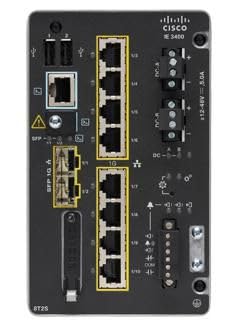
شکل 1: جلو view of the Cisco Catalyst IE3400 Rugged Series Industrial Ethernet Switch. This image displays the compact, rugged design of the switch with its various ports and LED indicators.
3. محتویات بسته
بررسی کنید که بسته شما حاوی موارد زیر باشد:
- Cisco Catalyst IE3400 Rugged Series Switch (Model IE-3400-8T2S-E)
4. راه اندازی
4.1 باز کردن و بازرسی
Carefully unpack the switch and inspect it for any signs of damage. Report any damage to your supplier immediately.
4.2 نصب
The IE3400 series switches are designed for various mounting options, including DIN rail or wall mount. Ensure the mounting surface is stable and can support the weight of the switch and connected cables. Refer to the specific mounting kit instructions for detailed steps.
4.3 اتصال برق
Connect the appropriate power supply to the switch's power input. Ensure the power source meets the switch's voltage and current requirements. Do not apply power until all network connections are made.
4.4 اتصالات شبکه
Connect your network devices (e.g., desktop computers, other switches, industrial equipment) to the RJ45 Ethernet ports using standard Ethernet cables. For fiber optic connections, insert compatible SFP modules into the SFP slots and connect fiber optic cables.
4.5 روشن شدن اولیه
Once all connections are secure, apply power to the switch. Observe the LED indicators for proper power-on and operational status.
5. دستورالعمل های عملیاتی
5.1 روشن/خاموش کردن
To power on the switch, connect it to a power source. To power off, disconnect the power source. Always ensure proper shutdown procedures if applicable to avoid data corruption or network disruption.
5.2 نشانگرهای LED
Monitor the LED indicators on the front panel to determine the switch's operational status, port link status, and activity. Refer to the product's technical documentation for a detailed explanation of each LED.
5.3 پیکربندی شبکه
Initial network configuration typically involves accessing the switch's management interface (e.g., web-based GUI, command-line interface via console port). Consult the Cisco IOS XE documentation for the IE3400 series for detailed configuration procedures, including IP address assignment, VLAN setup, and security settings.
6. تعمیر و نگهداری
6.1 تمیز کردن
Periodically clean the exterior of the switch with a soft, dry cloth. Do not use liquid or aerosol cleaners directly on the device. Ensure ventilation openings are free from dust and debris.
6.2 به روز رسانی سیستم عامل
مرتباً پشتیبانی سیسکو را بررسی کنید website for firmware updates. Keeping the firmware up-to-date ensures optimal performance, security, and access to new features. Follow Cisco's recommended procedures for firmware upgrades.
۲.۴ پایش محیطی
Ensure the operating environment remains within the specified temperature and humidity ranges to prevent overheating and ensure long-term reliability.
7 عیب یابی
7.1 بدون برق
If the switch does not power on, verify the power cable connection and the power source. Check the power supply unit if external. Ensure the power outlet is functional.
۵.۲ عدم وجود لینک در پورت
If a port LED is off, check the Ethernet cable connection at both ends. Try a different cable or port. Verify the connected device is powered on and functioning correctly.
۵.۳ مشکلات اتصال شبکه
If devices connected to the switch cannot communicate, verify IP configurations, VLAN settings, and ensure there are no IP address conflicts. Check for any error messages in the switch's logs via the management interface.
۵.۴ عملکرد کند
Check for network congestion, faulty cables, or duplex mismatches. Ensure the switch's firmware is up-to-date.
8. مشخصات
| نام تجاری | سیسکو |
| مدل | IE-3400-8T2S-E |
| سازنده | سیسکو |
| نوع رابط | RJ45، SFP |
| تعداد پورت ها | 8 |
| ابعاد محصول | 22.86 × 22.86 × 20.32 سانتی متر |
| وزن مورد | 2.28 کیلوگرم |
| تعداد آیتم ها | 1 |
| دستگاه های سازگار | کامپیوتر رومیزی |
| اجزای شامل | سوئیچ |
| UPC | 889728223379 |
| اولین بار در دسترس است | 11 ژانویه 2021 |
9. گارانتی و پشتیبانی
برای اطلاعات گارانتی و پشتیبانی فنی، لطفاً به مرجع رسمی مراجعه کنید سیسکو webسایت or contact your authorized Cisco reseller. Ensure you have your product model number (IE-3400-8T2S-E) and serial number available when seeking support.


