1. بیش ازview
The Google Pixel 5 is an advanced 5G Android smartphone designed for efficient communication and multimedia. It features a durable, water-resistant design, an advanced camera system with Night Sight and an ultrawide lens, and an all-day battery with Extreme Battery Saver capabilities. This device is an unlocked smartphone, offering flexibility in carrier and data plan selection.
۲.۲ اجزای موجود
- گوشی هوشمند گوگل پیکسل ۸
- آداپتور برق 18 وات USB-C
- کابل USB-C به USB-C
- ابزار خارج کردن سینی سیم کارت
- USB-C to USB-A Quick Switch Adapter
- Google Pixel USB-C earbuds (availability may vary by region)
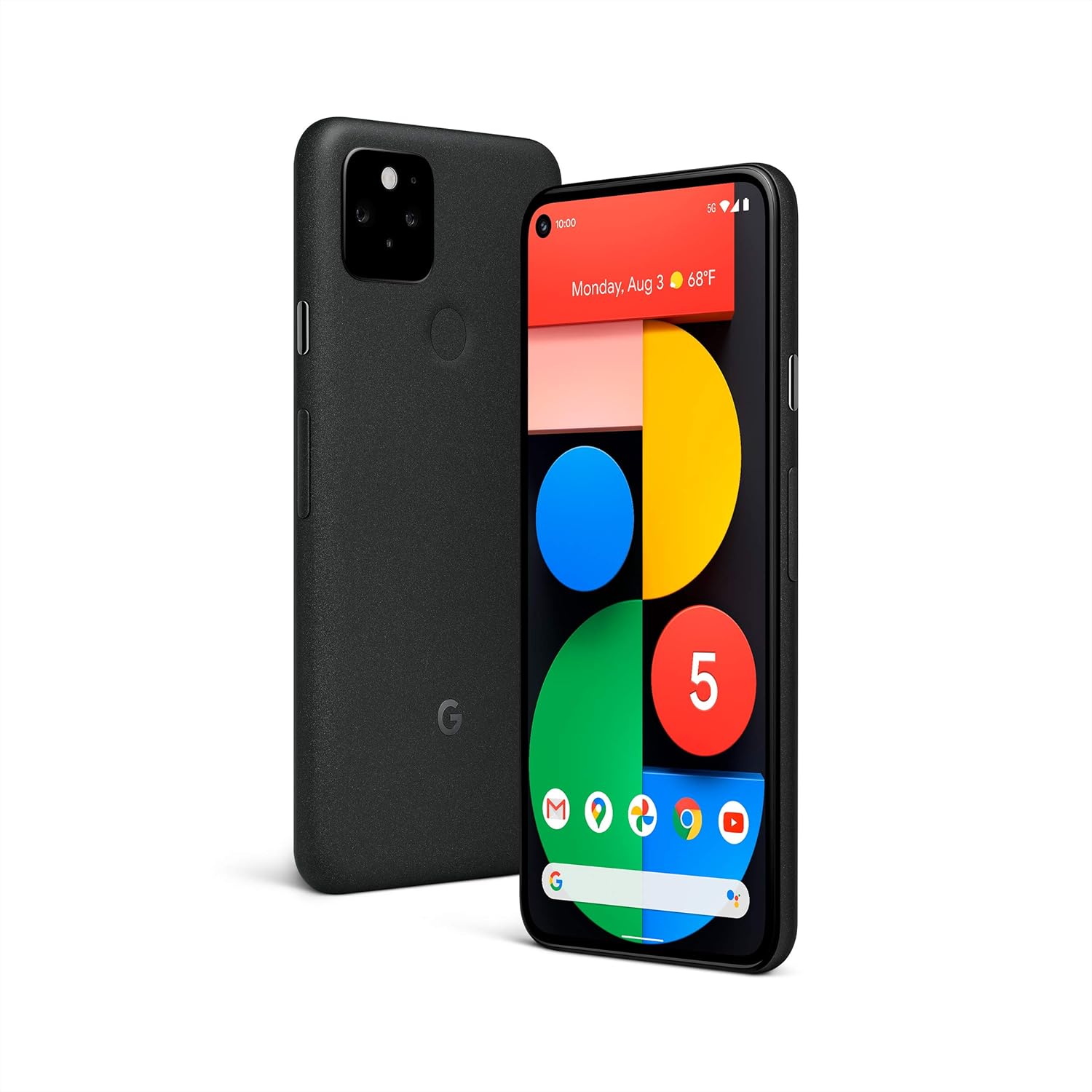
تصویر: جلو و عقب view of the Google Pixel 5 smartphone in Just Black.
2. راه اندازی
2.1 نصب سیم کارت
- سینی سیم کارت را در کنار Pixel 5 خود پیدا کنید.
- ابزار خارج کردن سینی سیمکارت را در سوراخ کوچک کنار سینی قرار دهید و محکم فشار دهید تا سینی بیرون بیاید.
- نانو سیم کارت خود را طوری داخل سینی قرار دهید که قسمتهای طلایی آن رو به پایین باشد.
- سینی را با دقت دوباره داخل گوشی قرار دهید تا با صدای کلیک در جای خود قرار گیرد.
۴.۱ روشن کردن اولیه و پیکربندی
- Press and hold the power button on the side of the phone until the Google logo appears.
- برای انتخاب زبان، اتصال به شبکه Wi-Fi و ورود به حساب Google خود، دستورالعملهای روی صفحه را دنبال کنید.
- شما در تنظیم ویژگیهای امنیتی مانند باز کردن قفل با اثر انگشت و قفل صفحه راهنمایی خواهید شد.
2.3 Data Transfer from an Old Phone
Use the included USB-C to USB-A Quick Switch Adapter to transfer data from your old phone to your new Pixel 5. Connect your old phone to the adapter, and the adapter to your Pixel 5. Follow the on-screen instructions to select the data you wish to transfer.

Image: A Google Pixel 5 connected to an older smartphone using the Quick Switch Adapter for data transfer.
3. دستورالعمل های عملیاتی
3.1 ناوبری اولیه
- صفحه اصلی: برای دسترسی به منوی برنامهها، از پایین به بالا بکشید. برای جابجایی بین صفحات اصلی، انگشت خود را به چپ یا راست بکشید.
- برگشت: انگشت خود را از لبه چپ یا راست صفحه بکشید.
- برنامه های اخیر: Swipe up from the bottom of the screen and hold, then release.
- اعلانها و تنظیمات سریع: انگشت خود را از بالای صفحه به پایین بکشید.
۳.۳ اتصال 5G
The Pixel 5 supports 5G networks, enabling faster download speeds and smoother streaming. A 5G data plan and compatible network coverage are required for 5G service. Performance may vary based on carrier, location, and network conditions.

Image: A Google Pixel 5 screen showing a video streaming, illustrating the speed of 5G connectivity.
3.3 ویژگی های دوربین
The Pixel 5 camera includes advanced features for various lighting conditions:
- دید در شب: Captures clear and vibrant photos in low-light environments.
- لنز فوق عریض: Allows for a wider field of view, ideal for landscapes and group photos.
- Portrait Light: Adjusts the lighting on subjects in portrait photos for studio-quality results.

Image: A man's face illuminated by soft light, showcasing the camera's ability to capture detail in challenging lighting conditions.

Image: A wide landscape photo, demonstrating the ultrawide lens capability of the Google Pixel 5.
3.4 Wireless Charging and Battery Share
The Pixel 5 supports Qi-compatible wireless charging. Place the phone on a compatible wireless charger to begin charging. Additionally, the Pixel 5 can wirelessly charge other Qi-certified devices using Battery Share. To activate Battery Share, navigate to Settings > Battery > Battery Share.

Image: A Google Pixel 5 wirelessly charging a pair of Pixel Buds on its rear surface.
3.5 مدیریت باتری
The Pixel 5 features an all-day battery. For extended battery life, enable صرفهجویی فوقالعاده در مصرف باتری mode, which can extend usage up to 48 hours by limiting active apps to essential functions. Access this feature in Settings > Battery.

Image: A family taking a selfie with a Google Pixel 5, symbolizing the phone's long-lasting battery for extended use.
3.6 ویژگی های امنیتی
The Pixel 5 incorporates the Titan M security chip to protect your operating system and sensitive data. The device receives guaranteed Android OS and security updates for at least three years from its initial release.

Image: A man interacting with his Google Pixel 5, representing the device's integrated security features.
3.7 Call Screen and Google Duo
- صفحه تماس: Google Assistant can filter out detected spam calls and provide information about unrecognized callers before you answer. This feature is available in the US and English only.
- Google Duo Screen Sharing: Share your screen during HD video calls to read articles, watch live sports, or browse content with friends and family. Requires Wi-Fi or 5G internet connection.
4. تعمیر و نگهداری
4.1 تمیز کردن دستگاه
To clean your Pixel 5, use a soft, lint-free cloth. For stubborn marks, slightly dampen the cloth with water. Avoid using harsh chemicals, abrasive cleaners, or compressed air, as these can damage the device's finish or internal components.
۶.۲ مقاومت در برابر آب و گرد و غبار
The Pixel 5 has an IP68 dust and water protection rating under IEC standard 60529, meaning it can withstand submersion in up to 1.5 meters of fresh water for 30 minutes. This resistance is not a permanent condition and may decrease over time with normal wear and tear, repair, disassembly, or damage. Chargers and accessories are not water or dust resistant. Avoid exposing the phone to saltwater, chlorinated water, or other liquids.

تصویر: نمای نزدیک view of the Google Pixel 5 with water droplets on its surface, demonstrating its water resistance.
4.3 به روز رسانی نرم افزار
Your Pixel 5 will automatically receive the latest Android OS and security updates. Ensure your device is connected to Wi-Fi and has sufficient battery charge to download and install updates.
5 عیب یابی
5.1 مسائل و راه حل های مشترک
- دستگاه پاسخگو نیست: برای ریستارت اجباری، دکمه پاور را حدود ۱۰ ثانیه فشار داده و نگه دارید.
- عمر باتری ضعیف: Check for background apps consuming power (Settings > Battery). Enable Extreme Battery Saver. Reduce screen brightness.
- Connectivity Problems (Wi-Fi/Cellular): Toggle Wi-Fi or cellular data off and on. Restart the device. Check network settings.
- از کار افتادن برنامه: Clear the app's cache (Settings > Apps > [App Name] > Storage & cache > Clear cache). If the issue persists, uninstall and reinstall the app.
5.2 تنظیم مجدد کارخانه
اگر مشکلات همچنان ادامه داشته باشند، ممکن است تنظیم مجدد کارخانه ضروری باشد. هشدار: این کار تمام دادههای گوشی شما را پاک میکند. قبل از ادامه، از دادههای مهم خود نسخه پشتیبان تهیه کنید. به تنظیمات > سیستم > گزینههای بازنشانی > پاک کردن تمام دادهها (بازنشانی به تنظیمات کارخانه) بروید.
6. مشخصات
| ویژگی | جزئیات |
|---|---|
| شماره مدل | GA01316-US |
| سیستم عامل | اندروید ۱۴ (در زمان عرضه) |
| اندازه نمایشگر | 6 اینچ |
| قطعنامه | 1080 x 2340 پیکسل |
| RAM | 8 گیگابایت |
| ظرفیت ذخیره سازی حافظه | 128 گیگابایت |
| مدل CPU | کوالکام اسنپدراگون ۷۳۰G |
| ظرفیت باتری | 4080 میلیونamp ساعت |
| ابعاد محصول | 5.7 x 2.8 x 0.3 اینچ |
| وزن مورد | ۳.۵۳ اونس (۱۰۰ گرم) |
| مقاومت در برابر آب | IP68 |
| شارژ بی سیم | سازگار با Qi |

Image: A comparison chart highlighting key features like 5G, water resistance, wireless charging, and camera specifications across Pixel 5, Pixel 4a with 5G, and Pixel 4a models.
7. گارانتی و پشتیبانی
7.1 گارانتی محصول
For detailed warranty information regarding your Google Pixel 5, please refer to the official Google support website or the warranty card included with your purchase. Warranty terms and conditions may vary by region.
7.2 پشتیبانی مشتری
If you require further assistance or encounter issues not covered in this manual, please visit the official Google Pixel Help Center online or contact Google customer support directly. Contact information can typically be found on the Google support webسایت
۱۰.۴. ویدیوهای رسمی محصول
هیچ ویدیوی رسمی از محصول وجود ندارد URLs were provided in the product data for embedding in this manual.


