1. محصول تمام شدview
The Sharp Digital Clock is designed for simplicity and convenience, featuring a clear green LED display and dual USB FastCharge ports for charging your devices. It includes an alarm function and a battery backup system to retain settings during power outages

شکل 1: جلو view of the Sharp Digital Clock, highlighting the large green LED display and dual USB charging ports.
2. راهنمای راه اندازی
2.1 اتصال برق
Connect the provided power adapter to the DC IN jack located at the back of the clock. Plug the other end into a standard electrical outlet. The display will illuminate, and the clock will be ready for time setting.
2.2 باتری پشتیبان (اختیاری)
For battery backup functionality, which retains time and alarm settings during a power outage, install two (2) AAA batteries (not included) into the battery compartment located on the bottom of the unit. During battery backup, the display will go blank to conserve power, but settings will be preserved.
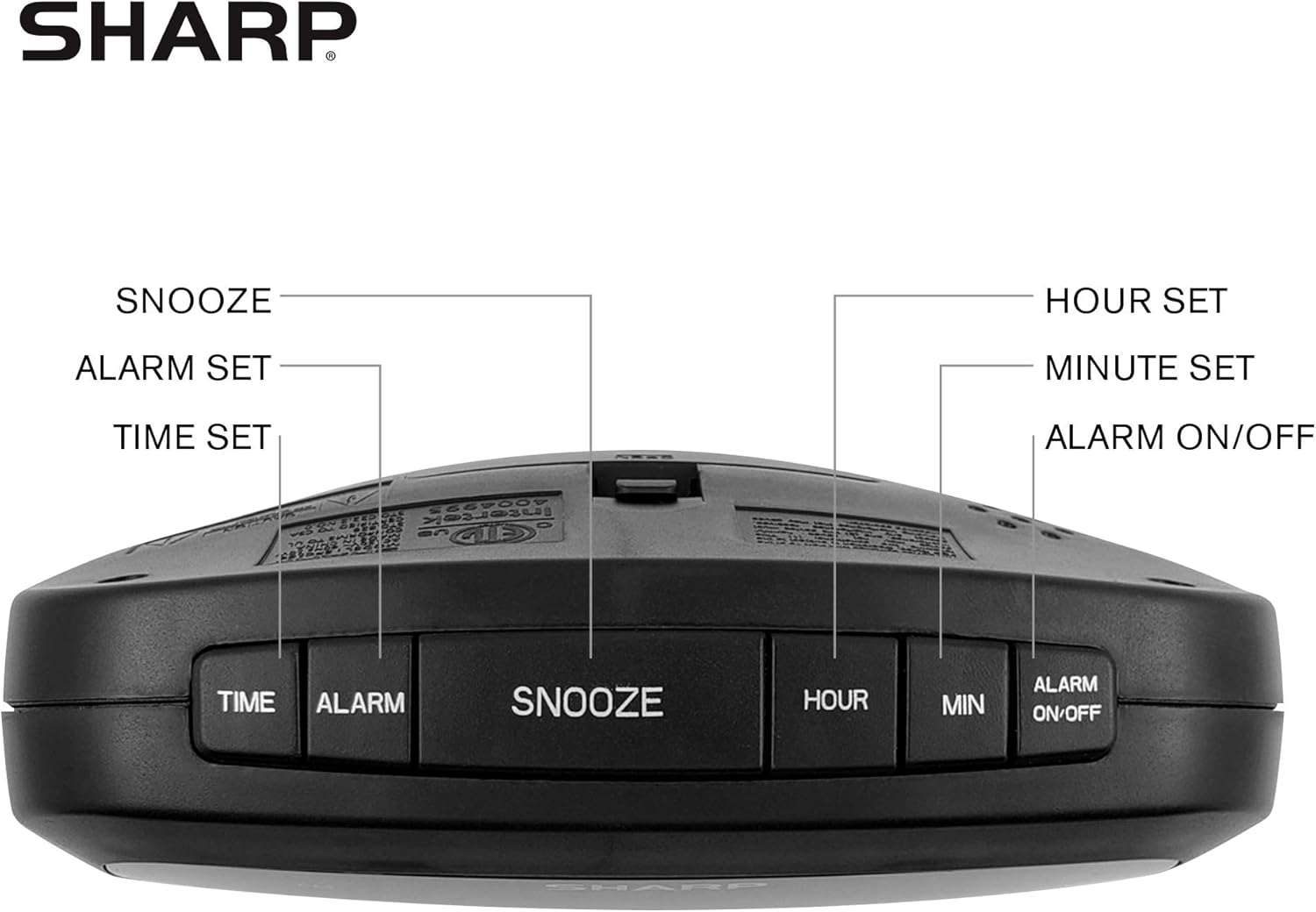
Figure 2: Underside of the clock with the battery compartment visible, requiring 2 AAA batteries for backup.
3. دستورالعمل های عملیاتی
The clock features intuitive top-mounted buttons for easy operation.

Figure 3: Top panel of the clock with clearly labeled buttons for time, alarm, snooze/dimmer, hour, minute, and alarm on/off.
3.1 تنظیم زمان
- را فشار داده و نگه دارید TIME دکمه را فشار دهید تا ارقام ساعت شروع به چشمک زدن کنند.
- را فشار دهید ساعت button to adjust the hour. Pay attention to the PM indicator if setting a PM time.
- را فشار دهید MIN دکمه تنظیم دقیقه.
- را فشار دهید TIME button again to confirm and save the time.
3.2 تنظیم زنگ هشدار
- را فشار داده و نگه دارید آلارم دکمه را فشار دهید تا ارقام ساعت زنگ دار شروع به چشمک زدن کنند.
- را فشار دهید ساعت دکمه تنظیم ساعت زنگ هشدار.
- را فشار دهید MIN دکمه برای تنظیم دقیقه زنگ هشدار.
- را فشار دهید آلارم button again to confirm and save the alarm time.
- برای فعال یا غیرفعال کردن زنگ هشدار، دکمه هشدار روشن / خاموش button. An alarm indicator light will appear on the display when the alarm is active.
3.3 Snooze and Dimmer Function
- وقتی زنگ هشدار به صدا درآمد، دکمه بزرگ را فشار دهید SNOOZE / DIMMER button to temporarily silence the alarm for a few minutes.
- To adjust the brightness of the green LED display, repeatedly press the SNOOZE / DIMMER button when the alarm is not sounding. Cycle through bright, medium, and low brightness settings.
3.4 Using the USB Charging Ports
The clock is equipped with two 2 AMP USB charging ports on the front, allowing you to conveniently charge your smartphone or other USB-powered devices directly from the clock.

Figure 4: The clock demonstrating its dual USB charging capability with two smartphones connected.
- Simply connect your device's USB charging cable to one of the USB ports on the front of the clock.
- Ensure your device is compatible with 2 AMP charging for optimal speed.
4. تعمیر و نگهداری
To ensure the longevity and proper functioning of your Sharp Digital Clock, follow these simple maintenance guidelines:
- تمیز کردن: Wipe the clock with a soft, dry cloth. Do not use abrasive cleaners, waxes, or solvents as they may damage the finish.
- قرار دادن: Place the clock on a stable, flat surface away from direct sunlight, heat sources, and excessive moisture.
- تعویض باتری: If using the battery backup, replace the AAA batteries annually or when the clock consistently loses time during power interruptions.
5 عیب یابی
| مشکل | علت احتمالی | راه حل |
|---|---|---|
| صفحه نمایش ساعت خالی است. | بدون قدرت یا قدرت شماtage. | Ensure the power adapter is securely plugged into the clock and a working electrical outlet. If there was a power outage, check if backup batteries are installed and functional. |
| صدای آژیر نمیآید. | Alarm not set or not activated. | Verify that the alarm time is correctly set and that the alarm indicator light is visible on the display (press ALARM ON/OFF). |
| پورتهای USB دستگاههای شارژکننده نیستند. | Device incompatibility or faulty cable. | Ensure your device is compatible with USB charging. Try a different USB cable. Confirm the clock is powered on. |
| صفحه نمایش خیلی روشن/کمنور است. | تنظیم روشنایی نیاز به تنظیم دارد. | Press the SNOOZE/DIMMER button repeatedly to cycle through brightness levels (bright, medium, low). |
6. مشخصات محصول
- برند: شارپ
- مدل: B08H3STVWG
- نوع نمایشگر: Digital Green LED
- منبع تغذیه: سیم برقی
- پشتیبان گیری باتری: 2 عدد باتری AAA (شامل نمی شود)
- پورت های USB: 2×2 AMP USB FastCharge Ports
- ابعاد محصول: ۶.۳ اینچ عرض × ۲.۷۲ اینچ ارتفاع
- وزن مورد: 9.59 اونس
- رنگ: سبز به رهبری
- مواد: پلاستیک
- UPC: 049353005089
7. گارانتی و پشتیبانی
This Sharp Digital Clock comes with a limited warranty. For detailed warranty information, product support, or to purchase accessories, please visit the official Sharp webسایت یا با خدمات مشتریان آنها تماس بگیرید. همچنین میتوانید از فروشگاه شارپ در آمازون.
لطفا رسید خرید خود را برای درخواست گارانتی نگه دارید.


