۲. چه چیزهایی در جعبه است؟
Before you begin, verify that all items are present:
- CUBOT X30 Unlocked Smartphone
- شارژر
- کابل USB Type-C
- راهنمای کاربر
- کیس محافظ
- پین سیم کارت
مدل: X30
Welcome to the CUBOT X30 Unlocked Smartphone user manual. This guide provides essential information for setting up, operating, maintaining, and troubleshooting your device. Please read this manual thoroughly to ensure optimal performance and longevity of your smartphone.

تصویر: جلو و عقب view of the CUBOT X30 smartphone, showcasing its design and multi-camera setup.
Before you begin, verify that all items are present:
The CUBOT X30 supports dual Nano SIM cards or one Nano SIM card and one TF (microSD) card for expanded storage.
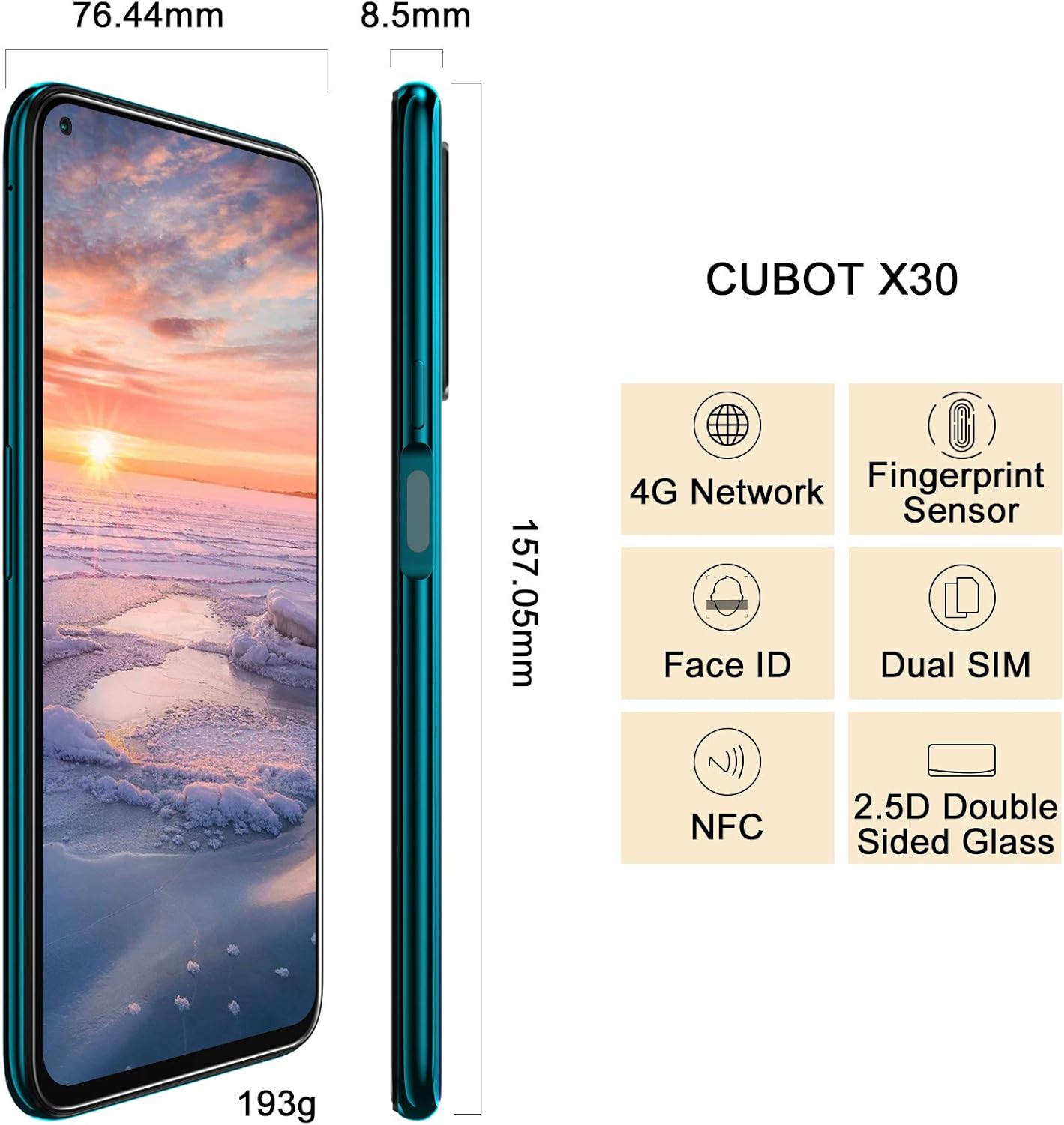
Image: Diagram showing the dimensions of the CUBOT X30 and icons representing its features like 4G Network, Fingerprint Sensor, Face ID, Dual SIM, and NFC. This image also implicitly shows the side profile where the SIM tray would be located.
To power on your device, press and hold the power button located on the side until the CUBOT logo appears. For first-time use, it is recommended to fully charge the battery.

Image: The CUBOT X30 display showing a battery charging indicator at 98%, illustrating the fast charging capability.
Your CUBOT X30 runs on Android 10. Navigation is primarily touch-based:

Image: The CUBOT X30 displaying the Android 10 interface, highlighting its operating system and the Helio P60 Octa-Core Processor.
Enhance your phone's security with biometric authentication:
The CUBOT X30 features a versatile camera system:

Image: The CUBOT X30's camera capabilities are highlighted, featuring the 48MP Samsung S5KGM1 Main Lens, AI Beauty Camera Mode, and Super Night Mode, with exampعکسهای لو.
Your device supports multiple connectivity options:
The CUBOT X30 comes with 8GB RAM and 256GB ROM, expandable via TF card up to 256GB.

Image: The CUBOT X30 display, emphasizing its 8GB RAM and 256GB ROM, with various application icons floating around, suggesting smooth multitasking and ampذخیره سازی
برای تمیز کردن صفحه نمایش و بدنه گوشی خود از یک پارچه نرم و بدون پرز استفاده کنید. از استفاده از مواد شیمیایی قوی یا مواد ساینده خودداری کنید.
برای افزایش طول عمر باتری:
مرتباً بهروزرسانیهای سیستم را بررسی کنید تا مطمئن شوید دستگاه شما جدیدترین ویژگیها و وصلههای امنیتی را دارد. به تنظیمات > سیستم > پیشرفته > بهروزرسانی سیستم.
هشدار: A factory reset will erase all data from your phone. Back up important data before proceeding.
برای انجام تنظیم مجدد کارخانه، به تنظیمات > سیستم > پیشرفته > گزینه های بازنشانی > پاک کردن همه داده ها (بازنشانی کارخانه). دستورالعمل های روی صفحه را دنبال کنید.

Image: The CUBOT X30's 6.4-inch FHD+ hole-punch screen, highlighting its 90% screen-to-body ratio and 1080*2310 pixel resolution.
| CPU | MT6771 Helio P60, Octa-core, ARM Mali-G72 MP3 GPU |
| سیستم عامل | اندروید 10.0 |
| حافظه | ۴ گیگابایت رم + ۶۴ گیگابایت حافظه داخلی (قابل ارتقا از طریق کارت حافظه TF تا ۱۲۸ گیگابایت) |
| نمایش | 6.4-inch FHD+ hole-punch screen, 1080*2310 resolution |
| دوربین عقب | 48MP Main (Samsung S5KGM1), 16MP Ultra Wide, 5MP Macro, 2MP Depth, 0.3MP Photosensitive |
| دوربین جلو | 32MP AI Beauty |
| باتری | 4200 mAh, Undetachable Battery, 5V/2A Fast Charge |
| قابلیت اتصال | Wi-Fi 2.4G/5.0G (802.1.1 a/b/g/n), Bluetooth 4.2, Type-C USB, OTG, NFC |
| ناوبری | GPS / A-GPS, Gallileo, Glonass, Beidou |
| حسگرها | Fingerprint Scanner, Face ID, Proximity, Accelerometer, Magnetic, Gyroscope, Light sensor |
| ابعاد | 6.18 x 3 x 0.33 اینچ (157.05 x 76.44 x 8.5 میلیمتر) |
| وزن | 6.8 اونس (193 گرم) |
| جک صوتی | Type C (no 3.5mm headphone jack) |
Your CUBOT X30 smartphone is covered by a limited manufacturer's warranty. Please refer to the warranty card included in your product packaging or visit the official CUBOT webبرای مشاهده شرایط و ضوابط دقیق مربوط به پوشش گارانتی و مدت زمان آن، به سایت مراجعه کنید.
For further assistance, technical support, or service inquiries, please contact CUBOT customer support through their official website or the contact information provided in your product documentation. When contacting support, please have your device model (X30) and purchase information ready.
فروشگاه رسمی CUBOT: از فروشگاه CUBOT در آمازون دیدن کنید
 |
راهنمای شروع سریع و دفترچه راهنمای کاربر CUBOT Quest راهنمای جامع برای گوشی هوشمند CUBOT Quest، شامل راهاندازی، ویژگیها، تنظیمات، ایمنی و انطباق با مقررات. یاد بگیرید که از تماسها، پیامها، اینترنت، دوربین و موارد دیگر استفاده کنید. |
 |
راهنمای شروع سریع CUBOT J5 - دفترچه راهنمای کاربر راهنمای جامع و سریع برای گوشی هوشمند CUBOT J5، شامل تنظیمات، ویژگیها، و اطلاعات نظارتی. یاد بگیرید که چگونه از دستگاه جدید CUBOT خود به طور موثر استفاده کنید. |
 |
راهنمای کاربر Cubot King Kong CS Android 10.0 دفترچه راهنمای جامع برای گوشی هوشمند Cubot King Kong CS با سیستم عامل اندروید ۱۰.۰، شامل تنظیمات، ویژگیها، چندرسانهای، ایمنی و مراقبت. |
 |
دفترچه راهنمای کاربر تلفن همراه Cubot X1 - تنظیمات، ویژگیها و مشخصات دفترچه راهنمای جامع کاربر برای گوشی هوشمند Cubot X1. یاد بگیرید که چگونه دستگاه خود را راهاندازی کنید، از ویژگیهای آن استفاده کنید، تنظیمات را مرور کنید و مشخصات فنی را بیابید. شامل دستورالعملهای ایمنی و نکات عیبیابی است. |
 |
راهنمای شروع سریع کوبوت راهنمای شروع سریع برای تلفن همراه Cubot، شامل تلفنهای مختلفview، شروع به کار با نصب باتری و سیم کارت، و عملکرد دکمهها. |
 |
راهنمای شروع سریع CUBOT KINGKONG ES 3 با گوشی هوشمند CUBOT KINGKONG ES 3 خود شروع کنید. این راهنمای شروع سریع، اطلاعات ضروری در مورد استفاده ایمن، پشتیبانی و رعایت مقررات را ارائه میدهد. |