1. مقدمه
Thank you for choosing the Morris 12L Silent Dehumidifier. This manual provides essential information for the safe and efficient operation, maintenance, and troubleshooting of your appliance. Please read it thoroughly before use and retain it for future reference.
This dehumidifier is designed to reduce excess humidity in indoor environments, helping to prevent issues such as mold growth, condensation, and musty odors. It also features modes to assist with drying laundry.
2. دستورالعمل های ایمنی
- اطمینان حاصل کنید که منبع تغذیه با حجم مطابقت داردtagروی برچسب رتبهبندی دستگاه مشخص شده است.
- دستگاه رطوبتگیر را با سیم برق یا دوشاخه آسیبدیده روشن نکنید.
- همیشه دستگاه را روی یک سطح صاف و پایدار قرار دهید تا از ریختن آب جلوگیری شود.
- برای جریان هوای مناسب، حداقل 20 سانتیمتر (8 اینچ) فضای خالی در اطراف دستگاه در نظر بگیرید.
- اجسام را در ورودی یا خروجی هوا قرار ندهید.
- قبل از تمیز کردن، تعمیر و نگهداری یا در صورت عدم استفاده برای مدت طولانی، دستگاه را از برق بکشید.
- Keep the appliance out of reach of children. The child lock function should be activated when children are present.
- از دستگاه رطوبتگیر در مناطقی که گازها یا مایعات قابل اشتعال نگهداری میشوند، استفاده نکنید.
- Empty the water tank regularly or ensure the continuous drainage hose is properly installed.
3. محصول تمام شدview
3.1 اجزاء
با اجزای اصلی دستگاه رطوبت گیر خود آشنا شوید:
- کنترل پنل (بالا)
- خروجی هوا (بالا)
- ورودی هوا (عقب)
- Water Tank (Front/Side)
- Continuous Drainage Port (Rear)
- Castor Wheels (Bottom)
- Washable Air Filter (Behind Air Inlet)

تصویر: جلو view of the Morris 12L Silent Dehumidifier, showcasing its compact design and top control panel.
3.2 ویژگی های کلیدی
- عملیات بی صدا: با صدای کم ۴۳ دسیبل کار میکند، مناسب برای اتاق خواب و محیطهای آرام.
- کنترل رطوبت: Adjustable humidity settings (Common Mode) and continuous dehumidification.
- حالت خشک کردن لباس: Dedicated mode to accelerate clothes drying.
- حالت خواب: Reduces fan speed and dims display for undisturbed rest.
- خاموش شدن خودکار: Automatically turns off when the water tank is full.
- راه اندازی مجدد خودکار: Restarts with previous settings after a power interruption.
- نمایشگر ال ای دی: Clear digital display for settings and current humidity.
- فیلتر هوای قابل شستشو: Easy to clean and maintain for optimal performance.
- قفل کودک: از تغییرات تصادفی در تنظیمات جلوگیری میکند.
- قابلیت حمل: Equipped with 360° castor wheels and an inset handle for easy movement.
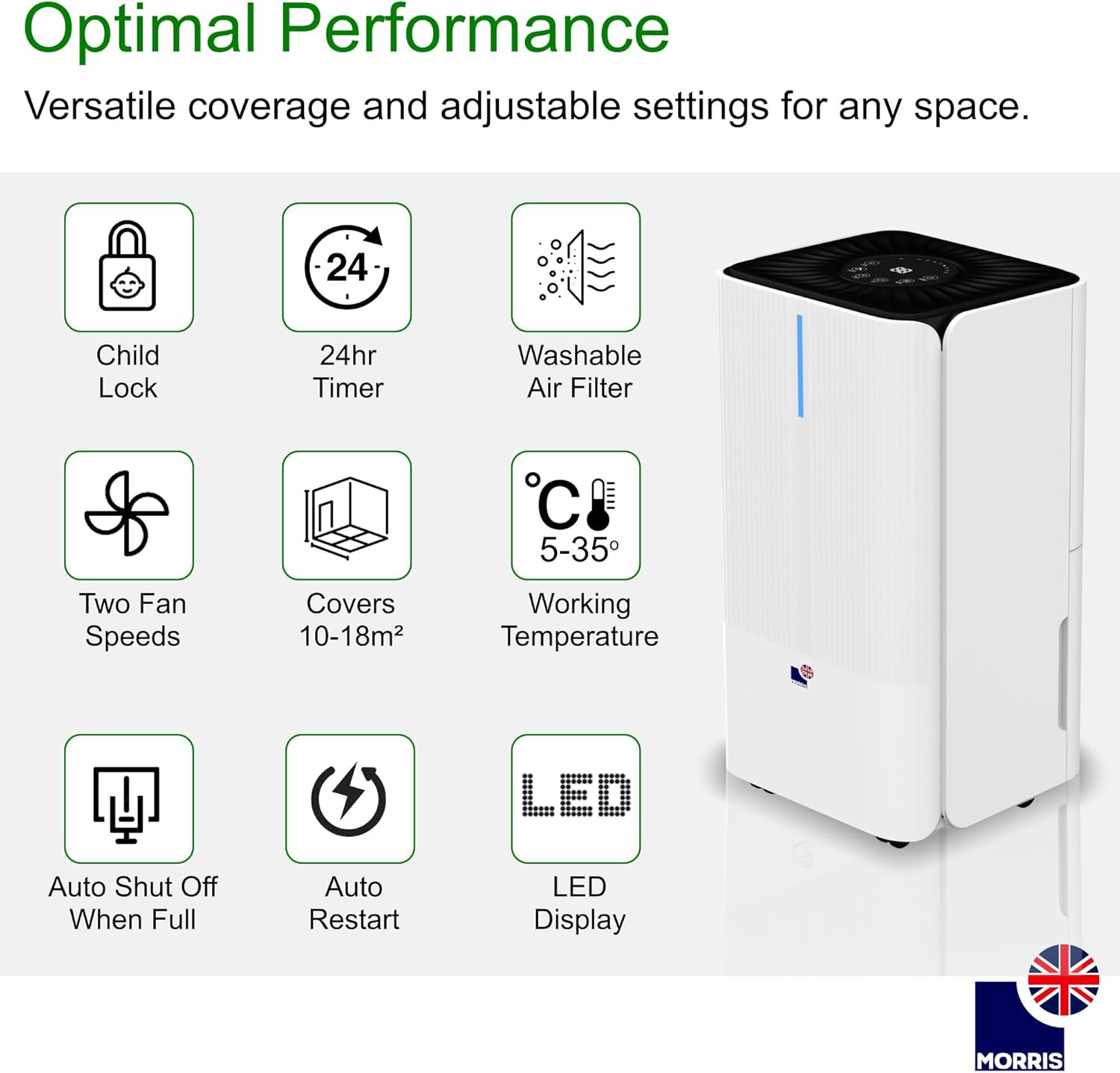
تصویر: Visual representation of key features including Child Lock, 24hr Timer, Washable Air Filter, Two Fan Speeds, Coverage Area, Working Temperature, Auto Shut Off When Full, Auto Restart, and LED Display.
4. راه اندازی
4.1 باز کردن بسته بندی
Carefully remove the dehumidifier from its packaging. Inspect the unit for any signs of damage. Retain the packaging for future storage or transport.
4.2 قرار دادن
Place the dehumidifier on a firm, level surface in the desired room. Ensure there is at least 20 cm (8 inches) of clear space around all sides of the unit to allow for adequate air circulation. Do not block the air inlet or outlet.
4.3 اتصال برق
سیم برق را به پریز برق دارای اتصال زمین وصل کنید. دستگاه وارد حالت آماده به کار میشود.
4.4 Continuous Drainage Setup (Optional)
For continuous operation without needing to empty the water tank, attach the included drainage hose to the continuous drainage port at the rear of the unit. Ensure the hose is directed downwards to a suitable drain or container, allowing gravity to facilitate water flow.

تصویر: Illustration of the continuous drainage hose connected to the dehumidifier for uninterrupted operation.
5. دستورالعمل های عملیاتی
5.1 کنترل پنل به پایان رسیدview

تصویر: به تفصیل view of the control panel, showing buttons for various functions and the central digital display.
کنترل پنل دارای دکمه های زیر است:
- قدرت: دستگاه را روشن یا خاموش می کند.
- جهت: Selects operating modes (Common, Continuous, Laundry, Sleep).
- تنظیم: Adjusts desired humidity level or timer settings.
- تایمر: تایمر روشن یا خاموش شدن خودکار را تنظیم میکند.
- سرعت: سرعت فن (زیاد/کم) را تنظیم میکند.
- قفل: عملکرد قفل کودک را فعال/غیرفعال میکند.
5.2 روشن/خاموش
را فشار دهید قدرت دکمه روشن یا خاموش کردن رطوبتگیر.
5.3 حالت عملیاتی
را فشار دهید حالت دکمه برای جابجایی بین حالتهای عملیاتی موجود:
- حالت مشترک: In this mode, you can set your desired humidity level. The dehumidifier will operate until the room humidity reaches the set level, then it will automatically turn off. It will restart if the room humidity rises 3% above the set level.
- حالت رطوبت زدایی مداوم: The unit will operate continuously at high fan speed, regardless of the room's humidity level. This mode requires the continuous drainage hose to be connected, as the water tank will fill rapidly. Humidity setting and fan speed adjustment are ineffective in this mode.
- حالت خشک کردن لباس: Designed to quickly dry clothes. Place the dehumidifier in the room where clothes are drying. The unit will operate at a high fan speed to remove moisture from the air, accelerating the drying process.
- حالت خواب: Activates low fan speed and dims the display for quiet operation during sleep. The dehumidifier will turn off when humidity is below or equal to 57% and restart when humidity is above or equal to 63%. The water tank full alarm will not sound in this mode, but a red light will illuminate to indicate a full tank.
5.4 Setting Humidity (Common Mode)
In Common Mode, press the تنظیم کنید button to adjust the desired humidity level. The humidity can typically be set between 30% and 80% in 5% increments. The unit will maintain the set humidity level.
۵.۲ تنظیم سرعت فن
را فشار دهید سرعت button to toggle between high and low fan speeds. This function is available in Common Mode and Laundry Drying Mode.
5.6 عملکرد تایمر
را فشار دهید تایمر button to set an auto-on or auto-off timer (1-24 hours). Use the تنظیم کنید button to adjust the desired time. The timer indicator will illuminate when active.
5.7 قفل کودک
را فشار داده و نگه دارید قفل button for a few seconds to activate or deactivate the child lock. When activated, all other buttons on the control panel will be unresponsive.
5.8 Smart Humidity Indicators
The unit features color-coded LED lights to indicate current humidity levels:
- قرمز: High Humidity (>65%)
- سبز: Optimal Levels (45%-65%)
- آبی: Low Humidity (<45%)

تصویر: Visual guide to the smart humidity indicators, showing red for high, green for optimal, and blue for low humidity levels.
6. تعمیر و نگهداری
6.1 تخلیه مخزن آب
When the water tank is full, the unit will automatically stop operating, and the 'Tank Full' indicator will illuminate (or a red light in Sleep Mode). Carefully pull out the water tank, empty the collected water, and reinsert the tank firmly until it clicks into place. The unit will resume operation.

تصویر: تصویر نحوه برداشتن مخزن آب برای تخلیه.
6.2 تمیز کردن فیلتر هوا
The washable air filter should be cleaned every two weeks or more frequently depending on usage and air quality. To clean:
- رطوبت گیر را خاموش کرده و از برق بکشید.
- فیلتر هوا را از پشت دستگاه جدا کنید.
- فیلتر را با آب گرم و صابون بشویید. کاملاً آبکشی کنید.
- قبل از نصب مجدد فیلتر در دستگاه، اجازه دهید کاملاً خشک شود.
۵.۳ تمیز کردن نمای بیرونی دستگاه
قسمت بیرونی دستگاه رطوبت گیر را با یک نرم کننده پاک کنیدamp cloth. Do not use harsh chemicals, abrasive cleaners, or solvents, as these may damage the surface.
6.4 ذخیره سازی
If storing the unit for an extended period, ensure the water tank is empty and clean, and the air filter is clean and dry. Store the dehumidifier in a cool, dry place, preferably in its original packaging.
7 عیب یابی
| مشکل | علت احتمالی | راه حل |
|---|---|---|
| واحد روشن نمی شود | منبع تغذیه ندارد؛ سیم برق به پریز برق وصل نیست؛ برق قطع استtage. | Check power outlet; Ensure power cord is securely plugged in; Check circuit breaker. |
| آب جمع نشده | Room humidity is too low; Temperature is too low; Air filter is clogged; Water tank is full or not properly inserted; Continuous drainage hose is connected. | Increase desired humidity setting; Ensure room temperature is above 5°C; Clean air filter; Empty and reinsert water tank correctly; Disconnect continuous drainage hose if collecting in tank. |
| واحد نویز دارد | Unit not on a level surface; Air filter clogged; Fan speed set to high. | Place on a flat, stable surface; Clean air filter; Select low fan speed or Sleep Mode. |
| نشت آب از دستگاه | Water tank not properly inserted; Continuous drainage hose is blocked or improperly installed. | Reinsert water tank correctly; Check continuous drainage hose for blockages or kinks, ensure proper downward slope. |
| Child Lock is active | دکمه ها پاسخگو نیستند | را فشار داده و نگه دارید قفل button for a few seconds to deactivate. |
8. مشخصات
| ویژگی | مشخصات |
|---|---|
| نام تجاری | موریس |
| شماره مدل | MOR12L-DHE |
| ظرفیت رطوبت زدایی | ۳۰ لیتر در روز |
| حجم مخزن آب | 2 لیتر |
| مصرف برق | 200 وات |
| سطح نویز | ۴۵ دسیبل |
| ابعاد (L x W x H) | 22 × 25 × 44.5 سانتی متر |
| وزن | 10.69 کیلوگرم |
| منطقه پوشش توصیه شده | Up to 25 m² (or 10-18 m² as per some feature bullets) |
| محدوده دمای کاری | ۵۰ درجه سانتیگراد - ۶۹ درجه سانتیگراد |
| ویژگی های خاص | Digital Display, Automatic Shut-off, Adjustable Humidity Control, Automatic Defrost, LED Power Indicator, Child Lock, 24hr Timer, Washable Air Filter, 2 Fan Speeds, Auto Restart. |
9. گارانتی و پشتیبانی
Your Morris 12L Silent Dehumidifier comes with a standard manufacturer's warranty. Please refer to the warranty card included with your purchase for specific terms and conditions. For technical support, spare parts, or service inquiries, please contact Morris customer service through their official webسایت یا خرده فروشی که محصول از آنجا خریداری شده است.


