1. محصول تمام شدview
The ProCase Wireless Keyboard (Model PC-08362168) is a compact and portable Bluetooth keyboard designed for multi-device compatibility. It offers a comfortable typing experience with low-profile, quiet keys and an ergonomic design, suitable for use with iOS, Android, and Windows operating systems.

Image: The ProCase Wireless Keyboard, a slim black keyboard with a standard QWERTY layout, designed for portability and multi-device use.
2. محتویات بسته
- ProCase Wireless Keyboard (Model PC-08362168)
- راهنمای کاربر (این سند)
توجه: برای کار به ۳ باتری قلمی نیاز است و در بستهبندی موجود نیست.
3. راهنمای راه اندازی
3.1. نصب باتری
- محفظه باتری را در پشت صفحه کلید پیدا کنید.
- درپوش محفظه باتری را باز کنید.
- دو (2) باتری AAA را وارد کنید و از قطبیت صحیح (+/-) اطمینان حاصل کنید.
- درپوش محفظه باتری را محکم ببندید.

Image: Underside of the keyboard showing the ON/OFF switch, Connect button, and the battery compartment for two AAA batteries.
3.2. روشن/خاموش کردن
Slide the ON/OFF switch, located on the back of the keyboard, to the "ON" position to power on the device. Slide it to "OFF" when not in use to conserve battery life.
3.3. جفت شدن بلوتوث
- اطمینان حاصل کنید که صفحه کلید روشن است.
- Press the "Connect" button on the back of the keyboard. The Bluetooth indicator light (usually blue) on the keyboard will start blinking, indicating it is in pairing mode.
- On your device (tablet, smartphone, computer), navigate to its Bluetooth settings.
- بلوتوث را فعال کنید و دستگاه های موجود را جستجو کنید.
- Select "ProCase Keyboard" (or similar name) from the list of found devices.
- Follow any on-screen prompts to complete the pairing process. A successful connection will be indicated by the Bluetooth light on the keyboard turning solid or turning off, depending on the model.

Image: Diagram illustrating wide compatibility with Android, Windows, and iOS devices, including iPads, Android tablets, Microsoft Surface, and smartphones. It also notes that a USB drive is not included and only Bluetooth connection is supported.
4. دستورالعمل های عملیاتی
4.1. Basic Typing
The keyboard features a standard QWERTY layout. Simply begin typing after successful pairing with your device.
4.2. Function Keys (F1-F12) and Hot Keys
The top row of keys serves dual functions: standard F-keys (F1-F12) and special hot keys for media control, volume, and other system functions. To use the F-keys (F1, F2, etc.), you must hold down the Fn key simultaneously with the desired F-key. Pressing the key without holding Fn will activate its associated hot key function.
- Fn + F1: خانه
- Fn + F2: جستجو کردن
- Fn + F3: Select All
- Fn + F4: کپی 🀄
- Fn + F5: چسباندن
- Fn + F6: Cut
- Fn + F7: آهنگ قبلی
- Fn + F8: پخش/مکث
- Fn + F9: آهنگ بعدی
- Fn + F10: بی صدا
- Fn + F11: کاهش حجم صدا
- Fn + F12: افزایش صدا

تصویر: نمای نزدیک view of a keyboard key, illustrating the scissor-cross mechanism for comfortable and responsive keystrokes.

Image: A person typing on the ProCase Wireless Keyboard, positioned next to a tablet, highlighting the comfortable and quiet typing experience.
5. تعمیر و نگهداری
5.1. تمیز کردن
To clean the keyboard, gently wipe the surface with a soft, dry, lint-free cloth. For stubborn dirt, slightly dampen the cloth with water or a mild cleaning solution. Avoid excessive moisture and do not spray cleaners directly onto the keyboard.
5.2. ذخیره سازی
When not in use for extended periods, power off the keyboard to conserve battery life. Store it in a cool, dry place away from direct sunlight and extreme temperatures.
6 عیب یابی
- کیبورد وصل نمیشه:
- مطمئن شوید که کیبورد روشن است و باتریهای آن نو هستند.
- Press the "Connect" button on the back of the keyboard to enter pairing mode.
- Verify Bluetooth is enabled on your device and try re-pairing.
- صفحه کلید را به دستگاه خود نزدیک کنید.
- هم کیبورد (خاموش/روشن) و هم دستگاه خود را مجدداً راهاندازی کنید.
- کلیدها پاسخ نمیدهند:
- سطح باتری را بررسی کنید و در صورت لزوم تعویض کنید.
- مطمئن شوید که کیبورد به درستی از طریق بلوتوث متصل شده است.
- هرگونه آلودگی را از اطراف کلیدها تمیز کنید.
- Function (F) keys not working as expected:
- Remember that to activate F1-F12 functions, you must hold down the Fn key simultaneously. Without holding Fn, the keys will activate their assigned hot key functions (e.g., media control). This behavior cannot be changed.
- عمر باتری کوتاه:
- Ensure the keyboard is powered off when not in use.
- The keyboard features a sleep mode to conserve power during inactivity.
- از باتری های AAA با کیفیت بالا استفاده کنید.
7. مشخصات
| ویژگی | جزئیات |
|---|---|
| شماره مدل | PC-08362168 |
| ابعاد (L x W x H) | 11.5 x 4.7 x 0.29 اینچ (29.2 x 11.9 x 0.74 سانتیمتر) |
| وزن | 10 اونس (283.5 گرم) |
| قابلیت اتصال | بلوتوث بی سیم |
| منبع تغذیه | 2 عدد باتری AAA (شامل نمی شود) |
| مواد | اکریلونیتریل بوتادین استایرن (ABS) |
| رنگ | مشکی |
| سیستم عامل های سازگار | iOS, Android, Windows (Note: Does not support Windows 8 Mobile) |
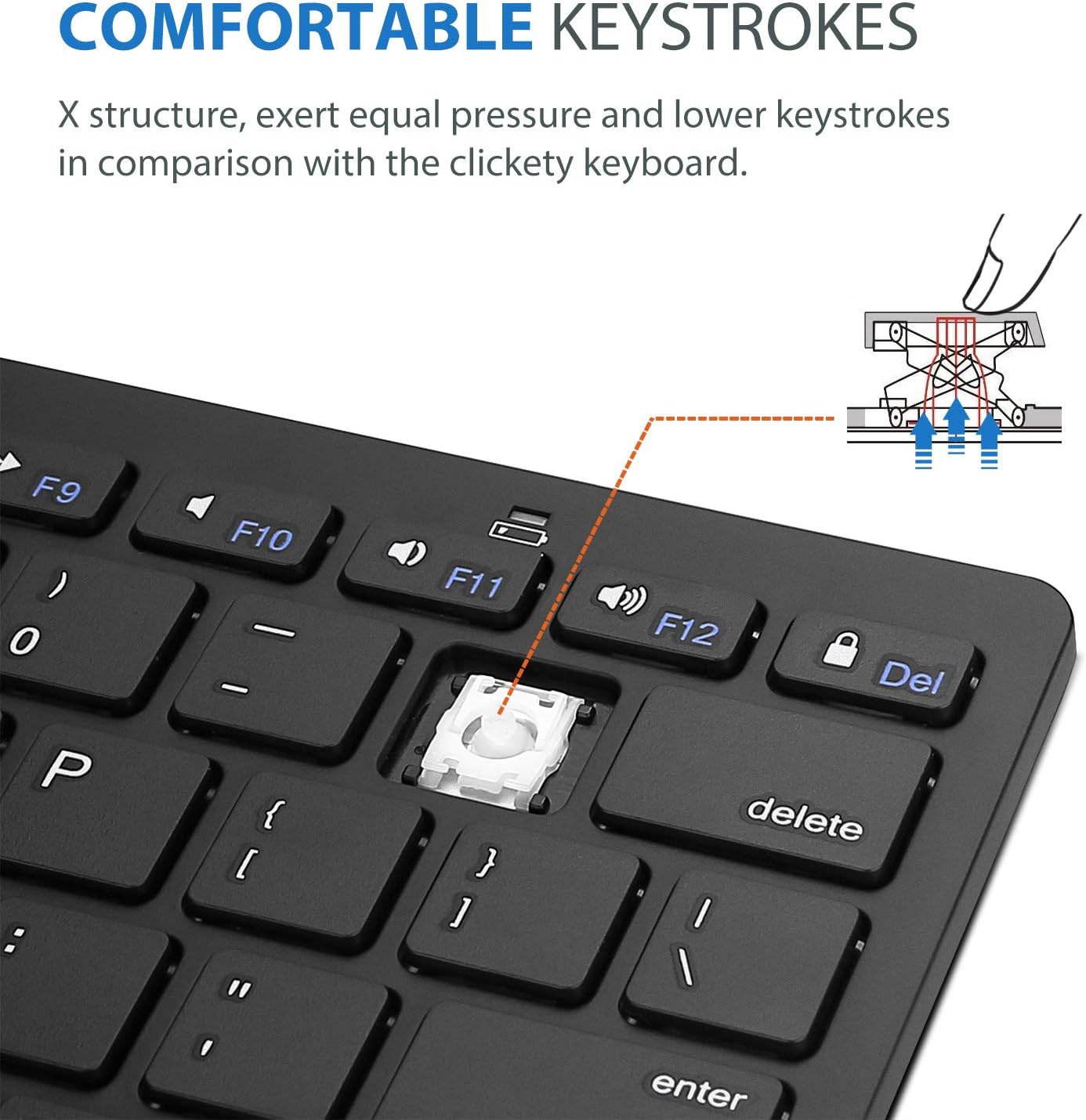
Image: Diagram showing the ultra-slim design and dimensions of the ProCase Wireless Keyboard, measuring 11.2 inches in length, 4.7 inches in width, and 0.19 inches in thickness.
8. گارانتی و پشتیبانی
8.1. اطلاعات گارانتی
ProCase products are designed for reliability and performance. For specific warranty details regarding your ProCase Wireless Keyboard, please refer to the warranty card included with your purchase or visit the official ProCase webسایت. فاکتور خرید خود را برای موارد گارانتی نگه دارید.
8.2. پشتیبانی مشتری
If you encounter any issues or have questions not covered in this manual, please contact ProCase customer support. You can find contact information on the official ProCase webسایت یا از طریق پلتفرم خرید شما.
برای اطلاعات بیشتر به سایت مراجعه کنید ProCase Store on Amazon.


