
1. مقدمه
Thank you for choosing the ROMOSS Large Capacity Portable Charger. This device is designed to provide reliable and efficient power to your mobile devices on the go. Please read this manual carefully before use to ensure proper operation and to maximize the lifespan of your product.
2. اطلاعات ایمنی
برای جلوگیری از آسیب یا جراحت به دستگاه خود، لطفاً نکات ایمنی زیر را رعایت کنید:
- پاوربانک را در معرض دمای شدید (بالای ۶۰ درجه سانتیگراد/۱۴۰ درجه فارنهایت یا زیر ۰ درجه سانتیگراد/۳۲ درجه فارنهایت) قرار ندهید.
- از انداختن، جدا کردن قطعات یا تلاش برای تعمیر دستگاه توسط خودتان خودداری کنید.
- دور از آب، رطوبت و مواد قابل اشتعال نگهداری شود.
- فقط از کابلها و آداپتورهای شارژ دارای مجوز استفاده کنید.
- دور از دسترس کودکان نگهداری شود.
- طبق مقررات محلی، مسئولانه محصول را دور بریزید.
3. محصول تمام شدview
The ROMOSS Large Capacity Portable Charger features multiple ports for versatile charging and an LED indicator for battery status.
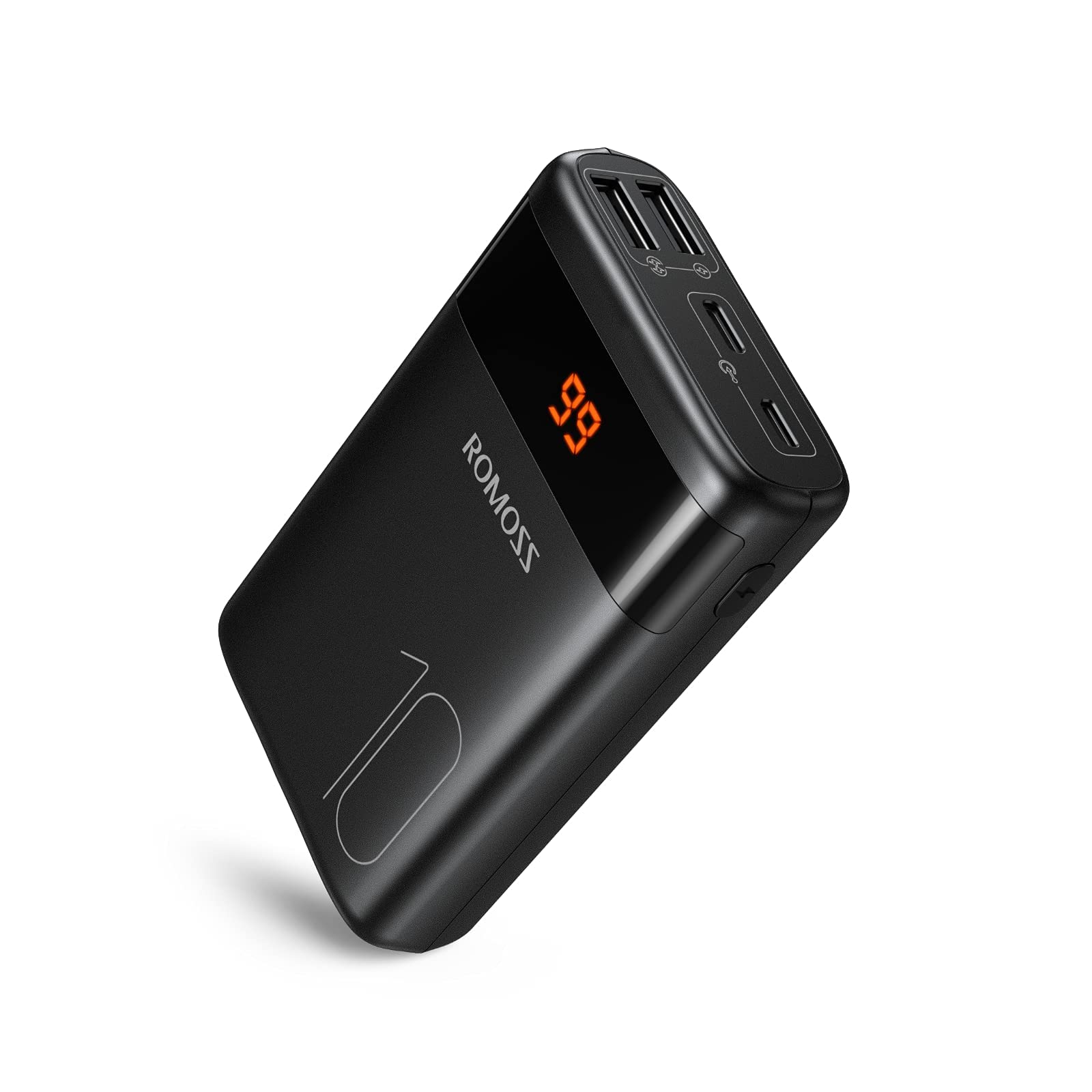
تصویر: جلو view of the ROMOSS Portable Charger, showing input/output ports and LED battery indicators.
اجزاء:
- دکمه پاور: Press once to check battery level, press and hold to activate/deactivate (if applicable).
- نشانگرهای LED: نمایش ظرفیت باتری باقی مانده
- بنادر ورودی: Used to charge the portable charger itself (e.g., Type-C, Micro USB, Lightning).
- پورت های خروجی: Used to charge other devices (e.g., USB-A, Type-C).
4. راه اندازی
4.1 شارژ اولیه
Before first use, fully charge your ROMOSS portable charger. This ensures optimal battery performance and accuracy of the battery indicator.
- Connect the portable charger to a power source (e.g., wall adapter, computer USB port) using a compatible charging cable (e.g., Type-C cable).
- The LED indicators will illuminate to show the charging progress.
- Once all LED indicators are solid, the portable charger is fully charged. Disconnect it from the power source.
5. دستورالعمل های عملیاتی
5.1 شارژ کردن دستگاه های خود
برای شارژ کردن تلفن همراه، تبلت یا سایر دستگاههای دارای پورت USB:
- Connect your device to an output port on the portable charger using its charging cable.
- The portable charger should automatically begin charging your device. If not, press the power button once.
- The LED indicators will show the remaining battery level of the portable charger during charging.
- Once your device is fully charged, disconnect it from the portable charger.
5.2 بررسی سطح باتری
To check the remaining battery capacity of the portable charger:
- دکمه پاور را یک بار فشار دهید.
- The LED indicators will light up, showing the current battery level. For example, four solid LEDs typically indicate a full charge, while one blinking LED indicates a low battery.
6. تعمیر و نگهداری
6.1 تمیز کردن
Wipe the portable charger with a soft, dry cloth. Do not use harsh chemicals or abrasive materials.
6.2 ذخیره سازی
Store the portable charger in a cool, dry place away from direct sunlight and extreme temperatures. If storing for an extended period, charge the device to approximately 50-75% capacity every three months to maintain battery health.
6.3 مراقبت از باتری
To prolong battery life, avoid fully discharging the portable charger frequently. It is recommended to recharge it before it completely runs out of power.
7 عیب یابی
| مشکل | علت احتمالی | راه حل |
|---|---|---|
| Portable charger not charging | Cable issue, power source issue, or charger fault. | Try a different charging cable and wall adapter. Ensure the power source is active. |
| Device not charging from portable charger | Portable charger is out of power, cable issue, or device compatibility. | Recharge the portable charger. Try a different charging cable. Ensure your device is compatible with USB charging. |
| شارژ آهسته | Cable quality, device input limit, or portable charger output limit. | Use a high-quality charging cable. Check if your device supports faster charging. Ensure the portable charger's output port supports the desired speed. |
| نشانگرهای LED کار نمی کنند | خطای دستگاه | If the device is still charging/discharging normally, this might be a minor fault. If not, contact customer support. |
If you encounter issues not listed here or if the problem persists, please contact ROMOSS customer support.
8. مشخصات
| ویژگی | جزئیات |
|---|---|
| نام تجاری | ROMOSS |
| مدل | Large Capacity Portable Charger |
| ASIN | B085RSRFQS |
| ورودی | Type-C (specific voltage/current not provided in source data) |
| خروجی | USB-A, Type-C (specific voltage/current not provided in source data) |
| گواهینامه | دارای گواهینامه PSE |
| تاریخ اولین موجود شدن (Amazon.co.jp) | 25 جولای 2019 |
9. گارانتی و پشتیبانی
ROMOSS products come with a standard warranty. For detailed warranty information, please refer to the warranty card included with your product or visit the official ROMOSS website. For technical support, troubleshooting assistance, or warranty claims, please contact ROMOSS customer service through their official channels.
میتوانید اطلاعات بیشتر و اطلاعات تماس را در ROMOSS Brand Store on Amazon.


