1. مقدمه
This manual provides essential information for setting up, operating, maintaining, and troubleshooting your Sony X800H 65-inch 4K Ultra HD Smart LED TV. Please read this manual thoroughly before using your television to ensure proper and safe operation.

تصویر 1.1: جلو view of the Sony X800H 65-inch 4K Ultra HD Smart LED TV.
۲. چه چیزهایی در جعبه است؟
Upon unpacking your Sony X800H TV, ensure all the following items are present:
- Sony X800H 65-inch 4K Ultra HD Smart LED TV
- کنترل از راه دور
- سیم برق
- Table-Top Stand (if not wall-mounting)
- دستورالعملهای عملیاتی / راهنمای راهاندازی سریع
- باتری برای کنترل از راه دور
3. راه اندازی
3.1 Attaching the Table-Top Stand
- برای جلوگیری از آسیب، صفحه تلویزیون را با احتیاط روی یک سطح نرم و صاف قرار دهید.
- براکتهای پایه را با سوراخهای پیچ در پایین تلویزیون تراز کنید.
- پایه را با استفاده از پیچهای ارائه شده محکم کنید. مطمئن شوید که همه پیچها محکم بسته شدهاند.
۴.۳ نصب دیواری (اختیاری)
If you choose to wall-mount your TV, please refer to the instructions provided with your wall-mount bracket. Ensure the bracket is compatible with VESA mounting standards for your TV size and weight. Professional installation is recommended.

تصویر ۴.۲: مثالample of a Sony TV mounted on a wall.
۳.۲ اتصال دستگاههای خارجی
Connect your external devices (e.g., cable box, Blu-ray player, gaming console) to the HDMI ports on the back of the TV. The Sony X800H features multiple HDMI inputs for your convenience.

تصویر 3.2: عقب view showing various input ports including HDMI, USB, and Ethernet.
۲.۳ اتصال برق و راهاندازی اولیه
- سیم برق را به تلویزیون و سپس به پریز برق وصل کنید.
- دکمه روشن/خاموش را روی کنترل از راه دور یا روی تلویزیون فشار دهید.
- Follow the on-screen instructions to complete the initial setup, including network connection, language selection, and channel scanning.
۵. کار با تلویزیون
۳.۱ عملکردهای اساسی کنترل از راه دور
The included remote control allows you to navigate menus, change channels, adjust volume, and access smart features. Familiarize yourself with the button layout for optimal use.
۴.۱ ویژگیهای تلویزیون هوشمند اندروید
Your Sony X800H is an Android TV, providing access to a wide range of apps, streaming services, and smart home integration. Use the Google Assistant for voice control and content search.
- دستیار گوگل: Press the Google Assistant button on your remote and speak your commands to search for movies, shows, control smart home devices, or get answers.
- دسترسی به برنامه: Navigate to the 'Apps' section to download and manage your favorite streaming applications like Netflix, Hulu, Disney+, and more.
- سازگاری با الکسا: Connect your TV with an Alexa-enabled device to control your TV with voice commands, stream smart camera feeds, play music, and launch video apps.
- اپل ایرپلی ۲ و هومکیت: آیفون و دستگاههای سیری خود را برای پخش محتوا و مدیریت خانه هوشمند به طور یکپارچه ادغام کنید.
ویدیوی ۱: پایان رسمیview of the Sony X800H 4K HDR LED Android Smart TV features, including smart functionality and picture quality enhancements.
5. ویژگی های کلیدی
The Sony X800H TV is equipped with advanced technologies to enhance your viewتجربه کردن:
- پردازنده 4K HDR X1: Experience premium 4K pictures with rich detail and texture. Content is upscaled to near-4K resolution using 4K X-Reality PRO.
- صفحه نمایش TRILUMINOS: Enjoy expanded, vivid colors for a more true-to-life picture, as intended by the creator.
- حالت بازی: Optimized settings for a smoother, more responsive gaming experience, ideal for PlayStation.
- اچدیآر و دالبی ویژن: Brings scenes to life with striking highlights, deeper darks, and vibrant colors.
- جریان حرکتی XR: Reduces blur in fast-moving scenes, making content appear with lifelike motion.
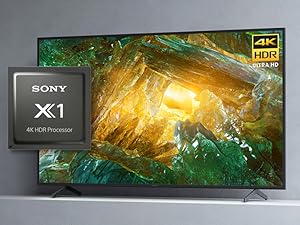
Image 5.1: The Sony X1 4K HDR Processor, central to enhanced picture quality.
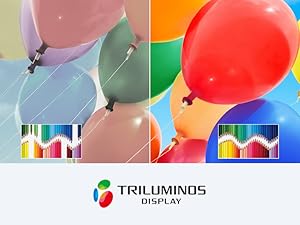
Image 5.2: Visual representation of the wide color gamut provided by the TRILUMINOS Display.
6. تعمیر و نگهداری
۴.۱ تمیز کردن تلویزیون
- صفحه نمایش: صفحه نمایش را به آرامی با یک پارچه میکروفایبر نرم و خشک پاک کنید. برای لکههای سرسخت، به آرامی ...ampپارچه را با آب یا محلول تمیزکننده مخصوص صفحه نمایش آغشته کنید (هرگز مستقیماً روی صفحه نمایش اسپری نکنید).
- قاب و پایه: برای پاک کردن گرد و غبار از قاب و پایه تلویزیون از یک پارچه نرم و خشک استفاده کنید.
- مهم: Always unplug the TV before cleaning. Avoid using harsh chemicals, abrasive cleaners, or solvents.
6.2 به روز رسانی نرم افزار
تلویزیون شما ممکن است بهروزرسانیهای خودکار نرمافزار را برای بهبود عملکرد و افزودن ویژگیهای جدید دریافت کند. برای دریافت این بهروزرسانیها، مطمئن شوید که تلویزیون شما به اینترنت متصل است. همچنین میتوانید بهصورت دستی در منوی تنظیمات تلویزیون، بهروزرسانیها را بررسی کنید.
7 عیب یابی
اگر با تلویزیون خود با مشکلاتی مواجه شدید، مراحل عیبیابی اولیه زیر را امتحان کنید:
- بدون برق: مطمئن شوید که سیم برق به طور محکم به تلویزیون و پریز برق وصل شده است. یک پریز برق دیگر را امتحان کنید.
- تصویر/صدا ندارد: Check that the correct input source is selected. Verify all cable connections to external devices are secure.
- ریموت کار نمی کند: باتریهای کنترل از راه دور را تعویض کنید. مطمئن شوید که هیچ مانعی بین کنترل از راه دور و حسگر مادون قرمز تلویزیون وجود ندارد.
- مشکلات اتصال شبکه: روتر و مودم خود را مجدداً راه اندازی کنید. تنظیمات شبکه تلویزیون را بررسی کنید تا مطمئن شوید که به شبکه Wi-Fi یا کابل اترنت صحیح متصل است.
- مشکلات کیفیت تصویر: تنظیمات تصویر (روشنایی، کنتراست، رنگ) را در منوی تلویزیون تنظیم کنید. مطمئن شوید که منبع محتوا کیفیت بالایی دارد.
For more detailed troubleshooting, refer to the comprehensive help guide accessible through your TV's settings menu or visit the Sony support webسایت
8. مشخصات
| ویژگی | مشخصات |
|---|---|
| نام تجاری | سونی |
| شماره مدل | XBR65X800H |
| اندازه صفحه نمایش | 64.5 اینچ (مورب) |
| فناوری نمایش | LED |
| قطعنامه | 4K Ultra HD (3840 x 2160) |
| نرخ تازه سازی | 60 هرتز |
| پردازنده | پردازنده 4K HDR X1 |
| سیستم عامل | تلویزیون اندروید با دستیار گوگل |
| قابلیت اتصال | HDMI, USB, Wi-Fi, Ethernet, Bluetooth |
| ابعاد (W x D x H) | ۶۵.۸ در ۱۲.۵ در ۴۰.۸ اینچ (با پایه) |
| وزن مورد | ۱۰.۱ پوند (با پایه) |
9. گارانتی و پشتیبانی
Your Sony X800H TV comes with a manufacturer's warranty. For specific warranty details, please refer to the warranty card included with your product or visit the official Sony support website. For technical assistance, product registration, or to find service centers, please visit www.sony.com/electronics/support.


