1. مقدمه
The HUAWEI B311-221 4G LTE WiFi Router is designed to provide high-speed internet access. It supports 4G LTE CAT4 with download speeds up to 150Mbps and Wi-Fi speeds up to 300Mbps (802.11n). This router allows you to share a 3G/4G network connection with up to 32 Wi-Fi enabled devices, including tablets, mobile phones, and laptops. Its plug-and-play functionality makes it suitable for various environments where traditional broadband internet may not be available. The HUAWEI HiLink app offers convenient management of your network and connected devices.
2. محتویات بسته
لطفاً محتویات بسته را با دقت بررسی کنید. در صورت مفقود شدن یا آسیب دیدن هر یک از اقلام، با فروشنده خود تماس بگیرید.
- 1 x HUAWEI B311-221 4G LTE WiFi Router
- 1 عدد کابل اترنت
- 1 عدد آداپتور برق
- 1 x راهنمای شروع سریع
3. محصول تمام شدview
3.1 جلو View

This image shows the front of the HUAWEI B311-221 router, featuring a clean white design with indicator lights for power, network status, Wi-Fi, and signal strength. The HUAWEI logo is visible at the bottom center.
3.2 عقب View و بنادر
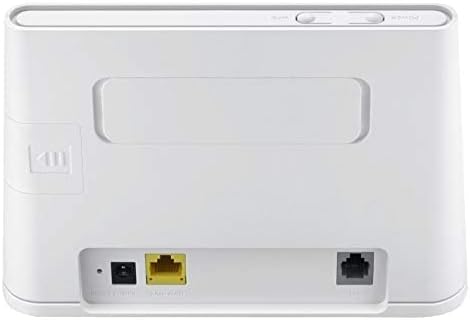
عقب view of the router displays the various ports for connectivity. These include the power input, a Gigabit Ethernet LAN/WAN port (yellow), and an RJ11 port for voice services.
3.3 اسلات سیم کارت

This image highlights the integrated SIM card slot located on the side of the router, which is essential for 4G LTE connectivity. The slot is shown open, indicating where the SIM card should be inserted.
3.4 چراغ نشانگر

A close-up of the router's top panel, showing the indicator lights for Power, Wi-Fi, Network Mode, and Signal Strength. These lights provide visual feedback on the router's operational status.
۱. دستورالعملهای راهاندازی
برای تنظیم روتر HUAWEI B311-221 خود، این مراحل را دنبال کنید:
- قرار دادن سیم کارت: Locate the SIM card slot on the side of the router. Carefully insert your standard-sized 3G/4G SIM card into the slot until it clicks into place. Ensure the SIM card is activated by your service provider.
- اتصال برق: Connect the power adapter to the router's power input port and then plug it into a power outlet. The router will automatically power on.
- روشن کردن: Press the Power button on the router. The Power indicator light should turn on.
- اتصال شبکه: Wait for the Network Mode and Signal Strength indicator lights to stabilize. A solid blue or green light typically indicates a successful 4G LTE connection.
- اتصال دستگاه ها:
- وای فای: On your device (laptop, phone, tablet), search for available Wi-Fi networks. Select the network name (SSID) printed on the label at the bottom of your router. Enter the Wi-Fi password (Key) also found on the label.
- اترنت: For wired connections, connect an Ethernet cable from the router's LAN/WAN port to your computer or other network device.
- رابط مدیریت دسترسی: a را باز کنید web browser on a connected device and enter the default IP address (usually 192.168.8.1) to access the router's web management page. Log in using the default username and password (found on the router label or in the Quick Start Guide).
- HUAWEI HiLink App: For easier management, download the HUAWEI HiLink app from your device's app store. Connect your phone to the router's Wi-Fi and use the app to monitor network status, manage connected devices, and configure settings.
5. دستورالعمل های عملیاتی
5.1 اتصال دستگاه ها
The router supports up to 32 Wi-Fi devices simultaneously. Ensure your devices are within the Wi-Fi coverage area for optimal performance.

This diagram illustrates the Wi-Fi coverage provided by the HUAWEI B311-221 router within a typical home environment, showing multiple devices connected wirelessly.
5.2 دسترسی به اینترنت
Once connected, devices can access the internet via the 4G LTE network. The router provides high-speed data for streaming, browsing, and online activities.

This image demonstrates the router's capability to deliver 4G internet at speeds up to 150Mbps to a connected laptop, facilitating fast downloads and online activities.
5.3 Using the HUAWEI HiLink App
The HUAWEI HiLink app allows you to:
- Check network strength and status.
- Read SMS messages received on the router's SIM card.
- Set data usage limits.
- View and manage all connected devices.
- Modify Wi-Fi settings (SSID, password).
Ensure your smartphone is connected to the router's Wi-Fi network to use the app.
6. تعمیر و نگهداری
برای اطمینان از عملکرد بهینه و طول عمر روتر HUAWEI B311-221 خود، این دستورالعملهای نگهداری را دنبال کنید:
- قرار دادن: روتر را در یک فضای باز و دور از موانع، اشیاء فلزی بزرگ و سایر دستگاههای الکترونیکی که ممکن است باعث ایجاد تداخل شوند، قرار دهید.
- تمیز کردن: برای تمیز کردن روتر از یک پارچه نرم و خشک استفاده کنید. از پاککنندههای مایع یا اسپریهای اسپری استفاده نکنید.
- تهویه: مطمئن شوید که منافذ تهویه روتر مسدود نشده باشند تا از گرم شدن بیش از حد جلوگیری شود.
- به روز رسانی سیستم عامل: به صورت دورهای، بهروزرسانیهای میانافزار را از طریق روتر بررسی کنید. web management interface or the HUAWEI HiLink app. Keeping the firmware updated ensures the best performance and security.
- چرخه قدرت: If you experience minor issues, try power cycling the router by unplugging it from the power outlet for 10 seconds and then plugging it back in.
7 عیب یابی
اگر با روتر خود با مشکل مواجه شدید، به مشکلات و راهحلهای رایج زیر مراجعه کنید:
| مشکل | راه حل ممکن |
|---|---|
| بدون اتصال به اینترنت |
|
| سرعت پایین وایفای |
|
| Cannot access router management page |
|
| سیگنال وای فای اغلب افت می کند |
|
8. مشخصات
| ویژگی | جزئیات |
|---|---|
| نام تجاری | HUAWEI |
| نام مدل | B311-221 |
| شماره مدل مورد | B311-221 |
| ابعاد محصول | 18.1 × 12.6 × 3.6 سانتی متر |
| وزن مورد | 218 گرم |
| رنگ | سفید |
| فناوری اتصال | Wi-Fi، 4G LTE |
| استاندارد ارتباط بی سیم | 802.11n |
| کلاس باند فرکانس | تک باند (2.4 گیگاهرتز) |
| حداکثر سرعت وایفای | تا 300 مگابیت بر ثانیه |
| Max 4G LTE Speed | تا 150 مگابیت بر ثانیه |
| پورت های اترنت | 1 x Gigabit Ethernet LAN/WAN port |
| پورت صدا | 1 عدد پورت RJ11 |
| اسلات سیم کارت | Integrated (Standard SIM) |
| ویژگی خاص | WPS, HUAWEI HiLink App Management |
| دستگاه های سازگار | Smart TV, Tablet, Personal Computer, Laptops, Phones, Gaming Devices |
| باتری های گنجانده شده است | خیر |
| Operating System (Compatibility) | Windows (and other OS via Wi-Fi/Ethernet) |
9. اطلاعات گارانتی
This HUAWEI product is covered by a limited warranty. The specific terms and duration of the warranty may vary depending on your region and local regulations. Please refer to the warranty card included in your product package or visit the official HUAWEI webبرای اطلاعات دقیق گارانتی به سایت مراجعه کنید. فاکتور خرید خود را برای درخواست گارانتی نگه دارید.
10. پشتیبانی
For technical support, product inquiries, or service requests, please contact HUAWEI customer support through one of the following methods:
- پشتیبانی آنلاین: به پشتیبانی رسمی HUAWEI مراجعه کنید webسایتی برای سوالات متداول، راهنماهای عیبیابی و گزینههای تماس.
- HUAWEI HiLink App: Use the support features available within the HiLink application.
- خط تلفن خدمات: Refer to your Quick Start Guide or HUAWEI's official website for regional service hotline numbers.
When contacting support, please have your product model (B311-221) and serial number ready.


