مقدمه
Thank you for choosing the Ksix Fitness Band GPS. This manual provides essential information for setting up, operating, and maintaining your device. Please read it carefully to ensure optimal performance and longevity of your fitness band.
The Ksix Fitness Band GPS is designed to monitor your physical activity comprehensively, featuring integrated GPS for route tracking, a dynamic 24-hour heart rate monitor, and a multi-sport mode to enhance your training sessions.
محصول تمام شده استview
The Ksix Fitness Band GPS is a versatile smartband equipped with advanced features to support your fitness journey. Its lightweight design and 1.3-inch TFT color screen offer a comfortable and clear user experience.
- GPS یکپارچه: Records your route during outdoor activities.
- 24-Hour Dynamic Heart Rate Monitor: ضربان قلب شما را به طور مداوم پیگیری میکند.
- حالت چند ورزشی: Monitors various types of workouts.
- مقاومت در برابر آب: IP68 rated, waterproof up to 3 meters for 1 hour.
- قابلیت اتصال: Bluetooth 4.0 for seamless connection with your smartphone.
- سازگاری: Works with Android 4.4 and later, and iOS 8.0 and later.
- عمر باتری: Up to 7-8 hours with GPS and real-time heart rate monitoring, and up to 30 days in standby mode.

Image 1: Ksix Fitness Band GPS displaying time and date.
راهنمای راه اندازی
1. شارژ کردن دستگاه
Before first use, fully charge your Ksix Fitness Band GPS. Connect the charging cable to the designated port on the device and a USB power source. The screen will indicate charging status.
2. Installing the Hi Move App
- جستجو برای "Hi Move" in your smartphone's app store (Google Play Store for Android or Apple App Store for iOS).
- اپلیکیشن را دانلود و نصب کنید.
- Open the app and follow the on-screen instructions to create an account and set up your profile.
۳.۲. جفت شدن با تلفن هوشمند شما
- اطمینان حاصل کنید که بلوتوث در گوشی هوشمند شما فعال است.
- Open the Hi Move app.
- به بخش جفتسازی دستگاه در داخل برنامه بروید.
- The app will search for available devices. Select "Ksix Fitness Band GPS" from the list.
- Confirm the pairing request on both your smartphone and the fitness band, if prompted.
- Once paired, the time and date on your fitness band will synchronize with your phone.
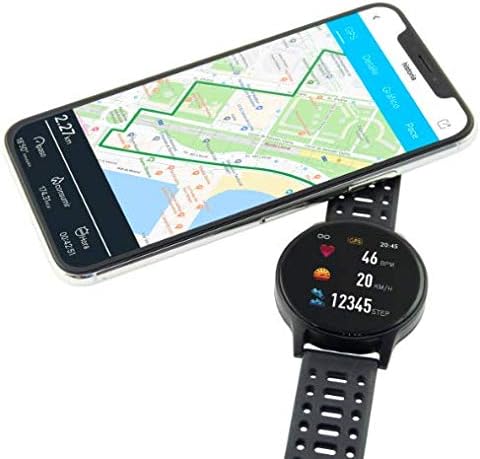
Image 2: Ksix Fitness Band GPS connected to a smartphone displaying a GPS-tracked route.
دستورالعمل های عملیاتی
پیمایش در رابط
The fitness band features a touch-sensitive screen. Swipe left/right or up/down to navigate through different functions and menus. Tap to select an option or confirm an action.
ردیابی GPS
For accurate GPS tracking, ensure you are in an open outdoor area with a clear view of the sky. Start your activity from the multi-sport mode, and the device will automatically attempt to acquire a GPS signal. Your route will be recorded and can be viewed in the Hi Move app after synchronization.
پایش ضربان قلب
The fitness band continuously monitors your heart rate. Wear the band snugly on your wrist, about one finger's width above your wrist bone, for accurate readings. You can view your current heart rate on the device and detailed historical data in the Hi Move app.
حالت چند ورزشی
Access the multi-sport mode from the main menu to select specific activities such as running, walking, cycling, etc. Selecting an activity will initiate tracking of relevant metrics like duration, distance, calories burned, and heart rate. End the activity when finished to save the data.

Image 3: Ksix Fitness Band GPS showing a person running, highlighting features like pedometer, multi-sport mode, heart rate monitoring, and distance tracking.
تعمیر و نگهداری
تمیز کردن
Regularly clean your fitness band and strap to prevent skin irritation and maintain device hygiene. Use a soft, damp از پارچه برای پاک کردن دستگاه استفاده کنید. از استفاده از مواد شیمیایی قوی یا مواد ساینده خودداری کنید.
مقاومت در برابر آب
The device is IP68 waterproof, meaning it can withstand immersion in water up to 3 meters deep for a maximum of 1 hour. It is suitable for swimming in shallow water but not recommended for diving, high-pressure water activities, or prolonged immersion. Ensure the charging port is dry before charging.
ذخیره سازی
When not in use for extended periods, store the fitness band in a cool, dry place. Avoid extreme temperatures and direct sunlight.
عیب یابی
- روشن نشدن دستگاه: Ensure the device is fully charged. Connect it to the charger and wait a few minutes.
- نمیتوان با تلفن هوشمند جفت شد:
- اطمینان حاصل کنید که بلوتوث روی گوشی شما فعال است.
- Make sure the fitness band is within Bluetooth range of your phone.
- Restart both your phone and the fitness band.
- Try unpairing and re-pairing the device through the Hi Move app.
- اندازهگیری نادرست ضربان قلب:
- مطمئن شوید که دستبند به طور محکم روی مچ دست شما قرار گرفته است، نه خیلی شل و نه خیلی سفت.
- سنسور پشت دستگاه را تمیز کنید.
- از حرکت بیش از حد در حین اندازهگیری خودداری کنید.
- عدم دریافت سیگنال GPS:
- مطمئن شوید که در یک فضای باز و با تهویه مناسب هستید view از آسمان
- چند دقیقه صبر کنید تا دستگاه سیگنال دریافت کند.
- Ensure the device's firmware is up to date via the Hi Move app.
- دادهها با برنامه همگامسازی نمیشوند:
- Ensure the fitness band is connected to your phone via Bluetooth.
- Open the Hi Move app and manually initiate a sync if available.
- اتصال اینترنت گوشی خود را بررسی کنید.
مشخصات
| شماره مدل | BXBZGPS01 |
| نام تجاری | Ksix |
| اندازه صفحه نمایش | 1.3 اینچ |
| نوع صفحه نمایش | TFT Color |
| ظرفیت باتری | ۴۷۰ میلیآمپر ساعت (لیتیوم-یون) |
| Battery Life (GPS + HR) | 7-8 ساعت |
| عمر باتری (استاندبای) | تا 30 روز |
| مقاومت در برابر آب | IP68 (up to 3 meters for 1 hour) |
| قابلیت اتصال | بلوتوث 4.0 |
| سازگاری | Android 4.4+ / iOS 8.0+ |
| وزن | 38 گرم |
| مواد | پلاستیک، پی وی سی |
| رنگ | مشکی |
گارانتی و پشتیبانی
For warranty information and technical support, please refer to the documentation provided with your purchase or visit the official Ksix webسایت. فاکتور خرید خود را برای موارد گارانتی نگه دارید.
سازنده: KSIX
تماس: Please refer to the Ksix official webسایت برای اطلاعات تماس خدمات مشتری.


